Skip to content
KitploitKITPLOIT
ToolsExploitsBlog
Log in
Submit
ToolsExploitsBlog
Submit

Hacking, PenTest, and Cybersecurity Tools for Your Security Arsenal!

Kitploit is a directory of hacking, cybersecurity, and pentesting tools. Discover the latest project updates to find vulnerabilities, analyze systems, automate testing, and strengthen your security.

FeedsContactPrivacy© 2026 Kitploit

Tool Directory

Categories

View all categories
Loading categories
gost — GO Simple Tunnel - a simple tunnel written in golang | Kitploit
Tools/GitHubGitHub/go-gost/gost
General Purpose UtilitiesEncryption/Decryption ToolsWeb Proxies & InterceptionNetwork SecurityPenetration TestingPrivacyCommand and ControlUtilities & FrameworksRemote Access ToolDNS Analysis
GitHub
7.6k834219h 23m agoReviewed by Kitploit
go-gost/gost

gost

GO Simple Tunnel - a simple tunnel written in golang

View RepositoryWebsite

Most Popular

View all →

Discover the most used tools by our community.

Explore all tools

Browse our collection of tools

View all tools →
Share

GO Simple Tunnel

A simple security tunnel written in golang

en zh

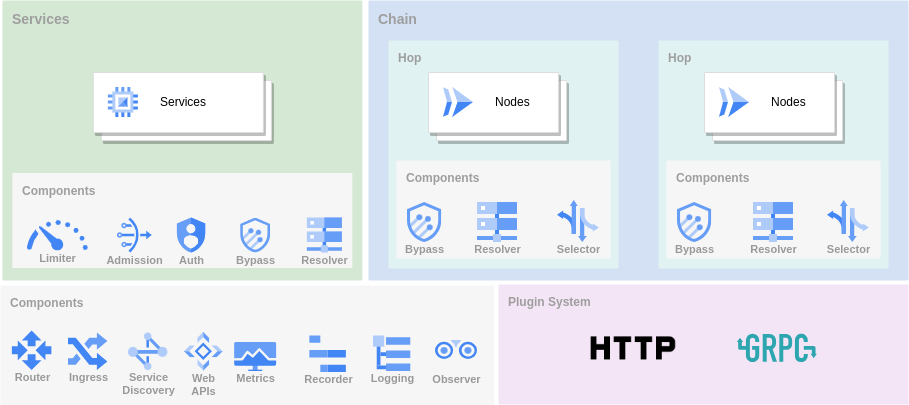
Features

  • Listening on multiple ports
  • Multi-level forwarding chain
  • Rich protocol
  • TCP/UDP port forwarding
  • Reverse Proxy and Tunnel
  • TCP/UDP transparent proxy
  • DNS resolver and proxy
  • TUN/TAP device and TUN2SOCKS
  • Load balancing
  • Routing control
  • Admission control
  • Bandwidth/Rate Limiter
  • Plugin System
  • Prometheus metrics
  • Dynamic configuration
  • Web API
  • GUI/WebUI

Overview

Overview

There are three main ways to use GOST as a tunnel.

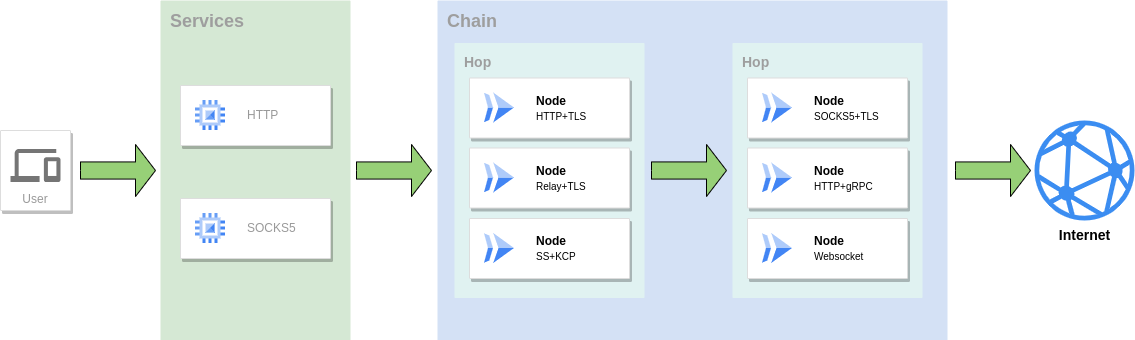
Proxy

As a proxy service to access the network, multiple protocols can be used in combination to form a forwarding chain for traffic forwarding.
Proxy

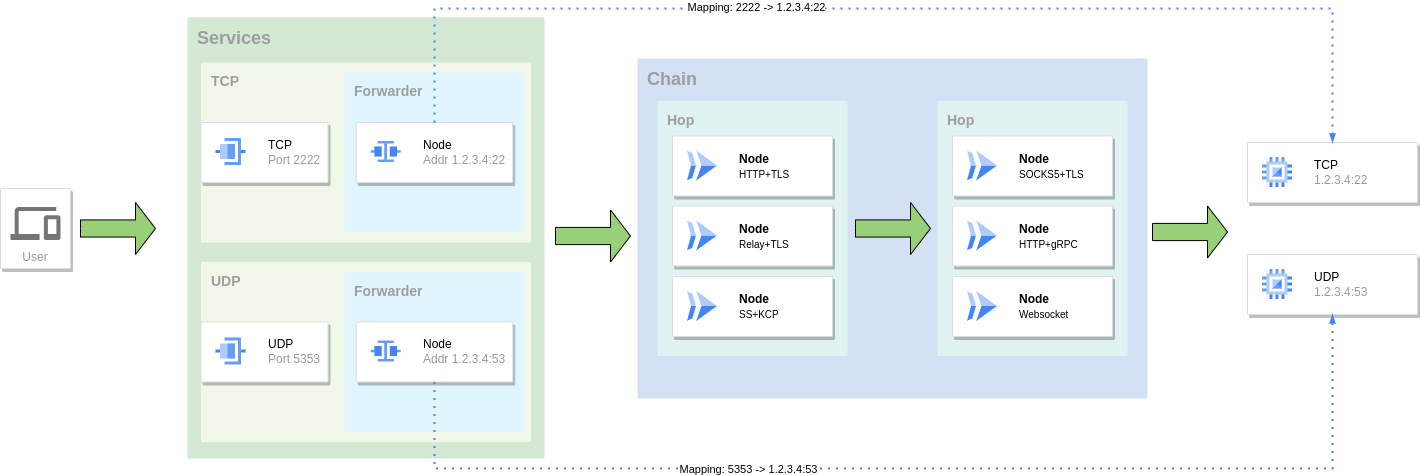
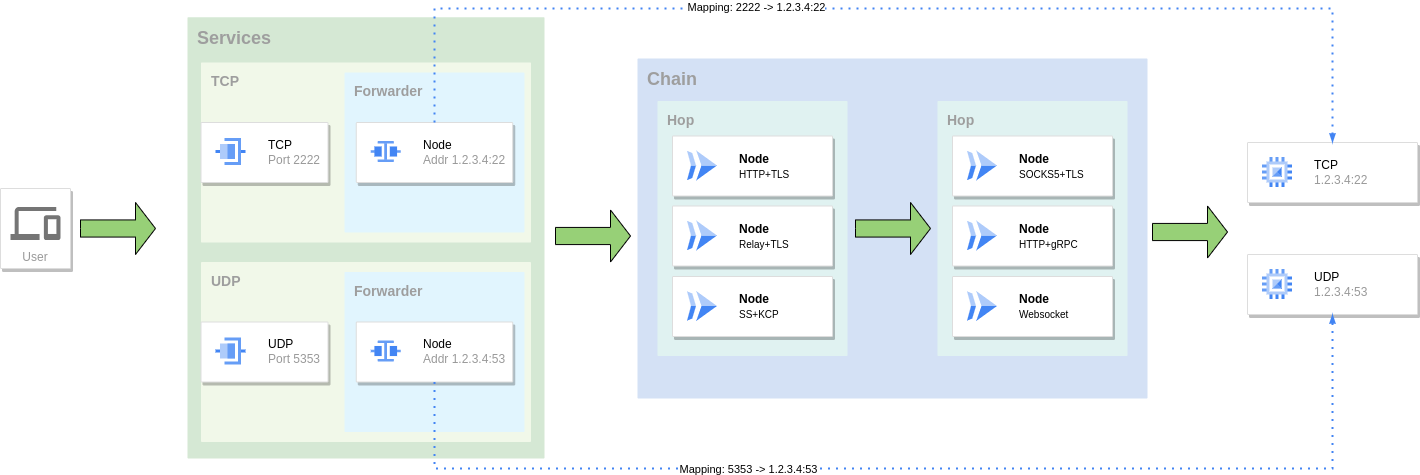
Port Forwarding

Mapping the port of one service to the port of another service, you can also use a combination of multiple protocols to form a forwarding chain for traffic forwarding.
Forward

Reverse Proxy

Use tunnel and intranet penetration to expose local services behind NAT or firewall to public network for access.
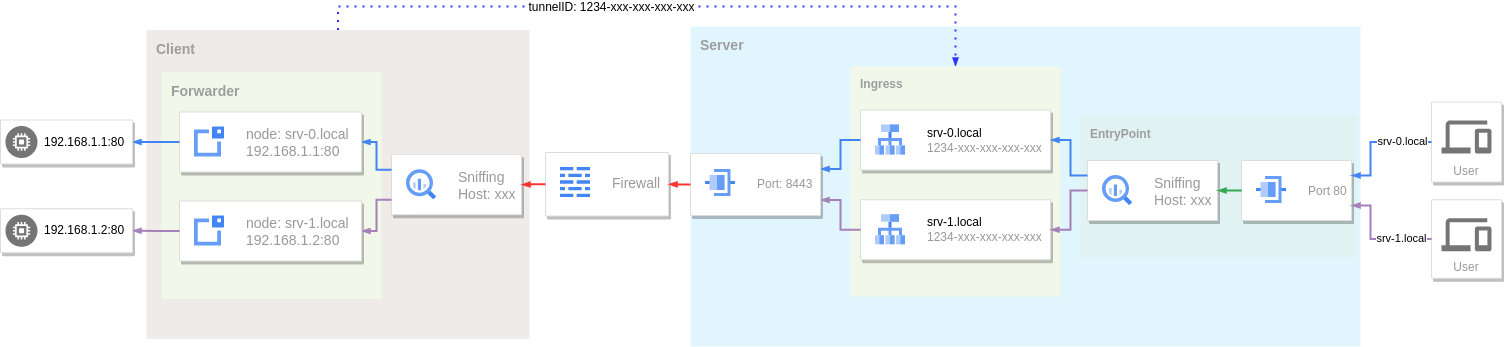
Reverse Proxy

Installation

Binary files

https://github.com/go-gost/gost/releases

Packages (DEB/RPM)

Download the package for your architecture from the releases page (amd64, amd64v3, arm64):

# Debian/Ubuntu
sudo apt install ./gost_<version>_linux_amd64.deb

# RHEL/Fedora
sudo dnf install ./gost_<version>_linux_amd64.rpm

The amd64v3 package requires an AVX2-capable CPU (x86-64-v3); use amd64 otherwise.

The packages ship a systemd service, but it is not enabled automatically: create /etc/gost/gost.yml first (see /usr/share/doc/gost/examples/gost.yml), then run sudo systemctl enable --now gost. Without a config file the service is skipped rather than failing.

install script

# install latest from [https://github.com/go-gost/gost/releases](https://github.com/go-gost/gost/releases)
bash <(curl -fsSL https://github.com/go-gost/gost/raw/master/install.sh) --install
# select version for install 
bash <(curl -fsSL https://github.com/go-gost/gost/raw/master/install.sh)

From source

git clone https://github.com/go-gost/gost.git
cd gost/cmd/gost
go build

Docker

docker run --rm gogost/gost -V

Tools

GUI

go-gost/gostctl

WebUI

go-gost/gost-ui

Shadowsocks Android

hamid-nazari/ShadowsocksGostPlugin

Support

Wiki: https://gost.run

YouTube: https://www.youtube.com/@gost-tunnel

Telegram: https://t.me/gogost

Google group: https://groups.google.com/d/forum/go-gost

Legacy version: v2.gost.run

Download Tool