 gen0sec/jailer
Jailer is an eBPF-based process jailing system that provides mandatory access control (MAC) for Linux. It tracks processes using BPF task_storage maps and enforces role-based policies on file access, network operations, and process execution.

Warning: This project is under heavy development and is NOT ready for production use. APIs, policy formats, and behavior may change without notice. Use for testing and experimentation only.
Note: This is an independent implementation and is not the same project as Meta's solution. While BpfJailer is functionally similar and inspired by the original idea and design by Liam Wisehart, Justin Ngai, Carl El Khoury, Mansee Chadha at Meta, this is a separate codebase developed independently. We extend our gratitude for the vision and foundational concepts that inspired this work.

Jailer is an eBPF-based process jailing system that provides mandatory access control (MAC) for Linux. It tracks processes using BPF task_storage maps and enforces role-based policies on file access, network operations, and process execution.
| Feature | Status | Description |
|---|---|---|
| Process Tracking | ✅ Working | Tracks processes using task_storage BPF map |
| Socket Enrollment | ✅ Working | Processes enroll via Unix socket API |
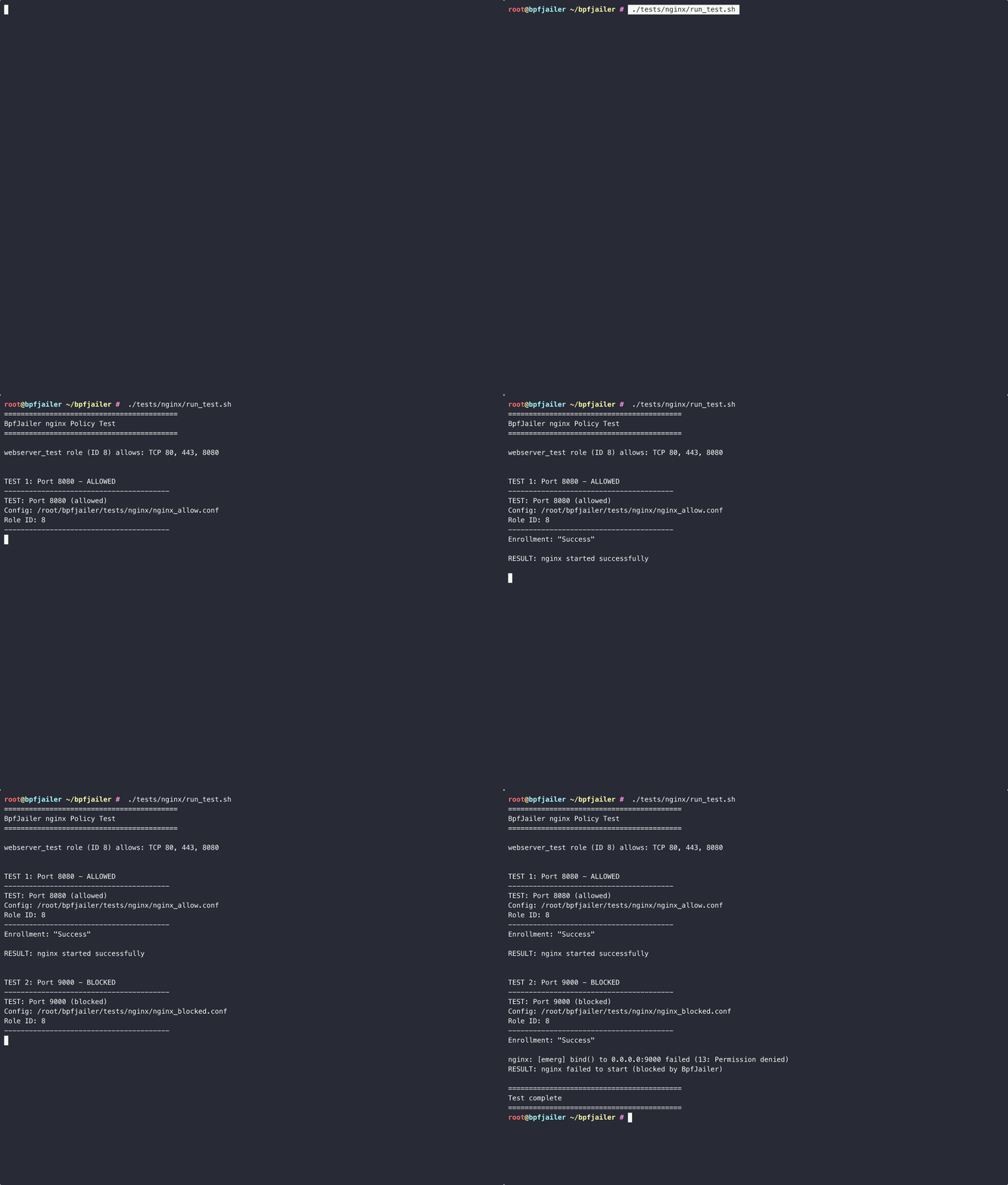
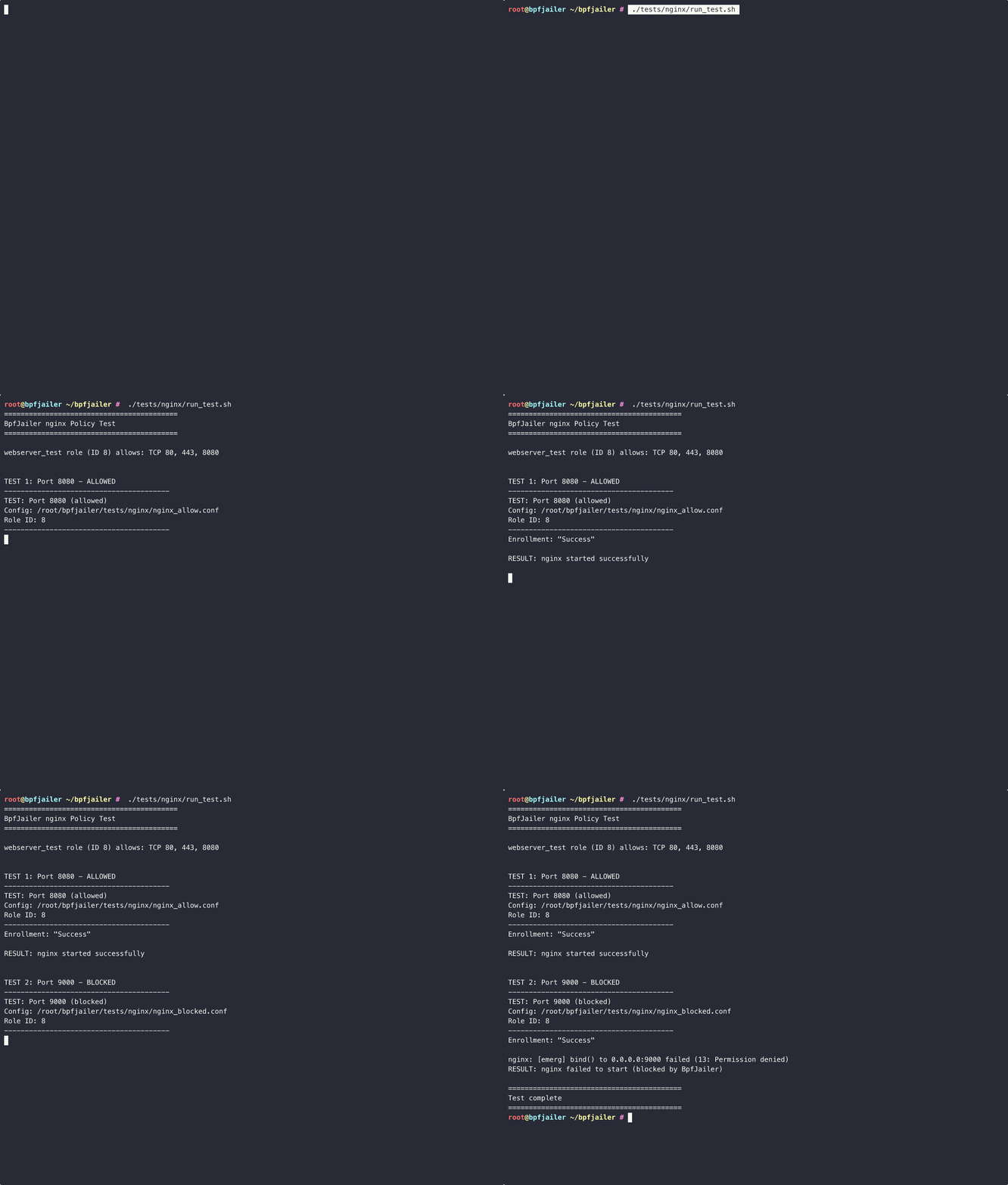
| Role-based Policies | ✅ Working | Restricted and permissive roles |
| File Access Control | ✅ Working | Block/allow file open operations |
| Jail Inheritance | ✅ Working | Child processes inherit parent's jail |
| Network Control | ✅ Working | Block/allow socket bind/connect |
| Port/Protocol Filtering | ✅ Working | Per-port TCP/UDP allow/deny rules |
| Exec Control | ✅ Working | Block/allow process execution |
| Path Matching | ✅ Working | Dentry walking with cache invalidation |
| Signed Binaries | 🚧 Stub | Binary signature validation (not implemented) |
| Alternative Enrollment | ✅ Working | Auto-enroll by executable, cgroup, or xattr |
| Daemonless Mode | ✅ Working | Bootstrap binary pins programs at early boot |
| Audit Events | ✅ Working | Perf buffer for systemd-journald integration |

BPF_MAP_TYPE_TASK_STORAGE support)# Check current kernel config
zcat /proc/config.gz 2>/dev/null || cat /boot/config-$(uname -r)
Required options:
CONFIG_BPF=y
CONFIG_BPF_SYSCALL=y
CONFIG_BPF_LSM=y
CONFIG_DEBUG_INFO_BTF=y
BPF LSM must be enabled in the kernel boot parameters:
# Check if BPF LSM is active
cat /sys/kernel/security/lsm
# Should include "bpf" in the list

# If not, add to kernel boot parameters:
# Edit /etc/default/grub and add to GRUB_CMDLINE_LINUX:
#   lsm=lockdown,capability,landlock,yama,apparmor,bpf

# Then update grub and reboot:
sudo update-grub
sudo reboot
For Ubuntu/Debian systems, you can also use:
# Create a script to enable BPF LSM
cat > /tmp/enable_bpf_lsm.sh << 'EOF'
#!/bin/bash
GRUB_FILE="/etc/default/grub"
if grep -q "lsm=" "$GRUB_FILE"; then
    sudo sed -i 's/lsm=[^""]*/lsm=lockdown,capability,landlock,yama,apparmor,bpf/' "$GRUB_FILE"
else
    sudo sed -i 's/GRUB_CMDLINE_LINUX="\(.*\)"/GRUB_CMDLINE_LINUX="\1 lsm=lockdown,capability,landlock,yama,apparmor,bpf"/' "$GRUB_FILE"
fi
sudo update-grub
echo "BPF LSM enabled. Please reboot."
EOF
chmod +x /tmp/enable_bpf_lsm.sh
sudo /tmp/enable_bpf_lsm.sh
Prebuilt tarballs are published for x86_64 and aarch64, built against
glibc 2.31 so they run on older distributions than the one they were built on.
curl -fsSL https://github.com/gen0sec/jailer/raw/main/install.sh | sudo sh
The script verifies the SHA256 before installing anything. Every artifact is also GPG-signed; to check provenance, import the release key first:
curl -fsSL https://github.com/gen0sec/jailer/releases/download/v0.1.1/bpfjailer-signing-key.asc | gpg --import
To install by hand instead, download the tarball for your architecture from the releases page and:
tar xzf bpfjailer-*-linux-gnu.tar.gz && cd bpfjailer-*-linux-gnu
sudo install -Dm0755 bpfjailer-bootstrap /usr/sbin/bpfjailer-bootstrap
sudo install -Dm0755 bpfjailer-daemon    /usr/sbin/bpfjailer-daemon
sudo install -Dm0644 bpfjailer.bpf.o     /usr/lib/bpfjailer/bpfjailer.bpf.o
sudo install -Dm0644 policy.json         /etc/bpfjailer/policy.json
sudo install -Dm0644 bpfjailer-*.service /etc/systemd/system/
sudo systemctl daemon-reload
Then enable one of the two modes described under Installation Modes.
# Install Rust
curl --proto '=https' --tlsv1.2 -sSf https://sh.rustup.rs | sh

# Install build dependencies (Ubuntu/Debian)
sudo apt-get install -y clang llvm libelf-dev linux-headers-$(uname -r)

# Install BPF target for Rust
rustup target add bpfel-unknown-none
cd jailer

# Build BPF programs
cd bpfjailer-bpf && cargo build --release && cd ..

# Build daemon and client
cargo build --release
# Run as root (loads config/policy.json if present)
sudo RUST_LOG=info ./target/release/bpfjailer-daemon
Expected output:
[INFO] BpfJailer daemon starting...
[INFO] Loading BpfJailer eBPF programs with libbpf-rs...
[INFO] ✓ pending_enrollments map available for enrollment
[INFO] ✓ network_rules map available for port/protocol filtering
[INFO] ✓ task_storage map created successfully
[INFO] ✓ Program task_alloc attached
[INFO] ✓ Program file_open attached
[INFO] ✓ Program socket_bind attached
[INFO] ✓ Program socket_connect attached
[INFO] ✓ Program bprm_check_security attached
[INFO] Initialized with default roles: restricted (1), permissive (2)
[INFO] Loaded policy from config/policy.json
[INFO] Loaded 5 roles
[INFO] Enrollment server listening on /run/bpfjailer/enrollment.sock
# Run vulnerability tests WITHOUT jailing (shows attacks succeed)
sudo python3 tests/vulnerable_apps/run_tests.py

# Run vulnerability tests WITH restricted role (shows attacks blocked)
sudo python3 tests/vulnerable_apps/run_tests.py --role 1

# Run specific test
sudo python3 tests/vulnerable_apps/run_tests.py --role 1 --test path

# List available tests and roles
sudo python3 tests/vulnerable_apps/run_tests.py --list
Example output with restricted role:
============================================================
TEST: Path Traversal / Arbitrary File Read
============================================================
Attempting to read /etc/passwd via path traversal...
BLOCKED - Permission denied (BpfJailer blocked file access)

============================================================
TEST: Command Injection
============================================================
Attempting command injection...
BLOCKED - Permission denied (BpfJailer blocked exec)

============================================================
TEST: Reverse Shell / Data Exfiltration
============================================================
Test 1: Reverse shell connection to 127.0.0.1:4444
BLOCKED - Permission denied (BpfJailer blocked connect)

