
Skip to content
KitploitKITPLOIT
ToolsExploitsBlog
Log in
Submit
ToolsExploitsBlog
Submit

Hacking, PenTest, and Cybersecurity Tools for Your Security Arsenal!

Kitploit is a directory of hacking, cybersecurity, and pentesting tools. Discover the latest project updates to find vulnerabilities, analyze systems, automate testing, and strengthen your security.

FeedsContactPrivacy© 2026 Kitploit

Tool Directory

Categories

View all categories
Loading categories
pingtunnel — Pingtunnel is a tool that send TCP/UDP traffic over ICMP | Kitploit

Tools/GitHubGitHub/esrrhs/pingtunnel
IDS/IPS EvasionNetwork SecurityPenetration TestingRed Teaming
GitHubesrrhs/pingtunnel

pingtunnel

Pingtunnel is a tool that send TCP/UDP traffic over ICMP

View Repository
3.7k5991520 days agoReviewed by Kitploit
Share

Pingtunnel

codecov

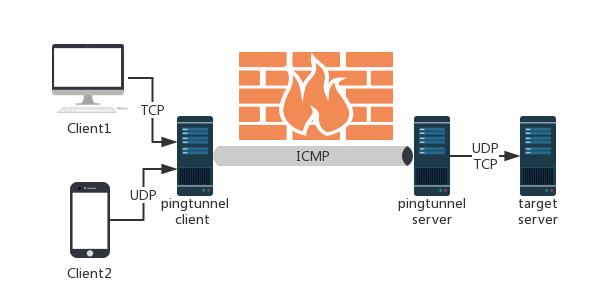
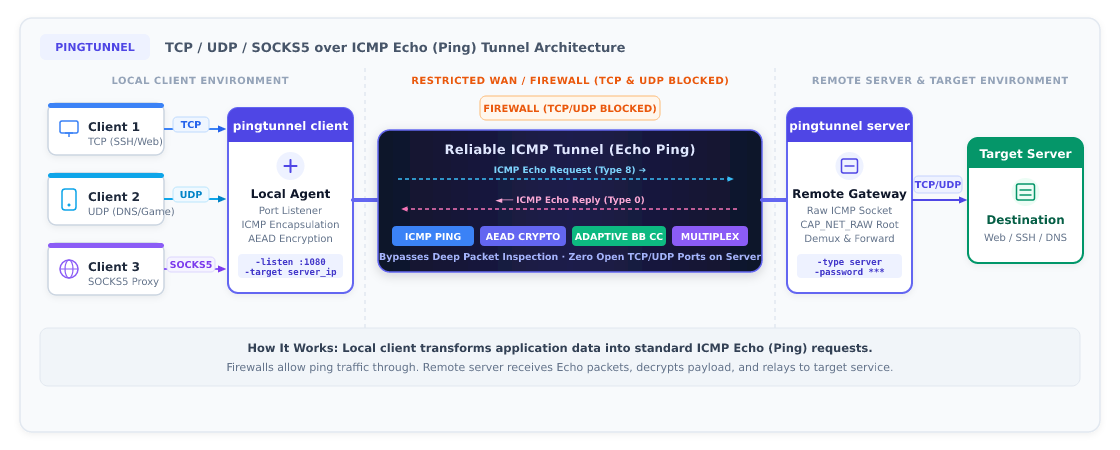
Pingtunnel is a network tool that tunnels TCP/UDP/SOCKS5 traffic over ICMP Echo (Ping) packets to bypass strict network firewalls or throttled TCP/UDP traffic.

⚠️ Note: This tool is strictly intended for study and research purposes. Do not use it for any illegal purpose.
image


🌟 Features

  • Unified v3 security architecture: the old numeric key and separate encryption switches are gone. A single shared password (-password) drives mutual authentication and end-to-end AEAD encryption (default chacha20-poly1305, optional aes256/aes128).
  • Multiple modes:
    • SOCKS5 proxy: start a local SOCKS5 proxy with one command, with optional username/password authentication;
    • TCP port forwarding: reach a specific remote TCP port (e.g. SSH, web, RDP);
    • UDP port forwarding: forward game UDP traffic, DNS 53, etc.;
    • Server-side secondary forwarding (-forward): the server can relay incoming traffic through an upstream SOCKS5/HTTP proxy.
  • Flexible configuration (config file mode recommended):
    • Run directly with a config file: pingtunnel config.json or pingtunnel -c config.json;
    • config.json in the current directory is loaded automatically by default;
    • Command-line flags always override the matching config file values.
  • Resilient on poor networks: a built-in bandwidth-adaptive congestion control algorithm (bb) suppresses bufferbloat and packet-loss-induced stalls.

🚀 Quick Start

Option 1: Config file mode (Recommended)

Sample files ship with the repository. Just fill in your server IP and a strong password:

1. Server config (config-server.json)

{
  "type": "server",
  "password": "YOUR_STRONG_PASSWORD_HERE",
  "encrypt": "chacha20",
  "icmp_listen": "0.0.0.0"
}

Start the server (requires root / administrator privileges):

sudo ./pingtunnel config-server.json
# or: sudo ./pingtunnel -c config-server.json

2. Client config (SOCKS5 proxy mode, config-client-socks5.json)

{
  "type": "client",
  "listen": "127.0.0.1:1080",
  "server": "YOUR_SERVER_IP",
  "socks5": true,
  "password": "YOUR_STRONG_PASSWORD_HERE",
  "encrypt": "chacha20"
}

Start the client:

./pingtunnel config-client-socks5.json
# or: ./pingtunnel -c config-client-socks5.json

Then set your browser or system proxy to SOCKS5 127.0.0.1:1080.


Option 2: Command line (CLI)

1. Start the server

Run on a machine with a public IP:

sudo ./pingtunnel -type server -password YOUR_STRONG_PASSWORD_HERE

(Optional) Disable the Linux kernel's default ICMP echo replies to avoid interference:

echo 1 > /proc/sys/net/ipv4/icmp_echo_ignore_all

2. Start the client

  • SOCKS5 proxy mode:
    ./pingtunnel -type client -l 127.0.0.1:1080 -s YOUR_SERVER_IP -socks5 -password YOUR_STRONG_PASSWORD_HERE
    
  • TCP port forwarding (default mode, e.g. map remote internal 192.168.1.100:22 to local port 2222):
    ./pingtunnel -type client -l :2222 -s YOUR_SERVER_IP -t 192.168.1.100:22 -password YOUR_STRONG_PASSWORD_HERE
    
  • UDP forwarding (e.g. local port 5353 to public DNS 8.8.8.8:53):
    ./pingtunnel -type client -l :5353 -s YOUR_SERVER_IP -t 8.8.8.8:53 -udp -password YOUR_STRONG_PASSWORD_HERE
    

🐳 Docker

Run the server

docker run --name pingtunnel-server -d \
  --restart=always \
  --privileged \
  --network host \
  esrrhs/pingtunnel ./pingtunnel -type server -password YOUR_STRONG_PASSWORD_HERE

Run with a mounted config file

docker run --name pingtunnel-server -d \
  --restart=always \
  --privileged \
  --network host \
  -v /etc/pingtunnel/server.json:/app/server.json:ro \
  esrrhs/pingtunnel ./pingtunnel /app/server.json

📖 Detailed Usage and Tuning Guide

For more advanced options and topologies (server-side secondary proxy, port forwarding, SOCKS5 authentication, flow control and congestion tuning), see: 👉 USAGE.md - Pingtunnel Usage and Configuration Guide


Download Tool

Most Popular

View all →

Discover the most used tools by our community.

  • 1

    OsintHunter

    letox4/osinthunter

    🎯 The ultimate OSINT toolkit: investigation graph, confidence scoring, alias families, map, timeline and reports. 49 modules, 400+ sites, no API keys required.

    786
  • 2

    ghostlock-app

    yukonga/ghostlock-app

    GhostLock One-Tap Execution App (CVE-2026-43499)

    506
  • 3

    ARTEX

    baarai/artex

    LLM multi-agent autonomous penetration testing platform with planner/worker agents, asset and exploration graphs, MITM traffic recording, and vulnerability retesting.

    429
  • 4

    redforge

    cybersecurity91/redforge

    Browser-side red team toolkit with 102 offline tools for recon, payload generation, credential attacks, crypto, encoding and engagement reporting.

    345
  • 5

    CyberStrikeAI

    ed1s0nz/cyberstrikeai

    The system of action for AI-native cybersecurity—where intent becomes governed execution, evidence becomes operational memory, and every operation improves the next.

    262
  • 6

    looking-glass

    anonghosty/looking-glass

    CSIRT platform that ingests Shadowserver reports into MongoDB and replays them as interactive maps, analysis, findings, advisories and executive dashboards.

    256

Explore all tools

Browse our collection of tools

View all tools →