 cyberark/skywrapper
SkyWrapper helps to discover suspicious creation forms and uses of temporary tokens in AWS




SkyWrapper is an open-source project which analyzes behaviors of temporary tokens created in a given AWS account. The tool is aiming to find suspicious creation forms and uses of temporary tokens to detect malicious activity in the account. The tool analyzes the AWS account, and creating an excel sheet includes all the currently living temporary tokens. A summary of the finding printed to the screen after each run.
SkyWrapper DEMO:
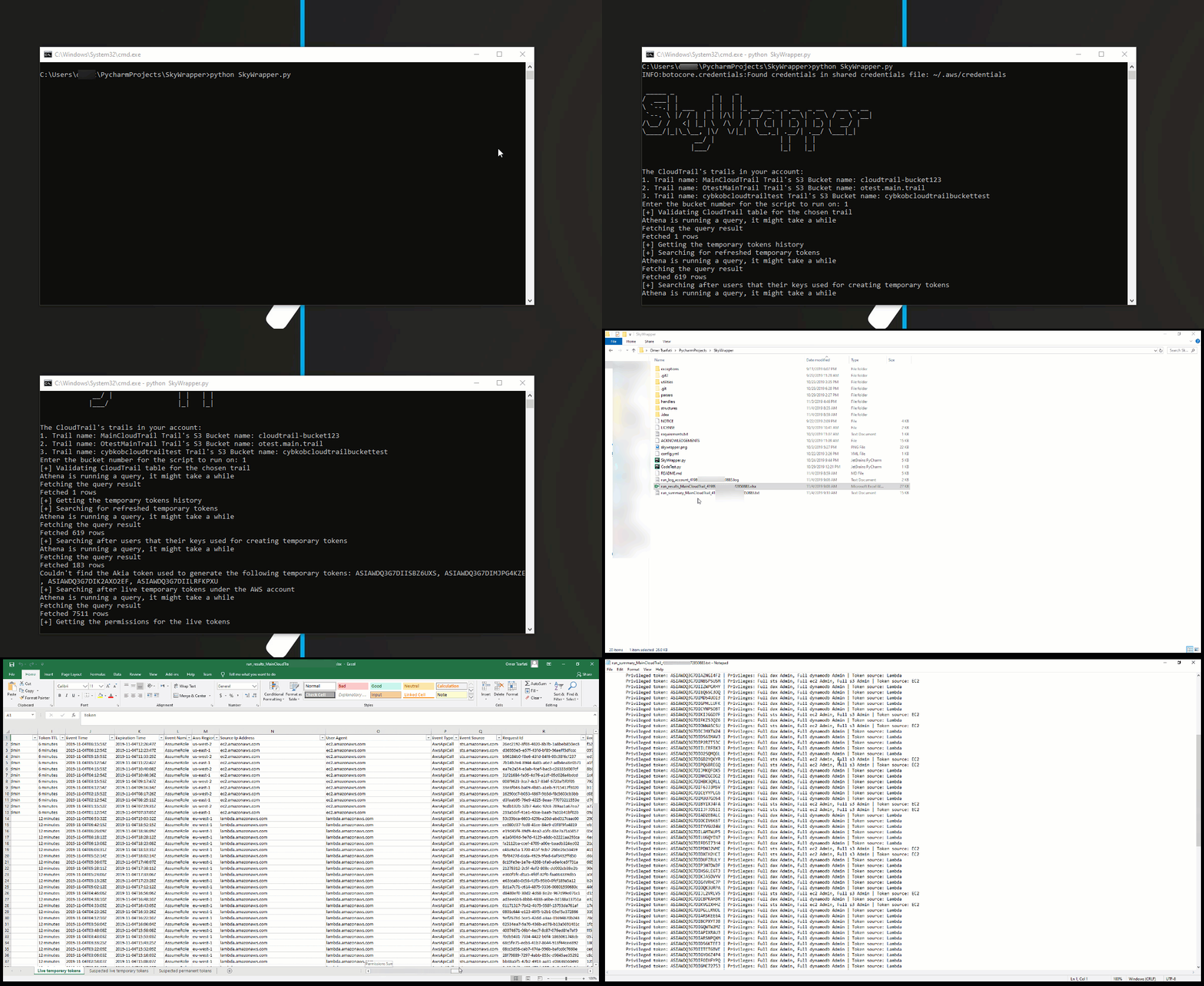
python SkyWrapper.py
For running this script, you will need at least the following permissions policy:
{
    "Version": "2012-10-17",
    "Statement": [
        {
            "Sid": "S3TrailBucketPermissions",
            "Effect": "Allow",
            "Action": [
                "s3:GetObject",
                "s3:ListBucketMultipartUploads",
                "s3:ListBucket",
                "s3:GetBucketLocation",
                "s3:ListMultipartUploadParts"
            ],
            "Resource": [
                "arn:aws:s3:::{cloudtrail_bucket_name}/*",
                "arn:aws:s3:::{cloudtrail_bucket_name}
            ]
        },
        {
            "Sid": "IAMReadPermissions",
            "Effect": "Allow",
            "Action": [
                "iam:ListAttachedRolePolicies",
                "iam:ListRolePolicies",
                "iam:GetRolePolicy",
                "iam:GetPolicyVersion",
                "iam:GetPolicy",
                "iam:ListRoles"
            ],
            "Resource": [
                "arn:aws:iam::*:policy/*",
                "arn:aws:iam::*:role/*"
            ]
        },
        {
            "Sid": "GLUEReadWritePermissions",
            "Effect": "Allow",
            "Action": [
                "glue:CreateTable",
                "glue:CreateDatabase",
                "glue:GetTable",
                "glue:GetDatabase"
            ],
            "Resource": "*"
        },
        {
            "Sid": "CLOUDTRAILReadPermissions",
            "Effect": "Allow",
            "Action": [
                "cloudtrail:DescribeTrails"
            ],
            "Resource": "*"
        },
        {
            "Sid": "ATHENAReadPermissions",
            "Effect": "Allow",
            "Action": [
                "athena:GetQueryResults",
                "athena:StartQueryExecution",
                "athena:GetQueryExecution"
            ],
            "Resource": "arn:aws:athena:*:*:workgroup/*"
        },
        {
            "Sid": "S3AthenaResultsBucketPermissions",
            "Effect": "Allow",
            "Action": [
                "s3:PutObject",
                "s3:GetObject",
                "s3:ListBucketMultipartUploads",
                "s3:CreateBucket",
                "s3:ListBucket",
                "s3:GetBucketLocation",
                "s3:ListMultipartUploadParts"
            ],
            "Resource": "arn:aws:s3:::aws-athena-query-results-*"
        }
    ]
}
Make sure you change the "{trail_bucket}" with your trail's bucket name!
In case you have more than one trail, which you want to use the script also on them, you have to add them as well to the policy permissions resource section.
"config.yaml" is the configuration file. In most cases, you can leave the configuration as is. In case you need to change it, the configuration file is documented.
athena: # Athena configuration
  database_name: default # The name of the database Athena uses for querying the trail bucket.
  table_name: cloudtrail_logs_{table_name} # The table name of the trail bucket name
  output_location: s3://aws-athena-query-results-{account_id}-{region}/ # The default output location bucket for the query results
output:
  excel_output_file: run_results_{trail}_{account_id}-{date}.xlsx # Excel results file
  summary_output_file: run_summary_{trail}_{account_id}-{date}.txt # Summary text results file
verify_https: True # Enable/ Disable verification of SSL certificates for HTTP requests
account:
    account_id: 0 # The account id - Keep it as 0 in case you don't know it
    aws_access_key_id: # If you keep it empty, the script will look after the default AWS credentials stored in ~/.aws/credentials
    aws_secret_access_key: # If you keep it empty, the script will look after the default AWS credentials stored in ~/.aws/credentials
    aws_session_token: # If you keep it empty, the script will look after the default AWS credentials stored in ~/.aws/credentials
For more comments, suggestions, or questions, you can contact Omer Tsarfati (@OmerTsarfati) and CyberArk Labs. You can find more projects developed by us in https://github.com/cyberark/.






