 completetech-security/node-cve-2026-56850-check
Offline Node.js evidence checker for CVE-2026-56850: HTTPS Agent PFX client identity collision. Single-file Python; JSON/CSV/HTML reports; no exploit payloads.





Offline evidence checker for CVE-2026-56850 — Node.js: HTTPS Agent PFX client identity collision. It compares Node.js runtime versions that an operator reports against the fixed releases named in the Node.js security advisory, and writes the result as CSV, JSON or script-free HTML.
The checker is a single Python 3.10+ file that uses only the standard library, so the executable can be copied and run on its own.
This checker triages version evidence. It does not assess a deployed system.
unknown.exploitability: not_tested. No result establishes that the flaw is reachable or exploited.Use it only with inventories you are authorized to assess.
CI runs the unit tests and --help on Python 3.10 and 3.14 on Ubuntu and Windows.
# Assess one runtime version and print JSON
python node_cve_2026_56850_check.py --version 22.23.2 --format json

# Assess the synthetic example inventory and save an HTML report
python node_cve_2026_56850_check.py --inventory examples/inventory.example.json --format html --output report.html

# Assess a CSV list and exit 1 if any result is a finding
python node_cve_2026_56850_check.py --csv-list inventory.csv --fail-on-finding
Run python node_cve_2026_56850_check.py --help for the option list, or python -m unittest -v to run the local test suite.
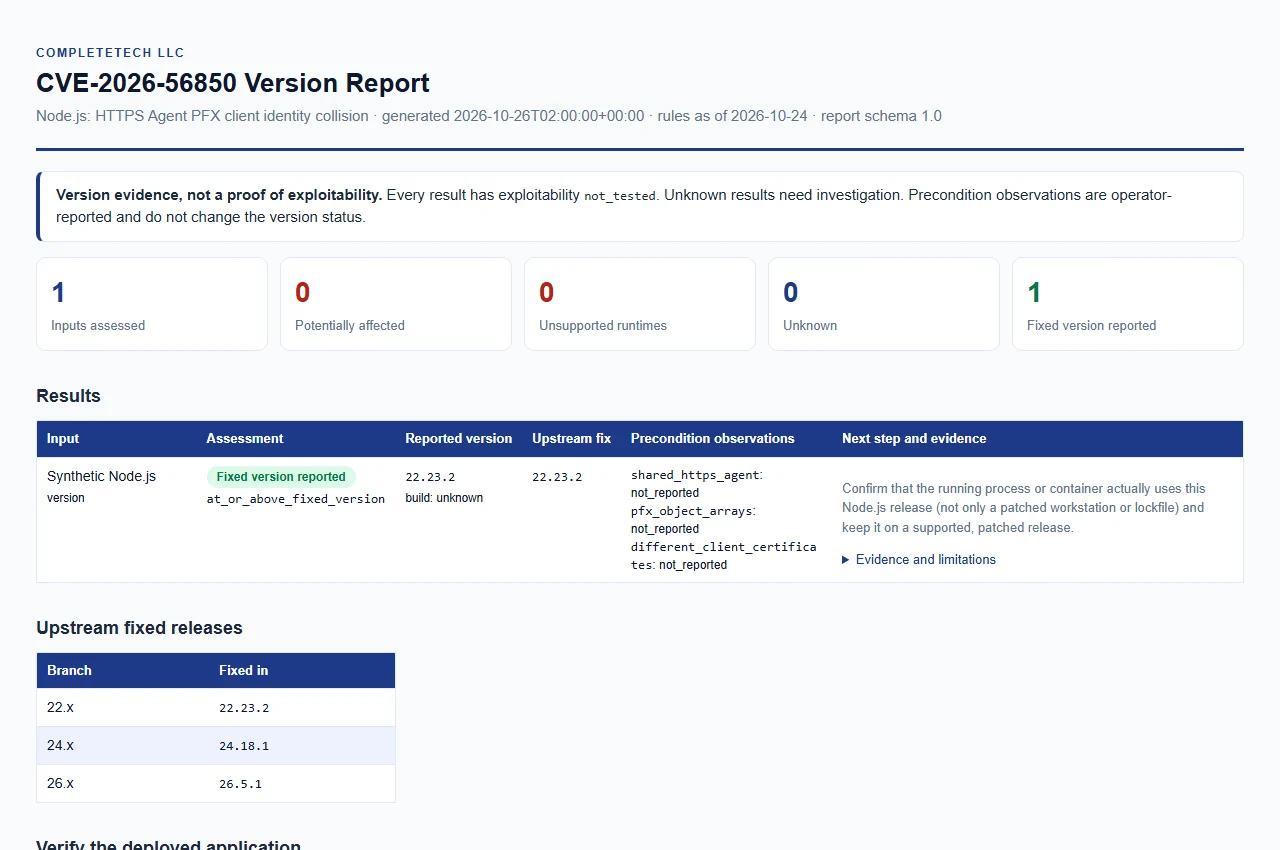
Open the synthetic example report. Example data only; this is not a live assessment.
There is no automatic scan of the current machine. Supply an exact version obtained from the deployed process, then choose an input source and an output format.
You can combine any of these in one run; all results go into one report.
| Option | Input |
|---|---|
--version VERSION (alias --node-version) | One Node.js version, such as 22.23.2; a leading v is accepted. Repeatable; each value describes a separate runtime. |
--inventory FILE | JSON object or array of entries. Repeatable. See JSON inventory. |
--csv-list FILE | CSV with a node_version column. Repeatable. See CSV list. |
At least one input is required. JSON, CSV and HTML reports are built from the same evidence.
| Option | Meaning |
|---|---|
--build-source SOURCE | Provenance of the --version builds, at most 512 characters. unknown (the default), upstream, official and official_upstream are compared as upstream builds; any other value, such as a vendor name, yields vendor_build_unverified and a status of unknown. |
--shared-https-agent {true,false} | Operator observation applied to --version inputs. |
--pfx-object-arrays {true,false} | Operator observation applied to --version inputs. |
--different-client-certificates {true,false} | Operator observation applied to --version inputs. |
--format {csv,json,html} | Report format. The default is csv. |
--output FILE | Save the report to a new file. The default is stdout. The parent directory must already exist. |
--force | Replace an existing output file. Without it, an existing output path is an error. |
--brand NAME | Organization name shown in the HTML report, at most 512 characters. The default is CompleteTech LLC. |
--fail-on-finding | Exit 1 when any result is potentially_affected or unsupported_runtime. See Exit codes and interruption. |
--tool-version | Print the checker name and version, then exit. (--version is the Node.js version, not the checker's.) |
The three observation options apply only to --version inputs; inventory and CSV entries carry their own observations. For example:
python node_cve_2026_56850_check.py --version 24.18.0 --build-source upstream --shared-https-agent true --format json
--force is explicit.--output must differ from every input file, even with --force. Output must be a regular file path; directories and dangling symbolic links are rejected.--force, publication uses a hard link so it cannot overwrite a file; on a filesystem without hard links the run fails with a message to choose another filesystem or use --force.Reviewed 2026-10-24 against the official release advisory and linked fixed releases. Advisory-specific caveats are preserved below.
| Node.js major | Fixed version |
|---|---|
| 22.x | 22.23.2 |
| 24.x | 24.18.1 |
| 26.x | 26.5.1 |
The vendor does not specify an introduced version in the release advisory. The rules therefore treat earlier plain versions of each listed major as potentially_affected, and listed fix versions and later plain versions on the same major as fixed_version_reported.
For each listed major, versions below its fixed version require remediation. Unlisted, custom/backported, and prerelease builds need explicit evidence; do not label unknown builds safe.






