
Skip to content
KitploitKITPLOIT
ToolsExploitsBlog
Log in
Submit
ToolsExploitsBlog
Submit

Hacking, PenTest, and Cybersecurity Tools for Your Security Arsenal!

Kitploit is a directory of hacking, cybersecurity, and pentesting tools. Discover the latest project updates to find vulnerabilities, analyze systems, automate testing, and strengthen your security.

FeedsContactPrivacy© 2026 Kitploit

Tool Directory

Categories

View all categories
Loading categories
evillimiter-windows — Tool that monitors, analyzes and limits the bandwidth of devices on the local network without administrative access (for Windows only) | Kitploit
Tools/GitHubGitHub/bitbrute/evillimiter-windows
IDS/IPS EvasionInformation GatheringNetwork SecurityPenetration TestingRed Teaming
GitHubbitbrute/evillimiter-windows

evillimiter-windows

Tool that monitors, analyzes and limits the bandwidth of devices on the local network without administrative access (for Windows only)

View Repository
23136446 years agoReviewed by Kitploit
Share

Evil Limiter for Windows

License Badge Maintenance HitCount Open Source Love

A tool to limit the bandwidth (upload/download) of devices connected to your network without physical or administrative access. evillimiter employs ARP spoofing and traffic shaping to throttle the bandwidth of hosts on the network. This is explained in detail below.

This tool is the Windows GUI port of the original CLI tool Evil Limiter for Linux.

Requirements

  • Windows 7 or higher

Missing requirements (including 3rd party applications, like Npcap) will be installed when running the setup.
Installation

  1. Download setup file from Release page
  2. Run setup file
  3. Follow the instructions
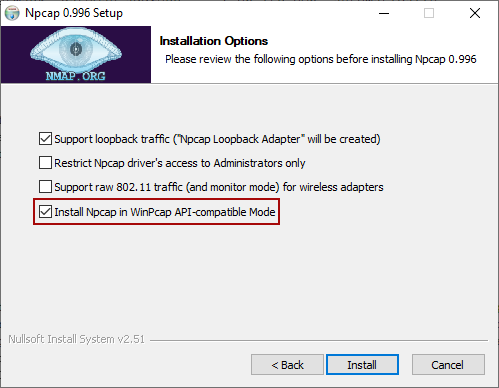
  4. If not already installed, you will be instructed to install Npcap. Make sure to install it in WinPcap API-compatible mode (check the checkbox).

  1. Run Evil Limiter

Restrictions

  • Limits IPv4 connctions only, since ARP spoofing requires the ARP packet that is only present on IPv4 networks.

Disclaimer

Evil Limiter for Windows is provided by bitbrute "as is" and "with all faults". The provider makes no representations or warranties of any kind concerning the safety, suitability, lack of viruses, inaccuracies, typographical errors, or other harmful components of this software. There are inherent dangers in the use of any software, and you are solely responsible for determining whether this software is compatible with your equipment and other software installed on your equipment. You are also solely responsible for the protection of your equipment and backup of your data, and the provider will not be liable for any damages you may suffer in connection with using, modifying, or distributing this software.

License

Copyright (c) 2019 by bitbrute. Some rights reserved.
Evil Limiter for Windows is licensed under the MIT License as stated in the LICENSE file.


Download Tool

Most Popular

View all →

Discover the most used tools by our community.

  • 1

    OsintHunter

    letox4/osinthunter

    🎯 The ultimate OSINT toolkit: investigation graph, confidence scoring, alias families, map, timeline and reports. 49 modules, 400+ sites, no API keys required.

    867
  • 2

    ghostlock-app

    yukonga/ghostlock-app

    GhostLock One-Tap Execution App (CVE-2026-43499)

    544
  • 3

    ARTEX

    baarai/artex

    LLM multi-agent autonomous penetration testing platform with planner/worker agents, asset and exploration graphs, MITM traffic recording, and vulnerability retesting.

    385
  • 4

    redforge

    cybersecurity91/redforge

    Browser-side red team toolkit with 102 offline tools for recon, payload generation, credential attacks, crypto, encoding and engagement reporting.

    360
  • 5

    looking-glass

    anonghosty/looking-glass

    CSIRT platform that ingests Shadowserver reports into MongoDB and replays them as interactive maps, analysis, findings, advisories and executive dashboards.

    302
  • 6

    CyberStrikeAI

    ed1s0nz/cyberstrikeai

    The system of action for AI-native cybersecurity—where intent becomes governed execution, evidence becomes operational memory, and every operation improves the next.

    279

Explore all tools

Browse our collection of tools

View all tools →




