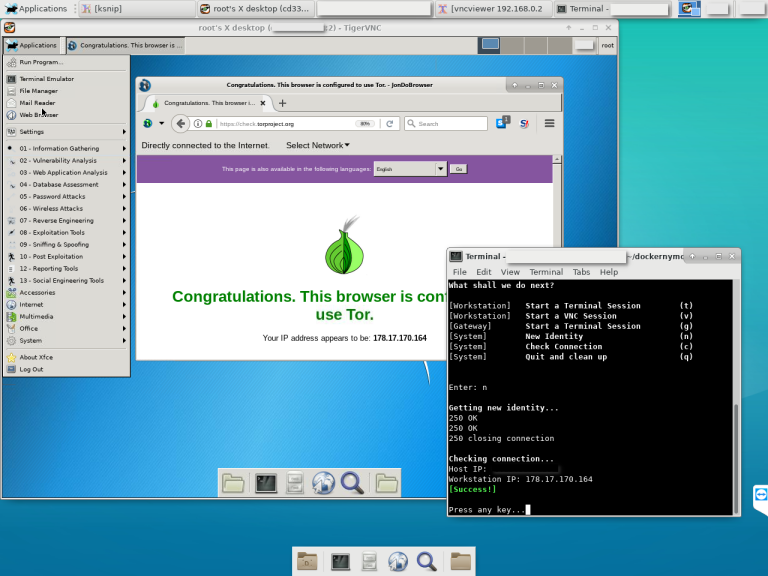
 bcapptain/dockernymous
A script used to create a whonix like gateway/workstation environment with docker containers.

SCROLL DOWN FOR REQUIREMENTS AND INSTRUCTIONS
IT JUST WON'T WORK IF YOU DON'T FOLLOW THEM
Warning:
Dockernymous is in a very early state of development. Only use it for educational purposes.
DON'T use it if you rely on strong anonymity!
[13.10.2018]
I completely changed the overall function logic of the script hence there are improvements in useability and stability. The look of the menu was improved.
These NEW function were added:
Option to keep the containers running and restore them later: You now have the choice to keep the containers running on exiting. This of course will speed up the start time of the whole script. For privacy reasons I keep the containers "self destroyable", so if you manually stop them or reboot your system they are gone nevertheless.
(Re)start TOR from menu
Stop TOR from menu
Enjoy! Bcapptain
[17.05.2018]
Switched from Debian to Alpine as gateway image/container!

I changed the Docker image that is set up as the gateway by dockernymous, from Debian to Alpine!
The resulting image size after configuration and commiting is now 23MB (Alpine) instead of 200MB (Debian)!
The instructions were updated below.
Dockernymous is a start script for Docker that runs and configures two individual Linux containers in order act as a anonymisation workstation-gateway set up.
It's aimed towards experienced Linux/Docker users, security professionals and penetration testers!
The gateway container acts as a Anonymizing Middlebox (see https://trac.torproject.org/projects/tor/wiki/doc/TransparentProxy) and routes ALL traffic from the workstation container through the Tor Network.
The idea was to create a whonix-like setup (see https://www.whonix.org) that runs on systems which aren't able to efficiently run two hardware virtualized machines or don't have virtualization capacities at all.
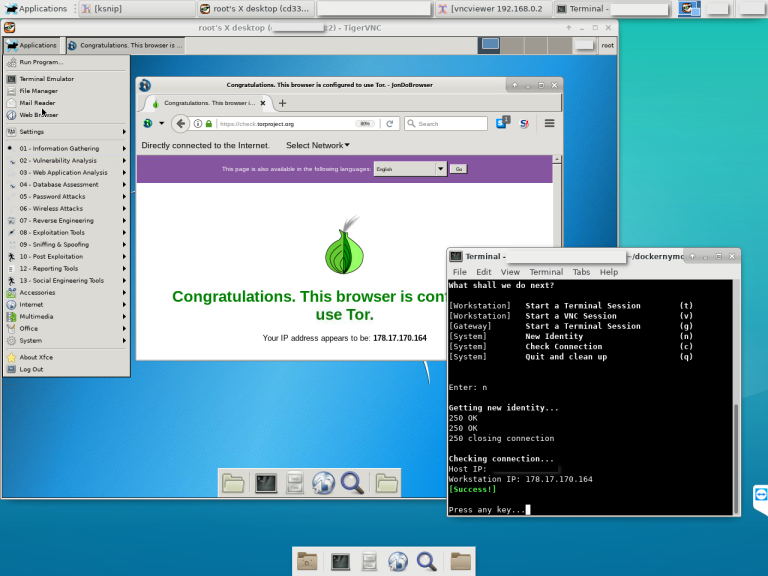
Host (Linux):
Gateway Image:
Workstation Image:
1. Host
To clone the dockernymous repository type:
git clone https://github.com/bcapptain/dockernymous.git
Dockernymous needs an up and running Docker environment and a non-default docker network. Let's create one:
docker network create --driver=bridge --subnet=192.168.0.0/24 docker_internal
2. Gateway (Alpine):
Get a lightweight gateway Image! For example Alpine:
docker pull alpine
Run the image, update the package list, install iptables & tor:
docker run -it alpine /bin/sh
apk add --update tor iptables iproute2
exit
Feel free to further customize the gateway for your needs before you extit.
To make this permanent you have to create a new image from the gateway container we just set up. Each time you run dockernymous a new container is created from that image and disposed on exit:
docker commit [Container ID] my_gateway
Get the container ID by running:
docker ps -a
3. Workstation (Kali Linux):
Get an image for the Workstation. For example, Kali Linux for penetration testing:
docker pull kalilinux/kali-linux-docker
Update and install the tools you would like to use (see https://www.kali.org/news/kali-linux-metapackages/).
docker run -it kalilinux/kali-linux-docker /bin/bash
apt-get update
apt-get dist-upgrade
apt install kali-linux-top10
Make sure the tightvncserver and curl packages are installed which is the case with most Kali Metapackages.
apt-get install tightvncserver
apt-get install curl
Install xfce4 for a minimal graphical Desktop:
$ apt-get install xfce4
$ apt-get clean
$ exit
As with the Gateway, to make this permanent you have to create an image from that customized container. Each time you run dockernymous a new container is created and disposed on exit.
$ docker commit [Container ID] my_workstation
Get the container ID by running:
$ docker ps -a
4. Run dockernymous In case you changed the names for the images to something different (defaults are: "docker_internal" (network), "my_gateway" (gateway), "my_workstation" (you guess it)) open dockernymous.sh with your favorite editor and update the actual names in the configuration section.
Everything should be set up by now, let's give it a try! Run Dockernymus (don't forget to 'cd' into the cloned folder):
bash dockernymous.sh
or mark it executable once:
chmod +x dockernymous.sh
and always run it with:
./dockernymous.sh
I'm happy for feedback. Please remember that dockernymous is still under development. The script is pretty messy, yet so consider it as a alpha phased project (no versioning yet).






