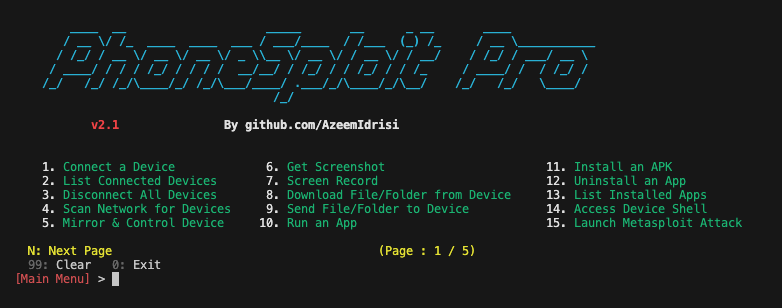
An all-in-one hacking tool to remotely take over Android devices.
<div align="center"> # PhoneSploit Pro The Swiss Army knife for Android. An all-in-one hacking tool written in `Python` to remotely take over Android devices using `ADB`, `scrcpy`, `Nmap`, and `Metasploit-Framework`.     </div> ## Table of contents - [Overview](#overview) - [Screenshots](#screenshots) - [Features](#features) - [Requirements](#requirements) - [Getting started](#getting-started) - [Installing dependencies](#installing-dependencies) - [Device setup tutorial](#device-setup-tutorial) - [Compatibility](#compatibility) - [Installing tools manually](#installing-tools-manually) - [Disclaimer](#disclaimer) - [Developer](#developer) - [Support](#support) - [Attribution](#attribution) --- ## Overview #### Own the device. Every way that matters. Connect over USB or Wi‑Fi, then control the device, extract data, stream camera and microphone, manage apps, and automate a full **Metasploit** compromise, all from one menu. You no longer need to memorize commands and arguments, PhoneSploit Pro does it for you. Pick a number and run. --- ## Screenshots 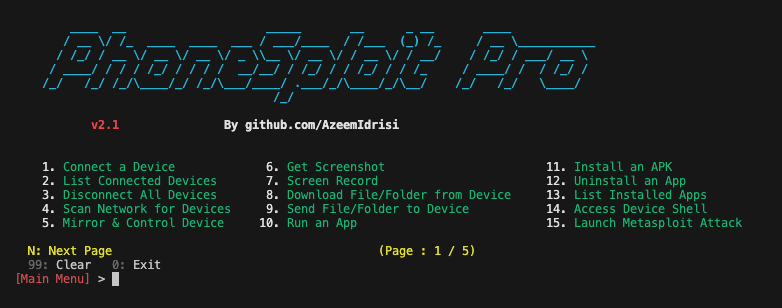 --- ## Features | Feature | Description | | ---------------------------------------- | ----------------------------------------------------------------------------------------------------------------------------------------------------------------------------------------------------------------------------------------------------------------------------------------------------------------------------------------------------------------------------------------------------------------- | | **Connect a device** | Connect to a device remotely using ADB. | | **List connected devices** | Show all devices currently attached to ADB. | | **Disconnect all devices** | Disconnect every ADB session. | | **Multi-device selection** | If several ADB devices are connected (USB or network), choose which device to use for the session (`ANDROID_SERIAL`). | | **Stop ADB server** | Stop the ADB server process. | | **Restart ADB server** | Restart the ADB server process. | | **Access device shell** | Open an interactive shell on the connected device. | | **Keycodes** | Send keycodes to control the device remotely. | | **Unlock device** | Turn the screen on, swipe up, and enter a password when needed. | | **Lock device** | Lock the device. | | **Restart / reboot** | Restart or reboot the device to `System`, `Recovery`, `Bootloader`, or `Fastboot`. | | **Power off** | Power off the target device. | | **Screenshot** | Take a screenshot and pull it to the computer automatically. | | **Screen recording** | Record the target device’s screen for a specified time and pull the recording to the computer automatically. | | **Anonymous screenshot / screen record** | Take screenshots or screen recordings and remove the file from the target device afterward. | | **Mirror and control** | Mirror the screen and control the target device. | | **List files and folders** | List all files and folders on the target device. | | **Download from device** | Download a file or folder from the target device. | | **Send to device** | Send a file or folder from the computer to the target device. | | **Copy WhatsApp data** | Copy all WhatsApp data to the computer. | | **Copy screenshots** | Copy all screenshots to the computer. | | **Copy camera photos** | Copy all camera photos to the computer. | | **Camera live** | Stream live video from the front or back camera on the target device. | | **Dump SMS** | Export all SMS from the device to the computer. | | **Dump contacts** | Export all contacts from the device to the computer. | | **Dump call logs** | Export all call logs from the device to the computer. | | **Run an app** | Launch an application on the device. | | **Install APK** | Install an APK from the computer to the target device. | | **Install split APKs** | Install apps shipped as multiple APK splits (e.g. split bundles). | | **Uninstall an app** | Remove an installed application. | | **List installed apps** | List all apps installed on the target device. | | **Extract APK** | Extract the APK from an installed app. | | **Force-stop app** | Force-stop a running application. | | **Clear app data** | Clear storage/data for a chosen app (factory reset for that app). | | **Restart app** | Restart an application (force-stop then relaunch). | | **Grant / revoke permission** | Grant or revoke a runtime permission for an app. | | **Open a link** | Open a URL on the target device. | | **Display a photo** | Show an image or photo on the target device. | | **Play audio** | Play an audio file on the target device. | | **Play video** | Play a video on the target device. | | **Send SMS** | Send SMS messages through the target device. | | **Device information** | Read build, model, chipset, patch level, encryption, and identifiers (IMEI when accessible, serial, boot serial, Android ID). | | **Accounts on device** | List account types and names from `dumpsys account` (no tokens). | | **SIM / operator info** | SIM and registered network operator properties with offline MCC-MNC lookup when available. | | **Bluetooth devices** | Parse Bluetooth dump for paired/recent devices with offline MAC vendor (OUI) lookup. | | **Battery information** | Read battery status and related details. | | **Record microphone audio** | Record audio from the microphone. | | **Stream microphone audio** | Stream live microphone audio. | | **Record device audio** | Record internal device audio. | | **Stream device audio** | Stream live device audio. | | **Hack device completely** | Guided Metasploit flow with pre-flight checks (device, Metasploit, payload status, LPORT); pick **LHOST** from local interfaces or enter a custom IP; optionally **reuse** an installed payload or rebuild; step-by-step progress while `msfvenom` builds the APK, ADB installs and launches it, and **Metasploit-Framework** opens a `meterpreter` handler; optional **uninstall** of the payload when finished. | | **LAN network scan** | Discover hosts on the local network to help find a target IP address; probe TCP ports `5555` and `5554` with service detection and show ADB-related fingerprints and hints for likely Android/ADB targets. | | **TCP port forwarding** | Forward, reverse, list, remove, or remove all TCP port forwarding rules over ADB. | | **Save logcat snippet** | Capture a slice of `logcat` output and save it to a file on the computer. | | **Live logcat stream** | Stream `logcat` live from the device. | | **Network snapshot** | Show a snapshot of network interfaces and connectivity on the device. | | **Developer settings** | Open the system **Developer options** screen on the device. | | **Read locale** | Read locale and language settings from the device. | | **Screen stay-on** | Set `svc power stayon` (stay on over USB, stay on always, or turn stay-on off). | | **Wi‑Fi status dump** | Dump detailed Wi‑Fi status from the device; summary lines annotate MAC/BSSID with offline vendor (OUI). | | **WLAN IP info** | Show WLAN IP addressing information and annotate interface MAC with offline vendor (OUI). | | **Wi‑Fi radio toggle** | Turn the Wi‑Fi radio on or off. | | **Ping connectivity** | Run ping checks against a host to test connectivity. | | **Saved Wi‑Fi networks** | List saved Wi‑Fi networks known to the device. | | **Root heuristics** | Heuristic checks for common signs of root access. | | **Vulnerability analysis (HARDAX)** | Read-only device audit over ADB via [HARDAX](https://github.com/V33RU/hardax): full scan, CVE/patch indicators, hardening (CIS/SELinux/boot/ADB/USB), app surface; Rich summary plus HTML/JSON/XLSX reports under `Downloaded-Files/vuln-reports/`. Installed with `pip install -r requirements.txt`. | | **Set resolution & display size** | View current display settings; set screen resolution (`wm size`) from 720p/1080p/2K/4K presets in portrait or landscape, or a custom `WxH`; set display density (`wm density`) from common DPI presets or a custom value; toggle display scaling (`wm scaling`); and reset everything to device defaults. | --- [Read more](https://github.com/azeemidrisi/phonesploit-pro)