
Skip to content
KitploitKITPLOIT
ToolsExploitsBlog
Log in
Submit
ToolsExploitsBlog
Submit

Hacking, PenTest, and Cybersecurity Tools for Your Security Arsenal!

Kitploit is a directory of hacking, cybersecurity, and pentesting tools. Discover the latest project updates to find vulnerabilities, analyze systems, automate testing, and strengthen your security.

FeedsContactPrivacy© 2026 Kitploit

Tool Directory

Categories

View all categories
Loading categories
angrgdb — Use angr inside GDB. Create an angr state from the current debugger state. | Kitploit

Tools/GitHubGitHub/andreafioraldi/angrgdb
ExploitationReverse EngineeringDebuggersBinary Analysis
GitHubandreafioraldi/angrgdb

angrgdb

Use angr inside GDB. Create an angr state from the current debugger state.

View Repository
20425556 years agoReviewed by Kitploit
Share

angrgdb

Use angr inside GDB. Create an angr state from the current debugger state.

Install

pip install angrgdb
echo "python import angrgdb.commands" >> ~/.gdbinit

Usage

angrgdb implements the angrdbg API in GDB.

You can use it in scripts like this:

from angrgdb import *

gdb.execute("b *0x004005f9")
gdb.execute("r aaaaaaaa")

sm = StateManager()
sm.sim(sm["rax"], 100)

m = sm.simulation_manager()
m.explore(find=0x00400607, avoid=0x00400613)

sm.to_dbg(m.found[0]) #write input to GDB

gdb.execute("x/s $rax")
#0x7fffffffe768:	"ais3{I_tak3_g00d_n0t3s}"
gdb.execute("c")
#Correct! that is the secret key!

You can also use angrgdb commands directly in GDB for simple stuffs:

  • angrgdb sim <register name> [size] Symbolize a register
  • angrgdb sim <address> [size] Symbolize a memory area
  • angrgdb list List all items that you setted as symbolic
  • angrgdb find <address0> <address1> ... <addressN> Set the list of find targets
  • angrgdb avoid <address0> <address1> ... <addressN> Set the list of avoid targets
  • angrgdb reset Reset the context (symbolic values and targets)
  • angrgdb run Generate a state from the debugger state and run the exploration
  • angrgdb shell Open an shell with a StateManager instance created from the current GDB state
  • angrgdb interactive Generate a state from the debugger state and explore by hand using a modified version of angr-cli

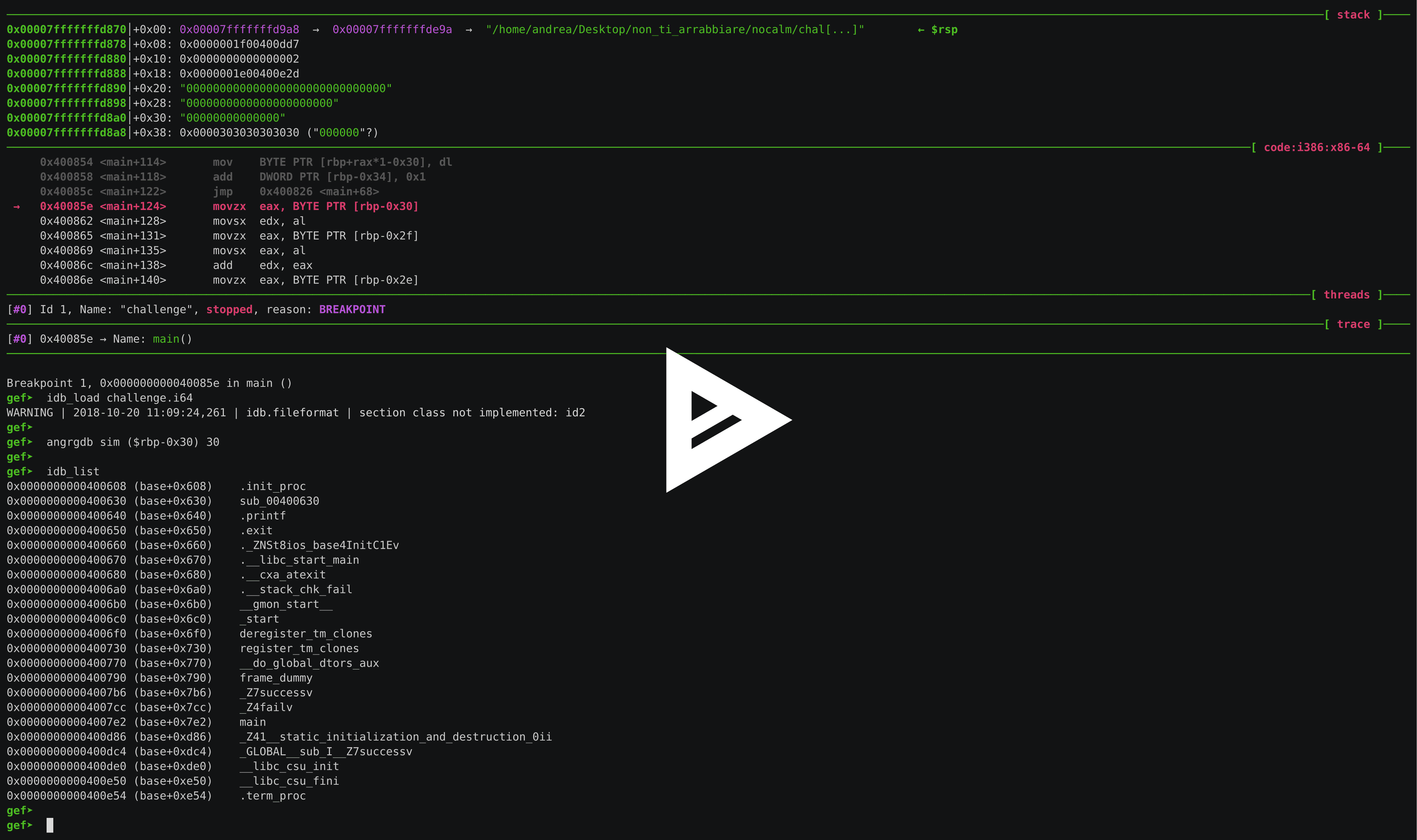
An example crackme solve using angrgdb+GEF+idb2gdb:

asciicast

Loading scripts in GDB

This is a tip if you don't want to use angrgdb from the cli but you want to use a python script. To load a script in GDB use source script.py.

TODO

  • add remote angrdbg like in IDAngr

Cite

Thesis PDF.

Bibtex:

@misc{fioraldi2020symbolic,
    title={Symbolic Execution and Debugging Synchronization},
    author={Andrea Fioraldi},
    year={2020},
    eprint={2006.16601},
    archivePrefix={arXiv},
    primaryClass={cs.CR}
}

Download Tool

Most Popular

View all →

Discover the most used tools by our community.

  • 1

    OsintHunter

    letox4/osinthunter

    🎯 The ultimate OSINT toolkit: investigation graph, confidence scoring, alias families, map, timeline and reports. 49 modules, 400+ sites, no API keys required.

    806
  • 2

    ghostlock-app

    yukonga/ghostlock-app

    GhostLock One-Tap Execution App (CVE-2026-43499)

    523
  • 3

    ARTEX

    baarai/artex

    LLM multi-agent autonomous penetration testing platform with planner/worker agents, asset and exploration graphs, MITM traffic recording, and vulnerability retesting.

    441
  • 4

    redforge

    cybersecurity91/redforge

    Browser-side red team toolkit with 102 offline tools for recon, payload generation, credential attacks, crypto, encoding and engagement reporting.

    346
  • 5

    looking-glass

    anonghosty/looking-glass

    CSIRT platform that ingests Shadowserver reports into MongoDB and replays them as interactive maps, analysis, findings, advisories and executive dashboards.

    270
  • 6

    CyberStrikeAI

    ed1s0nz/cyberstrikeai

    The system of action for AI-native cybersecurity—where intent becomes governed execution, evidence becomes operational memory, and every operation improves the next.

    264

Explore all tools

Browse our collection of tools

View all tools →





