
 alt3kx/wafaray
Enhance your malware detection with WAF + YARA (WAFARAY)



In essence, the main idea came to use WAF + YARA (YARA right-to-left = ARAY) to detect malicious files at the WAF level before WAF can forward them to the backend e.g. files uploaded through web functions see: https://owasp.org/www-community/vulnerabilities/Unrestricted_File_Upload
When a web page allows uploading files, most of the WAFs are not inspecting files before sending them to the backend. Implementing WAF + YARA could provide malware detection before WAF forwards the files to the backend.
Yes, one solution is to use ModSecurity + Clamav, most of the pages call ClamAV as a process and not as a daemon, in this case, analysing a file could take more than 50 seconds per file. See this resource: https://kifarunix.com/intercept-malicious-file-upload-with-modsecurity-and-clamav/
:-( A few clues here Black Hat Asia 2019 please continue reading and see below our quick LAB deployment.
Basically, It is a quick deployment (1) with pre-compiled and ready-to-use YARA rules via ModSecurity (WAF) using a custom rule; (2) this custom rule will perform an inspection and detection of the files that might contain malicious code, (3) typically web functions (upload files) if the file is suspicious will reject them receiving a 403 code Forbidden by ModSecurity.
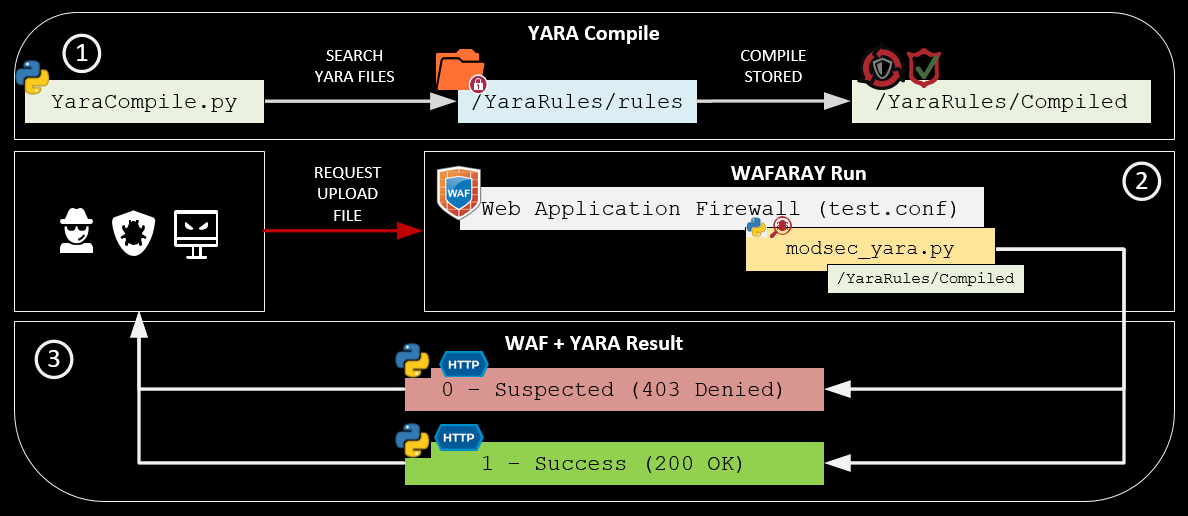
✔️ The YaraCompile.py compiles all the yara rules. (Python3 code)
✔️ The test.conf is a virtual host that contains the mod security rules. (ModSecurity Code)
✔️ ModSecurity rules calls the modsec_yara.py in order to inspect the file that is trying to upload. (Python3 code)
✔️ Yara returns two options 1 (200 OK) or 0 (403 Forbidden)
/YaraRules/Compiled/YaraRules/rules/YaraRules/YaraScripts/etc/apache2/sites-enabled/temporal Blueteamers: Rule enforcement, best alerting, malware detection on files uploaded through web functions.Redteamers/pentesters: GreyBox scope , upload and bypass with a malicious file, rule enforcement.Security Officers: Keep alerting, threat hunting.SOC: Best monitoring about malicious files.CERT: Malware Analysis, Determine new IOC.The Proof of Concept is based on Debian 11.3.0 (stable) x64 OS system, OWASP CRC v3.3.2 and Yara 4.0.5, you will find the automatic installation script here wafaray_install.sh and an optional manual installation guide can be found here: manual_instructions.txt also a PHP page has been created as a "mock" to observe the interaction and detection of malicious files using WAF + YARA.
✔️ Step 1: Download Debian 11.3.0: https://cdimage.debian.org/debian-cd/current/amd64/iso-dvd/debian-11.3.0-amd64-DVD-1.iso
✔️ Step 2: Deploy using VMware or VirtualBox
✔️ Step 3: Once installed, please follow the instructions below:
alex@waf-labs:~$ su root
root@waf-labs:/home/alex#

# Remember to change YOUR_USER by your username (e.g waf)
root@waf-labs:/home/alex# sed -i 's/^\(# User privi.*\)/\1\nalex ALL=(ALL) NOPASSWD:ALL/g' /etc/sudoers
root@waf-labs:/home/alex# exit
alex@waf-labs:~$ sudo sed -i 's/^\(deb cdrom.*\)/#\1/g' /etc/apt/sources.list
alex@waf-labs:~$ sudo sed -i 's/^# \(deb\-src http.*\)/ \1/g' /etc/apt/sources.list
alex@waf-labs:~$ sudo sed -i 's/^# \(deb http.*\)/ \1/g' /etc/apt/sources.list
alex@waf-labs:~$ echo -ne "\n\ndeb http://deb.debian.org/debian/ bullseye main\ndeb-src http://deb.debian.org/debian/ bullseye main\n" | sudo tee -a  /etc/apt/sources.list
alex@waf-labs:~$ sudo apt-get update
alex@waf-labs:~$ sudo apt-get install sudo -y
alex@waf-labs:~$ sudo apt-get install git vim dos2unix net-tools -y
alex@waf-labs:~$ git clone https://github.com/alt3kx/wafaray
alex@waf-labs:~$ cd wafaray
alex@waf-labs:~$ dos2unix wafaray_install.sh
alex@waf-labs:~$ chmod +x wafaray_install.sh
alex@waf-labs:~$ sudo ./wafaray_install.sh >> log_install.log

# Test your LAB environment
alex@waf-labs:~$ firefox localhost:8080/upload.php

Once the Yara Rules were downloaded and compiled.
It is similar to when you deploy ModSecurity, you need to customize what kind of rule you need to apply. The following log is an example of when the Web Application Firewall + Yara detected a malicious file, in this case, eicar was detected.
Message: Access denied with code 403 (phase 2). File "/temporal/20220812-184146-YvbXKilOKdNkDfySME10ywAAAAA-file-Wx1hQA" rejected by
the approver script "/YaraRules/YaraScripts/modsec_yara.py": 0 SUSPECTED [YaraSignature: eicar]
[file "/etc/apache2/sites-enabled/test.conf"] [line "56"] [id "500002"]
[msg "Suspected File Upload:eicar.com.txt -> /temporal/20220812-184146-YvbXKilOKdNkDfySME10ywAAAAA-file-Wx1hQA - URI: /upload.php"]
$ sudo service apache2 stop
$ sudo service apache2 start
$ cd /var/log
$ sudo tail -f apache2/test_access.log apache2/test_audit.log apache2/test_error.log
⚠️ Be careful about your test. The following demos were tested on isolated virtual machines. ⚠️
A malicious file is uploaded, and the ModSecurity rules plus Yara denied uploading file to the backend if the file matched with at least one Yara Rule. (Example of Malware: https://secure.eicar.org/eicar.com.txt) NOT EXECUTE THE FILE.

For this demo, we disable the rule 933110 - PHP Inject Attack to validate Yara Rules.
A malicious file is uploaded, and the ModSecurity rules plus Yara denied uploading file to the backend if the file matched with at least one Yara Rule. (Example of WebShell PHP: https://github.com/drag0s/php-webshell) NOT EXECUTE THE FILE.






