 alessandroz/lazagneforensic
Windows passwords decryption from dump files

The LaZagne project is back !!!
LaZagne uses an internal Windows function called CryptUnprotectData to decrypt user passwords. This API should be called on the victim user session, otherwise, it does not work. If the computer has not been started (when the analysis is realized on an offline mounted disk), or if we do not want to drop a binary on the remote host, no passwords can be retrieved.
LaZagneForensic has been created to avoid this problem. This work has been mainly inspired by the awesome work done by Jean-Michel Picod and Elie Bursztein for DPAPICK and Francesco Picasso for Windows DPAPI laboratory.
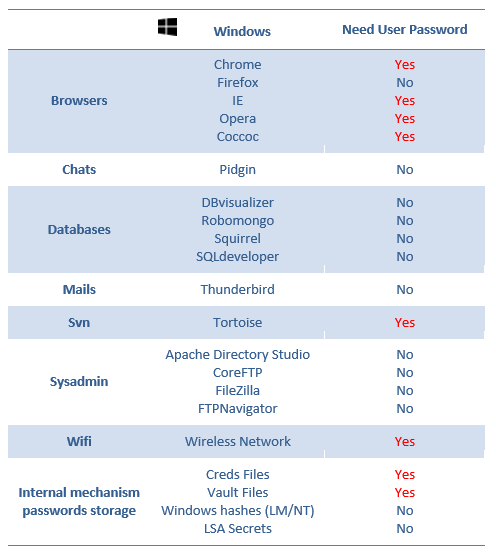
Note: The main problem is that to decrypt these passwords, the user Windows passwords is needed.
sudo wget https://bootstrap.pypa.io/pip/2.7/get-pip.py
sudo python2 ./get-pip.py
sudo apt install python2-dev
pip2 install markerlib
pip2 install distribute
pip2 install -r requirements.txt
PS C:\Users\test\Desktop> Import-Module .\dump.ps1
PS C:\Users\test\Desktop> Dump
Folder dump created successfully !
python dump.py
python laZagneForensic.py all -remote /tmp/dump -password 'ZapataVive'
python laZagneForensic.py all -remote /tmp/dump
test:~$ ls /tmp/disk/
total 769M
drwxr-xr-x 2 root root    0 févr.  1 14:05 ProgramData
-rwxr-xr-x 1 root root 256M févr.  1 14:05 swapfile.sys
-rwxr-xr-x 1 root root 512M févr.  1 14:05 pagefile.sys
drwxr-xr-x 2 root root    0 janv. 31 00:35 System Volume Information
dr-xr-xr-x 2 root root    0 janv. 26 10:17 Program Files (x86)
dr-xr-xr-x 2 root root    0 janv. 25 18:13 Program Files
drwxr-xr-x 2 root root    0 janv. 19 10:09 Windows
drwxr-xr-x 2 root root    0 janv. 16 15:52 Homeware
drwxr-xr-x 2 root root    0 janv.  9 17:33 PerfLogs
drwxr-xr-x 2 root root    0 nov.  22 20:37 Recovery
drwxr-xr-x 2 root root 4,0K nov.  22 20:31 Documents and Settings
dr-xr-xr-x 2 root root    0 nov.  22 20:31 Users
python laZagneForensic.py all -local /tmp/disk -password 'ZapataVive'
python laZagneForensic.py all -local /tmp/disk
Note: Use -v for verbose mode and -vv for debug mode.
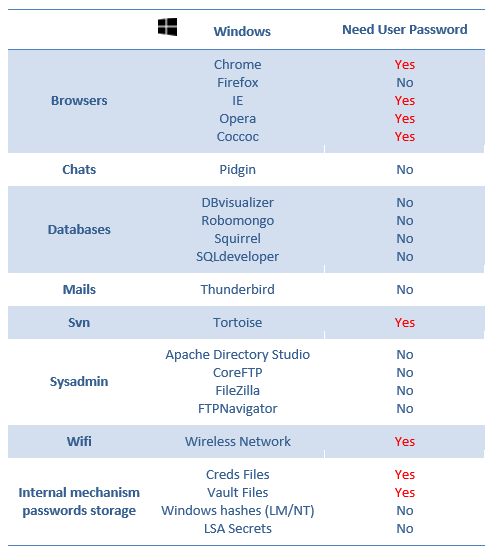
Note: Check the following image to understand which passwords you could decrypt without needed the user windows password. All credentials found will be tested as Windows password in case of the user re-uses the same password.
Do not hesitate to support my work doing a donation, I will appreciate a lot:
| Alessandro ZANNI |
|---|
| [email protected] |
