
Skip to content
KitploitKITPLOIT
ToolsExploitsBlog
Log in
Submit
ToolsExploitsBlog
Submit

Hacking, PenTest, and Cybersecurity Tools for Your Security Arsenal!

Kitploit is a directory of hacking, cybersecurity, and pentesting tools. Discover the latest project updates to find vulnerabilities, analyze systems, automate testing, and strengthen your security.

FeedsContactPrivacyยฉ 2026 Kitploit

Tool Directory

Categories

View all categories
Loading categories
horus โ€” An OSINT / digital forensics tool built in Python | Kitploit
Tools/GitHubGitHub/6abd/horus
OSINT (Open Source Intelligence)Encryption/Decryption ToolsForensicsInformation GatheringSteganographyDigital Forensics
GitHub6abd/horus

horus

An OSINT / digital forensics tool built in Python
View Repository
64573462 months agoReviewed by Kitploit

Most Popular

View all โ†’

Discover the most used tools by our community.

Explore all tools

Browse our collection of tools

View all tools โ†’
Share
Website

Project | Horus

6abd - horus GitHub tag stars - horus forks - horus issues - horus License

Table of Contents

  • ๐Ÿš€ About Horus
  • โšก Installation and Usage Instructions
  • โš™๏ธ API Configuration
  • ๐Ÿ”ฎ Intended Features
  • ๐Ÿค Current Maintainers
  • ๐Ÿ› ๏ธ Contributing
  • ๐Ÿ“ง Contact Me
  • ๐Ÿค Acknowledgements

๐Ÿš€ About Horus

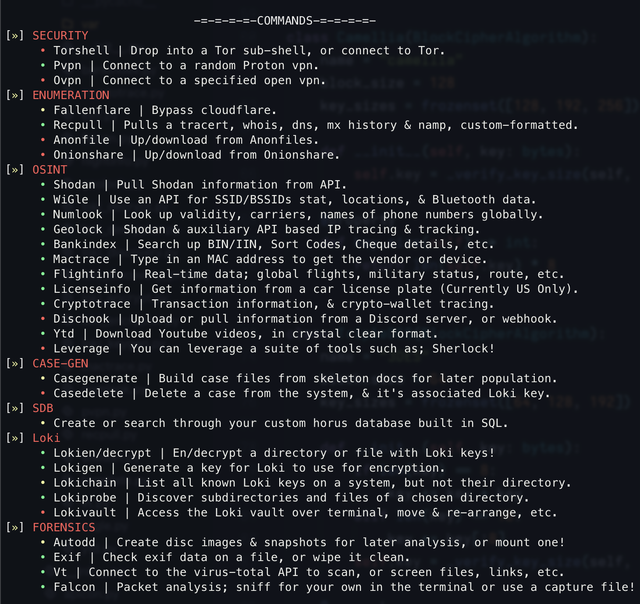
Horus is an all-in-one encompassing tool for investigations assistance, from API leveraging to compiling data too. Its your pre-ops buddy!

โšก Installation and Usage Instructions

To get started with this project, you will need Python installed on your device. Once it is installed, follow these steps:

  1. Clone this repository.
  2. cd to the 'horus' directory. (Make sure it isn't the outermost folder)
  3. Install dependencies using the following command: pip install -r requirements.txt
  4. In the 'horus' directory, run python3 horus.py on Linux/MacOS, or py horus.py on Windows

Note: protonvpn-cli is a requirement for the 'pvpn' command Note: openvpn CLI is a requirement for the 'ovpn' command

โš™๏ธ API Configuration

To configure the APIs necessary for usage of certain commands, you can either manually enter them, or use the 'apicon' command

To manually configure API keys, navigate to /src/modules/var/pipes/api_config.json. Enter your API keys in their corresponding entries.

โš ๏ธ Warning: If you are contributing to this repository or are testing it through a public fork, make sure to remove your API keys from the JSON file before pushing changes.

๐Ÿ”ฎ Intended Features

๐ŸŸข = Fully implemented or more than 80% done

๐ŸŸก = Partially implemented / In development

๐Ÿ”ด = To be implemented

On Shodan: Shodan is a paid API, so in order for your API to work you need to subscribe to them. A lot of its feature's location-related functionality is available in 'geolock', but more detailed features require that API.

๐Ÿค Current Maintainers

  • 6abd (Me) | Project Lead and Developer

๐Ÿ› ๏ธ Contributing

  • If you notice a bug or want to request a feature, make an issue with the appropriate tag
  • If you would like to fix a bug or add a feature yourself, make a PR and I'll take a look
  • If you would like to become a long-term maintainer/contributor, contact me
  • For any other inquiries, you may also contact me

๐Ÿ“ง Contact Me

  • Email: [email protected]
  • Discord: maestro.hq or through the community server

๐Ÿค Acknowledgements

  • Fox | Was Previously Project Manager
  • Tornado | Was Previously QA
  • Mart | Was Previously Sr Dev
  • Mu | Was Previously Jr Dev

Some code used can be attributed to Fox and Askerdyne Ltd., specifically the 'Loki' encryption toolset.

Some .github files were made by Jesse Squires

Horus - An OSINT / digital forensics tool built in Python | Product Hunt

Download Tool