
chisel v1.13.0
نفق TCP/UDP سريع عبر HTTP مع تشفير SSH، يدعم إعادة توجيه المنافذ العكسية، ووكيل SOCKS5، والمصادقة من العميل لاختراق الشبكة بأمان وتجاوز جدران الحماية.
Chisel


Chisel هو نفق TCP/UDP سريع، يُنقل عبر HTTP، ويُؤمَّن عبر SSH. ملف تنفيذي واحد يتضمن كلاً من العميل والخادم. مكتوب بلغة Go (golang). يُعد Chisel مفيدًا بشكل أساسي لعبور جدران الحماية، رغم أنه يمكن استخدامه أيضًا لتوفير نقطة نهاية آمنة داخل شبكتك.
جدول المحتويات
الميزات
- سهولة الاستخدام
- أداء عالٍ*
- اتصالات مشفرة باستخدام بروتوكول SSH (عبر
crypto/ssh) - اتصالات موثّقة؛ اتصالات العميل الموثّقة عبر ملف إعدادات المستخدمين، واتصالات الخادم الموثّقة عبر مطابقة البصمة.
- إعادة اتصال العميل تلقائيًا مع تراجع أُسّي (قابل للضبط عبر
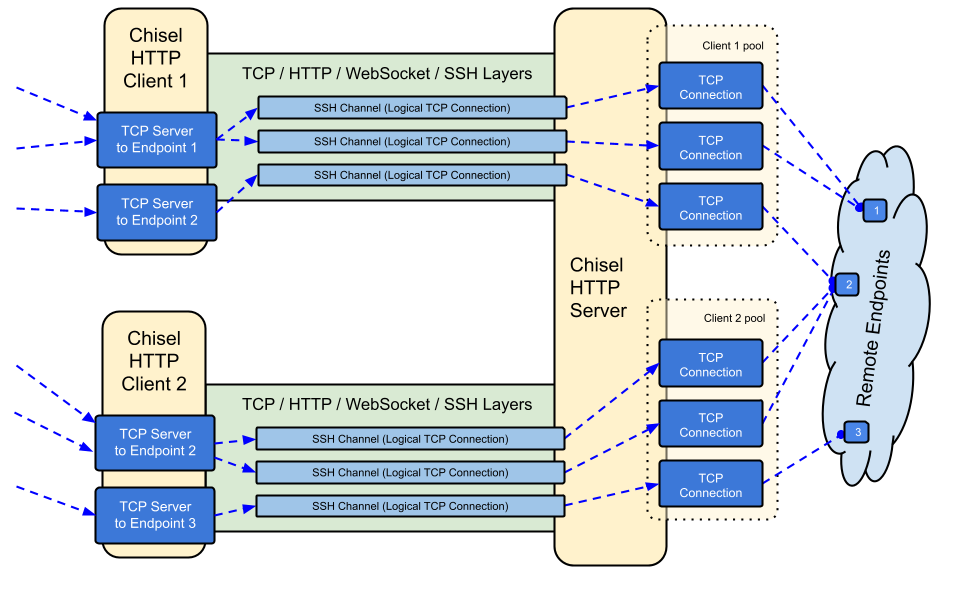
--min/max-retry-interval)؛ تنتهي مهلة نبضات keepalive، لذا تُكتشف الاتصالات الميتة بصمت (النوم/الاستيقاظ، انتهاء مهلة NAT، إعادة تشغيل الخادم) ويُعاد إنشاؤها - يمكن للعملاء إنشاء عدة نقاط نهاية للنفق عبر اتصال TCP واحد
- يمكن للعملاء اختياريًا المرور عبر وكلاء SOCKS أو HTTP CONNECT
- إعادة توجيه المنافذ العكسي (تمر الاتصالات عبر الخادم وتخرج من العميل)
- يمكن للخادم اختياريًا أن يعمل أيضًا كـ وكيل عكسي
- يسمح الخادم اختياريًا باتصالات SOCKS5 (انظر الدليل أدناه)
- يسمح العملاء اختياريًا باتصالات SOCKS5 من إعادة توجيه منفذ عكسي
- اتصالات العميل عبر stdio التي تدعم
ssh -o ProxyCommandمما يوفر SSH عبر HTTP
التثبيت
الملفات التنفيذية


انظر أحدث إصدار أو قم بتنزيله وتثبيته الآن باستخدام curl https://i.jpillora.com/chisel! | bash
تُبنى الملفات التنفيذية باستخدام أحدث إصدار من Go، والذي يحدد الحد الأدنى لإصدارات أنظمة التشغيل: Windows 10 / Server 2016، وmacOS 12، ونواة Linux 3.2، وFreeBSD 12.2. للأنظمة الأقدم (مثل Windows 7)، استخدم الإصدار v1.8.1 أو أقدم.
Docker


docker run --rm -it jpillora/chisel --help
الصور متعددة المعماريات ومنشورة على كل من Docker Hub (jpillora/chisel) وGitHub Container Registry (ghcr.io/jpillora/chisel).
Fedora
يتم صيانة الحزمة بواسطة مجتمع Fedora. إذا واجهت مشكلات متعلقة باستخدام RPM، فيرجى استخدام متتبع المشكلات هذا.
sudo dnf -y install chisel
المصدر
$ go install github.com/jpillora/chisel@latest
عرض توضيحي
يمكنك تشغيل خادم العرض التوضيحي الخاص بك في دقائق (اختفى عرض Heroku التوضيحي القديم مع الطبقة المجانية من Heroku). يقوم example/fly.toml بنشر chisel server هذا إلى الحصة المجانية من fly.io:
$ chisel server --port $PORT --backend http://example.com
# listens on $PORT, proxies normal web requests to http://example.com
انشره باستخدام fly launch --copy-config من دليل example/، ثم أنشئ نفقًا إلى أي خدمة تعمل بجانب الخادم، على سبيل المثال:
$ chisel client https://<your-app>.fly.dev 3000
# connects to your chisel server,
# tunnels your localhost:3000 to the server's localhost:3000
عند زيارة عنوان URL الخاص بتطبيقك في متصفح، يتم الوصول إلى الوكيل الخلفي الافتراضي للخادم ويظهر نسخة من example.com.
الاستخدام
$ chisel --help

  Usage: chisel [command] [--help]

  Version: X.Y.Z

  Commands:
    server - runs chisel in server mode
    client - runs chisel in client mode

  Read more:
    https://github.com/jpillora/chisel
$ chisel server --help

  Usage: chisel server [options]

  Options:

    --host, Defines the HTTP listening host – the network interface
    (defaults the environment variable HOST and falls back to 0.0.0.0).

    --port, -p, Defines the HTTP listening port (defaults to the environment
    variable PORT and falls back to port 8080).

    --key, (deprecated use --keygen and --keyfile instead)
    An optional string to seed the generation of a ECDSA public
    and private key pair. All communications will be secured using this
    key pair. Share the subsequent fingerprint with clients to enable detection
    of man-in-the-middle attacks (defaults to the CHISEL_KEY environment
    variable, otherwise a new key is generate each run).

    --keygen, A path to write a newly generated PEM-encoded SSH private key file.
    If users depend on your --key fingerprint, you may also include your --key to
    output your existing key. Use - (dash) to output the generated key to stdout.

    --keyfile, An optional path to a PEM-encoded SSH private key. When
    this flag is set, the --key option is ignored, and the provided private key
    is used to secure all communications. (defaults to the CHISEL_KEY_FILE
    environment variable). Since ECDSA keys are short, you may also set keyfile
    to the inline key string itself, exactly as printed by --keygen (a base64
    string with a "ck-" prefix); no extra base64 encoding is needed.

    --authfile, An optional path to a users.json file. This file should
    be an object with users defined like:
      {
        "<user:pass>": ["<addr-regex>","<addr-regex>"]
      }
    when <user> connects, their <pass> will be verified and then
    each of the remote addresses will be compared against the list
    of address regular expressions for a match. Patterns are NOT
    anchored by default: "10.0.0.1:80" also matches
    "210.0.0.1:8080", and "." matches any character. Anchor your
    patterns, e.g. "^10\.0\.0\.1:80$". The empty string ""
    matches every address. Addresses will
    always come in the form "<remote-host>:<remote-port>" for normal remotes,
    "R:<local-interface>:<local-port>" for reverse port forwarding
    remotes, and "socks" for SOCKS5 proxy access. Note that SOCKS5
    access previously bypassed this list; existing authfiles which
    should allow SOCKS5 must add an entry matching "socks" (the
    empty wildcard "" matches everything, including "socks"). This
    file will be automatically reloaded on change. Reloads apply
    to new connections and to new tunnels of connected clients;
    established tunnels are not interrupted.

    --auth, An optional string representing a single user with full
    access, in the form of <user:pass>. It is equivalent to creating an
    authfile with {"<user:pass>": [""]}. If unset, it will use the
    environment variable AUTH.