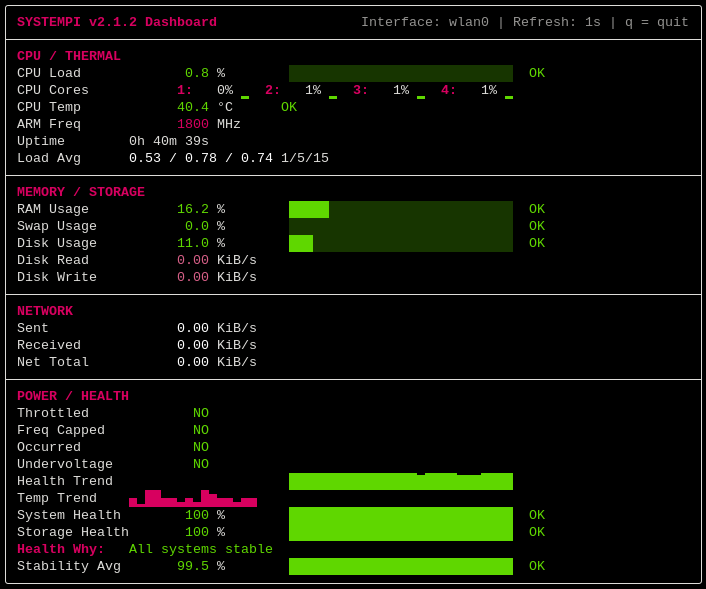
面向 Linux 终端的实时 Raspberry Pi 系统监控仪表盘,具备实时遥测、硬件健康分析和低闪烁渲染能力。
vcgencmd 获取 Raspberry Pi 硬件遥测数据q 立即退出仪表盘| 模式 | 用途 |
|---|---|
| Balanced | 完整监控仪表盘 |
| Compact | 针对较小终端优化 |
| Minimal | 仅保留必要信息的简洁模式 |
| Doctor | 诊断、告警和更新监控模式 |
每种变体都针对不同的监控工作流而设计——从轻量级最小监控到深度诊断分析。
systempi --variation balanced --theme raspberrypi
--variant 和 --var 也可以作为 --variation 的别名使用。
systempi --variation doctor --repo-check --theme vaulttec
systempi --variation compact --theme crt
systempi --variation minimal --theme ice
systempi --variation balanced --theme wasteland
systempi --variation doctor --theme biohazard
systempi --variation balanced --theme ocean
systempi --variation doctor --theme synthwave
git clone https://github.com/WastelandSYS/systempi.git
cd systempi
chmod +x install.sh uninstall.sh
sudo ./install.sh
使用以下命令启动:
systempi
cd systempi
sudo ./uninstall.sh
可选的依赖清理:
sudo ./uninstall.sh --remove-deps
卸载程序会从 /usr/local/bin 中移除全局 systempi 快捷方式。它不会删除你克隆的仓库文件夹。
默认启动:
systempi
随时按 q 退出实时仪表盘。
一次性快照模式(渲染一次后退出):
systempi --once
紧凑模式:
systempi --variation compact
最小模式:
systempi --variation minimal
均衡模式:
systempi --variation balanced
医生模式(以诊断为重点):
systempi --variation doctor
带可选仓库新鲜度检查的 Doctor 模式:
systempi --variation doctor --repo-check
Doctor 模式会在本地软件包状态发生变化时刷新其常规的 Updates 计数。该计数仍然来自 apt list --upgradable;SystemPi 仅将软件包状态变化作为再次询问 APT 的触发条件。此过程无需 sudo/root 权限,也不会安装、移除或升级软件包。
--repo-check 为可选启用项,且仅在 Doctor 模式下有效。它会联系机器上已配置的 APT 仓库,将隔离的用户自有元数据存储在 ~/.cache/systempi/apt/ 下,并每三小时异步刷新一次,且不会修改系统 APT 缓存。
Updates 表示机器常规 APT 元数据当前已知的更新。Repo 表示 SystemPi 可选私有仓库新鲜度检查的结果。例如,Updates 8 available 和 Repo 9 available 表示系统当前已知有 8 个可用更新,而隔离的仓库检查则看到共有 9 个可用软件包。
Once + export snapshot:
systempi --once --export text --output report.txt
systempi --once --export json --output report.json
支持 watch/history 的实时告警事件日志记录:
systempi --watch
systempi --history
--watch 记录新激活的告警事件,--history 打印来自以下位置的近期事件:
~/.local/state/systempi/events.log
主题选择示例:
systempi --theme ocean
systempi --theme matrix
systempi --theme wasteland
刷新间隔示例:
systempi --refresh 0.5
systempi --refresh 2
将网络指标固定到特定接口:
systempi --interface eth0
systempi --interface wlan0
禁用 ANSI 颜色:
systempi --no-color
合并选项:
systempi --variation compact --theme mono --refresh 2 --interface wlan0 --no-color
帮助菜单:
systempi -h
版本信息:
systempi --version
终端字形选择:
systempi --glyphs auto
systempi --glyphs unicode
systempi --glyphs ascii
auto 会自动为当前终端选择兼容性最好的字形集。unicode 强制使用完整的 Unicode 渲染,而 ascii 则使用纯 ASCII 回退方案以获得最大兼容性。
主要面向 Linux 系统设计。
已在以下环境测试:
说明:
vcgencmd。psutil,该依赖由 install.sh 安装。hailortcli 可用时,会自动检测 Raspberry Pi AI Hat+ / AI Hat+2 遥测数据。--repo-check 支持面向基于 Debian/APT 的系统,并使用用户已配置的 APT 仓库。systempi 的构建目标是让 Raspberry Pi 监控变得现代、响应迅速且视觉上令人愉悦,而不是杂乱或过时。
该仪表盘专注于:
Systempi 基于 GNU General Public License v3.0 发布。完整许可证文本请参见 LICENSE。