CVE-2023-5217 是一个已在野外被利用的 libvpx 漏洞,由谷歌威胁分析组的 Clément Lecigne 发现,该漏洞针对 Chrome 浏览器。
本仓库演示了如何使用 WebCodecs 和 MediaRecorder API 在浏览器中触发 CVE-2023-5217。CVE-2023-5217 允许堆缓冲区溢出,溢出长度可控,并可用重复的小 4 字节值进行覆盖。目前尚不清楚 CVE-2023-5217 是如何在野外被利用的。
在公开披露前后,libvpx 中出现了两个补丁,Chromium 中有一个补丁,修复了 CVE-2023-5217。libvpx 的补丁包括禁用 VP8 线程数更改以及一个用于多线程编码的测试。Chromium 的补丁禁用了在 WebCodecs 中调整线程数的功能。
libvpx 是一个处理 VP8/VP9 编码和解码的库。
CVE-2023-5217 的关键问题在于,在 libvpx VP8 编码会话中,减少线程数同时增加帧高度会导致线性堆溢出,溢出长度可控,并可重复写入一个小的 4 字节值。帧高度的差异控制覆盖的长度,新的帧宽度控制重复写入的 4 字节值。该漏洞可被多次利用,通过在后续配置中减小高度来连续写入不同的小 4 字节值。
libvpx VP8 编码器维护一个名为 mt_current_mb_col 的数组,用于存储编码器线程当前正在处理的列。该数组仅在线程数大于 1 时分配,其大小是 mb_rows 的函数,其中 mb_rows = frame_height >> 4,且 frame_height 向上取整到最近的 16 的倍数。
// https://github.com/webmproject/libvpx/blob/6512f994da13e2f27e6a7bd449efee0a374b55b7/vp8/common/alloccommon.c#L85
// The width and height are rounded up to a multiple of 16 and then assigned to `mb_rows` and `mb_cols`
int vp8_alloc_frame_buffers(VP8_COMMON *oci, int width, int height) {
    ...
    // Round up the width/height up to the nearest multiple of 16
    if ((width & 0xf) != 0) width += 16 - (width & 0xf);
    if ((height & 0xf) != 0) height += 16 - (height & 0xf);
    ...
    oci->mb_rows = height >> 4;
    oci->mb_cols = width >> 4;
    ...
}
// https://github.com/webmproject/libvpx/blob/6512f994da13e2f27e6a7bd449efee0a374b55b7/vp8/encoder/onyx_if.c#L1232
// This snippet shows the allocation of `mt_current_mb_col`
void vp8_alloc_compressor_data(VP8_COMP *cpi) {
  ...
  // Only allocate if we have more than 1 thread
  if (cpi->oxcf.multi_threaded > 1) {
    int i;

    vpx_free(cpi->mt_current_mb_col);
    // sizeof(*cpi->mt_current_mb_col) is 4
    CHECK_MEM_ERROR(&cpi->common.error, cpi->mt_current_mb_col,
                    vpx_malloc(sizeof(*cpi->mt_current_mb_col) * cm->mb_rows));
    for (i = 0; i < cm->mb_rows; ++i)
      vpx_atomic_init(&cpi->mt_current_mb_col[i], 0);
  }
  ...
}
一旦 libvpx 完成一帧的编码,它会将已编码的列数加上 mt_sync_range 存储到 mt_current_mb_col 中。
// https://github.com/webmproject/libvpx/blob/6512f994da13e2f27e6a7bd449efee0a374b55b7/vp8/encoder/onyx_if.c#L1212
// Snippet where the mt_sync_range value is set, based on the width.
void vp8_alloc_compressor_data(VP8_COMP *cpi) {
    ...
#if CONFIG_MULTITHREAD
  if (width < 640) {
    cpi->mt_sync_range = 1;
  } else if (width <= 1280) {
    cpi->mt_sync_range = 4;
  } else if (width <= 2560) {
    cpi->mt_sync_range = 8;
  } else {
    cpi->mt_sync_range = 16;
  }
#endif
  ...
}
// https://github.com/webmproject/libvpx/blob/6512f994da13e2f27e6a7bd449efee0a374b55b7/vp8/encoder/encodeframe.c#L560
// Function where the attacker chosen value is written
static void encode_mb_row(...) {
  ...
  const int nsync = cpi->mt_sync_range; // This value is set in vp8_alloc_compressor_data
  vpx_atomic_int rightmost_col = VPX_ATOMIC_INIT(cm->mb_cols + nsync);
  ...
  if (vpx_atomic_load_acquire(&cpi->b_multi_threaded) != 0) {
    current_mb_col = &cpi->mt_current_mb_col[mb_row];
  }
  ...
  if (vpx_atomic_load_acquire(&cpi->b_multi_threaded) != 0) {
    // current_mb_col is a reference to mt_current_mb_col
    vpx_atomic_store_release(current_mb_col,
                             vpx_atomic_load_acquire(&rightmost_col));
  }
  ...
}
要溢出 mt_current_mb_col,我们需要三种编码配置:
mt_current_mb_col。此新高度必须小于 configinit.initial_height,否则会出错。mt_current_mb_col,使其处于易受攻击状态。当以下条件成立时,libvpx 会重复向先前分配范围之外写入值 (configattack.width >> 4) + 1(其中 1 是变量 mt_sync_range,宽度向上取整到最近的 16 的倍数):\text{ceil}(\text{config}_{\text{init}}.\text{height}/16) \geq \text{ceil}(\text{config}_{\text{attack}}.\text{height}/16) \gt \text{ceil}(\text{config}_{\text{vuln}}.\text{height}/16)$$
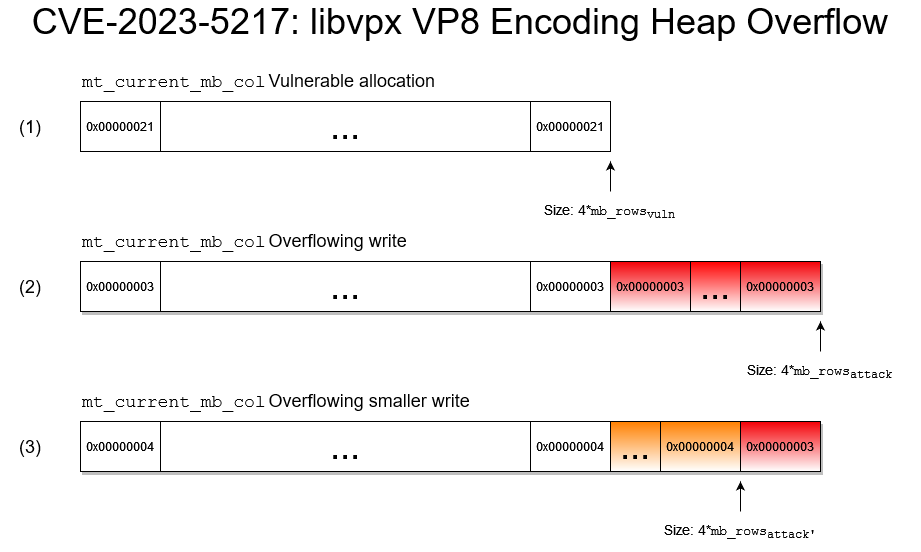
更具体地说,假设我们使用 configinit 初始化 VP8 编码配置,宽度 = 1200,高度 = 1200,线程数 = 4。攻击步骤如下:
mb_rows 设置为 704/16=44,数组 mt_current_mb_col 分配为 (44)*4 = 176 字节。写入 mt_current_mb_col 的值为 512/16 + 1 = 33。mt_current_mb_col 仅在线程数大于 1 时重新分配,因此其大小保持不变,但 mb_rows 现在设置为 1008/16 = 63。当 libvpx 调用 encode_mb_row 时,它将向 mt_current_mb_col 分配之外写入 (63-44)*4 = 68 字节,重复写入值 32/16 + 1 = 3,其中 32 是向上取整的宽度,1 是 mt_sync_range 值。mb_rows = 992/16 = 62,mb_cols = 48/16 = 3,仅向原始分配之外写入 (62-44)*4 = 64 字节,值为 4。要利用此漏洞,攻击者需要能够控制编码高度、宽度和线程数。前两者比较简单,但后者需要找到重新配置编码线程数的地方。
// https://github.com/webmproject/libvpx/blob/67bfb41ed8598edfb25bd6f245f9c39a68808548/vp8/vp8_cx_iface.c#L301
static vpx_codec_err_t set_vp8e_config(VP8_CONFIG *oxcf,
 ...
  oxcf->multi_threaded = cfg.g_threads;
在 Firefox 中,我们可以通过调整 VP8TrackEncoder 中编码的帧区域来控制线程数。如果帧面积大于 307,200(640x480 帧)且机器拥有超过 2 个核心,则使用多于一个线程。
// https://searchfox.org/mozilla-central/source/dom/media/encoder/VP8TrackEncoder.cpp#97
nsresult CreateEncoderConfig(...) {
  ...
  int32_t number_of_cores = PR_GetNumberOfProcessors();
  if (aWidth * aHeight > 1920 * 1080 && number_of_cores >= 8) {
    config->g_threads = 4;  // 4 threads for > 1080p.
  } else if (aWidth * aHeight > 1280 * 960 && number_of_cores >= 6) {
    config->g_threads = 3;  // 3 threads for 1080p.
  } else if (aWidth * aHeight > 640 * 480 && number_of_cores >= 3) {
    config->g_threads = 2;  // 2 threads for qHD/HD.
  } else {
    config->g_threads = 1;  // 1 thread for VGA or less
  }
  ...
我们发现 MediaRecorder API 依赖于 VP8TrackEncoder,我们可以通过更改正在录制的画布大小来调整宽度和高度。有关如何调用,请参阅下面的 MediaRecorder 部分。
Chrome 同样根据编码的帧面积调整线程数,并根据核心数进行调整。
// https://source.chromium.org/chromium/chromium/src/+/main:media/video/vpx_video_encoder.cc;l=84
EncoderStatus SetUpVpxConfig(...) {
  ...
  // Set the number of threads based on the image width and num of cores.
  config->g_threads = GetNumberOfThreadsForSoftwareEncoding(opts.frame_size);
}

// https://source.chromium.org/chromium/chromium/src/+/main:media/base/video_encoder.cc;drc=f5bdc89c7395ed24f1b8d196a3bdd6232d5bf771;l=33
int GetNumberOfThreadsForSoftwareEncoding(gfx::Size frame_size) {
  int area = frame_size.GetCheckedArea().ValueOrDefault(1);
  // Default to 1 thread for less than VGA.
  int desired_threads = 1;

  if (area >= 3840 * 2160) {
    desired_threads = 16;
  } else if (area >= 2560 * 1080) {
    desired_threads = 8;
  } else if (area >= 1280 * 720) {
    desired_threads = 4;
  } else if (area >= 640 * 480) {
    desired_threads = 2;
  }

  // Clamp to the number of available logical processors/cores.
  desired_threads =
      std::min(desired_threads, base::SysInfo::NumberOfProcessors());

  return desired_threads;
}
此路径由 WebCodecs VideoEncoding API 执行,我们可以直接修改编码宽度/高度。请参阅 WebCodecs 部分了解其工作原理。
文件 mediarecorder.html 演示了如何从画布创建 MediaRecorder 会话,并调整宽度/高度以触发 VP8 编码重新配置,从而在易受攻击的浏览器中触发 CVE-2023-5217。在调整画布宽度和高度参数时,我们使用 setTimeout 来确保 VP8 编码会话有足够的时间进行重新配置。可以调整超时参数以提高可靠性。