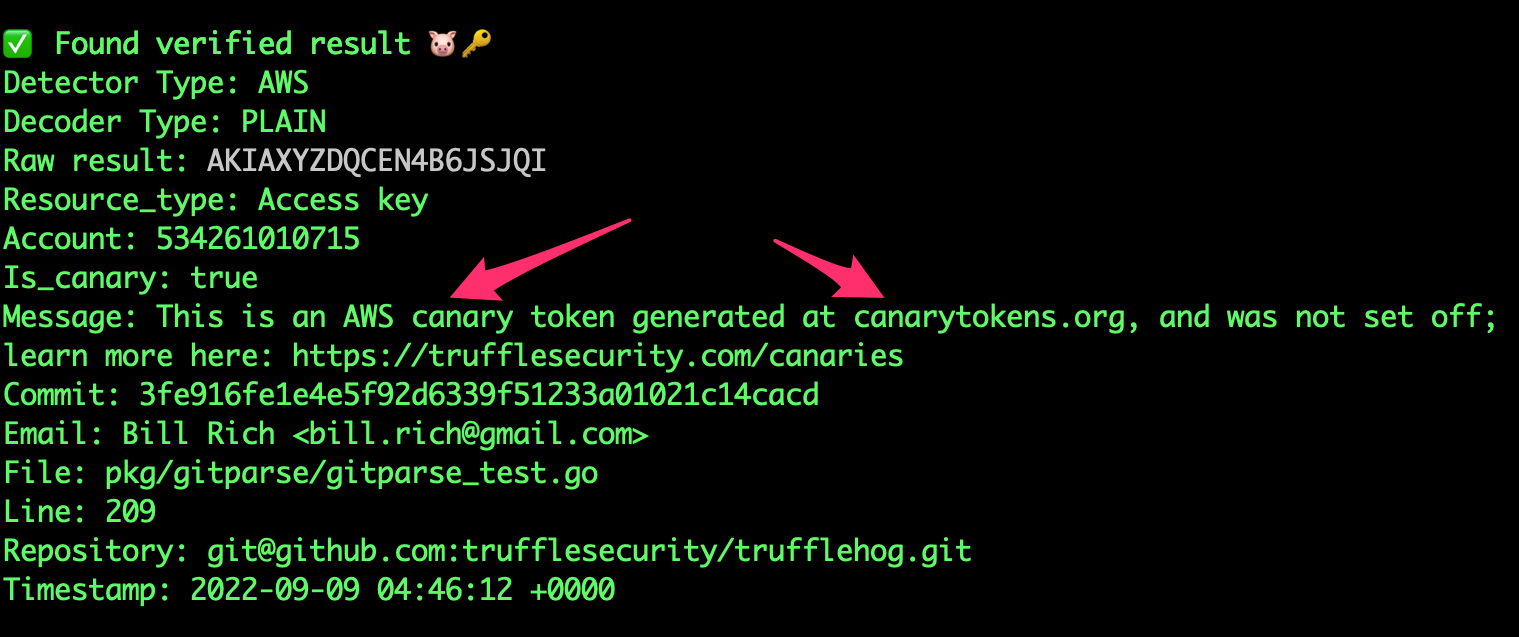
发现泄露的凭证。
您是否有兴趣持续监控 Git、Jira、Slack、Confluence、Microsoft Teams、Sharepoint(以及更多) 中的凭证?我们有一个企业产品可以提供帮助!了解更多信息请访问 https://trufflesecurity.com/trufflehog-enterprise。
我们将企业产品的收入用于资助更多优秀的开源项目,让整个社区都能受益。
TruffleHog 是最强大的秘密发现、分类、验证和分析工具。在这里,秘密指机器用于向另一台机器验证自身身份的凭证。这包括 API 密钥、数据库密码、私密加密密钥等等。
TruffleHog 可以在许多地方查找秘密,包括 Git、聊天、维基、日志、API 测试平台、对象存储、文件系统等。
TruffleHog 对 800 多种秘密类型进行分类,将它们映射回其所属的特定身份。它是 AWS 秘密?Stripe 秘密?Cloudflare 秘密?Postgres 密码?SSL 私钥?有时仅凭查看很难判断,所以 TruffleHog 会对找到的所有内容进行分类。
对于 TruffleHog 能分类的每个秘密,它还可以登录以确认该秘密是否有效。这一步对于判断是否存在当前的活跃危险至关重要。
对于最常见的 20 多种泄露凭证类型,TruffleHog 不是发送一个请求来检查秘密能否登录,而是可以发送多个请求,以了解关于该秘密的一切信息。谁创建了它?它可以访问哪些资源?它在这些资源上拥有哪些权限?
有问题?有反馈?欢迎加入 Slack 或 Discord 与我们交流。
加入我们的 Slack 社区
加入 秘密扫描 Discord
```bash
docker run --rm -it -v "$PWD:/pwd" trufflesecurity/trufflehog:latest github --org=trufflesecurity
# :floppy_disk: 安装
为您提供了几种安装方式:
### MacOS 用户```bash
brew install trufflehog
确保在执行以下命令之前 Docker 引擎正在运行:
docker run --rm -it -v "$PWD:/pwd" trufflesecurity/trufflehog:latest github --repo https://github.com/trufflesecurity/test_keys
#### Windows 命令提示符```bash
docker run --rm -it -v "%cd:/=\%:/pwd" trufflesecurity/trufflehog:latest github --repo https://github.com/trufflesecurity/test_keys
docker run --rm -it -v "${PWD}:/pwd" trufflesecurity/trufflehog github --repo https://github.com/trufflesecurity/test_keys
#### M1 和 M2 Mac```bash
docker run --platform linux/arm64 --rm -it -v "$PWD:/pwd" trufflesecurity/trufflehog:latest github --repo https://github.com/trufflesecurity/test_keys
Download and unpack from https://github.com/trufflesecurity/trufflehog/releases
### 从源代码编译```bash
git clone https://github.com/trufflesecurity/trufflehog.git
cd trufflehog; go install
curl -sSfL https://raw.githubusercontent.com/trufflesecurity/trufflehog/main/scripts/install.sh | sh -s -- -b /usr/local/bin
### 使用安装脚本,验证校验和签名(需要已安装 cosign)```bash
curl -sSfL https://raw.githubusercontent.com/trufflesecurity/trufflehog/main/scripts/install.sh | sh -s -- -v -b /usr/local/bin
curl -sSfL https://raw.githubusercontent.com/trufflesecurity/trufflehog/main/scripts/install.sh | sh -s -- -b /usr/local/bin
# :closed_lock_with_key: 验证构建产物
所有构建产物都应用了校验和,生成的校验和文件使用 cosign 进行签名。
你需要以下工具来验证签名:
- [Cosign](https://docs.sigstore.dev/cosign/system_config/installation/)
验证步骤如下:
1. 从 [releases](https://github.com/trufflesecurity/trufflehog/releases) 页面下载你需要的构建产物文件以及以下文件。
- trufflehog\_{version}\_checksums.txt
- trufflehog\_{version}\_checksums.txt.pem
- trufflehog\_{version}\_checksums.txt.sig
2. 验证签名: ```shell
cosign verify-blob <path to trufflehog_{version}_checksums.txt> \
--certificate <path to trufflehog_{version}_checksums.txt.pem> \
--signature <path to trufflehog_{version}_checksums.txt.sig> \
--certificate-identity-regexp 'https://github\.com/trufflesecurity/trufflehog/\.github/workflows/.+' \
--certificate-oidc-issuer "https://token.actions.githubusercontent.com"
将 {version} 替换为下载的文件版本
或者,如果您使用安装脚本,请传递 -v 选项以执行签名验证。这要求在运行安装脚本之前安装 Cosign 二进制文件。
命令:```bash trufflehog git https://github.com/trufflesecurity/test_keys --results=verified
预期输出:```
🐷🔑🐷 TruffleHog. Unearth your secrets. 🐷🔑🐷
Found verified result 🐷🔑
Detector Type: AWS
Decoder Type: PLAIN
Raw result: AKIAYVP4CIPPERUVIFXG
Line: 4
Commit: fbc14303ffbf8fb1c2c1914e8dda7d0121633aca
File: keys
Email: counter <[email protected]>
Repository: https://github.com/trufflesecurity/test_keys
Timestamp: 2022-06-16 10:17:40 -0700 PDT
...
trufflehog github --org=trufflesecurity --results=verified
## 3:扫描一个 GitHub 组织,排除已归档的仓库```bash
trufflehog github --org=trufflesecurity --exclude-archived
命令:```bash trufflehog git https://github.com/trufflesecurity/test_keys --results=verified --json
输入:
预期输出:```
{"SourceMetadata":{"Data":{"Git":{"commit":"fbc14303ffbf8fb1c2c1914e8dda7d0121633aca","file":"keys","email":"counter \[email protected]\u003e","repository":"https://github.com/trufflesecurity/test_keys","timestamp":"2022-06-16 10:17:40 -0700 PDT","line":4}}},"SourceID":0,"SourceType":16,"SourceName":"trufflehog - git","DetectorType":2,"DetectorName":"AWS","DecoderName":"PLAIN","Verified":true,"Raw":"AKIAYVP4CIPPERUVIFXG","Redacted":"AKIAYVP4CIPPERUVIFXG","ExtraData":{"account":"595918472158","arn":"arn:aws:iam::595918472158:user/canarytokens.com@@mirux23ppyky6hx3l6vclmhnj","user_id":"AIDAYVP4CIPPJ5M54LRCY"},"StructuredData":null}
...
trufflehog github --repo=https://github.com/trufflesecurity/test_keys --issue-comments --pr-comments
## 6: 扫描S3存储桶以获取高置信度结果 (已验证 + 未知)```bash
trufflehog s3 --bucket=<bucket name> --results=verified,unknown
trufflehog s3 --role-arn=
## 8: 在Docker中使用SSH认证扫描Github仓库```bash
docker run --rm -v "$HOME/.ssh:/root/.ssh:ro" trufflesecurity/trufflehog:latest git ssh://github.com/trufflesecurity/test_keys
trufflehog filesystem path/to/file1.txt path/to/file2.txt path/to/dir
## 10: 扫描本地 git 仓库
克隆 git 仓库。例如 [test keys](https://github.com/trufflesecurity/trufflehog/blob/HEAD/[email protected]:trufflesecurity/test_keys.git) 仓库。```bash
git clone [email protected]:trufflesecurity/test_keys.git
从父目录(git仓库外部)运行 trufflehog。```bash trufflehog git file://test_keys --results=verified,unknown
为防止本地扫描中的恶意 git 配置(参见 CVE-2025-41390),TruffleHog 会在扫描前将本地 git 仓库克隆到临时目录中。这遵循了 [Git 的安全最佳实践](https://git-scm.com/docs/git#_security)。如果你想指定一个自定义路径来克隆仓库(而非 tmp),可以使用 `--clone-path` 标志。如果希望跳过本地克隆过程并直接扫描仓库(仅适用于受信任的仓库),可以使用 `--trust-local-git-config` 标志。
## 11: 仅扫描 GCS 存储桶中的已验证秘密```bash
trufflehog gcs --project-id=<project-ID> --cloud-environment --results=verified
多次使用 --image 标志来扫描多个镜像。```bash
trufflehog docker --image trufflesecurity/secrets --results=verified
trufflehog docker --image docker://new_image:tag --results=verified
trufflehog docker --image file://path_to_image.tar --results=verified
## 13: 在 CI 中扫描
将 `--since-commit` 标志设置为您默认分支,即人们合并到的分支(例如:"main")。将 `--branch` 标志设置为您的 PR 的分支名称(例如:"feature-1")。根据您使用的 CI/CD 平台,此值可以动态获取(例如:[Circle CI 中的 CIRCLE_BRANCH](https://circleci.com/docs/variables/) 和 [Travis CI 中的 TRAVIS_PULL_REQUEST_BRANCH](https://docs.travis-ci.com/user/environment-variables/))。如果仓库已克隆且在 CI/CD 工作流期间目标分支已检出,那么 `--branch HEAD` 就足够了。`--fail` 标志在找到有效凭据时将返回 183 错误代码。```bash
trufflehog git file://. --since-commit main --branch feature-1 --results=verified,unknown --fail
多次使用 --workspace-id、--collection-id、--environment 标志来扫描多个目标。```bash
trufflehog postman --token= --workspace-id=
## 15: 扫描一个 Jenkins 服务器```bash
trufflehog jenkins --url https://jenkins.example.com --username admin --password admin
使用 TruffleHog 认证本地集群有两种方式:(1) 用户名和密码,(2) 服务令牌。
trufflehog elasticsearch --nodes 192.168.14.3 192.168.14.4 --username truffle --password hog
#### 使用服务令牌连接到本地集群```bash
trufflehog elasticsearch --nodes 192.168.14.3 192.168.14.4 --service-token ‘AAEWVaWM...Rva2VuaSDZ’
要扫描 Elastic Cloud 上的集群,你需要一个 Cloud ID 和 API 密钥。```bash
trufflehog elasticsearch
--cloud-id 'search-prod:dXMtY2Vx...YjM1ODNlOWFiZGRlNjI0NA=='
--api-key 'MlVtVjBZ...ZSYlduYnF1djh3NG5FQQ=='
## 17. 扫描 GitHub 仓库中的跨分支对象引用和已删除提交
以下命令将枚举 GitHub 仓库中已删除和隐藏的提交,然后扫描其中是否存在秘密信息。这是一个 alpha 版本功能。```bash
trufflehog github-experimental --repo https://github.com/<USER>/<REPO>.git --object-discovery
除了正常的 TruffleHog 输出之外,--object-discovery 标志会在新的 $HOME/.trufflehog 目录中创建两个文件:valid_hidden.txt 和 invalid.txt。这些文件用于在提交枚举期间跟踪状态,同时向用户提供所有隐藏和已删除提交的完整列表(valid_hidden.txt)。如果您希望在扫描后自动删除这些文件,请添加 --delete-cached-data 标志。
注意:使用此方法枚举仓库中的所有有效提交需要20分钟到几个小时不等,具体取决于仓库的大小。我们添加了一个进度条,让您随时了解枚举所需的时间。实际的秘密扫描运行得非常快。
有关跨 Fork 对象引用的更多信息,请阅读我们的博客文章。
trufflehog huggingface
--model <model_id>
--dataset <dataset_id>
--space <space_id>
--bucket <bucket_id>
### 扫描属于一个 Hugging Face 组织或用户的所有模型、数据集、Spaces 和 Buckets```bash
trufflehog huggingface --org <orgname> --user <username>
(可选) 当扫描一个组织或用户时,你可以使用 --skip-all-models、--skip-all-datasets、--skip-all-spaces、--skip-all-buckets 跳过整个类别的资源,或者使用 --ignore-models <model_id>、--ignore-datasets <dataset_id>、--ignore-spaces <space_id>、--ignore-buckets <bucket_id> 跳过特定资源。
trufflehog huggingface --model <model_id> --include-discussions --include-prs
## 19. 扫描 stdin 输入```bash
aws s3 cp s3://example/gzipped/data.gz - | gunzip -c | trufflehog stdin
🐷🔑🐷 TruffleHog. Unearth your secrets. 🐷🔑🐷,然后程序就退出了,怎么回事?
--token 标志并提供个人访问令牌trufflehog:ignore 注释来忽略该秘密。TruffleHog v3 是用 Go 完全重写的,带来了许多强大的新功能。
对于每个检测到的潜在凭证,我们都费尽心思地针对我们认为它所属的 API 实现了程序化验证。验证消除了误报,并提供了三种结果状态:
例如,AWS 凭证检测器 会向 AWS API 执行 GetCallerIdentity API 调用,以验证 AWS 凭证是否处于活动状态。
TruffleHog 针对你可能想要扫描的每种数据源都有一个子命令:
每个子命令都有自己的选项,你可以使用提供给该子命令的 --help 标志查看:```
$ trufflehog git --help
usage: TruffleHog [] [ ...]
TruffleHog is a tool for finding credentials.
Flags: -h, --[no-]help Show context-sensitive help (also try --help-long and --help-man). --log-level=0 Logging verbosity on a scale of 0 (info) to 5 (trace). Can be disabled with "-1". --[no-]profile Enables profiling and sets a pprof and fgprof server on :18066. -j, --[no-]json Output in JSON format. --[no-]json-legacy Use the pre-v3.0 JSON format. Only works with git, gitlab, and github sources. --[no-]github-actions Output in GitHub Actions format. --concurrency=12 Number of concurrent workers. --[no-]no-verification Don't verify the results. --results=RESULTS Specifies which type(s) of results to output: verified (confirmed valid by API), unknown (verification failed due to error), unverified (detected but not verified), filtered_unverified (unverified but would have been filtered out). Defaults to verified,unverified,unknown. --[no-]no-color Disable colorized output --[no-]allow-verification-overlap Allow verification of similar credentials across detectors --[no-]filter-unverified Only output first unverified result per chunk per detector if there are more than one results. --filter-entropy=FILTER-ENTROPY Filter unverified results with Shannon entropy. Start with 3.0. --config=CONFIG Path to configuration file. --[no-]print-avg-detector-time Print the average time spent on each detector. --[no-]no-update Don't check for updates. --[no-]fail Exit with code 183 if results are found. --[no-]fail-on-scan-errors Exit with non-zero error code if an error occurs during the scan. --verifier=VERIFIER ... Set custom verification endpoints. --[no-]custom-verifiers-only Only use custom verification endpoints. --detector-timeout=DETECTOR-TIMEOUT Maximum time to spend scanning chunks per detector (e.g., 30s). --archive-max-size=ARCHIVE-MAX-SIZE Maximum size of archive to scan. (Byte units eg. 512B, 2KB, 4MB) --archive-max-depth=ARCHIVE-MAX-DEPTH Maximum depth of archive to scan. --archive-timeout=ARCHIVE-TIMEOUT Maximum time to spend extracting an archive. --include-detectors="all" Comma separated list of detector types to include. Protobuf name or IDs may be used, as well as ranges. --exclude-detectors=EXCLUDE-DETECTORS Comma separated list of detector types to exclude. Protobuf name or IDs may be used, as well as ranges. IDs defined here take precedence over the include list. --[no-]no-verification-cache Disable verification caching --[no-]force-skip-binaries Force skipping binaries. --[no-]force-skip-archives Force skipping archives. --[no-]skip-additional-refs Skip additional references. --user-agent-suffix=USER-AGENT-SUFFIX Suffix to add to User-Agent. --[no-]version Show application version.
Commands: help [...] Show help.
git []
Find credentials in git repositories.
github [] Find credentials in GitHub repositories.
github-experimental --repo=REPO [] Run an experimental GitHub scan. Must specify at least one experimental sub-module to run: object-discovery.
gitlab --token=TOKEN [] Find credentials in GitLab repositories.
filesystem [] [...] Find credentials in a filesystem.
s3 [] Find credentials in S3 buckets.
gcs [] Find credentials in GCS buckets.
syslog --format=FORMAT [] Scan syslog
circleci --token=TOKEN Scan CircleCI
docker [] Scan Docker Image
travisci --token=TOKEN Scan TravisCI
postman [] Scan Postman
elasticsearch [] Scan Elasticsearch
jenkins --url=URL [] Scan Jenkins
huggingface [] Find credentials in HuggingFace datasets, models and spaces.
stdin Find credentials from stdin.
multi-scan Find credentials in multiple sources defined in configuration.
json-enumerator [...] Find credentials from a JSON enumerator input.
analyze Analyze API keys for fine-grained permissions information.
例如,要扫描一个 `git` 仓库,从以下开始```
trufflehog git https://github.com/trufflesecurity/trufflehog.git
TruffleHog 支持通过 --config 标志提供的配置文件中定义自定义正则检测器和多个数据源。正则检测器可用于任何子命令,而配置中定义的数据源仅用于 multi-scan 子命令。
数据源的配置格式可在 Truffle Security 的数据源配置文档页面找到。
示例 GitHub 数据源配置和选项参考:```yaml sources:
您可以在 `sources` 键下定义多个连接(见上文),TruffleHog 将并发扫描所有来源。
## S3
S3 源支持在扫描时假定 IAM 角色,而不仅仅是 IAM 用户。这使得用户能够更轻松地扫描多个 AWS 账户,而无需依赖每个账户的硬编码凭证。
TruffleHog 最初使用的 IAM 身份需要在每个要假定的 IAM 角色的[信任策略](https://aws.amazon.com/blogs/security/how-to-use-trust-policies-with-iam-roles/)中作为主体具有 `AssumeRole` 权限。
要使用本地设置的凭证或(如果在 EC2 实例上)实例元数据扫描特定存储桶:```bash
trufflehog s3 --bucket=<bucket-name>
要使用假定角色扫描特定存储桶:```bash trufflehog s3 --bucket= --role-arn=
多个角色可以作为单独的参数传递。以下命令将尝试扫描每个角色在 S3 API 中有权限列出的每个存储桶:```bash
trufflehog s3 --role-arn=<iam-role-arn-1> --role-arn=<iam-role-arn-2>
退出码:
--fail 标志时返回。on: push: branches: - main pull_request:
jobs: test: runs-on: ubuntu-latest steps: - name: Checkout code uses: actions/checkout@v4 with: fetch-depth: 0 - name: Secret Scanning uses: trufflesecurity/trufflehog@main with: extra_args: --results=verified,unknown
在上面的示例配置中,我们正在扫描所有PR和推送到`main`的实时密钥。只会扫描所引用提交中的代码更改。如果你想扫描整个分支,请参阅下面的“高级用法”部分。
### 浅克隆
如果你将TruffleHog集成到独立的工作流中,并且没有与TruffleHog一起运行任何其他CI/CD工具,那么我们建议使用[浅克隆](https://git-scm.com/docs/git-clone#Documentation/git-clone.txt---depthltdepthgt)来加速你的工作流。以下是一个如何做到这一点的示例:```
...
- shell: bash
run: |
if [ "${{ github.event_name }}" == "push" ]; then
echo "depth=$(($(jq length <<< '${{ toJson(github.event.commits) }}') + 2))" >> $GITHUB_ENV
echo "branch=${{ github.ref_name }}" >> $GITHUB_ENV
fi
if [ "${{ github.event_name }}" == "pull_request" ]; then
echo "depth=$((${{ github.event.pull_request.commits }}+2))" >> $GITHUB_ENV
echo "branch=${{ github.event.pull_request.head.ref }}" >> $GITHUB_ENV
fi
- uses: actions/checkout@v3
with:
ref: ${{env.branch}}
fetch-depth: ${{env.depth}}
- uses: trufflesecurity/trufflehog@main
with:
extra_args: --results=verified,unknown
...
根据事件类型(push 或 PR),我们计算当前存在的提交数量。然后加上 2,以便在代码更改之前引用一个基准提交。我们将该整数值传给 checkout action 中的 fetch-depth 标志,同时指定相关分支。现在我们的 checkout 过程应该会快得多。
TruffleHog 静态检测 https://canarytokens.org/。

如果你想要指定特定的 `base` 和 `head` 引用,可以使用 `base` 参数(TruffleHog CLI 中的 `--since-commit` 标志)和 `head` 参数(TruffleHog CLI 中的 `--branch` 标志)。我们仅建议在非常特定的用例中使用这些参数,当默认行为不起作用时。
#### 高级用法:扫描整个分支```
- name: scan-push
uses: trufflesecurity/trufflehog@main
with:
base: ""
head: ${{ github.ref_name }}
extra_args: --results=verified,unknown
stages:
security-secrets: stage: security allow_failure: false image: alpine:latest variables: SCAN_PATH: "." # Set the relative path in the repo to scan before_script: - apk add --no-cache git curl jq - curl -sSfL https://raw.githubusercontent.com/trufflesecurity/trufflehog/main/scripts/install.sh | sh -s -- -b /usr/local/bin script: - trufflehog filesystem "$SCAN_PATH" --results=verified,unknown --fail --json | jq rules: - if: '$CI_PIPELINE_SOURCE == "merge_request_event"'
在上面的示例流水线中,我们正在扫描所有仓库目录和文件中的活跃机密。该作业仅在流水线来源为合并请求事件时运行,即当创建新的合并请求时触发。
## 预提交钩子
TruffleHog可在预提交钩子中使用,以防止凭据在离开您的计算机之前泄露。
更多信息请参阅[预提交钩子文档](https://github.com/trufflesecurity/trufflehog/blob/HEAD/PreCommit.md)。
## 自定义正则表达式检测器(alpha)
TruffleHog支持检测和验证自定义正则表达式。
对于检测,至少需要一个**正则表达式**和**关键词**。
**关键词**是一个固定的字面字符串标识符,出现在要检测的正则表达式内部或附近。为了给验证提供最大的灵活性,使用包含正则表达式匹配结果的webhook。
TruffleHog将发送一个包含正则表达式匹配结果的JSON POST请求到配置的webhook端点。如果端点响应`200 OK`状态码,则该机密被视为已验证。如果由于网络/API错误导致验证失败,结果将被标记为未知。
自定义检测器支持几种不同的过滤机制:熵、针对整个匹配的正则表达式、针对捕获的机密的正则表达式,以及对照机密检查的排除词列表(如果存在捕获组,则检查捕获组;如果不存在捕获组,则检查整个匹配)。请注意,如果您的自定义检测器设置了多个`regex`(在本示例中为`hogID`和`hogToken`),则过滤器将应用于每个正则表达式。[这里](https://github.com/trufflesecurity/trufflehog/blob/HEAD/examples/generic_with_filters.yml)是一个使用这些过滤器的自定义检测器示例。
**注意:** 此功能为alpha版本,可能发生变化。
### 正则表达式检测器示例
[这里](https://github.com/trufflesecurity/trufflehog/blob/HEAD/pkg/custom_detectors/CUSTOM_DETECTORS.md)介绍了如何设置带验证服务器的自定义正则表达式检测器。
## 通用JWT检测
TruffleHog支持对其找到的通用JWT子集进行检测和验证。
具体来说,如果JWT使用公钥加密而非HMAC,且可以获取公钥,则TruffleHog可以确定该JWT是否有效。
## :mag: 分析
TruffleHog支持对凭据进行更深入的分析,以查看其权限和可访问的资源。```bash
trufflehog analyze
本项目感谢所有贡献者。[参与贡献]。
非常欢迎贡献!请先查看我们的贡献指南。
我们不再接受对 TruffleHog v2 的贡献,但该代码可在 v2 分支中获取。
我们发布了一些关于如何开始添加新秘密检测器的文档和工具。让我们一起改进检测功能!
目前,trufflehog 正处于大量开发阶段,无法保证公共 API 的稳定性。
自 v3.0 起,TruffleHog 根据 AGPL 3 许可证发布,包含在 LICENSE 中。TruffleHog v3.0 不使用之前的任何代码库,但已注意在命令行界面上保持向后兼容性。此版本之前的工作仍以 GPL 2.0 许可证提供,可在本仓库的历史记录以及之前的包发布和标签中找到。需要完成 CLA 才能接受我们未来的贡献。