



功能特性 • 安装 • 用法 • 库 • 加入 Discord
mapCIDR 旨在简化大规模扫描操作的负载分配;它既可作为库使用,也可作为独立的 CLI 工具使用。
sbh、sbc)a、aa)match-ip)filter-ip)s、sr)count)ip-format)si、sp)t4、t6)go install -v github.com/projectdiscovery/mapcidr/cmd/mapcidr@latest
mapcidr -h
这将显示该工具的帮助信息。以下是它支持的所有开关。
INPUT:
   -cl, -cidr string[]  CIDR/IP/File containing list of CIDR/IP to process

PROCESS:
   -sbc int                  Slice CIDRs by given CIDR count
   -sbh int                  Slice CIDRs by given HOST count
   -a, -aggregate            Aggregate IPs/CIDRs into minimum subnet
   -aa, -aggregate-approx    Aggregate sparse IPs/CIDRs into minimum approximated subnet
   -c, -count                Count number of IPs in given CIDR
   -t4, -to-ipv4             Convert IPs to IPv4 format
   -t6, -to-ipv6             Convert IPs to IPv6 format
   -ip-format, -if string[]  IP formats (0,1,2,3,4,5,6,7,8,9,10,11)
   -zpn, -zero-pad-n int     number of padded zero to use (default 3)
   -zpp, -zero-pad-permute   enable permutations from 0 to zero-pad-n for each octets

FILTER:
   -f4, -filter-ipv4         Filter IPv4 IPs from input
   -f6, -filter-ipv6         Filter IPv6 IPs from input
   -skip-base                Skip base IPs (ending in .0) in output
   -skip-broadcast           Skip broadcast IPs (ending in .255) in output
   -mi, -match-ip string[]   IP/CIDR/FILE containing list of IP/CIDR to match (comma-separated, file input)
   -fi, -filter-ip string[]  IP/CIDR/FILE containing list of IP/CIDR to filter (comma-separated, file input)

MISCELLANEOUS:
   -s, -sort                  Sort input IPs/CIDRs in ascending order
   -sr, -sort-reverse         Sort input IPs/CIDRs in descending order
   -si, -shuffle-ip           Shuffle Input IPs in random order
   -sp, -shuffle-port string  Shuffle Input IP:Port in random order

UPDATE:
   -up, -update                 update mapcidr to latest version
   -duc, -disable-update-check  disable automatic mapcidr update check

OUTPUT:
   -verbose            Verbose mode
   -o, -output string  File to write output to
   -silent             Silent mode
   -version            Show version of the project
要获取给定 CIDR 的 IP 列表,请使用以下命令:
mapcidr -cidr 173.0.84.0/24
                   ____________  ___
  __ _  ___ ____  / ___/  _/ _ \/ _ \
 /  ' \/ _ '/ _ \/ /___/ // // / , _/
/_/_/_/\_,_/ .__/\___/___/____/_/|_| v0.5
          /_/

		projectdiscovery.io

[WRN] Use with caution. You are responsible for your actions
[WRN] Developers assume no liability and are not responsible for any misuse or damage.

173.0.84.0
173.0.84.1
173.0.84.2
173.0.84.3
173.0.84.4
173.0.84.5
173.0.84.13
173.0.84.14
173.0.84.15
173.0.84.16
也可以使用以下命令获取给定 IP 范围内的 IP 列表:
$ echo "192.168.0.0-192.168.0.5" | mapcidr
192.168.0.0
192.168.0.1
192.168.0.2
192.168.0.3
192.168.0.4
192.168.0.5
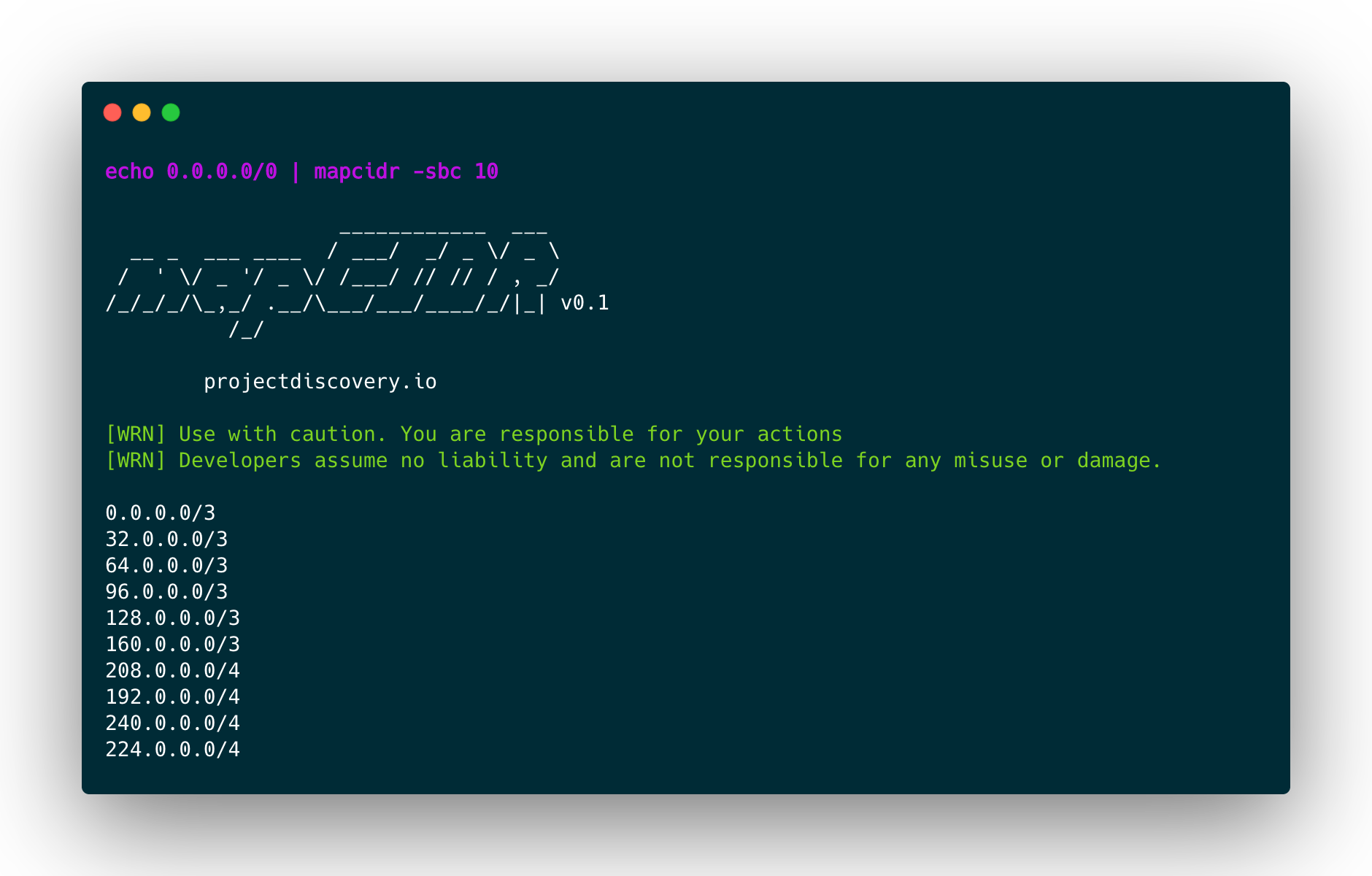
要按 CIDR 数量切分给定的 CIDR 或 CIDR 列表,或将其切分为多个等大的较小子网,请使用以下命令:
mapcidr -cidr 173.0.84.0/24 -sbc 10 -silent
173.0.84.0/27
173.0.84.32/27
173.0.84.64/27
173.0.84.96/27
173.0.84.128/27
173.0.84.160/27
173.0.84.208/28
173.0.84.192/28
173.0.84.240/28
173.0.84.224/28
要按每个 CIDR 中主机数量相等的方式对给定 CIDR 进行切片,请使用以下命令:
mapcidr -cidr 173.0.84.0/16 -sbh 20000 -silent
173.0.0.0/18
173.0.64.0/18
173.0.128.0/18
173.0.192.0/18
注意:只有在所需的切片数量或每个子网的主机数量为 2 的幂时,才能获得完美的拆分。否则,工具将尝试自动寻找最佳的拆分策略以获得所需结果。
要将多个 CIDR 范围合并为更小的子网块,请使用以下命令:
$ mapcidr -cl cidrs.txt -aggregate
要列出给定 IP 列表的 CIDR 块,请使用以下命令:
$ mapcidr -il ips.txt -aggregate
也可以对稀疏 IP 组执行近似聚合(仅限版本 4)。最终区间将包含不属于输入的连续 IP:
$ cat ips.txt

1.1.1.1
1.1.1.16
1.1.1.31
$ cat ips.txt | mapcidr -aggregate-approx

1.1.1.0/27
要列出给定 IP 范围(IPv4 | IPv6)的 CIDR 块,请使用以下命令:
 $ mapcidr  -cl 192.168.0.1-192.168.0.255 -aggregate
 OR
 $ echo 192.168.0.1-192.168.0.255 | mapcidr -aggregate
192.168.0.1/32
192.168.0.2/31
192.168.0.4/30
192.168.0.8/29
192.168.0.16/28
192.168.0.32/27
192.168.0.64/26
192.168.0.128/25
要从给定的 CIDR 范围列表中匹配 IP,请使用以下命令:
$ mapcidr -cidr 192.168.1.0/24 -mi 192.168.1.253,192.168.1.252
$ mapcidr -cidr 192.168.1.0/24 -mi ip_list_to_match.txt
要过滤给定 CIDR 范围列表中的 IP,请使用以下命令:
$ mapcidr -cidr 192.168.1.224/28 -fi 192.168.1.233,192.168.1.234
$ mapcidr -cidr 192.168.1.224/28 -fi ip_list_to_filter.txt
要将给定的 IP 表示为多种格式,可以使用 -if 0 标志来显示所有支持的格式值,也可以使用此处列出的特定索引号来显示特定类型的格式。目前,支持 10 种独特格式。
$ echo 127.0.1.0 | mapcidr -if 0 -silent

127.0.1.0
127.0.1.0
0177.0.01.0
0x7f.0x0.0x1.0x0
0x7f000100
0xabfa659dfa7f000100
281472812450048
111111111111111101111111000000000000000100000000
0x7f.0.01.0x0
::ffff:7f00:0100
%31%32%37%2E%30%2E%31%2E%30
127.000.001.000
IPv4 | IPv6 地址可以通过 -t4 和 -t6 分别转换为 IPv4 和 IPv6,从 v6 到 v4 表示法或 IPv4 映射表示法转换为 IPv4 地址。
$ cat ips.txt

1.1.1.1
2.2.2.2
$ mapcidr -cl ips.txt -t6

00:00:00:00:00:ffff:0101:0101
00:00:00:00:00:ffff:0202:0202
注意:并非所有 IPv6 地址都能转换为 IPv4。你只能转换有效的、可表示为 IPv4 的 IPv6 地址。 |
要统计给定 CIDR 或 CIDR 列表中的主机数量,请使用以下命令:
$ echo 173.0.84.0/16 | mapcidr -count -silent

65536
要获取 ASN 编号对应的 IP 地址,请使用以下命令:
echo AS15133 | mapcidr -silent

5.104.64.0
5.104.64.1
5.104.64.2
5.104.64.3
5.104.64.4
可以直接在 Go 程序中使用该库。以下代码片段展示了如何将 CIDR 划分为子网,以及如何将其划分为包含特定数量主机的子网:
package main

import (
	"fmt"

	"github.com/projectdiscovery/mapcidr"
)

func main() {
	// Divide the CIDR into two subnets
	subnets1 := mapcidr.SplitN("192.168.1.0/24", 2)
	for _, subnet := range subnets1 {
		fmt.Println(subnet)
	}
	// Divide the CIDR into two subnets containing 128 hosts each
	subnets2 := mapcidr.SplitByNumber("192.168.1.0/24", 128)
	for _, subnet := range subnets2 {
		fmt.Println(subnet)
	}

	// List all IPs in the CIDR
	ips, _ := mapcidr.IPAddresses("192.168.1.0/24")
	for _, ip := range ips {
		fmt.Println(ip)
	}
}
mapCIDR 由 projectdiscovery 团队用 🖤 打造。