priyanshu-rawa/cybersecurity-handbook
开源网络安全知识库,包含 400+ 篇笔记、实验和速查表,涵盖攻击、防御、密码学、云和取证。

<div align="center">
<img src="https://capsule-render.vercel.app/api?type=waving&color=0:0F2027,50:2C5364,100:4D6BFE&height=200%C2%A7ion=header&text=Cybersecurity%20Handbook&fontSize=48&fontColor=ffffff&fontAlignY=38&desc=Learn.%20Defend.%20Master%20the%20Craft.&descAlignY=58&descSize=18&animation=fadeIn" width="100%"/>
<a href="https://cybersecurity-handbook-lake.vercel.app">
<img src="https://readme-typing-svg.demolab.com/?lines=Open-source+Cybersecurity+Knowledge+Base;400++Notes+%C2%B7+Labs+%C2%B7+Interactive+Graph;Built+by+the+Community,+for+the+Community;From+First+Principles+to+Advanced+Concepts&font=Fira+Code%C2%A2er=true&width=650&height=45&color=4D6BFE&vCenter=true&size=22&pause=1800" alt="Typing SVG" />
</a>
</div>
<h1 align="center">📚 网络安全手册</h1>
<p align="center">
一个面向学生、专业人士和自学者的开源网络安全知识库——以结构化笔记、动手实验和真实世界概念的形式构建,支持搜索与可视化导航。
</p>
<p align="center">
使用 <b>Quartz</b> 构建 • 由 <b>Markdown</b> 驱动 • 社区驱动 • MIT 许可
</p>
<p align="center">
<a href="https://cybersecurity-handbook-lake.vercel.app">
<img src="https://img.shields.io/badge/%F0%9F%8C%90_Live_Website-Visit_Now-4D6BFE?style=for-the-badge&labelColor=0D1117" alt="Live Website">
</a>
<a href="#quick-start">
<img src="https://img.shields.io/badge/%F0%9F%9A%80_Getting_Started-Guide-2EA44F?style=for-the-badge&labelColor=0D1117" alt="Getting Started">
</a>
<a href="#contributing">
<img src="https://img.shields.io/badge/%F0%9F%A4%9D_Contributions-Welcome-FF8C00?style=for-the-badge&labelColor=0D1117" alt="Contributions">
</a>
</p>
<p align="center">
<img src="https://img.shields.io/github/stars/priyanshu-rawa/Cybersecurity-Handbook?style=for-the-badge&logo=github&color=F5C518&labelColor=0D1117" alt="Stars">
<img src="https://img.shields.io/github/forks/priyanshu-rawa/Cybersecurity-Handbook?style=for-the-badge&logo=github&color=4D6BFE&labelColor=0D1117" alt="Forks">
<img src="https://img.shields.io/github/contributors/priyanshu-rawa/Cybersecurity-Handbook?style=for-the-badge&color=2EA44F&labelColor=0D1117" alt="Contributors">
</p>
<p align="center">
<img src="https://img.shields.io/github/issues/priyanshu-rawa/Cybersecurity-Handbook?style=flat-square&logo=github&color=red&labelColor=0D1117" alt="Issues">
<img src="https://img.shields.io/github/last-commit/priyanshu-rawa/Cybersecurity-Handbook?style=flat-square&logo=git&color=orange&labelColor=0D1117" alt="Last Commit">
<img src="https://img.shields.io/github/license/priyanshu-rawa/Cybersecurity-Handbook?style=flat-square&color=blueviolet&labelColor=0D1117" alt="License">
<img src="https://img.shields.io/badge/Built_With-Quartz-7C3AED?style=flat-square&labelColor=0D1117" alt="Quartz">
<img src="https://img.shields.io/badge/Docs-Markdown-000000?style=flat-square&logo=markdown&labelColor=0D1117" alt="Markdown">
<img src="https://img.shields.io/badge/PRs-Welcome-brightgreen?style=flat-square&logo=git&labelColor=0D1117" alt="PRs Welcome">
<img src="https://visitor-badge.laobi.icu/badge?page_id=priyanshu-rawa.Cybersecurity-Handbook&style=flat-square&color=4D6BFE" alt="Visitors">
</p>
<p align="center">
<img src="https://img.shields.io/badge/Linux-FCC624?style=flat-square&logo=linux&logoColor=black" alt="Linux">
<img src="https://img.shields.io/badge/Windows-0078D6?style=flat-square&logo=windows&logoColor=white" alt="Windows">
<img src="https://img.shields.io/badge/Docker-2496ED?style=flat-square&logo=docker&logoColor=white" alt="Docker">
<img src="https://img.shields.io/badge/Kubernetes-326CE5?style=flat-square&logo=kubernetes&logoColor=white" alt="Kubernetes">
<img src="https://img.shields.io/badge/Python-3776AB?style=flat-square&logo=python&logoColor=white" alt="Python">
<img src="https://img.shields.io/badge/Node.js-339933?style=flat-square&logo=node.js&logoColor=white" alt="Node.js">
<img src="https://img.shields.io/badge/Vercel-000000?style=flat-square&logo=vercel&logoColor=white" alt="Vercel">
</p>
<img src="https://capsule-render.vercel.app/api?type=rect&color=0:4D6BFE,100:7C3AED&height=3&width=1000" width="100%"/>
<blockquote align="center">
<b>以清晰的方式学习网络安全——从基础到进阶概念,尽在一本可搜索的开源手册中。</b>
</blockquote>
<div align="center">
<table>
<tr>
<th>📝 笔记</th>
<th>🧪 实验</th>
<th>🔍 搜索</th>
<th>⚡ 性能</th>
<th>👥 社区</th>
</tr>
<tr>
<td align="center">400+ 且持续增长</td>
<td align="center">动手实践学习</td>
<td align="center">即时全文搜索</td>
<td align="center">由 Quartz 驱动</td>
<td align="center">开源</td>
</tr>
</table>
</div>
<img src="https://capsule-render.vercel.app/api?type=rect&color=0:4D6BFE,100:7C3AED&height=3&width=1000" width="100%"/>
<details>
<summary><b>📑 目录</b></summary>
<br>
- [预览](#preview)
- [我为什么构建这个项目](#why-i-built-this)
- [你将获得什么](#what-you-get)
- [快速开始](#quick-start)
- [涵盖内容](#whats-covered)
- [贡献](#contributing)
- [支持这个项目](#support-this-project)
- [许可证](#license)
</details>
---
## 预览
<p align="center">
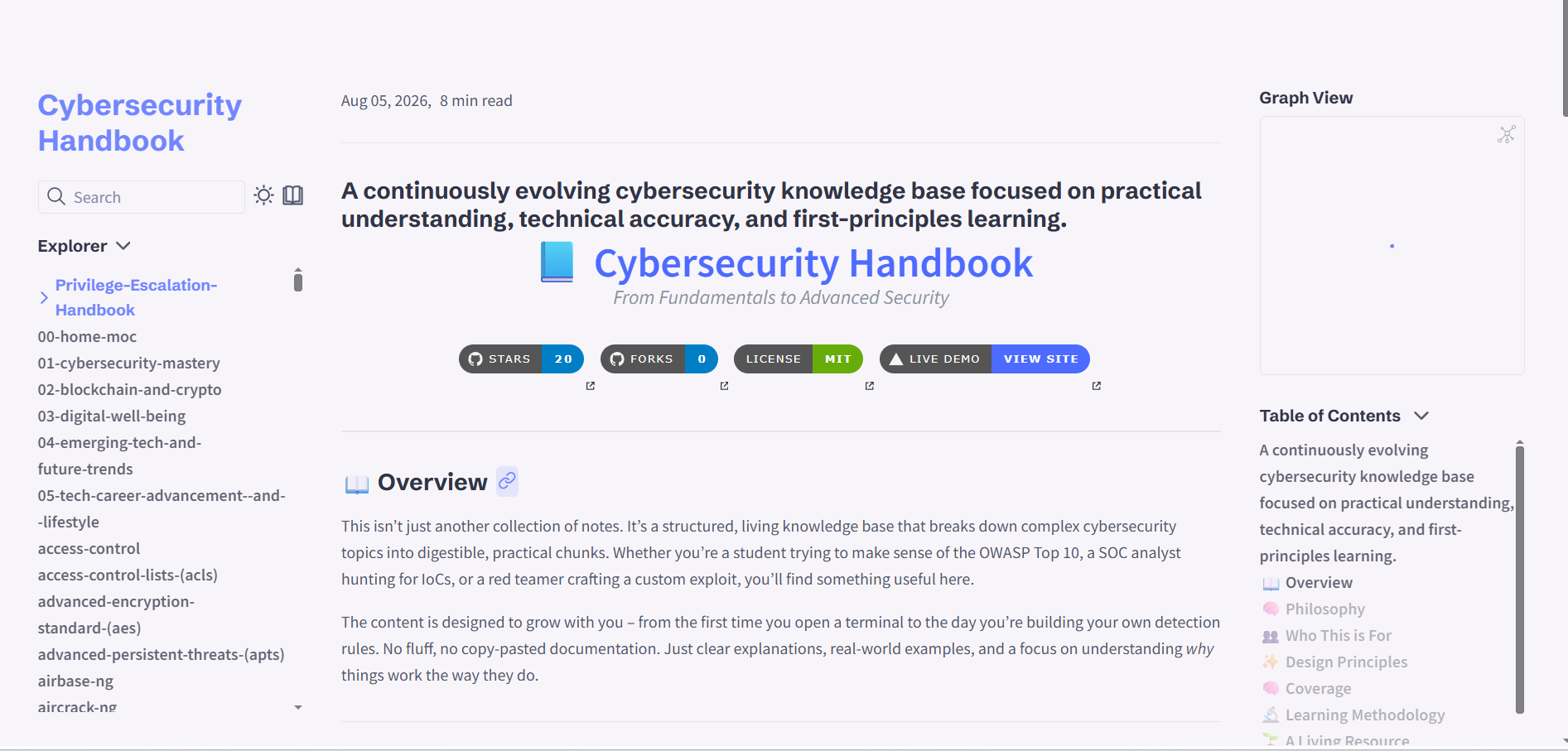
<img src="https://assets.kitploit.com/production/public/readmes/49884/97f1107561b7ada1ec096bafa59b13ded790e711ab7652874841ba86848c59c5.png" alt="首页" width="48%">
<img src="https://assets.kitploit.com/production/public/readmes/49884/83c04c2a4fff672d1ce57498459d4f2a3528aa5830116aa4c18c8f82847ba5b4.png" alt="交互式图谱" width="48%">
</p>
<p align="center"><sub>首页 · 交互式知识图谱——每条笔记都链接到相关概念</sub></p>
<p align="center">
<img src="https://assets.kitploit.com/production/public/readmes/49884/b5c7fbc8fbc5b6b052743554c93e7999a2fa3bef29c8493dcad968d157197fc3.png" alt="阅读模式" width="48%">
<img src="https://assets.kitploit.com/production/public/readmes/49884/92659e0599ff8c44cc45f95063ee04177e803df0a7ef84c8af2f5d88c4ab51b4.png" alt="深色模式" width="48%">
</p>
<p align="center"><sub>阅读模式 · 深色模式(Catppuccin Mocha)</sub></p>
<p align="center">
<img src="https://raw.githubusercontent.com/priyanshu-rawa/cybersecurity-handbook/main/assets/images/Phone-view-v2.jpeg" alt="移动端视图" width="280">
</p>
<p align="center"><sub>在移动端完全响应式</sub></p>
<img src="https://capsule-render.vercel.app/api?type=rect&color=0:7C3AED,100:4D6BFE&height=3&width=1000" width="100%"/>
## 我为什么构建这个项目
我花了很多个夜晚做着你此刻可能正在做的事——逛论坛、看教程,试图拼凑出安全领域真正重要的东西。
我找到的大部分内容都落入三类之一:太浅(一堆工具列表,却不解释它们为什么有效)、太零散(好内容分散在十几个博客和付费课程里),或者定价仿佛只有 500 美元的课程才是唯一的入门途径。
于是我开始写自己的笔记——那种解释*事物如何运作*的笔记,而不只是告诉你该粘贴哪些命令。随着时间推移,这些笔记逐渐成长为这本手册。
我并非掌握所有答案,但我确实认为,只要解释得足够清晰,这些东西是可以学会的。如果这能帮你省下一个深夜的“兔子洞”,那它就完成了它的使命。
<div align="right"><a href="#cybersecurity-handbook">⬆ 返回顶部</a></div>
## 你将获得什么
- 🔍 跨 400+ 条笔记的**即时搜索**
- 🕸️ **交互式图谱**——查看主题之间如何关联
- 🌗 **浅色与深色模式**,包括 Catppuccin Mocha
- 📱 **适用于任何设备**——手机、平板或笔记本电脑
- 🎯 **第一性原理式讲解**,而不只是命令列表
- 🚫 无广告、无付费墙、无需登录
<img src="https://capsule-render.vercel.app/api?type=rect&color=0:4D6BFE,100:7C3AED&height=3&width=1000" width="100%"/>
## 快速开始
在 2 分钟内于本地运行。
**前置条件:** Node.js v18+ 以及 npm 或 yarn。
<details>
<summary><b>🐧 Linux / macOS</b></summary>
```bash
git clone https://github.com/priyanshu-rawa/Cybersecurity-Handbook.git
cd Cybersecurity-Handbook
npm install
npm run quartz:dev
```
</details>
<details>
<summary><b>🪟 Windows (PowerShell)</b></summary>
```powershell
git clone https://github.com/priyanshu-rawa/Cybersecurity-Handbook.git
cd Cybersecurity-Handbook
npm install
npm run quartz:dev
```
</details>
**生产环境构建:**
```bash
npm run quartz:build # build the static site
npm run quartz:serve # preview the build locally
```
## 涵盖内容
| 领域 | 主题 |
|---|---|
| 🖥️ 操作系统与网络 | Linux、Windows、TCP/IP、DNS、VPN、防火墙 |
| ⚔️ 攻击性安全 | OWASP Top 10、SQL 注入、XSS、扫描、利用、后渗透 |
| 🛡️ 防御性安全 | SOC、事件响应、SIEM、日志分析、威胁狩猎、数字取证 |
| ☁️ 云与基础设施 | AWS、Azure、GCP、零信任、Docker、Kubernetes、DevSecOps、IAM |
| 💻 编程与自动化 | Python、Bash、PowerShell、脚本、CI/CD、Git |
| 🔐 密码学 | 对称/非对称加密、AES、RSA、哈希(SHA-256、MD5)、PKI、TLS、证书 |
如果你从零开始,这里有一条粗略的学习路径:
```mermaid
graph LR
A[Fundamentals & Networking] --> B[Offensive Security]
A --> C[Defensive Security]
B --> D[Cloud & Infrastructure]
C --> D
D --> E[Automation & Scripting]
E --> F[Cryptography]
```
<img src="https://capsule-render.vercel.app/api?type=rect&color=0:7C3AED,100:4D6BFE&height=3&width=1000" width="100%"/>
## 贡献
欢迎各种规模的贡献,从修正一个拼写错误到添加一个全新的主题。第一次为开源做贡献?很乐意带你入门,只需开一个 issue。
**参与方式:**
- 📝 内容 — 新主题、更正、更清晰的解释
- 🎨 设计 — 图表、布局、视觉优化
- 💻 代码 — 错误修复、Quartz 配置、新功能
- 📚 文档 — 格式、交叉引用、清晰度
- 👥 社区 — 报告问题、回答问题
**步骤:**
| 步骤 | 操作 |
|:---:|---|
| 1 | Fork 仓库(右上角按钮) |
| 2 | 克隆你的 fork:`git clone https://github.com/your-username/Cybersecurity-Handbook.git` |
| 3 | 创建分支:`git checkout -b feature/your-feature-name` |
| 4 | 进行修改 |
| 5 | 暂存修改:`git add .` |
| 6 | 提交:`git commit -m "Add: new section on ransomware defense"` |
| 7 | 推送:`git push origin feature/your-feature-name` |
| 8 | 针对 `main` 发起 Pull Request |
**内容放置位置:**
| 类型 | 位置 |
|---|---|
| 📝 笔记 | `content/`(对应的分类文件夹) |
| 🧪 实验 | `content/`(对应的实验文件夹) |
| 🖼️ 图片 | `assets/images/` |
| 📊 图表 | `assets/diagrams/` |
<div align="right"><a href="#cybersecurity-handbook">⬆ 返回顶部</a></div>
## 支持本项目
本手册免费,且将永远免费。如果它帮助到了你,以下这些做法才真正有意义:
| | |
|---|---|
| ⭐ 给仓库加星 | 帮助其他人发现它 |
| 📢 分享它 | LinkedIn、X、Reddit、Discord — 无论你的社交网络在哪里 |
| 🖊️ 贡献 | 修正拼写错误、添加主题、完善解释 |
| 💬 提供反馈 | 开一个 issue 或讨论 |
| 🐛 报告 bug | 告诉我哪里坏了或不清楚 |
想分享它?欢迎复制这段文字:
> *"发现这本免费的网络安全手册,包含 400+ 篇笔记,使用 Obsidian + Quartz 构建:https://github.com/priyanshu-rawa/Cybersecurity-Handbook"*
如果这本手册对你有所帮助,一句简短的留言将令我由衷感激:`[email protected]`
<div align="center">
**Star 历史**
<a href="https://star-history.com/#priyanshu-rawa/Cybersecurity-Handbook&Date">
<img src="https://api.star-history.com/svg?repos=priyanshu-rawa/Cybersecurity-Handbook&type=Date" alt="Star History Chart" width="600">
</a>
</div>
<img src="https://capsule-render.vercel.app/api?type=rect&color=0:4D6BFE,100:7C3AED&height=3&width=1000" width="100%"/>
## 许可证
MIT 许可证 — 详情请参阅 [LICENSE](https://github.com/priyanshu-rawa/cybersecurity-handbook/blob/main/LICENSE.txt)。可自由使用、修改、分发或商业化,只要保留版权声明即可。始终欢迎回馈贡献。
<img src="https://capsule-render.vercel.app/api?type=waving&color=0:4D6BFE,50:2C5364,100:0F2027&height=150%C2%A7ion=footer" width="100%"/>
<div align="center">
**Cybersecurity Handbook** — 一个通过文档、实验和实践学习构建的知识库。
*如果这对你有帮助,一颗星能让我保持继续构建的动力。* ⭐
也欢迎看看 CyberTimeline — 横跨五十年的 35 起真实网络攻击,以交互式时间线呈现。
</div>
</div>