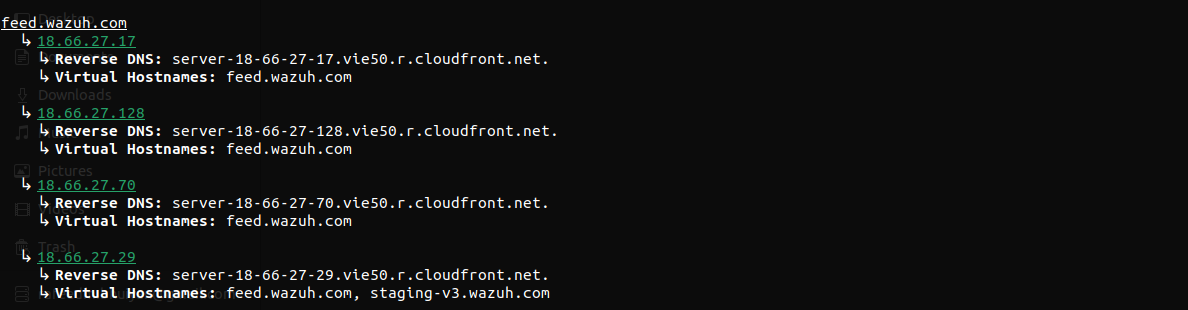
Domainim 是一款用于组织网络扫描的快速域名侦察工具。该工具旨在通过 OSINT、暴力破解、DNS 解析等技术,提供组织结构的简要概览。
当前功能(v1.4.0)-
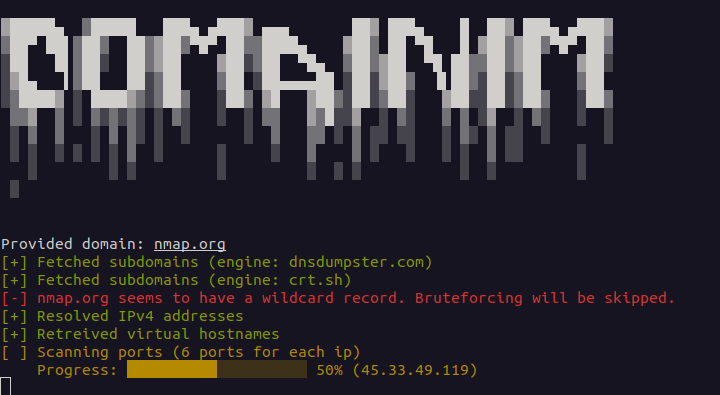
虚拟主机名枚举
反向 DNS 查询
检测通配符子域名(IPv4 和 IPv6)。仅解析到通配符 IP 的被动结果会被隐藏,除非它们曾在 TLS 证书中出现过。可使用 --force-brute 强制进行暴力破解,此时仅解析到通配符 IP 的结果会被丢弃
基础 TCP 端口扫描
基础 UDP 端口扫描(通过 --udp-ports 选择启用,无需 root 权限)
支持将子域名作为输入
多域名枚举。可将多个域名作为参数或写入文件(--list | -i)提供,并依次进行枚举
目录爆破(通过 --dir-wordlist 选择启用)。对发现的每个子域名的 http 和 https 服务探测字典中的路径,并带有软 404 过滤。参见目录爆破
将结果导出为 JSON 文件
本项目受 Sublist3r 启发。端口扫描模块大量基于 NimScan。
你可以从源码构建此仓库-
git clone [email protected]:pptx704/domainim
nimble build
./domainim <domain>... [--list=<filename>] [--ports=<ports>] [--udp-ports=<ports>] [--dir-wordlist=<filename>]
或者,你也可以直接从发布页面下载二进制文件。请注意,该二进制文件仅在基于 Debian 的系统上经过测试。
./domainim <domain>... [--list=<filename> | -i:<filename>] [--ports=<ports> | -p:<ports>] [--udp-ports=<ports>] [--wordlist=<filename> | -l:<filename> [--rps=<int> | -r:<int>] [--force-brute | -f]] [--dns=<dns> | -d:<dns>] [--out=<filename> | -o:<filename>] [--dir-wordlist=<filename> [--dir-status=<list>] [--dir-rps=<int>] [--dir-concurrency=<int>]]
<domain>... 是一个或多个要枚举的域名。每个也可以是子域名。参见多个域名。--list | -i 是包含目标域名的文件路径。参见多个域名。请将值写为 --list=<filename> 或 -i:<filename>;带空格的 --list <filename> 不起作用。--ports | -p 是要扫描端口的字符串规范。它可以是以下之一:
all - 扫描所有端口(1-65535)none - 跳过端口扫描(默认)t<n> - 扫描最常见的 n 个端口(与 nmap 相同)。即 t100 扫描前 100 个端口。最大值为 5000。如果 n 大于 5000,将被设置为 5000。80 扫描端口 8080-100 扫描端口 80 到 10080,443,8080 扫描端口 80、443 和 808080,443,8080-8090,t500 扫描端口 80、443、8080 到 8090 以及前 500 个端口--udp-ports 是要扫描的 UDP 端口的字符串规范。它使用与 --ports 相同的语法(all、none、t<n>、单值、范围值、逗号分隔值和组合)。除非给出此选项并指定至少一个端口,否则 UDP 扫描处于关闭状态;--ports 仅限 TCP,绝不会启用 UDP。请注意,t<n> 使用与 TCP 扫描相同的热门端口列表,该列表按 TCP 流行度排序。即
--udp-ports=53 扫描 UDP 端口 53--udp-ports=53,123,161 扫描 UDP 端口 53、123 和 161--udp-ports=1-1024 扫描 UDP 端口 1 到 1024--udp-ports=t100 将前 100 个端口作为 UDP 扫描--ports=80,443 --udp-ports=53,t20 扫描 TCP 端口 80 和 443,以及 UDP 端口 53 和前 20 个端口--dns | -d 是 DNS 服务器的地址。这应该是一个有效的 IPv4 地址,并且可以选择包含端口号:
a.b.c.d - 使用位于 a.b.c.d 端口 53 的 DNS 服务器a.b.c.d#n - 使用位于 a.b.c.d 端口 n 的 DNS 服务器--wordlist | -l - 字典文件路径。用于爆破子域名。如果文件无效,将跳过爆破。空行和以 # 开头的行会被忽略。你可以从 SecLists 获取字典。在发布页面中也提供了一个字典。--force-brute | -f - 即使发现通配符记录也进行爆破。仅解析到通配符 IP 的子域名会被丢弃。--rps | -r - 爆破期间每秒发出的请求数。默认值为 1024 req/s。需要注意的是,DNS 查询是分批进行的,只有前一批完成后才会进行下一批。由于查询可能受到速率限制,增加该值并不总能保证更快的结果。--dir-wordlist、--dir-status、--dir-rps、--dir-concurrency - 目录爆破。除非给出 --dir-wordlist,否则关闭。参见目录爆破。--out | -o - 输出文件路径。输出将以 JSON 格式保存。文件名必须以 .json 结尾。示例
./domainim nmap.org --ports=all./domainim nmap.org scanme.nmap.org --out=results.json./domainim nmap.org --list=targets.txt./domainim google.com --ports=none --dns=8.8.8.8#53./domainim pptx704.com --ports=t100 --wordlist=wordlist.txt --rps=1500./domainim pptx704.com --ports=t100 --wordlist=wordlist.txt --out=results.json./domainim nmap.org --wordlist=wordlist.txt --force-brute./domainim mysite.com --ports=t50,5432,7000-9000 --dns=1.1.1.1./domainim domainim.com --ports=80 --udp-ports=53,123./domainim nmap.org --udp-ports=53,123,161 --out=results.json./domainim nmap.org --dir-wordlist=paths.txt --dir-status=200,301-303 --dir-rps=20 --dir-concurrency=10可以使用 ./domainim --help 或 ./domainim -h 访问帮助菜单。
Usage:
    domainim <domain>... [--list=<filename> | -i:<filename>] [--ports=<ports> | -p:<ports>] [--udp-ports=<ports>] [--wordlist=<filename> | -l:<filename> [--rps=<int> | -r:<int>] [--force-brute | -f]] [--dns=<dns> | -d:<dns>] [--out=<filename> | -o:<filename>] [--dir-wordlist=<filename> [--dir-status=<list>] [--dir-rps=<int>] [--dir-concurrency=<int>]]
    domainim (-h | --help)

Options:
    -h, --help              Show this screen.
    -i, --list              File with target domains, one per line. Blank lines and lines starting with `#` are ignored.
                            Combines with domains given as arguments. Duplicates are removed.
    -p, --ports             Ports to scan. [default: `none`]
                            Can be `all`, `none`, `t<n>`, single value, range value, combination
    --udp-ports             UDP ports to scan. Same format as --ports. [default: `none`]
                            Replies are reported as open, silence as open|filtered.
    -l, --wordlist          Wordlist for subdomain bruteforcing. Bruteforcing is skipped for invalid file.
    -f, --force-brute       Bruteforce even if a wildcard record is found. Results resolving only to wildcard IPs are discarded.
    -d, --dns               IP and Port for DNS Resolver. Should be a valid IPv4 with an optional port [default: system default]
    -r, --rps               DNS queries to be made per second [default: 1024 req/s]
    --dir-wordlist          Wordlist of paths for directory busting on http and https of every resolved subdomain. Enables the feature.
    --dir-status            Status codes to report, a list of values and ranges [default: `200,204,301,302,307,308,401,403`]
    --dir-rps               Directory busting requests to be made per second [default: 50 req/s]
    --dir-concurrency       Directory busting requests in flight at once [default: 20]
    -o, --out               JSON file where the output will be saved. Filename must end with `.json`

Examples:
    domainim domainim.com --ports=80 --udp-ports=53,123
    domainim domainim.com domainim.org --list=targets.txt
    domainim domainim.com -p:t500 -l:wordlist.txt --dns:1.1.1.1#53 --out=results.json
    domainim domainim.com --dir-wordlist=paths.txt --dir-status=200,301-303 --dir-rps=20 --dir-concurrency=10
    domainim sub.domainim.com --ports=all --dns:8.8.8.8 -l:wordlist.txt -r:1500 -f -o:results.json
单个域的结果 JSON schema 如下(多个域请参见 Multiple domains)-
[
  {
    "subdomain": string,
    "ipv6": [string],
    "data": [
      {
        "ipv4": string,
        "vhosts": [string],
        "reverse_dns": string,
        "ports": [int],
        "udp_ports": [int],
        "udp_open_filtered": [int]
      }
    ]
  }
]
ipv6 列出子域的 IPv6 地址(AAAA 记录)。该字段始终存在,当子域没有 IPv6 地址时为空列表。地址采用压缩的小写形式,并按字符串排序。该键紧跟在 subdomain 之后、data 之前。data 中的条目仍基于 IPv4:每个 IPv4 地址对应一个条目,IPv6 地址永远不会单独拥有条目。所有其他字段保持其名称、类型和含义不变,因此 ipv6 是 JSON 输出中唯一的新增项。
ports 始终存在,列出开放的 TCP 端口。udp_ports 和 udp_open_filtered 仅在指定 --udp-ports 且至少包含一个端口时存在;未指定时则省略。这三个列表均经过排序。对于没有公共 IPv4 地址的子域,data 为空列表,即使该子域拥有 IPv6 地址也是如此。
udp_ports - 对探测作出响应的 UDP 端口(开放)udp_open_filtered - 未作出响应的 UDP 端口(开放|过滤)