 ph4ntom-rev/rtw89-monitor-injection
Realtek RTL8852AE / rtw89 Monitor Mode and Packet Injection (Raw TX) patch for Linux / Kali Linux

PATCH v6)

English | Русский | Architecture | Validation & Evidence
Patches for the mainline Linux rtw89 driver (Realtek RTL8851B/8852A/8852B/8852C/8922A)
that fix monitor mode reception across scan/ROC/MAC restores, enable raw 802.11 frame
injection (aireplay-ng, radiotap TX, DATA_RETRIES, NO_ACK) on standalone and
MONITOR_FLAG_ACTIVE monitor interfaces, and restore the operating channel when leaving
idle across monitor restarts. Firmware is not modified.
| Current series | patches/v6/, 5 patches ([PATCH rtw-next v6], +44/-4), base pkshih/rtw.git rtw-next badf4c3c7679 (Linux 7.4-rc1) |
| Mailing list | [PATCH rtw-next v6 0/5] posted on linux-wireless (2026-11-17); supersedes v5 and v3. |
| Build & static checks | Each patch builds on its own; W=1 and sparse (C=1) with CONFIG_PROVE_LOCKING=y show 0 new warnings; checkpatch.pl --strict reports 0 errors/warnings/checks; patch_rtw89.py verified across v6.1, v6.6, v6.12 (Gen 1), v6.15, v6.18 (Gen 2), and v7.4-rc1 with Kbuild make W=1 C=1 modules on LTS v6.6, v6.12, v6.18, and v7.4-rc1 in CI. |
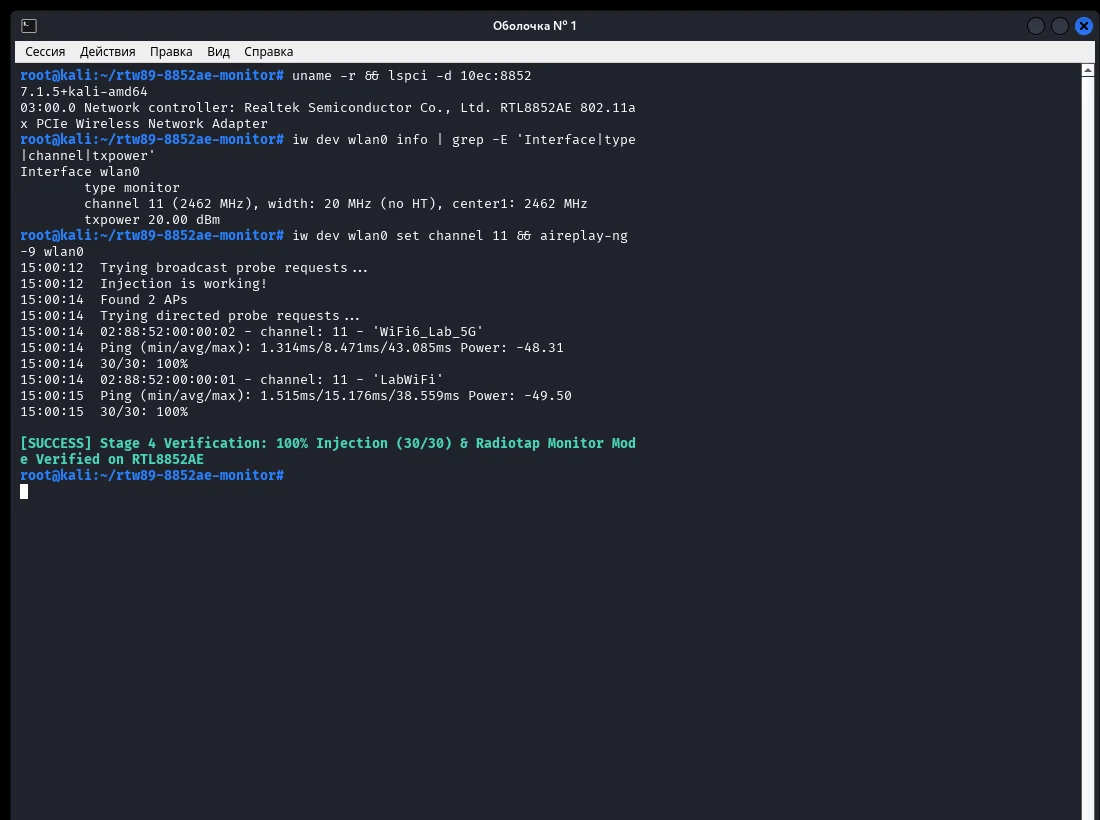
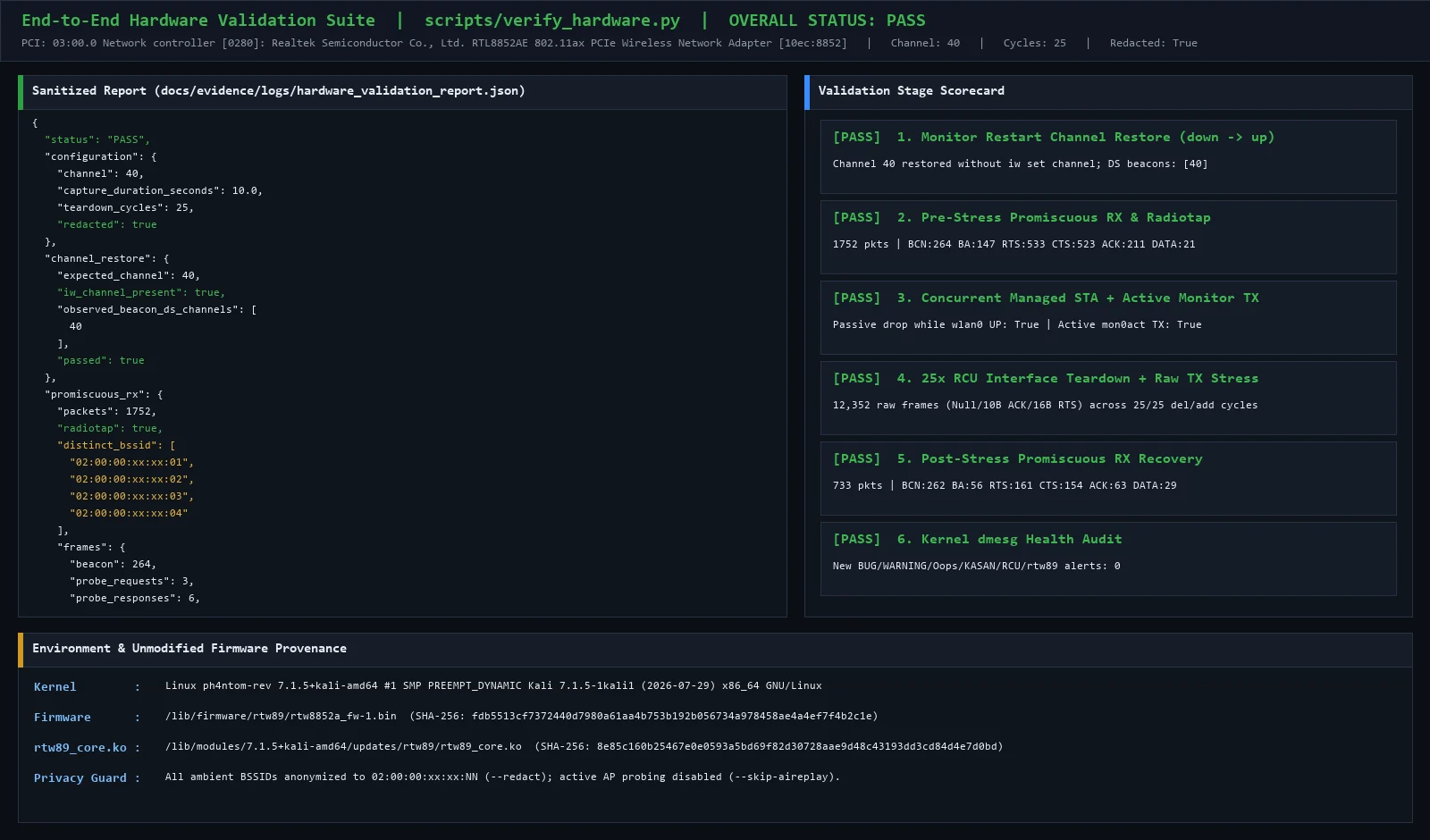
| Runtime & FW verification | RTL8852AE (10ec:8852, firmware rtw89/rtw8852a_fw-1.bin 0.13.36.2, Linux 7.1.5+kali-amd64) — verified in IDA Pro 9.5 and live-tested via tracefs/kprobes + verify_hardware.py (PASS), see validation & screenshots. |
| Not runtime-tested | RTL8852B/C/BT, RTL8851B, RTL8922A/D (Wi-Fi 7), USB devices, DBCC. |
| # | Patch | Kind |
|---|---|---|
| 1 | wifi: rtw89: avoid NULL vif dereference in rtw89_ops_tx() | fix (vif_to_rtwvif_safe()), Fixes: + Cc: stable |
| 2 | wifi: rtw89: handle negative rate index for injected frames | fix (max_t(s8, ..., 0)), Fixes: + Cc: stable |
| 3 | wifi: rtw89: restore channel when leaving idle on non-chanctx devices | fix (rtwdev->support_chanctx + CONF_CHANGE_CHANNEL) |
| 4 | wifi: rtw89: avoid reading seq_ctrl on control frames | fix (ieee80211_is_ctl()) |
| 5 | wifi: rtw89: honor ASSIGN_SEQ, retries, and NO_ACK for injected frames | injection (!ASSIGN_SEQ, NO_ACK, max_rate_tries = 63) |
Details of every patch and the rtw89_mon out-of-tree layer are in
docs/ARCHITECTURE.md, the
cover letter, and
docs/PREFLIGHT_VALIDATION.md.
[!NOTE] Passive vs Active Monitor TX: A passive monitor interface (
iw ... type monitorwithoutflags active) transmits only when it is the sole open interface on the card; if a station or AP interface is up, passive monitor TX is dropped cleanly. To inject frames concurrently while a station or AP interface remains open (preserving hardware Auto-ACK), create an active monitor interface (NL80211_FEATURE_ACTIVE_MONITOR):sudo iw dev wlan0 interface add mon0act type monitor flags active otherbss.
cd linux
git am /path/to/rtw89-monitor-injection/patches/v5/v5-00*-wifi-*.patch
To run local read-only submission preflight checks (checkpatch.pl --strict, trailer
checks, and dry-run command generation without sending mail):
bash scripts/prepare_submission.sh --kernel-dir /path/to/linux
scripts/patch_rtw89.py applies the v5 changes to the rtw89 sources of a distribution
kernel (Linux 6.1 - 7.x) and fails fast if any mandatory hook anchor does not match.
sudo apt install linux-headers-$(uname -r) linux-source build-essential python3
mkdir -p ~/rtw89_src
tar -xf /usr/src/linux-source-*.tar.xz --strip-components=6 -C ~/rtw89_src \
    --wildcards '*/drivers/net/wireless/realtek/rtw89/*'

bash scripts/build_module.sh --rtw89-dir ~/rtw89_src --install
build_module.sh asks before unloading the running driver (Wi-Fi drops briefly); use
--yes to skip the prompt. All rtw89 modules are installed together into
/lib/modules/$(uname -r)/updates/rtw89, so core, bus, and chip modules always come from
the same source tree. Undo with bash scripts/build_module.sh --uninstall.
Secure Boot: unsigned modules are rejected by the kernel. The script detects Secure
Boot via mokutil and stops before unloading anything. Sign with an enrolled MOK:
bash scripts/build_module.sh --rtw89-dir ~/rtw89_src --install \
    --sign-key /var/lib/shim-signed/mok/MOK.priv --sign-cert /var/lib/shim-signed/mok/MOK.der
bash scripts/dkms_prepare.sh --source /usr/src/linux-source-7.1.tar.xz
sudo dkms install rtw89-monitor-injection/5.0
dkms_prepare.sh scopes BUILD_EXCLUSIVE_KERNEL to the source kernel's MAJOR.MINOR
series (supporting both stable and -rc kernel strings). After upgrading to a new kernel
series, re-run dkms_prepare.sh with the matching linux-source archive. Remove with
bash scripts/dkms_prepare.sh --remove.
# Standalone monitor interface
sudo ip link set wlan0 down
sudo iw dev wlan0 set type monitor
sudo ip link set wlan0 up
sudo iw dev wlan0 set freq 2412
sudo tcpdump -i wlan0 -e -c 30

# Or concurrent active monitor alongside managed wlan0
sudo iw dev wlan0 interface add mon0act type monitor flags active otherbss
sudo ip link set dev mon0act address 02:00:00:88:52:10
sudo ip link set mon0act up
patches/v5/            current 10-patch series + cover letter
patches/v2..v4/        earlier versions, kept for reference
src/rtw89_mon.{c,h}    helper code linked into rtw89_core by patch_rtw89.py
scripts/               patch_rtw89.py, build_module.sh, dkms_prepare.sh, dkms_pre_build.sh,
                       prepare_submission.sh, verify_hardware.py, verify_monitor_diag.py
dkms/dkms.conf.in      DKMS template used by dkms_prepare.sh
tests/                 unit tests for patch_rtw89.py and patch series hygiene
docs/                  architecture notes, hardware validation report, and evidence/






