scare 是一个面向命令行的多架构汇编 REPL 和模拟器。
现有的现代汇编 REPL 并不多。已有的要么是不透明的 Web 应用,要么局限于特定的架构/平台。scare 是为那些想要测试、实验或以其他方式摆弄汇编代码的人而构建的。所有汇编后的代码都在模拟器中运行,该模拟器只执行你提供的代码。底层 scarelib 库的多架构设计旨在实现模块化,以便能够快速添加新的架构。
版本 0.3.0 是 scare 的首个公开发布版本。
核心功能
当前支持的架构
依赖要求
从命令行使用所需的架构来调用 scare。这将创建一个使用默认设置的 REPL 实例。
python3 scare.py -a x64
帮助文件
[x64]400000> /
scare Help

/ /? /help                        -- Open help menu
/x /exit /q /quit                 -- Quit the program

/back n                           -- Go back n number of lines
/dis {0xaddress|$register} NUM    -- Disassemble NUM bytes from 0xaddress or $register
/export FILETYPE FILENAME         -- Export machine code as FILETYPE to the FILENAME
                                     FILETYPE List:
                                     - bin
                                     - elf64
                                     - pe32
/info                             -- Info about the emulator state
/l /list                          -- List the current program
/load file.asm                    -- Load listing from file.asm (overwrites current program)
/read {0xaddress|$register} NUM   -- Read NUM bytes from 0xaddress or $register
/reset                            -- Reset the emulator to a clean state
/run                              -- Run the current program
/save file.asm                    -- Save assembly output to file.asm

[[: Config Commands :]] (Use /c or /config)
NOTE: Run /reset if you are changing emu/* options, otherwise the emulator may not start!

/c               -- Print all config options
/c emu/arch      -- Print Arch Value
/c emu/arch x64  -- Set Arch to x64
/c x86/xmm 1     -- Enable x86/xmm
在汇编列表中向后回退
mov eax, 0x5555
mov ebx, 0xaaaa
xor eax, ebx
/l
/back 2
mov ecx, 0xbbbb
add eax, ecx
加载文件、保存文件
/load examples/x64/test.asm
/l
/run
/read $rsp 32
pop rdx
/save test2.asm
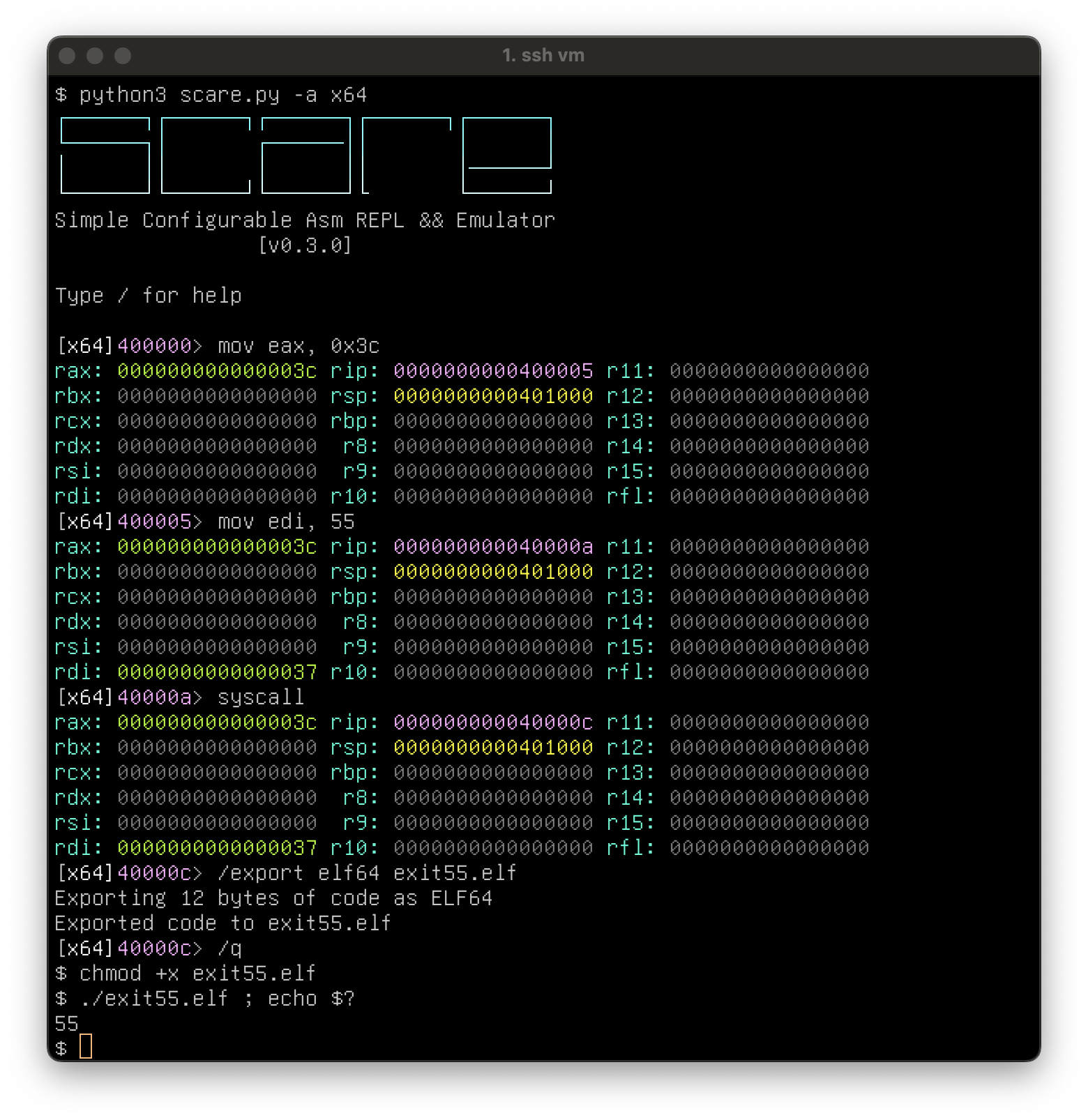
导出为二进制文件,这里你应该会得到一个名为 exit55.elf 的 elf64 文件,它会在运行时退出。
mov eax, 0x3c
mov edi, 55
syscall
/export elf64 exit55.elf
使用配置选项
not rax
/c x86/xmm 1
movq xmm4, rax
movaps xmm5, xmm4
解码 shellcode:
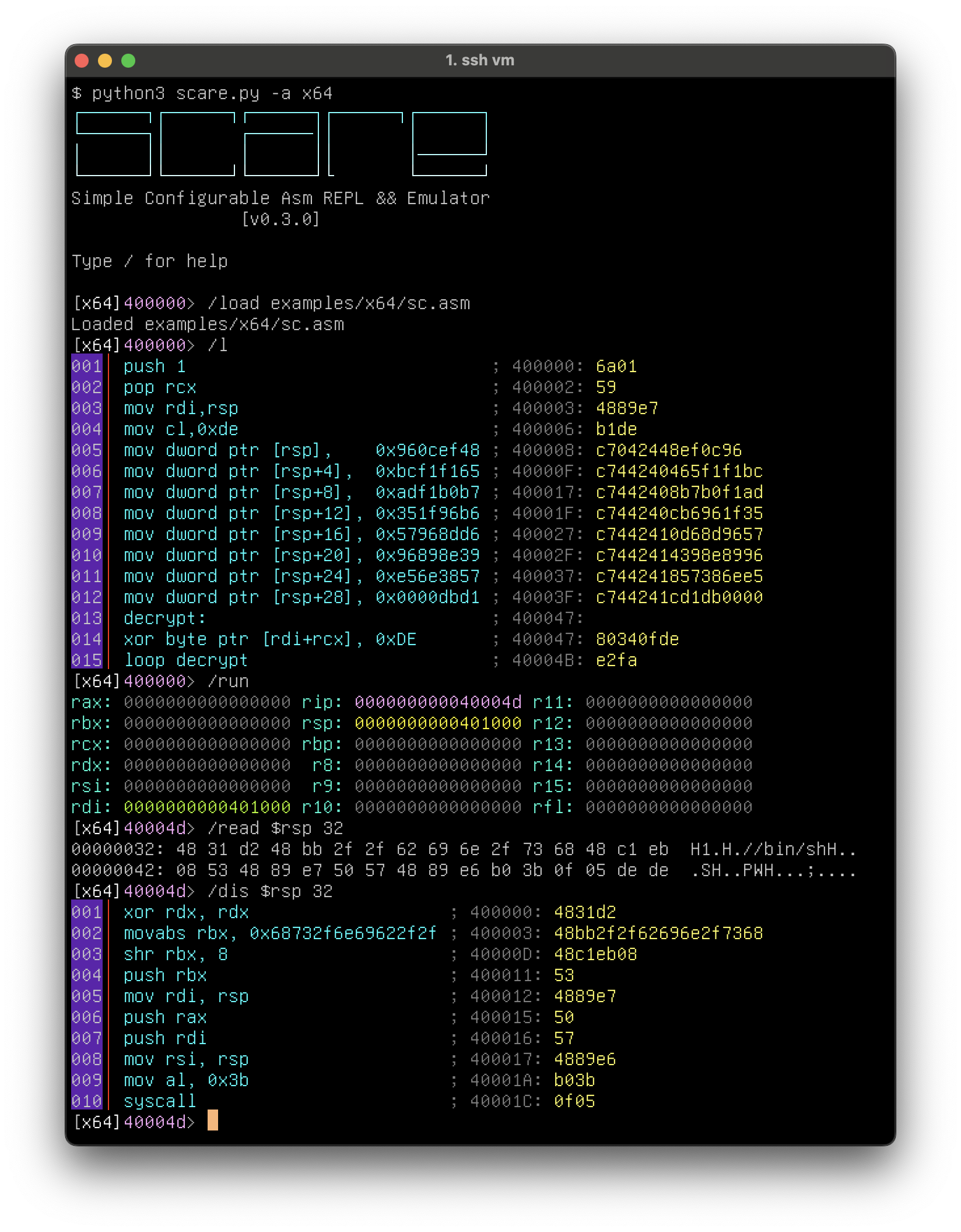
将代码导出为 elf64 并运行它:
未来有许多很棒的功能可以添加:更多的架构(无论是知名的还是冷门的)、更多的 CPU 模式、更好的环境模拟、在 emu/asm/dis 库之间热切换等等。要让模拟器、汇编器和反汇编器很好地协同工作并不总是那么简单。
由于需要在模拟器配置上做出决策,某些功能目前可能尚不支持。这个项目的目标是成为针对目标架构的通用 REPL 和模拟器解决方案。因此,开发路线图将是“添加人们提出的东西”,同时保持易于使用和开发。
如果你有想法,欢迎提交 PR。
如果你发现了 bug,欢迎提交 issue。
谢谢,玩得开心!
~ netspooky
向 haunted crew 致敬



