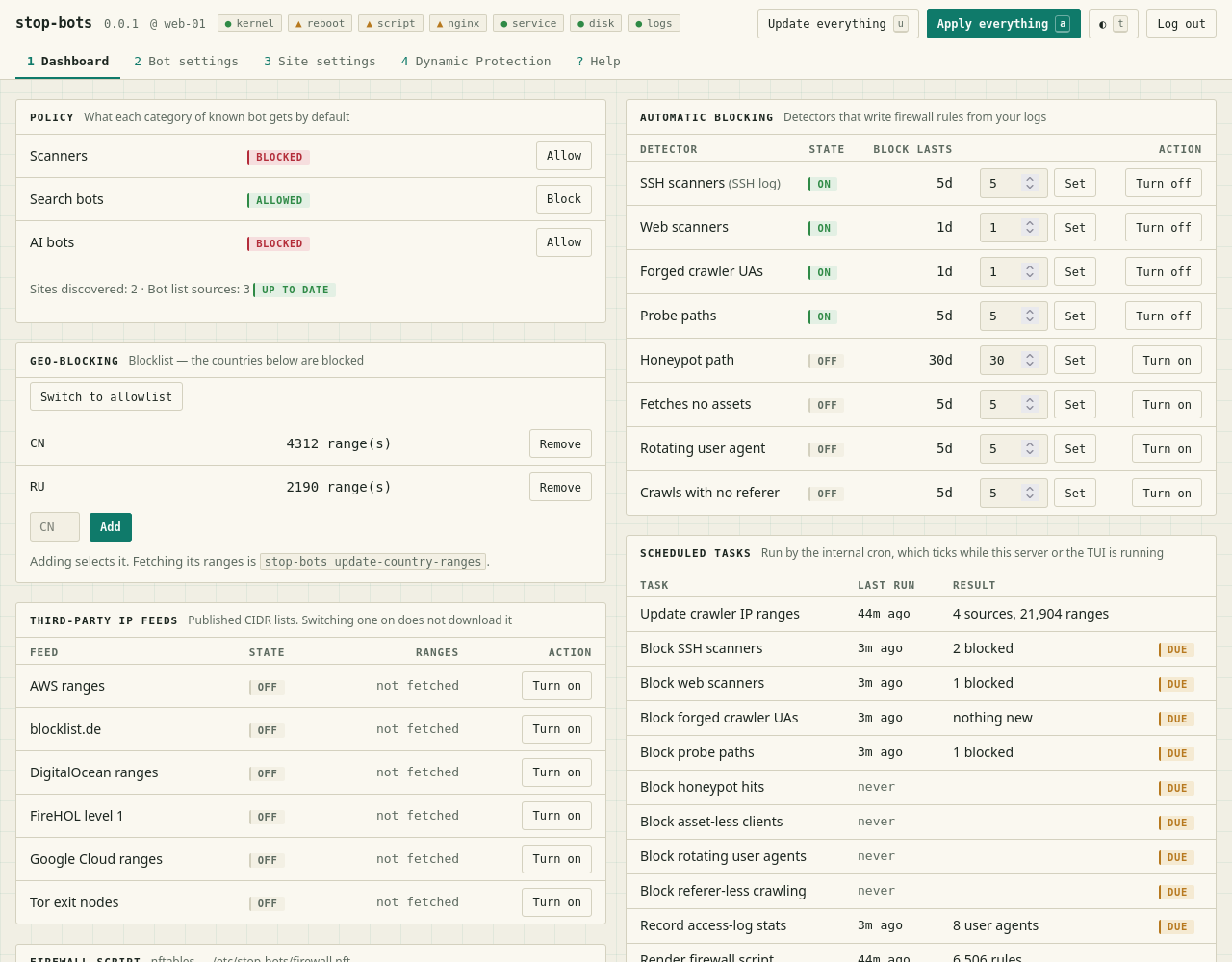
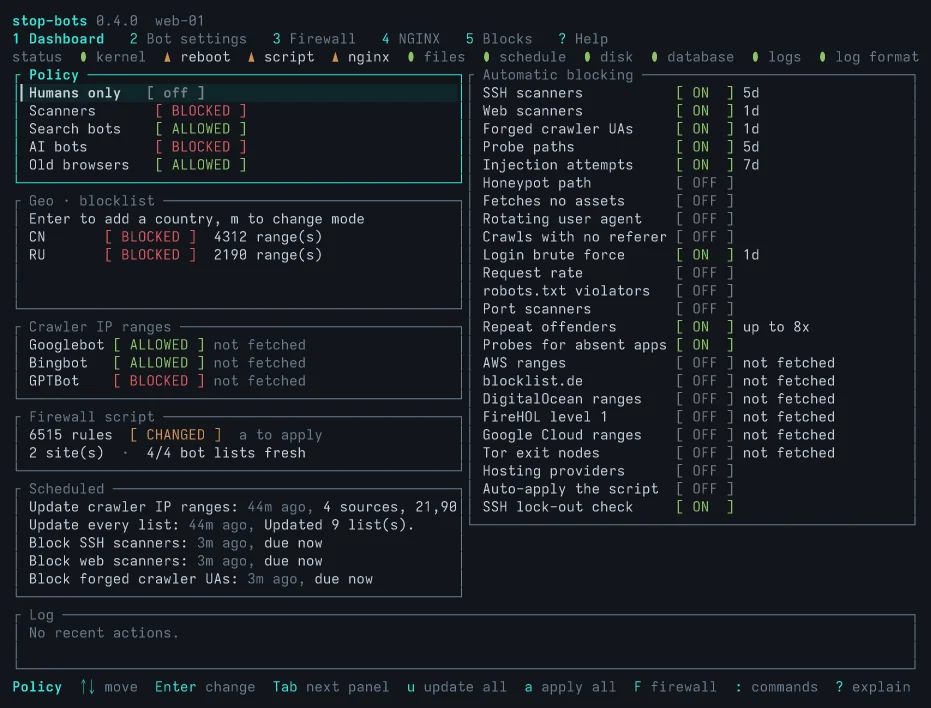
一个 TUI 和一个 CLI,帮助你配置服务器以阻止恶意机器人,而无需躲在 CDN 后面。它是你现有 Web 服务器(nginx、Apache、Traefik 或 NPMplus)和 防火墙(nftables 或 iptables)的漂亮界面。专为那些不想躲在 Cloudflare 后面、不想把所有权柄交给一家公司的人而做。
它通过两种方式保护你:
它试图防止你做出自我毁灭的事情。在应用之前,你始终会先看到变更
内容,并且可以使用 --dry-run 标志来获得额外安全保障。但我猜
最终你会为了方便而想要启用自动应用。因此,该应用也试图
不把你锁在外面。成功通过 SSH 登录的 IP 地址永远不会被阻止,Web 服务器配置
在应用前始终会经过测试,并且它会尝试识别运行在 HTTP 代理后面的应用,
并针对这些应用调整动态检测规则。
大红按钮:sudo stop-bots uninstall all
本 readme 的其余部分由 AI 撰写。欢迎让你自己的 AI 来总结它,我不 介意。
安装不会启动任何东西,在你应用之前也不会写入任何内容。首次应用时, 使用新数据库的初始设置:
以下是写入位置:
| 内容 | 位置 |
|---|---|
| 阻止规则 | 每个站点的 server 块内,位于 # BEGIN stop-bots 和 # END stop-bots 之间 |
规则所需的文件,当某项设置需要时(robots.txt、速率限制) | /etc/stop-bots/nginx/ 和 NGINX 的 conf.d(对于 Apache,为 /etc/stop-bots/apache/ 和 conf-enabled) |
| 在 Traefik 上,上述两者 | 一个独立文件 stop-bots.yml,位于 Traefik 的文件提供程序读取的目录中;不会编辑你的任何文件 |
| 在 NPMplus 上,上述两者 | custom_nginx/server_http.conf 中的一个块(每个 NPMplus 主机都会包含),custom_nginx/http_top.conf 中的一行,以及 custom_nginx/stop-bots/ 中的独立文件;NPMplus 写入的主机文件永远不会被编辑 |
| 防火墙脚本 | /etc/stop-bots/firewall.next.nft(对于 iptables 为 .next.sh),应用后复制到 firewall.nft;它只操作自己的 inet stop_bots 表 |
| 设置、阻止列表及每个存在的原因 | /var/lib/stop-bots/db.sqlite3 |
以下是在全新数据库和单站点 NGINX 上运行 sudo stop-bots batch --dry-run --diff 的输出,
已精简(真实的用户代理模式有几百个名称长):
Dry run: nothing is downloaded, scanned, written, applied or recorded. Against the database as it is, `batch` would:
NGINX: 1 file(s) would change:
  /etc/nginx/sites-enabled/example.com
Firewall (nftables): 0 rule(s), 0 kernel entries; no applied script at /etc/stop-bots/firewall.nft yet, so all of it is new
lockout check passed: the SSH log was read, and no connected client would be blocked
would write 0 rule(s) to /etc/stop-bots/firewall.next.nft; not applied — review it, then apply it (“Apply everything” or `stop-bots render-firewall --apply`)
--- /etc/nginx/sites-enabled/example.com
+++ /etc/nginx/sites-enabled/example.com
@@ -1,4 +1,10 @@
 server {
+    # BEGIN stop-bots (DO NOT EDIT)
+    if ($http_user_agent ~* "AgentReadinessScanner|AIScan|ArgusScanner|…|xAI-Grok|zmap-proxy-probe") {
+        return 403;
+    }
+    # END stop-bots
+
     listen 443 ssl;
     server_name example.com;
     root /var/www/example.com;
--- /etc/stop-bots/firewall.nft (does not exist)
+++ /etc/stop-bots/firewall.next.nft
@@ -0,0 +1,29 @@
+#!/usr/sbin/nft -f
+# Generated by stop-bots 0.2.0. Not executed automatically — review, then run
+# with: nft -f <this file>
…
+add table inet stop_bots
+delete table inet stop_bots
+add table inet stop_bots
+add chain inet stop_bots bot_block { type filter hook input priority -1; policy accept; }
…
在 Debian 或 Ubuntu 上,从 APT 仓库安装:
curl -fsSL https://ivankovic.github.io/stop-bots/key.gpg \
  | sudo tee /usr/share/keyrings/stop-bots.gpg > /dev/null
echo "deb [signed-by=/usr/share/keyrings/stop-bots.gpg] \
https://ivankovic.github.io/stop-bots stable main" \
  | sudo tee /etc/apt/sources.list.d/stop-bots.list
sudo apt update && sudo apt install stop-bots
或者使用 Rust 1.88 或更新版本执行 cargo install stop-bots,或从 GitHub releases 获取适用于 x86_64 或 aarch64 Linux 的静态二进制文件,每个都附带校验和与构建来源证明(验证下载)。安装过程不会启动任何东西。
它已在 使用 systemd 的 Debian 和 Ubuntu,以及 NGINX、Apache、Traefik 或 NPMplus 上测试。防火墙需要 nft,或 iptables-restore 和 ip6tables-restore。不支持 Caddy。
默认使用 NGINX。在 Apache 主机上,只需声明一次,并启用 mod_rewrite,因为拦截规则是以它编写的:
sudo stop-bots set-web-server apache
sudo a2enmod rewrite
Apache 支持比 NGINX 的支持更新,并已在 Debian 和 Ubuntu 的布局(/etc/apache2)上测试过。少数功能仅限 NGINX,速率限制就是其中之一。
在 Traefik 3 主机上,将其指向 Traefik 文件提供程序读取的目录,并让 Traefik 的访问日志保留用户代理,因为默认情况下它会丢弃用户代理,而大多数检测器都需要它:
sudo stop-bots set-web-server traefik --root /etc/traefik/dynamic
sudo stop-bots set-log-paths --access-log /var/log/traefik/access.log
# In Traefik's static config
accessLog:
  filePath: /var/log/traefik/access.log
  fields:
    headers:
      names:
        User-Agent: keep
        Referer: keep
它写入高优先级路由器,在任何站点自身的路由器看到被阻止的请求之前,就以 403 响应。Traefik 会自行读取该文件,因此不会执行重载。来自 Docker 标签的站点会获得主机范围的设置;只有当站点的路由器位于该目录下的某个文件中时,该站点才会获得自己的设置。Traefik 只能返回 403,无法提供生成的 robots.txt 或进行速率限制。
在 NPMplus 主机上,将其指向 NPMplus 的数据目录,即其 compose 文件挂载到 /data 的主机目录(除非你更改过,否则为 /opt/npmplus),并指向 NPMplus 在其 compose.yaml 中设置 LOGROTATE=true 后写入的访问日志:
sudo stop-bots set-web-server npmplus --root /opt/npmplus
sudo stop-bots set-log-paths --access-log /opt/npmplus/nginx/logs/access.log
NPMplus 在每次保存主机时都会重新写入该主机自己的配置,因此 stop-bots 从不编辑这些文件。它向 custom_nginx/server_http.conf 写入一个块(每个 NPMplus 主机都会包含该文件),并向 custom_nginx/http_top.conf 写入一行,其余内容保持原样。它在容器内通过 docker exec npmplus nginx -t 和 docker exec npmplus nginx -s reload 测试并重载 NGINX;对于名称不同的容器,请向 set-web-server 传入 --test 和 --reload。每个主机都会获得主机级设置,因此带有自身设置的站点会被拒绝:NPMplus 没有可供 stop-bots 写入的、针对单个主机的文件。
Apache、Traefik 和 NPMplus 的测试程度不如 NGINX。 我自己运行 NGINX,因此那是背后有真实流量的后端。Apache、Traefik 和 NPMplus 在容器中针对真实服务器进行了测试,但并未在日常使用中测试。如果其中任何一个看起来有问题,请提交 issue。
从本仓库的克隆中,使用 Podman(或 STOP_BOTS_CONTAINER_RUNTIME=docker)和 Rust 工具链:
make demo
这会构建二进制文件,并将你带入一个运行 NGINX 的一次性 Ubuntu 容器中的 shell,其日志中已经有一些错误请求,以及一份可尝试事项的列表。它应用的防火墙规则保留在容器内部,exit 会将其删除。
sudo stop-bots 启动 TUI。它需要 root 权限,因为它会重写你的 Web 服务器配置并加载防火墙规则。? 解释光标下的任何内容,再次按 ? 会显示每个屏幕上的所有按键。
使用 sudo 运行每条命令。没有 root 权限时,stop-bots 无法打开
/var/lib/stop-bots/db.sqlite3,并会回退到你自己的数据库(它会打印是哪一个),其中不包含你的任何设置。
或者从 CLI 运行,用于脚本:
sudo stop-bots status
sudo stop-bots batch --dry-run --diff
sudo stop-bots batch --apply
sudo stop-bots install firewall
sudo stop-bots status
stop-bots --help 会列出所有命令。
没有任何任务会自动重新运行。 检测、列表更新以及其他任务都按照一个调度计划运行,而该计划仅在 TUI 打开时才会推进,或者由 cron 触发运行。在你不常驻的服务器上,让 cron 来运行它:
sudo stop-bots install cron --dry-run    # read the plan
sudo stop-bots install cron
它会写入 /etc/cron.d/stop-bots,该文件每分钟运行一次 stop-bots tick:检测器每分钟运行,列表每周运行,与 TUI 的 Dashboard 在 Scheduled tasks 下列出的任务相同。sudo stop-bots status 会显示它们上次运行的时间。
在你允许它应用之前,它仍然只会写入它发现的内容,并且有两个开关用于此目的,因为风险不同。NGINX 配置在 nginx -t 之后最多每小时重新应用一次;防火墙脚本会在出现新封锁后的几分钟内应用,并且仅当锁定检查确实能够读取 SSH 日志时才会应用:
sudo stop-bots set-auto-apply --enabled true
sudo stop-bots set-auto-apply-firewall --enabled true
sudo stop-bots install firewall 会添加一个单元,在启动时再次加载已应用的防火墙脚本。
如果你更愿意编写自己的 crontab,stop-bots batch --apply 是一次完整执行,会应用所有内容,而 --no-fetch 会跳过下载。
sudo stop-bots uninstall all 会将主机恢复到原来的状态。先使用 --dry-run 运行它,以查看每一步。除非添加 --purge,否则数据库会被保留。
此工具会编辑你的 Web 服务器配置和防火墙,使用风险自负。首次应用防火墙规则时,请保留一种不依赖 SSH 进入服务器的方式,例如你的提供商控制台。
Stop Bots 覆盖了通常需要两到三个工具才能完成的范围:在 Web 服务器的 HTTP 层进行拦截,在防火墙的 IP 层进行拦截,以及从日志中进行检测。它通过一个本地二进制文件完成这些工作,并提供一个界面来审查和撤销每个拦截。它不需要账户或云服务,也不会将任何关于你流量的信息发送到任何地方。