
Skip to content
KitploitKITPLOIT
工具漏洞利用博客
Log in
提交
工具漏洞利用博客
提交

黑客、渗透测试和网络安全工具,武装您的安全武器库!

Kitploit 是一个黑客、网络安全和渗透测试工具的目录。发现最新的项目更新,查找漏洞、分析系统、自动化测试并加强你的安全。

订阅源联系隐私© 2026 Kitploit

工具目录

分类

查看所有分类
Loading categories
sdrtrunk — A cross-platform java application for decoding, monitoring, recording and streaming trunked mobile and related radio protocols using Software Defined Radios (SDR). Website: | Kitploit
工具/GitHubGitHub/dsheirer/sdrtrunk
Wireless SecurityDigital Forensics
GitHubdsheirer/sdrtrunk

sdrtrunk

A cross-platform java application for decoding, monitoring, recording and streaming trunked mobile and related radio protocols using Software Defined Radios (SDR). Website:

查看仓库
2.2k354605小时41分前Kitploit 审核通过
分享
内容在请求的语言中不可用。显示英文版本。

Gradle Build Nightly Release Latest Release Downloads License Discord support-google_groups-blue

sdrtrunk

A cross-platform java application for decoding, monitoring, recording and streaming trunked mobile and related radio protocols using Software Defined Radios (SDR).

📖 Read the sdrtrunk User Manual

New to sdrtrunk? Start with the Getting Started guide, then use the User Manual and How-To Guides to set up tuners, playlists, aliases and streaming.
  • Help/Wiki Home Page
  • Getting Started
  • User Manual
  • How-To Guides
  • FAQ
  • Download
  • Support

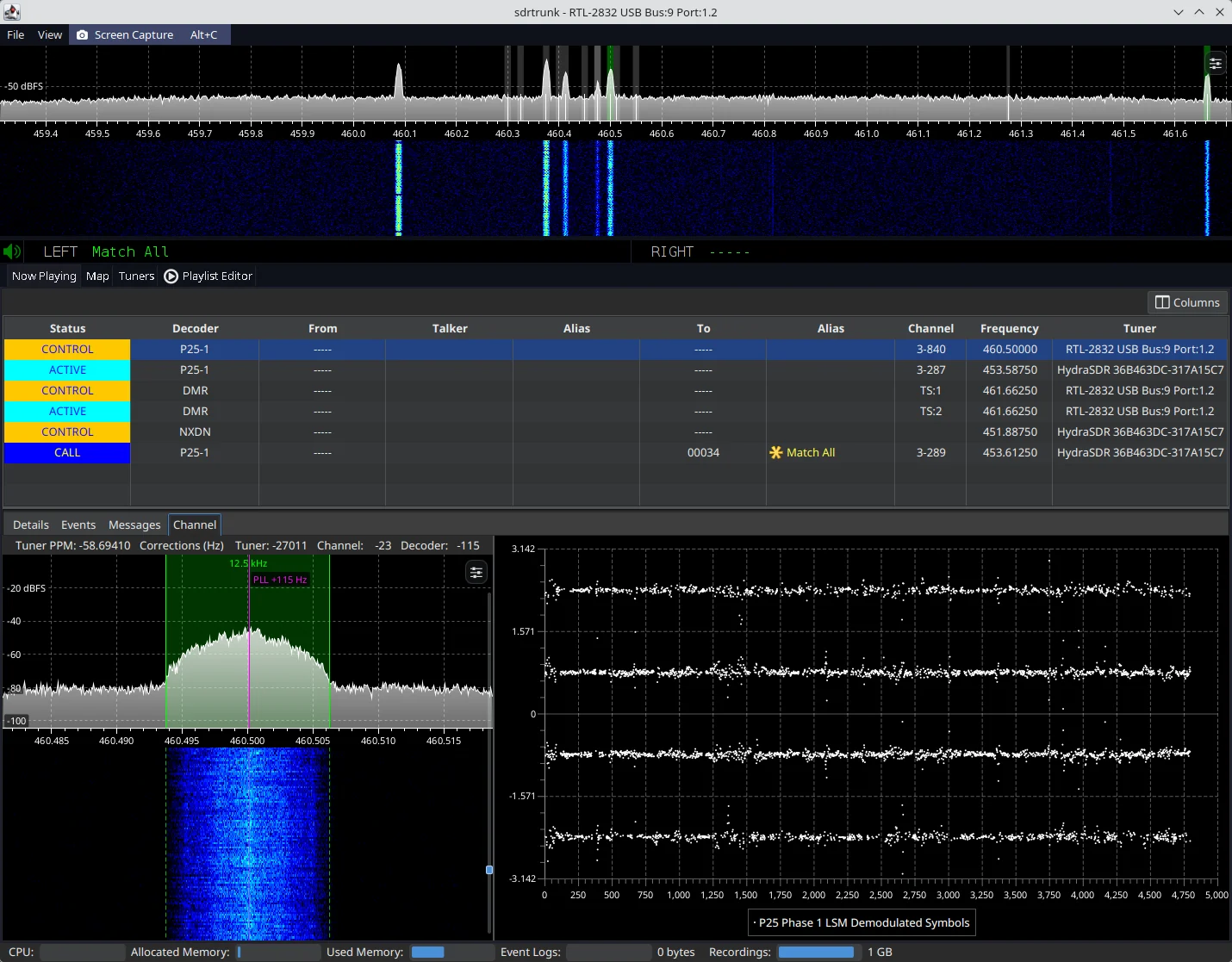
sdrtrunk primary application window decoding a P25 trunked radio system Figure 1: sdrtrunk decoding a P25 Phase 1 simulcast trunked radio system

Download the Latest Release

All release versions of sdrtrunk are available from the releases tab.

  • (alpha) These versions are under development feature previews and likely to contain bugs and unexpected behavior.
  • (beta) These versions are currently being tested for bugs and functionality prior to final release.
  • (final) These versions have been tested and are the current release version.

Download Nightly Software Build

The nightly release contains current builds of the software for all supported operating systems. This version of the software may contain bugs and may not run correctly. However, it let's you preview the most recent changes and fixes before the next software release. Always backup your playlist(s) before you use the nightly builds. Note: the nightly release is updated each time code changes are committed to the code base, so it's not really 'nightly' as much as it is 'current'.

Minimum System Requirements

  • Operating System: Windows (32 or 64-bit), Linux (32 or 64-bit) or Mac (64-bit, 12.x or higher)
  • CPU: 4-core
  • RAM: 8GB or more (preferred). Depending on usage, 4GB may be sufficient.

Creating a Release (Maintainers)

Releases are built and published automatically by the Release GitHub workflow whenever a version tag is pushed to the repository.

The version is taken from the tag, so there is no version number to update in the code. Create and push a tag with a leading v, following the naming convention described in gradle.properties (e.g. v0.6.2-alpha-1, v0.6.2-beta-1 or v0.6.2):

git tag v0.6.2-beta-1
git push origin v0.6.2-beta-1

Builds made from an untagged commit get a version like 0.6.2-beta-1-14-g4626d567 (14 commits after the v0.6.2-beta-1 tag, at commit 4626d567), with -dirty appended when there are uncommitted changes.

The workflow then:

  • Verifies that the version the build derives from git matches the tag and fails if it does not.
  • Builds and tests the code, then creates the release zips for Linux, Mac and Windows (x86-64 and aarch64).
  • Creates a GitHub release titled Version <version> with auto-generated release notes (a "What's Changed" list of the PRs merged since the previous version tag), and attaches the six zip files plus a SHA256SUMS checksum file.
  • Marks tags containing a dash (alpha and beta versions) as pre-releases. Tags without a dash become full releases.

If the workflow fails part way through, fix the problem and re-run it from the Actions tab. It resumes from the draft release left behind. It won't modify a release that has already been published. To rebuild a published release, delete the release and the tag on GitHub, then push the tag again.


下载工具

最受欢迎

查看全部 →

发现我们社区最常用的工具。

  • 1

    OsintHunter

    letox4/osinthunter

    🎯 终极 OSINT 工具包:调查图谱、置信度评分、别名家族、地图、时间线和报告。49 个模块、400+ 个站点,无需 API 密钥。

    989
  • 2

    ghostlock-app

    yukonga/ghostlock-app

    GhostLock 一键执行应用(CVE-2026-43499)

    576
  • 3

    looking-glass

    anonghosty/looking-glass

    CSIRT 平台,可将 Shadowserver 报告导入 MongoDB,并将其重放为交互式地图、分析、发现、公告和高管仪表板。

    354
  • 4

    redforge

    cybersecurity91/redforge

    浏览器端红队工具包,包含 102 个离线工具,用于侦察、载荷生成、凭据攻击、加密、编码和交战报告。

    339
  • 5

    ARTEX

    baarai/artex

    基于LLM的多智能体自主渗透测试平台,具备规划器/执行器智能体、资产与探索图谱、MITM流量记录以及漏洞复测功能。

    323
  • 6

    CyberStrikeAI

    ed1s0nz/cyberstrikeai

    AI原生网络安全的行动系统——在这里,意图转化为受治理的执行,证据沉淀为运营记忆,每一次操作都让下一次更出色。

    315

探索所有工具

浏览我们的工具集合

查看所有工具 →








