OnionHop V3
OnionHop V3 is a modern, cross-platform desktop app (Windows, macOS and Linux) that routes your traffic through Tor. It can run Tor as a local SOCKS proxy or as a system-wide tunnel, automatically pick a working connection strategy for your network with Smart Connect, scan and apply working bridges for censored networks across every transport, and even let you volunteer as a Snowflake proxy.
Disclaimer
OnionHop is provided "as-is". Tor usage can be illegal or restricted in some jurisdictions. You are responsible for complying with local laws and regulations.
What's new in V3 (since v2.7)
V3 is a ground-up rebuild on a new cross-platform UI stack, with a much smarter connection engine and a far wider set of censorship-resistant transports.
- Now cross-platform — native desktop builds for Windows, macOS (signed & notarized universal app) and Linux (AppImage). Same app, native look on each OS.
- Redesigned UI — Fluent/native look (FluentAvalonia), light/dark/follow-system themes, an accent picker, an integrated chromeless title bar on Windows and native window chrome on macOS, and 8 languages (English, German, French, Chinese, Russian, Persian, Azerbaijani, and Sorani Kurdish).
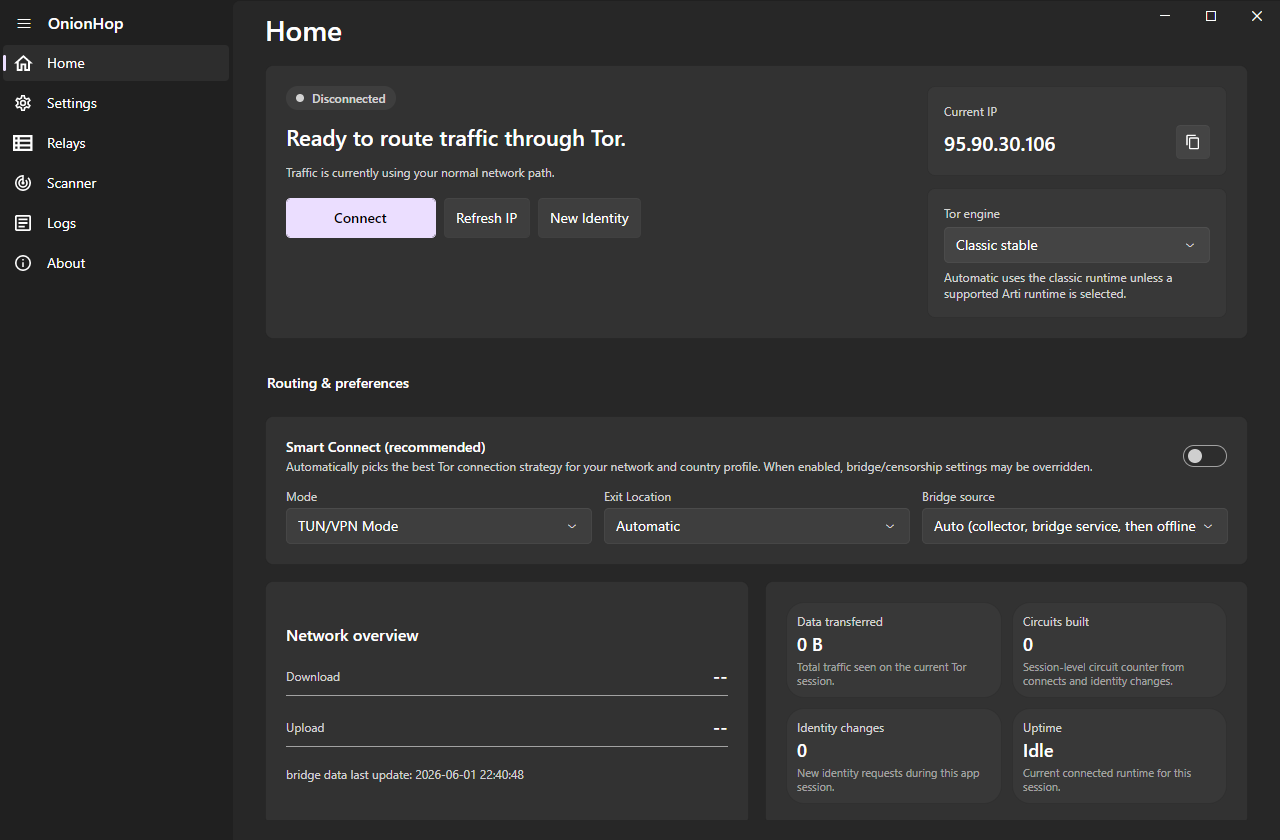
- Smart Connect — an offline censorship "brain" that auto-picks the best connection strategy for your network and country: it knows where Tor is blocked, prefers transports that survive there, pre-tests bridge reachability, races strategies in parallel, fails fast off dead paths, and remembers what worked on each network so the next connect is instant.
- Three Tor engines — Classic (
tor.exe, full control: bridges, country/entry/exit pinning, control-port New Identity), Arti (the Rust Tor implementation with native bridge/PT config), and ArtiHop (shortened 2-hop Guard→Exit circuits for lower latency).
- More censorship-resistant transports — obfs4, snowflake (with optional AMP-cache fronting), webtunnel, conjure, meek, and dnstt (a DNS tunnel that gets Tor through when only DNS is allowed).
- Bridge Scanner — fetch and reachability-test bridges of every transport, see color-coded latency, and one-click apply the ones that actually work on your network.
- More bridge sources — the official Tor bridge service, the censorship-resistant OnionHop Bridges Collector (derived from Delta-Kronecker/Tor-Bridges-Collector), built-in community bridges, and a thin-set top-up so a tiny live fetch is automatically backed by bundled bridges.
- Relays browser — search the live Tor relay list by nickname, country, role, flags and bandwidth, and pin a preferred entry/middle/exit.
- Command-line interface — a full-featured TUI (
OnionHopV3.Cli) with a live status dashboard, connect/scan/bridges/snowflake/relays commands and settings persistence. Windows, Linux and macOS packages are built by CI.
- Stronger leak protection — optional full DNS-over-Tor, a kill switch, UDP blocking in TUN mode, and an in-app WebRTC/UDP privacy notice.
- Tor-only mode (Windows): Windows Firewall lets only Tor out, also while OnionHop is disconnected or closed, until you turn it off (Settings, Privacy & Security; CLI:
tor-only on|off|status).
- Volunteer as a Snowflake proxy — help censored users reach Tor, straight from Settings.
- Quality-of-life — decoupled system-proxy toggle (turn it off while Tor stays connected), an opt-in persistent admin helper to skip repeat UAC prompts in TUN mode (off by default), an in-app changelog, and Bitcoin donations.
Download
Grab the latest build for your platform from Releases:
| Platform | File | Notes |
|---|
| Windows | OnionHop-Setup-v3.exe | Installer (self-contained, .NET runtime bundled) |
| Windows | OnionHopV3-Portable-…win-x64.zip | Portable, no install |
| Linux | OnionHop-x86_64.AppImage | chmod +x and run |
| Linux (ARM64) | OnionHop-aarch64.AppImage | 64-bit ARM desktops and laptops; chmod +x and run |
| macOS | OnionHop-3.x-macOS.dmg | Signed & notarized; universal (Apple Silicon + Intel) — from the macOS repo |
| Windows CLI | OnionHop-CLI-Setup-3.x.exe / portable ZIP | Terminal interface |
| Linux CLI | OnionHopCLI-…linux-x64.tar.gz | Terminal interface |
| Linux CLI (ARM) | OnionHopCLI-…linux-arm64.tar.gz (64-bit) / …linux-arm.tar.gz (32-bit ARMv7) | Raspberry Pi and other ARM boards; see Headless use |
| macOS CLI | OnionHopCLI-…macos-arm64.tar.gz (Apple Silicon) / …macos-x64.tar.gz (Intel) | Terminal interface; signed & notarized — from the macOS repo like the DMGs |
The macOS .dmg is published from the dedicated, code-signing rana-gmbh/onionhopMac repository.
Getting started
-
Install the build for your OS (above). The Windows installer and the macOS/Linux bundles are self-contained — the .NET 9 runtime is bundled.
-
Choose a mode
- Proxy Mode (recommended, no admin): runs Tor locally and points the OS system proxy at Tor's local SOCKS5 endpoint. Best compatibility for proxy-aware apps.
- TUN/VPN Mode (admin): system-wide routing via sing-box (Wintun on Windows, the system TUN on macOS/Linux); needed for apps that ignore proxy settings. Leak-resistant (DNS through Tor, UDP blocked).
-
Connect
- Leave Smart Connect on to let OnionHop pick the best strategy automatically, or pick a Tor engine / Exit Location / Bridges yourself.
- In a censored network, enable Bridges or open the Scanner to find bridges that work in your region.
- Click Connect.
Notes
.onion sites require a Tor-aware client (Tor Browser recommended) or SOCKS remote DNS (e.g., Firefox "Proxy DNS when using SOCKS v5").- Country/relay pinning and control-port New Identity require the Classic engine. Arti and ArtiHop support OnionHop bridge/PT configuration, but Classic remains the most complete choice for manual circuit control.
Tor engines
 center2055/onionhop