在 tor 网络站点上爬取,搜索关键词。
VigilantOnion 为网络威胁情报团队提供补充,使其能够监控 tor 网络上的查询并获得最佳结果。
在其第一个版本中,使用 django 进行管理和创建仪表板,使用起来有很大困难。在这个新版本中,查询以及用于消除误报的方法都更好了。
为了消除误报并提高准确性水平,我使用 yararule 和 notes,为我认为最相关的规则设置较高的值,如下图所示:
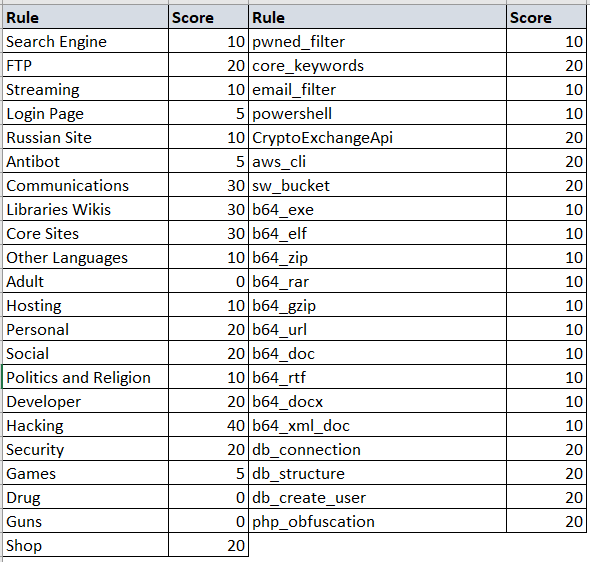
这些值是动态的,可以根据你的需要更改。
新的 yararule 可以添加到类别文件和关键词文件中,这样你就可以消除误报并获得更令人满意的结果。
设置文件中需要更改的地方很少,但它们对使用该脚本非常重要。
以下字段用于配置 tor 网络代理,如果你运行的是 Windows 脚本,端口通常会变为 9051
server_proxy:  localhost
port_proxy:  9050
type_proxy:  socks5h
timeout server 字段用于确定等待请求的时间,时间越长,脚本运行所需的时间就越长。
timeout: 30
score server 字段用于确定 URL 被爬取并发送到 syslog 的最低分数值。
score_categorie:  20
score_keywords:  40
有些 url 会离线,很难知道它们是否会恢复,因此我创建了一个计数器,你可以确定最大尝试次数,一旦达到该次数,脚本将不再尝试访问该 url。
count_categories: 5
每当对 url 进行爬取时,都会保存该次最后扫描的日期,你可以确定同一 url 两次扫描之间的天数限制。
daystime: 10
最后,我不再使用 django,现在要查看结果,你需要一个类似 Splunk 或 ELK 的 syslog,你只需在此处定义它们
sendlog:  True
logport:  5151
logip:  "localhost"
它的使用更简单,你只需要安装 tor 和 python 库,为此请运行以下命令:
pip install -r requirements.txt
在安装 tor 客户端和库之后,使用 --help 命令获取其使用详情。
➜  python3 observer.py -h
usage: observer.py [-h] [--config CONFIG] [--crawler] [--url URL] [--search]
                   [--engines ENGINES] [--find FIND] [--pastebin PASTEBIN]

VigilantOnion is a script to collect as many sites from the onion network as
possible and add them to a database. With all possible sites collected, a
crawler will be created so that we can monitor the search for keywords defined
by you.

optional arguments:
  -h, --help            show this help message and exit
  --config CONFIG, -c CONFIG
                        Configuration file in yaml format
  --crawler             Starts the TOR network URL crawler process.
  --url URL, -u URL     Specifies the URL to crawl.
  --search              Start the URL search process on the surface. Select a
                        framework where you want to search for urls.
  --engines ENGINES, -e ENGINES
                        Validates the available engines for searching URLs.
  --find FIND, -f FIND  Search for arguments on .onion network research sites
  --pastebin PASTEBIN   Search for .onion urls in pastebin paste.

You can also develop new framework so that the database has more urls onions.
要让脚本正常工作,你需要新的 URL,为此我创建了一个在表层网络上搜索 URL 的方法,如下例所示:
python3.6 observer.py --config config/config.yml --search -e "gist,reddit,cybersecuritynews,discoverdarkwebservice"
你也可以直接从 pastebin 文件中获取 URL,如下例所示:
python3.6 observer.py --config config/config.yml --search --pastebin "s7TPZCKz,kSaYqtVX,0GYEEApe,3qkqyqiM,RfgBLg5Q,gtksBij4,FpPzQKHg,wB0uh00r,jDGJhQCC,q6DZ9U,ac2TnUjY,pv4xRWXQ,PgLUE7pF,9XW5Pc7R,hqyGMi7e,UZRM2z8y,7tQvV5CU,9JhVq3H3,Cb5HTydt,kMW5wp3N,v5Yq66sH,2q3SsR3a,gnd8jx97,QwSJYhYF,iNydrDfe"
收集到一些 URL 后,你就可以启动爬虫进程了。 请记住,第一次运行耗时最长,因为网站内容的分类和归类将在此时完成。
python3.6 observer.py --config config/config.yml --crawler
如果你想爬取单个 URL,请使用:
python3.6 observer.py --config config/config.yml --crawler --url "76qugh5bey5gum7l.onion"
结果的输出为 json 格式,并以相同的格式发送到所选的 syslog。
{
  "lastscan": "2020-06-29",
  "id": 10760,
  "type": "URI",
  "url": "lolitmhfkpif7sky.onion",
  "title": "Lolita Club",
  "baseurl": "vyqi2nm36otufrgg.onion",
  "status": "Online",
  "count_status": 0,
  "source": "Script",
  "categorie": [
    {
      "full_categorie": [
        "no_match"
      ],
      "score_categorie": 0
    }
  ],
  "keywords": [
    {
      "full_keywords": [
        "no_match"
      ],
      "score_keywords": 0
    }
  ],
  "discovery_date": "2020-06-29 14:24"
}
我使用 splunk,你可以把你的仪表盘做得和我的一样:

欢迎 fork 或提交 issue 来参与项目协作。