
Skip to content
KitploitKITPLOIT
工具漏洞利用博客
Log in
提交
工具漏洞利用博客
提交

黑客、渗透测试和网络安全工具,武装您的安全武器库!

Kitploit 是一个黑客、网络安全和渗透测试工具的目录。发现最新的项目更新,查找漏洞、分析系统、自动化测试并加强你的安全。

订阅源联系隐私© 2026 Kitploit

工具目录

分类

查看所有分类
Loading categories
0 — Open-source cybersecurity harness to build and deploy sovereign, persistent AI security agents (sentinels) that continuously find, prove and fix security risks. Web UI, CLI, CI and MCP. | Kitploit
工具/GitHubGitHub/0sec-labs/0
Static AnalysisVulnerability ScannersVulnerability AnalysisFuzzingPenetration TestingDevSecOpsBinary AnalysisRed TeamingAI Security
GitHub0sec-labs/0

0

Open-source cybersecurity harness to build and deploy sovereign, persistent AI security agents (sentinels) that continuously find, prove and fix security risks. Web UI, CLI, CI and MCP.


1.5k20119411小时9分前Kitploit 审核通过
分享
查看仓库网站
内容在请求的语言中不可用。显示英文版本。

0security

Sovereign AI security agents

By the Swiss Applied AI & Cybersecurity Research Lab

Backed by Y Combinator

Latest release MIT or Apache-2.0 license GitHub stars

0security is software infrastructure to deploy sovereign, persistent AI security agents that find and fix security risks across any tech stack, work with any model, and run anywhere.


Documentation Security research Install locally Enterprise

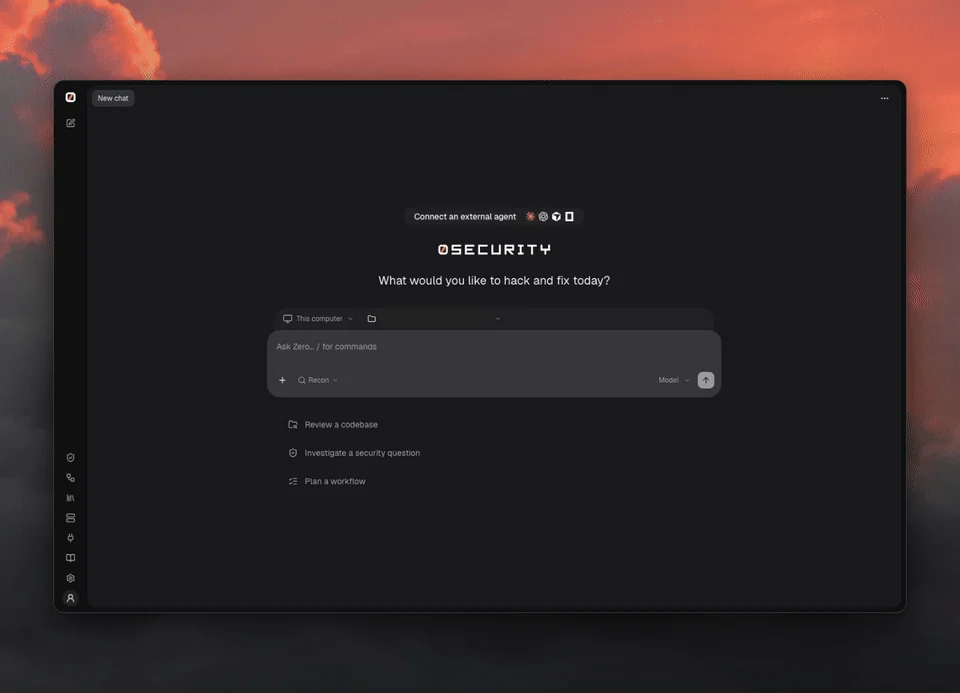
0 web UI: review a demo API, watch the investigation, then open findings with suggested fixes and verification

Quick start

curl -fsSL https://raw.githubusercontent.com/0sec-labs/0security/main/install.sh | bash
0

Prefer the terminal?

export OPENAI_API_KEY="your-api-key"
0 threads send new "Review ./your-repo for security problems"
0 findings list

Any supported provider works: set its key instead (Anthropic, OpenRouter, DeepSeek and more, see Models), or connect one in the browser with 0.

Windows, Docker and source installs
  • Windows (experimental): download 0-windows-x64.exe from Releases.
  • Docker: docker run --rm ghcr.io/0sec-labs/0security:latest --help. See the Docker guide.
  • Source: Node.js 24+ and pnpm, then pnpm install --frozen-lockfile && pnpm build.
  • install.sh supports Apple Silicon macOS and x64/ARM64 Linux. Set INSTALL_DIR to change the location.

Only point 0 at systems you own or are authorized to test.
What can you do with 0?

  • Talk to a security agent about a folder on your computer or a remote Computer, in a Thread
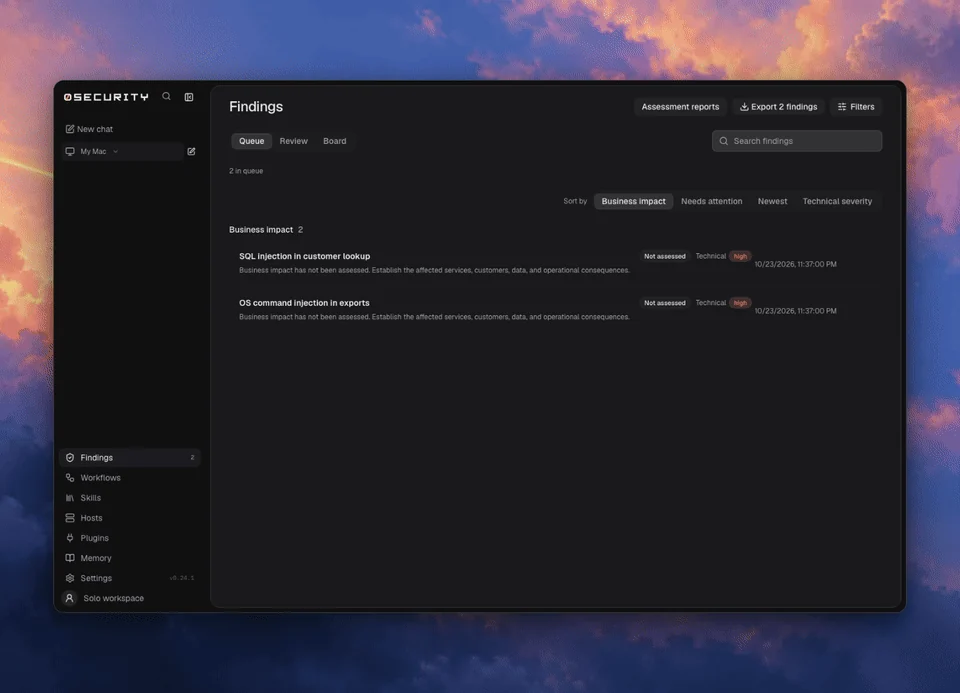
  • Review findings on a board, with source evidence, and export them
  • Verify fixes: a finding is marked Verified by or Not verified
  • Build persistent security agents: Sentinels are standing threads that wake on a schedule or on every pull request, with skills, memory and automations written as prompts
  • Keep memory as plain notes that every thread can read
  • Extend it with extensions and skills

0 findings: review the queue, organize the board, and inspect source evidence

Why 0?

  • Open source: MIT or Apache-2.0, built in the open
  • Private: runs on your computer, in your CI or in a container, and only the context you send to your chosen model leaves it
  • Flexible: any provider key or local OpenAI-compatible server, from the CLI, CI or a coding agent
  • Evidence first: every finding links to its source evidence
  • Verified: a finding says whether it was verified, and by what
  • Proven in public: disclosed vulnerabilities and upstream fixes, including in the Linux kernel

Coding agents

0 sentinels run <id> --task "Review this pull request" --yes

See the command reference.

Learn more

  • Documentation
  • Models and providers
  • Extensions and MCP
  • Command reference
  • Security research
  • Enterprise

Contributing

0 is built in the open. Huge thanks to everyone who has filed a bug, fixed a doc or sent a patch.

  • Report bugs in issues
  • Improve the docs
  • Write an extension or a skill
  • Found a vulnerability in 0? See SECURITY.md

Start with the contributing guide. Run pnpm install and pnpm dev to work on the engine. Open an issue before large changes.


Contributors to 0sec-labs/0security

License

MIT OR Apache-2.0. Public disclosures and upstream fixes.

下载工具

最受欢迎

查看全部 →

发现我们社区最常用的工具。

  • 1

    OsintHunter

    letox4/osinthunter

    🎯 终极 OSINT 工具包:调查图谱、置信度评分、别名家族、地图、时间线和报告。49 个模块、400+ 个站点,无需 API 密钥。

    786
  • 2

    ghostlock-app

    yukonga/ghostlock-app

    GhostLock 一键执行应用(CVE-2026-43499)

    506
  • 3

    ARTEX

    baarai/artex

    基于LLM的多智能体自主渗透测试平台,具备规划器/执行器智能体、资产与探索图谱、MITM流量记录以及漏洞复测功能。

    429
  • 4

    redforge

    cybersecurity91/redforge

    浏览器端红队工具包,包含 102 个离线工具,用于侦察、载荷生成、凭据攻击、加密、编码和交战报告。

    345
  • 5

    CyberStrikeAI

    ed1s0nz/cyberstrikeai

    AI原生网络安全的行动系统——在这里,意图转化为受治理的执行,证据沉淀为运营记忆,每一次操作都让下一次更出色。

    262
  • 6

    looking-glass

    anonghosty/looking-glass

    CSIRT 平台,可将 Shadowserver 报告导入 MongoDB,并将其重放为交互式地图、分析、发现、公告和高管仪表板。

    256

探索所有工具

浏览我们的工具集合

查看所有工具 →