
mboxshell v0.6.2
mboxShell。适用于任意大小 MBOX 文件的快速终端查看器。无需加载到内存,即可打开、搜索和导出 Gmail Takeout 备份(50GB+)中的电子邮件。使用 Rust 构建。
mboxShell
适用于任意大小 MBOX 文件的快速终端查看器。无需将邮件加载到内存中,即可打开、搜索并导出 Gmail Takeout 备份(50 GB+)中的邮件。


为什么会有这个项目
当你使用 Google Takeout 从 Gmail 导出邮件时,会得到一个或多个 .mbox 文件,大小可能达到数十 GB——此外,你拥有的每个 Google Group 还会多出一个邮箱,这一点很容易被忽略,而且它可能比 Gmail 导出本身还要大。目前没有跨平台的终端工具能够在不将文件完全加载到内存的情况下高效地打开、搜索和浏览这些文件。
mboxShell 正是为解决这一问题而构建:在几秒内打开 50 GB 的 MBOX,流畅浏览数十万封邮件,按发件人、日期或内容搜索,并导出你需要的任何内容。一切都在终端中完成,无需 GUI、无需服务器、无外部依赖。
使用场景
- 浏览 Gmail 备份(Google Takeout),保留其原始标签
- 读取你拥有的群组,Takeout 会将其导出为独立邮箱——通常是归档中最大的文件
- 分析邮件归档,用于服务器、迁移或审计场景
- 搜索邮件,支持来自任何来源的 MBOX 文件(Thunderbird、Unix 服务器等)
- 导出邮件为 EML、CSV 或纯文本,以便进一步处理
- 提取附件,可单独提取或批量提取
- 合并多个 MBOX 文件为一个,并去除重复项
在 Mac 上也可使用:mboxViewer
如果你更喜欢 macOS 上的原生图形体验,请查看 mboxViewer——这是由同一团队构建的原生 Mac 应用。它提供熟悉的邮箱式界面,可打开、浏览和搜索 MBOX 文件,而无需将其导入邮件客户端。拖放你的 .mbox 文件,即可在简洁的 macOS 原生窗口中即时访问所有邮件、附件和标签。非常适合希望获得 mboxShell 解析引擎的强大能力,同时享受桌面 GUI 舒适体验的用户。
在浏览器中也可使用:Online Mbox Viewer
需要在不安装任何东西的情况下查看 MBOX 文件?试试 Online Mbox Viewer——这是同一作者开发的免费、MIT 许可的 Web 应用。它完全在浏览器中打开并渲染 .mbox 文件:不会上传到任何服务器,因此你的邮件始终留在你的机器上。非常适合从任何设备快速查看。源代码位于 github.com/dcarrero/online-mbox-viewer。
功能特性
- 从不将文件加载到内存中。 使用 1 MB 缓冲区的流式 I/O。100 GB 的 MBOX 使用的内存与 1 GB 的 MBOX 大致相同,约为 500 MB(只有元数据索引驻留在内存中)。
- 持久化索引。 首次打开时会创建二进制索引(
.mboxshell.idx),因此后续打开耗时不到一秒。 - 完整的 Gmail 支持。 检测并将
X-Gmail-Labels作为虚拟文件夹显示在侧边栏面板中,让你可以按收件箱、已发送、星标、自定义标签等进行筛选。 - Google Groups 邮箱。 读取 Takeout 归档为每个你拥有的群组附带的
topics.mbox文件,以群组名称而非无意义的文件名来命名它们,将群组显示为虚拟标签,并按精确的X-GM-THRIDid 对会话进行线程化。 - 正确的编码。 解码 RFC 2047 编码字,支持 UTF-8、ISO-8859-1、Windows-1252、KOI8-R,以及
encoding_rs能识别的任何字符集。 - 会话线程化。 使用 JWZ 算法(与 Netscape/Mozilla 使用的算法相同)将消息分组为线程,或在邮箱自身带有会话 id 时使用该 id。
- 高级搜索。 字段特定筛选(
from:、subject:、date:、body:、has:attachment、label:等)、日期范围、大小筛选、AND/OR 运算符以及取反。 - 灵活导出。 单个或批量导出为 EML、CSV(兼容 Excel)、纯文本、HTML、新的 MBOX 或 Maildir。解码附件提取。
- 单一二进制文件。 无运行时,无依赖。一个约 5 MB 的可执行文件,可在 Linux、macOS 和 Windows 上运行。
- 完整的终端 UI。 键盘导航(vi 风格)、三种布局模式、交互式搜索栏、可配置快捷键。
- 双语。 界面提供英语和西班牙语,根据系统区域设置自动检测。
安装
预构建二进制文件(推荐)
从 Releases 页面下载适用于你平台的最新版本:
| 平台 | 二进制文件 |
|---|---|
| Linux x86_64 | mboxshell-linux-x86_64 |
| Linux ARM64 | mboxshell-linux-aarch64 |
| Linux RISC-V 64 | mboxshell-linux-riscv64 |
| FreeBSD x86_64 | mboxshell-freebsd-x86_64 |
| macOS Intel | mboxshell-macos-x86_64 |
| macOS Apple Silicon | mboxshell-macos-aarch64 |
| Windows x86_64 | mboxshell-windows-x86_64.exe |
| Windows ARM64 | mboxshell-windows-arm64.exe |
下载后,使其可执行并将其移动到你的 PATH 中:
# Linux / macOS
chmod +x mboxshell-*
sudo mv mboxshell-* /usr/local/bin/mboxshell

# Or place it in a user-local directory
mv mboxshell-* ~/.local/bin/mboxshell
在 Windows 上,将 mboxshell-windows-x86_64.exe 移动到 PATH 中的某个文件夹,或直接运行它。
从源码构建
要求:Rust 1.85 或更高版本。
# Clone and build
git clone https://github.com/dcarrero/mboxshell.git
cd mboxshell
cargo build --release

# The binary is at target/release/mboxshell
# Install it system-wide:
sudo cp target/release/mboxshell /usr/local/bin/

# Or for the current user only:
cp target/release/mboxshell ~/.local/bin/
为其他平台交叉编译
# Add the target you need
rustup target add aarch64-apple-darwin      # macOS Apple Silicon
rustup target add x86_64-unknown-linux-gnu  # Linux x86_64
rustup target add aarch64-unknown-linux-gnu # Linux ARM64

# Build for a specific target
cargo build --release --target aarch64-apple-darwin
通过 Cargo 安装
cargo install --git https://github.com/dcarrero/mboxshell.git
快速开始
# Open an MBOX file in the terminal UI
mboxshell mail.mbox

# Index and show statistics
mboxshell index mail.mbox
mboxshell stats mail.mbox

# Search from the command line
mboxshell search mail.mbox "from:[email protected] date:2024"
mboxshell search mail.mbox "has:attachment subject:invoice" --json

# Export messages
mboxshell export mail.mbox --format eml --output ./emails/
mboxshell export mail.mbox --format csv --output summary.csv

# Hand over only part of an archive: a new mailbox with just the matches
mboxshell export mail.mbox --format mbox --query "from:[email protected]" -o handover.mbox

# Convert to Maildir (read/replied/flagged state kept as Maildir flags)
mboxshell export mail.mbox --format maildir -o ~/Maildir/Archive

# Extract attachments
mboxshell attachments mail.mbox --output ./attachments/

# Merge multiple MBOX files (duplicates are removed by default)
mboxshell merge file1.mbox file2.mbox -o merged.mbox

# Merge tagging every message with the mailbox it came from
mboxshell merge Inbox.mbox Sent.mbox -o merged.mbox --source-header

# Generate shell completions
mboxshell completions bash > /etc/bash_completion.d/mboxshell
mboxshell completions zsh > ~/.zfunc/_mboxshell
mboxshell completions fish > ~/.config/fish/completions/mboxshell.fish
CLI 命令
| 命令 | 描述 |
|---|---|
mboxshell [FILE] | 在 TUI 中打开文件(默认操作) |
mboxshell open <path> | 在 TUI 中打开 MBOX 文件 |
mboxshell index <path> [-f/--force] | 构建或重建二进制索引 |
mboxshell stats <path> [--json] | 显示 MBOX 文件的统计信息 |
mboxshell search <path> <query> [--json] | 从命令行搜索邮件 |
mboxshell export <path> -f <format> -o <output> [--query <q>] | 导出邮件(格式:eml、csv、txt、html、mbox、maildir) |
mboxshell merge <files...> -o <output> [--no-dedup] [--source-header] | 将多个 MBOX 文件合并为一个 |
mboxshell attachments <path> -o <output> | 提取所有附件 |
mboxshell completions <shell> | 生成 shell 补全(bash、zsh、fish、powershell、elvish) |
mboxshell manpage | 生成 man 手册页 |
mboxshell config [path|show|defaults] | 显示配置文件位置、内容或默认值 |
全局标志:
| 标志 | 描述 |
|---|---|
-f、--force | 强制重建索引,即使索引已存在(在 export 中,-f 是 --format——在那里请完整拼写 --force) |
-v、--verbose | 增加日志详细程度(-v info、-vv debug、-vvv trace) |
--lang <en|es> | 强制界面语言(默认自动检测) |
合并标志:
| 标志 | 描述 |
|---|---|
--no-dedup | 跳过重复检测,逐字节拼接输入,仅在未以换行结尾的输入后添加一个换行符(默认开启去重:当邮件的 Message-ID 和内容都与较早的邮件匹配时,该邮件即为重复) |
--source-header | 向每封邮件注入 X-Mbox-Source: <mailbox name> 头,使合并后的归档可追溯到每封邮件来源的邮箱 |
源标签是你看到的邮箱名称:对于 Apple Mail 导出——一个名为 Inbox.mbox 的目录,其中包含一个字面名为 mbox 的文件——它显示为 Inbox.mbox,而不是 mbox。最终会共享同一标签的邮箱会相互区分(Work/Inbox.mbox 与 Personal/Inbox.mbox)。
终端 UI
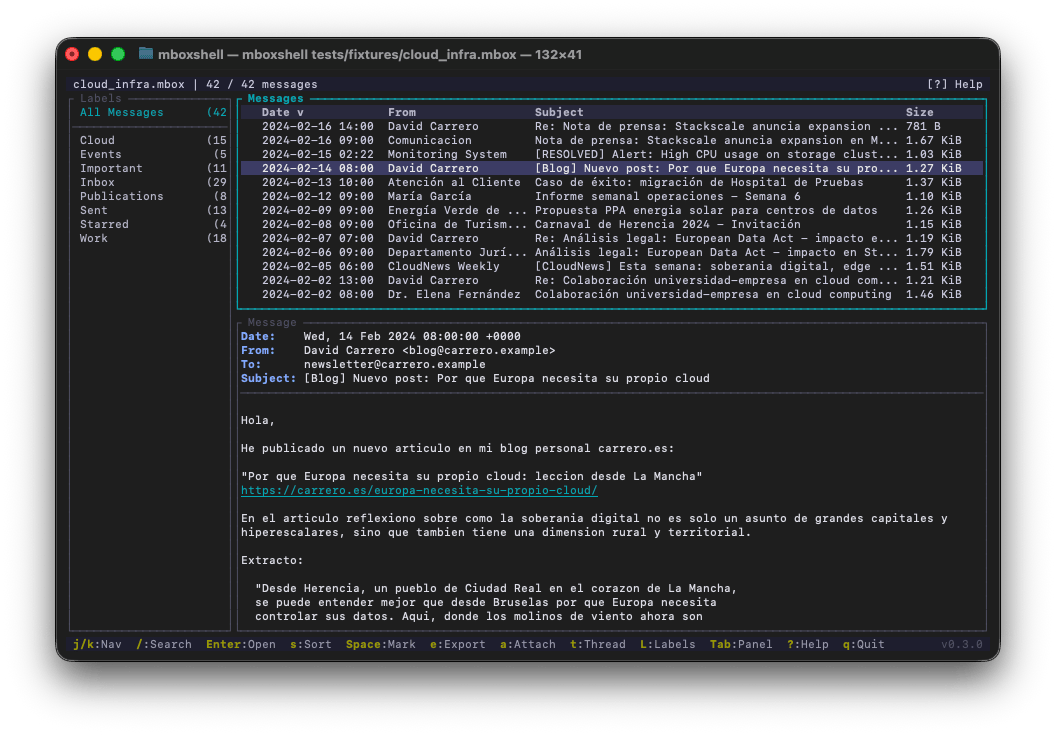
键盘快捷键
| 按键 | 操作 |
|---|---|
j / k | 下一条 / 上一条邮件 |
g / G | 第一条 / 最后一条邮件 |
PgDn / PgUp | 向下翻页 / 向上翻页 |
Enter | 打开邮件 / 切换到邮件视图 |
Shift-↑ / Shift-↓ | 滚动所选邮件正文(保持列表焦点);邮件边框会显示位置指示器(Top / NN% / Bot) |
Tab / Shift-Tab | 循环切换面板焦点 |
Esc | 返回列表 / 关闭弹窗 |
/ | 打开搜索栏 |
f | 打开搜索过滤弹窗 |
n / N | 下一个 / 上一个搜索结果 |
Space | 标记 / 取消标记邮件 |
* | 标记 / 取消标记全部 |
s | 循环切换排序列(日期、发件人、主题、大小) |
S | 切换排序方向 |
e | 导出邮件(EML、TXT、CSV、附件) |
a | 显示附件(j/k 导航,Enter 保存,A 全部保存) |
t | 切换会话(线程)视图 |
l | 显示 / 聚焦 / 隐藏标签侧边栏 |
h | 切换完整邮件头 |
r | 切换原始邮件源 |
1 / 2 / 3 | 布局:仅列表 / 水平分割 / 垂直分割 |
? | 帮助 |
F1 | 搜索语法(在搜索栏内也可用) |
q | 退出 |