返回更新列表
新发布Sep 4, 2026

safe-chain v1.5.16

使用 Aikido Safe Chain 防范通过 npm、yarn、pnpm、npx、pnpx、pip、uv 和 poetry 安装的恶意代码。免费使用,无需令牌。
分享

Aikido Safe Chain

Aikido Safe Chain

NPM Version NPM Downloads

  • 在开发者笔记本电脑和 CI/CD 上阻止恶意软件
  • 支持 npm 和 PyPI,更多包管理器即将推出
  • 阻止发布不足 48 小时的包,且不会中断您的构建
  • 无需令牌、免费、不共享构建数据

需要 npm 和 PyPI 之外的保护?

Aikido Device Protection 基于 Safe Chain 构建,将包和扩展安全性扩展到更多生态系统:npmPyPIVS CodeOpen VSX - (Cursor、Windsurf、Kiro、Vs Codium、...)、MavenNuGetChrome 扩展GoSkills.sh AI 技能RubyRust 等。

获取集中式策略管理、请求与审批工作流,以及您组织中每个开发者工作站的可见性。由相同的 Aikido Intel 数据源提供支持。可手动部署,或通过您的 MDM 工具(Jamf、Fleet 或 Iru)进行管理。


Aikido Safe Chain 支持以下包管理器:

  • 📦 npm
  • 📦 npx
  • 📦 yarn
  • 📦 pnpm
  • 📦 pnpx
  • 📦 rush
  • 📦 rushx
  • 📦 bun
  • 📦 bunx
  • 📦 pip
  • 📦 pip3
  • 📦 uv
  • 📦 poetry
  • 📦 uvx
  • 📦 pipx
  • 📦 pdm

使用方法

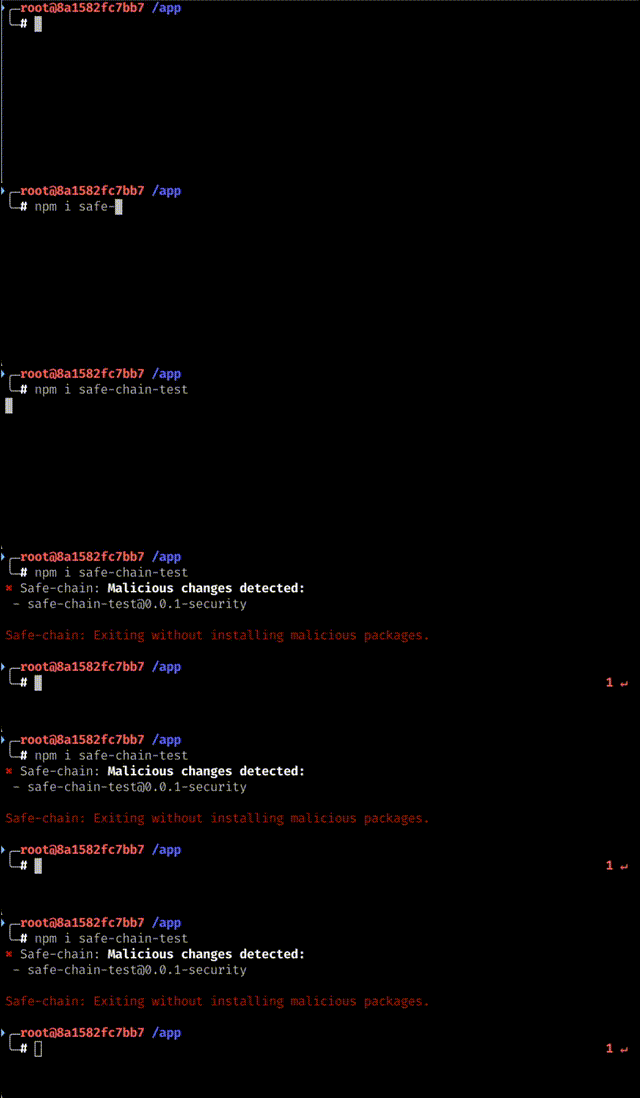
Aikido Safe Chain 演示

安装

使用安装脚本即可轻松安装 Aikido Safe Chain。

Unix/Linux/macOS```shell

curl -fsSL https://github.com/AikidoSec/safe-chain/releases/download/1.5.16/install-safe-chain.sh -o /tmp/install-safe-chain.sh
&& echo "7a7b6e54c2e0adbcb53bc1bf7d258cc974f8f31e77ed048b88e4d2e4ac758839 /tmp/install-safe-chain.sh" | sha256sum -c -
&& sh /tmp/install-safe-chain.sh
&& rm /tmp/install-safe-chain.sh

### Windows (PowerShell)```powershell
$installer = Join-Path $env:TEMP "install-safe-chain.ps1"
Invoke-WebRequest "https://github.com/AikidoSec/safe-chain/releases/download/1.5.16/install-safe-chain.ps1" -OutFile $installer -UseBasicParsing
$expectedHash = "6F46B5CFA42DDF9545616E169A567E764CE179E6321E6555D2C3A81768E2635D"
if ((Get-FileHash $installer -Algorithm SHA256).Hash -ne $expectedHash) {
    Remove-Item $installer -ErrorAction SilentlyContinue
    throw "Checksum verification failed for install-safe-chain.ps1"
}
& $installer
Remove-Item $installer

上述安装命令始终引用特定版本。如需安装其他版本,请将版本号替换为您所需的版本号。所有可用版本均可在发布页面查看。

下载完整性

安装脚本通过带版本号的发布URL(releases/download/1.5.16/...)提供。GitHub发布内容不可变——一旦工件发布到带版本号的URL,便无法修改或替换,因此您下载的文件保证与发布时完全一致。

验证安装

  1. ❗重启您的终端以开始使用Aikido Safe Chain。

    • 此步骤至关重要,因为它可确保npm、npx、yarn、pnpm、pnpx、rush、rushx、bun、bunx、pip、pip3、poetry、uv、uvx、pipx和pdm的shell别名被正确加载。如果您不重启终端,这些别名将不可用。
  2. 验证安装,请运行以下验证命令: ```shell npm safe-chain-verify pnpm safe-chain-verify pip safe-chain-verify uv safe-chain-verify

    Any other supported package manager: {packagemanager} safe-chain-verify

  • 输出应显示“OK: Safe-chain works!”,确认 Aikido Safe Chain 已正确安装并运行。
  1. (可选)测试恶意软件拦截,尝试安装一个测试包:

    对于 JavaScript/Node.js: ```shell npm install safe-chain-test

对于 Python: ```shell pip3 install safe-chain-pi-test

- 输出应显示 Aikido Safe Chain 正在阻止安装这些测试包,因为它们被标记为恶意软件。

当运行 `npm`、`npx`、`yarn`、`pnpm`、`pnpx`、`rush`、`rushx`、`bun`、`bunx`、`pip`、`pip3`、`uv`、`uvx`、`poetry`、`pipx` 和 `pdm` 命令时,Aikido Safe Chain 会自动检查你尝试安装的包中是否存在恶意软件。它还会在可用时拦截 pip 的 Python 模块调用(例如,`python -m pip install ...`、`python3 -m pip download ...`)。如果检测到任何恶意软件,它会提示你退出该命令。

你可以通过运行以下命令检查已安装的版本:```shell
safe-chain --version

工作原理

恶意软件拦截

Aikido Safe Chain 通过运行一个轻量级代理服务器来工作,该服务器会拦截来自 npm 仓库和 PyPI 的软件包下载。当你运行 npm、npx、yarn、pnpm、pnpx、rush、rushx、bun、bunx、pip、pip3、uv、uvx、poetry、pipx 或 pdm 命令时,所有软件包下载都会经过这个本地代理,它会根据 Aikido Intel - Open Sources Threat Intelligence 实时验证软件包。如果在任何软件包(包括深层依赖)中检测到恶意软件,代理会在恶意代码到达你的机器之前阻止下载。

最低软件包年龄

Safe Chain 会对受支持的生态系统应用最低软件包年龄检查。

当前不同生态系统的执行方式有所不同:

  • 基于 npm 的软件包管理器:
    • 在正常的软件包解析过程中,Safe Chain 会从仓库返回的软件包元数据中抑制那些比配置的最低年龄更新的版本
    • 对于绕过该元数据流程的直接软件包下载请求,Safe Chain 可以使用新发布软件包的缓存列表直接阻止该请求
  • Python 软件包管理器:
    • 在软件包解析过程中,Safe Chain 会从 PyPI 元数据响应中抑制过于年轻的文件和版本
    • 对于绕过该元数据流程的直接软件包下载请求,Safe Chain 可以使用新发布软件包的缓存列表直接阻止该请求

默认情况下,最低软件包年龄为 48 小时。这在新发布的软件包最容易包含未检测到威胁的关键时期提供了额外的安全层。你可以配置此阈值或完全绕过此保护——请参阅下方的 最低软件包年龄配置 部分。

Shell 集成

Aikido Safe Chain 与你的 shell 集成,以便在使用 npm、npx、yarn、pnpm、pnpx、rush、rushx、bun、bunx 以及 Python 软件包管理器(pip、uv、uvx、poetry、pipx、pdm)时提供无缝体验。它会为这些命令设置别名,使其被 Aikido Safe Chain 命令包装,这些命令会在执行原始命令之前管理代理服务器。我们目前支持:

  • Bash
  • Zsh
  • Fish
  • PowerShell
  • PowerShell Core

有关 shell 集成的更多信息,请参阅 shell 集成文档

卸载

要卸载 Aikido Safe Chain,请使用我们的一行卸载命令:

Unix/Linux/macOS```shell

curl -fsSL https://github.com/AikidoSec/safe-chain/releases/download/1.5.16/uninstall-safe-chain.sh | sh

### Windows (PowerShell)```powershell
iex (iwr "https://github.com/AikidoSec/safe-chain/releases/download/1.5.16/uninstall-safe-chain.ps1" -UseBasicParsing)

❗卸载后请重启终端,以确保所有别名均已移除。

配置

日志记录

你可以通过 --safe-chain-logging 标志或 SAFE_CHAIN_LOGGING 环境变量来控制 Aikido Safe Chain 的输出。

配置选项

你可以通过多个来源设置日志级别(按优先级排序):

  1. 命令行参数(最高优先级):

    • --safe-chain-logging=silent - 抑制 Aikido Safe Chain 的所有输出,除非检测到恶意软件被阻止。包管理器的输出正常写入 stdout,而 Safe Chain 仅在其阻止了恶意软件并导致进程退出时写入一条简短消息。

      npm install express --safe-chain-logging=silent
      
    • --safe-chain-logging=verbose - 启用 Aikido Safe Chain 的详细诊断输出。适用于排查问题或了解 Safe Chain 在后台执行的操作。

      npm install express --safe-chain-logging=verbose
      
  2. 环境变量: ```shell export SAFE_CHAIN_LOGGING=verbose npm install express

有效值:silentnormalverbose

这对于在终端会话或 CI/CD 环境中为所有包管理器命令设置默认日志级别非常有用。

文件日志

你可以使用 --safe-chain-log-file 标志或 SAFE_CHAIN_LOG_FILE 环境变量将 Aikido Safe Chain 输出镜像到日志文件中。文件日志默认禁用,当设置路径后启用。文件格式(--safe-chain-log-file-format)和详细程度(--safe-chain-log-file-verbosity)与终端输出独立控制。

配置选项

可通过以下任一方式设置(按优先级排序):

  1. CLI 参数(最高优先级): ```shell npm install express
    --safe-chain-log-file=~/safe-chain.log
    --safe-chain-log-file-format=plain
    --safe-chain-log-file-verbosity=normal
  2. 环境变量: ```shell export SAFE_CHAIN_LOG_FILE=~/safe-chain.log export SAFE_CHAIN_LOG_FILE_FORMAT=plain export SAFE_CHAIN_LOG_FILE_VERBOSITY=normal
  3. 配置文件 (~/.safe-chain/config.json): ```json { "logFile": "~/safe-chain.log", "logFileFormat": "plain", "logFileVerbosity": "normal" }

logFileFormatjson(默认)或 plain

logFileVerbositysilentnormalverbose(默认)。独立于 --safe-chain-logging

最小软件包年龄

您可以配置软件包在 Safe Chain 允许其安装之前必须存在的时间长度。默认情况下,软件包必须至少存在 48 小时才能被安装。

对于基于 npm 的软件包管理器,此检查目前有两种强制执行模式:

  • Safe Chain 在正常依赖解析期间,从软件包元数据中抑制过于年轻的版本。
  • 当直接软件包下载请求与缓存的新发布软件包列表匹配时,Safe Chain 会阻止这些请求。

对于 Python 软件包管理器,此检查目前有两种强制执行模式:

  • Safe Chain 在依赖解析期间,从 PyPI 元数据中抑制过于年轻的文件和发布版本。
  • 当直接软件包下载请求与缓存的新发布软件包列表匹配时,Safe Chain 会阻止这些请求。

配置选项

您可以通过多个来源设置最小软件包年龄(按优先级顺序):

  1. 命令行参数(最高优先级): ```shell npm install express --safe-chain-minimum-package-age-hours=48
  2. 环境变量: ```shell export SAFE_CHAIN_MINIMUM_PACKAGE_AGE_HOURS=48 npm install express
  3. 配置文件~/.safe-chain/config.json): ```json { "minimumPackageAgeHours": 48 }

排除包

通过环境变量或配置文件(两者会合并)排除受信任的包,使其不受最低年龄过滤的影响。使用 @scope/* 可信任来自某个组织的所有包:```shell export SAFE_CHAIN_MINIMUM_PACKAGE_AGE_EXCLUSIONS="@aikidosec/*"

## 安装

### 从源码构建

```bash
git clone https://github.com/xxx/xxx.git
cd xxx
go build

使用 Docker

docker pull xxx/xxx
docker run -it xxx/xxx

快速开始

./xxx -h

配置

配置文件位于 config.yaml,示例配置如下:

server:
  host: 0.0.0.0
  port: 8080

使用示例

./xxx --target example.com
``````json
{
  "npm": {
    "minimumPackageAgeExclusions": ["@aikidosec/*"]
  },
  "pip": {
    "minimumPackageAgeExclusions": ["requests"]
  }
}

自定义注册表

配置 Safe Chain 以扫描来自自定义或私有注册表的软件包。

支持的生态系统:

  • Node.js
  • Python

配置选项

您可以通过环境变量或配置文件设置自定义注册表。两种来源会合并在一起。

  1. 环境变量(逗号分隔): ```shell export SAFE_CHAIN_NPM_CUSTOM_REGISTRIES="npm.company.com,registry.internal.net" export SAFE_CHAIN_PIP_CUSTOM_REGISTRIES="pip.company.com,registry.internal.net"
  2. 配置文件~/.safe-chain/config.json): ```json { "npm": { "customRegistries": ["npm.company.com", "registry.internal.net"] }, "pip": { "customRegistries": ["pip.company.com", "registry.internal.net"] } }

PYPI 配置文件

如果您依赖 pip.conf 文件进行 pip 配置,则必须通过 PIP_CONFIG_FILE 环境变量显式地将其指向 pip,以便 Safe Chain 能够合并它。

Safe Chain 在其 MITM 代理后面运行 pip,并写入一个临时 pip 配置文件以注入其证书和代理设置。当设置了 PIP_CONFIG_FILE 时,Safe Chain 会将其设置合并到您文件的副本中(您的原始文件绝不会被修改),从而保留您的 index-url、凭据和其他选项。当未设置 PIP_CONFIG_FILE 时,pip 的用户级配置(例如 ~/.config/pip/pip.conf)可能会被 Safe Chain 的临时文件覆盖,您的设置将不会被采用。

恶意软件列表基础 URL

配置 Safe Chain 从自定义镜像 URL 获取恶意软件数据库和新软件包列表。这使您可以托管自己的 Aikido 恶意软件数据库副本。

配置选项

您可以通过多种来源设置恶意软件列表基础 URL(按优先级顺序):

  1. CLI 参数(最高优先级): ```shell npm install express --safe-chain-malware-list-base-url=https://your-mirror.com
  2. 环境变量: ```shell export SAFE_CHAIN_MALWARE_LIST_BASE_URL=https://your-mirror.com npm install express
  3. 配置文件~/.safe-chain/config.json): ```json { "malwareListBaseUrl": "https://your-mirror.com" }

基础 URL 应指向一个镜像 https://malware-list.aikido.dev/ 结构的服务器,包括以下路径:

  • /malware_predictions.json(JavaScript 生态系统恶意软件数据库)
  • /malware_pypi.json(Python 生态系统恶意软件数据库)
  • /releases/npm.json(JavaScript 新包列表)
  • /releases/pypi.json(Python 新包列表)

项目配置文件

除了主目录配置文件(~/.safe-chain/config.json)之外,Safe Chain 还支持项目配置文件,以便将设置检入仓库并与团队共享,而无需在每台机器上单独配置。

在仓库根目录的 .aikido 文件中添加一个 safe-chain: 部分(该文件与其他 Aikido 工具使用的文件相同,Safe Chain 仅读取自己的 safe-chain: 部分并忽略其余内容)。当找到该部分时,其设置会合并到主目录配置文件之上:项目配置中设置的值优先,而数组(如 customRegistries)会从两个文件中合并,而不是由其中一个替换另一个。

只能从项目配置文件中设置以下设置:```yaml safe-chain: minimumPackageAgeHours: 48 npm: customRegistries: - npm.company.com minimumPackageAgeExclusions: - "@aikidosec/*" pip: customRegistries: - pip.company.com minimumPackageAgeExclusions: - requests

类似 `scanTimeout`、`malwareListBaseUrl` 以及 `logFile*` 选项的设置无法通过项目配置文件进行配置——它们只能来自你的主目录配置、命令行参数或环境变量。

## 自定义安装目录

默认情况下,Safe Chain 会安装到 `~/.safe-chain`。你可以通过向安装程序传递显式的安装目录来更改此位置。这对于系统级安装(例如在 Docker 镜像内)或当你需要避免与其他工具发生冲突时非常有用。

设置后,所有 Safe Chain 数据(二进制文件、shims、脚本、配置)都将放置在自定义目录下,而不是 `~/.safe-chain`。

### Unix/Linux/macOS```shell
curl -fsSL https://github.com/AikidoSec/safe-chain/releases/download/1.5.16/install-safe-chain.sh -o /tmp/install-safe-chain.sh \
  && echo "7a7b6e54c2e0adbcb53bc1bf7d258cc974f8f31e77ed048b88e4d2e4ac758839  /tmp/install-safe-chain.sh" | sha256sum -c - \
  && sh /tmp/install-safe-chain.sh --install-dir /usr/local/.safe-chain \
  && rm /tmp/install-safe-chain.sh

Windows```powershell

$installer = Join-Path $env:TEMP "install-safe-chain.ps1" Invoke-WebRequest "https://github.com/AikidoSec/safe-chain/releases/download/1.5.16/install-safe-chain.ps1" -OutFile $installer -UseBasicParsing $expectedHash = "6F46B5CFA42DDF9545616E169A567E764CE179E6321E6555D2C3A81768E2635D" if ((Get-FileHash $installer -Algorithm SHA256).Hash -ne $expectedHash) { Remove-Item $installer -ErrorAction SilentlyContinue throw "Checksum verification failed for install-safe-chain.ps1" } & $installer -InstallDir 'C:\ProgramData\safe-chain' Remove-Item $installer

# 在 CI/CD 中使用

您可以通过将 Aikido Safe Chain 集成到构建流程中,保护您的 CI/CD 流水线免受恶意软件包的侵害。这可确保在自动化构建期间安装的任何软件包在安装前都经过恶意软件检查。

## 为 CI/CD 安装

使用 `--ci` 标志可自动为 CI/CD 环境配置 Aikido Safe Chain。这会在 PATH 中设置可执行 shim,而不是 shell 别名。

### Unix/Linux/macOS(GitHub Actions、Azure Pipelines 等)```shell
curl -fsSL https://github.com/AikidoSec/safe-chain/releases/download/1.5.16/install-safe-chain.sh -o /tmp/install-safe-chain.sh \
  && echo "7a7b6e54c2e0adbcb53bc1bf7d258cc974f8f31e77ed048b88e4d2e4ac758839  /tmp/install-safe-chain.sh" | sha256sum -c - \
  && sh /tmp/install-safe-chain.sh --ci \
  && rm /tmp/install-safe-chain.sh

Windows(Azure Pipelines 等)```powershell

$installer = Join-Path $env:TEMP "install-safe-chain.ps1" Invoke-WebRequest "https://github.com/AikidoSec/safe-chain/releases/download/1.5.16/install-safe-chain.ps1" -OutFile $installer -UseBasicParsing $expectedHash = "6F46B5CFA42DDF9545616E169A567E764CE179E6321E6555D2C3A81768E2635D" if ((Get-FileHash $installer -Algorithm SHA256).Hash -ne $expectedHash) { Remove-Item $installer -ErrorAction SilentlyContinue throw "Checksum verification failed for install-safe-chain.ps1" } & $installer -ci Remove-Item $installer

## 支持的平台

- ✅ **GitHub Actions**
- ✅ **Azure Pipelines**
- ✅ **CircleCI**
- ✅ **Jenkins**
- ✅ **Bitbucket Pipelines**
- ✅ **GitLab Pipelines**

## GitHub Actions 示例```yaml
- name: Setup Node.js
  uses: actions/setup-node@v4
  with:
    node-version: "22"
    cache: "npm"

- name: Install safe-chain
  run: |
    curl -fsSL https://github.com/AikidoSec/safe-chain/releases/download/1.5.16/install-safe-chain.sh -o /tmp/install-safe-chain.sh
    echo "7a7b6e54c2e0adbcb53bc1bf7d258cc974f8f31e77ed048b88e4d2e4ac758839  /tmp/install-safe-chain.sh" | sha256sum -c -
    sh /tmp/install-safe-chain.sh --ci
    rm /tmp/install-safe-chain.sh

- name: Install dependencies
  run: npm ci

Azure DevOps 示例```yaml

  • task: NodeTool@0 inputs: versionSpec: "22.x" displayName: "Install Node.js"

  • script: | curl -fsSL https://github.com/AikidoSec/safe-chain/releases/download/1.5.16/install-safe-chain.sh -o /tmp/install-safe-chain.sh echo "7a7b6e54c2e0adbcb53bc1bf7d258cc974f8f31e77ed048b88e4d2e4ac758839 /tmp/install-safe-chain.sh" | sha256sum -c - sh /tmp/install-safe-chain.sh --ci rm /tmp/install-safe-chain.sh displayName: "Install safe-chain"

  • script: npm ci displayName: "Install dependencies"

## CircleCI 示例```yaml
version: 2.1
jobs:
  build:
    docker:
      - image: cimg/node:lts
    steps:
      - checkout
      - run: |
          curl -fsSL https://github.com/AikidoSec/safe-chain/releases/download/1.5.16/install-safe-chain.sh -o /tmp/install-safe-chain.sh
          echo "7a7b6e54c2e0adbcb53bc1bf7d258cc974f8f31e77ed048b88e4d2e4ac758839  /tmp/install-safe-chain.sh" | sha256sum -c -
          sh /tmp/install-safe-chain.sh --ci
          rm /tmp/install-safe-chain.sh
      - run: npm ci
workflows:
  build_and_test:
    jobs:
      - build

Jenkins 示例

注意:这假设 Jenkins 代理上已安装 Node.js 和 npm。```groovy pipeline { agent any

environment { // Jenkins does not automatically persist PATH updates from setup-ci, // so add the shims + binary directory explicitly for all stages. // If you installed into a custom directory, replace ~/.safe-chain with that path here. PATH = "${env.HOME}/.safe-chain/shims:${env.HOME}/.safe-chain/bin:${env.PATH}" }

stages { stage('Install safe-chain') { steps { sh ''' set -euo pipefail

      # Install Safe Chain for CI
      curl -fsSL https://github.com/AikidoSec/safe-chain/releases/download/1.5.16/install-safe-chain.sh -o /tmp/install-safe-chain.sh
      echo "7a7b6e54c2e0adbcb53bc1bf7d258cc974f8f31e77ed048b88e4d2e4ac758839  /tmp/install-safe-chain.sh" | sha256sum -c -
      sh /tmp/install-safe-chain.sh --ci
      rm /tmp/install-safe-chain.sh
    '''
  }
}

stage('Install project dependencies etc...') {
  steps {
    sh '''
      set -euo pipefail
      npm ci
    '''
  }
}

} }

## Bitbucket Pipelines 示例```yaml
image: node:22

steps:
  - step:
      name: Install
      script:
        - |
          curl -fsSL https://github.com/AikidoSec/safe-chain/releases/download/1.5.16/install-safe-chain.sh -o /tmp/install-safe-chain.sh
          echo "7a7b6e54c2e0adbcb53bc1bf7d258cc974f8f31e77ed048b88e4d2e4ac758839  /tmp/install-safe-chain.sh" | sha256sum -c -
          sh /tmp/install-safe-chain.sh --ci
          rm /tmp/install-safe-chain.sh
        - export PATH=~/.safe-chain/shims:~/.safe-chain/bin:$PATH
        - npm ci

设置完成后,CI 流水线中后续所有的包管理器命令都将自动受到 Aikido Safe Chain 恶意软件检测的保护。

GitLab 流水线示例

要在 GitLab 流水线中添加 safe-chain,你需要将其安装到运行流水线的镜像中。可以通过以下方式完成:

  1. 定义一个用于运行构建的 Dockerfile ```dockerfile FROM node:lts

    Install safe-chain

    RUN curl -fsSL https://github.com/AikidoSec/safe-chain/releases/download/1.5.16/install-safe-chain.sh -o /tmp/install-safe-chain.sh
    && echo "7a7b6e54c2e0adbcb53bc1bf7d258cc974f8f31e77ed048b88e4d2e4ac758839 /tmp/install-safe-chain.sh" | sha256sum -c -
    && sh /tmp/install-safe-chain.sh --ci
    && rm /tmp/install-safe-chain.sh

    Add safe-chain to PATH (update paths if you used a custom install dir)

    ENV PATH="/root/.safe-chain/shims:/root/.safe-chain/bin:${PATH}"

  2. 在 CI 流水线中构建 Docker 镜像 ```yaml build-image: stage: build-image image: docker:latest services: - docker:dind script: - docker login -u $CI_REGISTRY_USER -p $CI_REGISTRY_PASSWORD $CI_REGISTRY - docker build -t $CI_REGISTRY_IMAGE:latest . - docker push $CI_REGISTRY_IMAGE:latest

  3. 在您的流水线中使用该镜像: ```yaml npm-ci: stage: install image: $CI_REGISTRY_IMAGE:latest script: - npm ci

完整流程示例如下:```yaml stages:

  • build-image
  • install

build-image: stage: build-image image: docker:latest services: - docker:dind script: - docker login -u $CI_REGISTRY_USER -p $CI_REGISTRY_PASSWORD $CI_REGISTRY - docker build -t $CI_REGISTRY_IMAGE:latest . - docker push $CI_REGISTRY_IMAGE:latest

npm-ci: stage: install image: $CI_REGISTRY_IMAGE:latest script: - npm ci

# 故障排除

遇到问题?请参阅[故障排除指南](https://github.com/aikidosec/safe-chain/blob/main/docs/troubleshooting.md)获取常见问题的帮助。

# 报告问题

如果您遇到问题:

1. 访问 [GitHub Issues](https://github.com/AikidoSec/safe-chain/issues)
2. 请包含:
   * 操作系统及版本
   * Shell 类型及版本
   * `safe-chain --version` 输出
   * 验证命令的输出
   * 失败命令的详细日志(添加 `--safe-chain-logging=verbose` 参数)

分类