
Skip to content
KitploitKITPLOIT
ИнструментыЭксплойтыБлог
Log in
Отправить
ИнструментыЭксплойтыБлог
Отправить

Инструменты для хакинга, пентеста и кибербезопасности — ваш арсенал защиты!

Kitploit — это каталог инструментов для хакинга, кибербезопасности и пентестинга. Находите последние обновления проектов для поиска уязвимостей, анализа систем, автоматизации тестирования и усиления вашей безопасности.

ЛентыКонтактыКонфиденциальность© 2026 Kitploit

Каталог инструментов

Категории

Все категории
Loading categories
Инструменты/GitHubGitHub/topscoder/nuclei-wordfence-cve
Vulnerability ScannersVulnerability AnalysisExploitationInformation GatheringWeb SecurityCrawler
GitHubtopscoder/nuclei-wordfence-cve

nuclei-wordfence-cve

80k+ WordPress Nuclei templates, updated daily from Wordfence intel—filter by severity/tags/CVE and scan in one line. 🚀🔒

Репозиторий
1.3k154511 ч 38 мин назадПроверено Kitploit

Популярное

Смотреть все →

Откройте для себя самые используемые инструменты нашего сообщества.

  • 1

    OsintHunter

    letox4/osinthunter

    🎯 Полный набор инструментов OSINT: граф расследования, оценка достоверности, семейства псевдонимов, карта, временная шкала и отчёты. 49 модулей, более 400 сайтов, API-ключи не требуются.

    668
  • 2

    ghostlock-app

    yukonga/ghostlock-app

    # Приложение GhostLock с запуском в один клик (CVE-2026-43499)

    496
  • 3

    ARTEX

    baarai/artex

    Платформа автономного тестирования на проникновение на основе мультиагентной LLM с агентами-планировщиками и агентами-исполнителями, графами активов и исследования, записью MITM-трафика и повторной проверкой уязвимостей.

    394
  • 4

    redforge

    cybersecurity91/redforge

    Браузерный инструментарий для red team с 102 офлайн-инструментами для разведки, генерации полезной нагрузки, атак на учётные данные, криптографии, кодирования и отчётности по проектам.

    339
  • 5

    CyberStrikeAI

    ed1s0nz/cyberstrikeai

    Система действий для кибербезопасности на базе ИИ — где намерение превращается в управляемое исполнение, доказательства становятся оперативной памятью, а каждая операция улучшает следующую.

    258
  • 6

    antifox

    antifox-ai/antifox

    Мультиагентная платформа автономного тестирования на проникновение на базе ИИ, которая выполняет разведку, обнаружение поверхности атаки, валидацию эксплуатации и подготовку отчётов с подтверждающими доказательствами.

    254

Изучить все инструменты

Просмотрите нашу коллекцию инструментов

Смотреть все инструменты →
Поделиться
Контент недоступен на запрошенном языке. Показываем английскую версию.

Nuclei + Wordfence = ♥

91,426 Nuclei Templates for WordPress Security Scanning 🥳

GitHub Workflow Status pre-commit Templates added
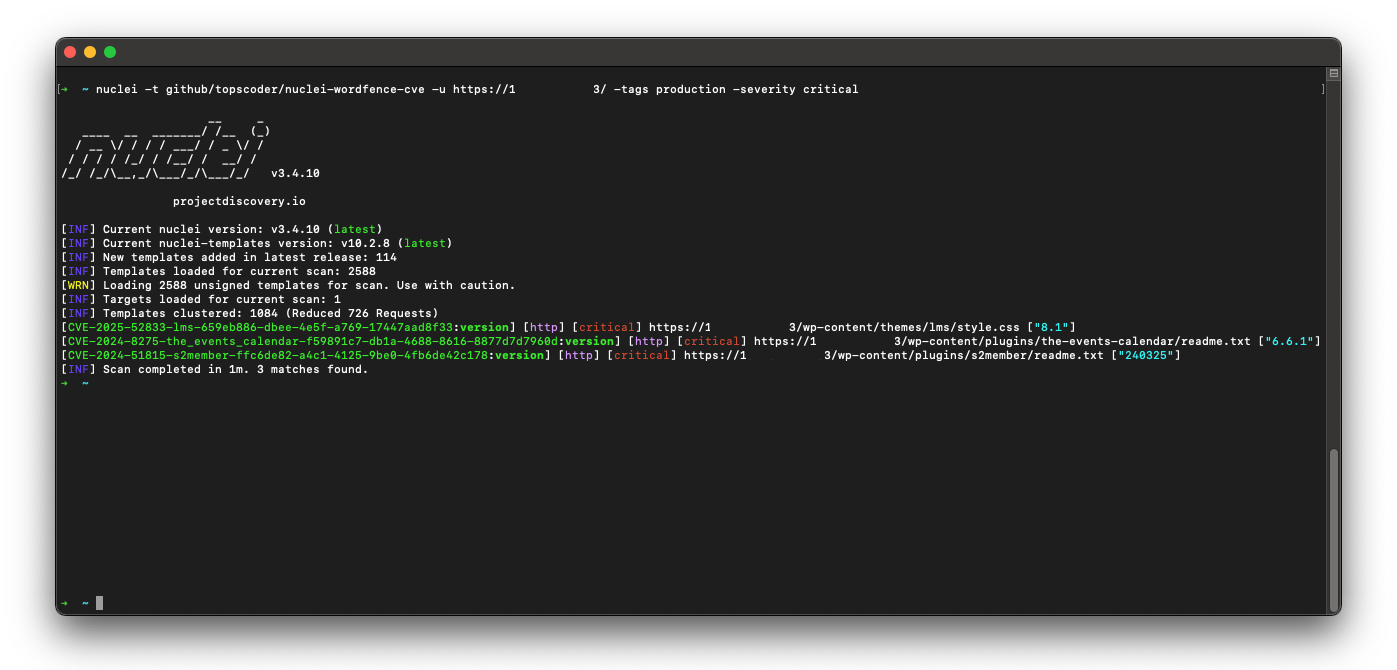
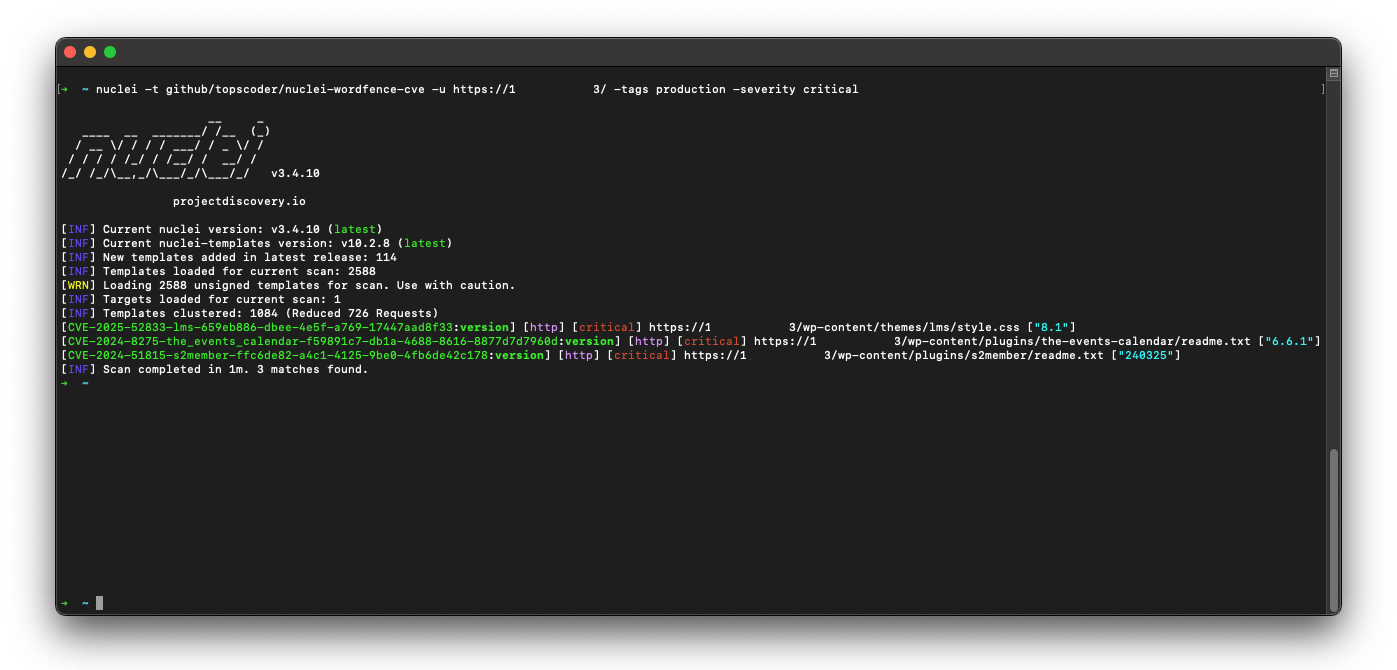
Project Demo

Level up your WordPress security game! This project's got a treasure trove of fresh Nuclei templates for WordPress. Scan for weaknesses in Core, plugins, and themes – all based on the latest intel from Wordfence.com.

Here's why this is your new best friend:

  • Massive collection: No more hunting for individual templates, you've got a whole arsenal at your fingertips.
  • Always on point: These templates stay updated with the freshest threats, so you're never behind the curve.
  • Open source magic: Need to tweak a template for a specific situation? No problem, you've got full control.

If you're guarding a WordPress site, this project is your secret weapon to identify vulnerabilities before the bad guys do. Stop wasting time and secure your sites like a pro!


[!TIP] If you found this project helpful, please consider buying me a coffee.

Buy Me A Coffee

✨ What's in it?!

categorytotal
wp-plugins84,340
wp-themes6,304
wp-core788
other0
severitytotal
critical8,899
high16,421
medium23,858
low42,248
info0

🚀 Quick Start

To install this nuclei-wordfence-cve repository for use with Nuclei, you can use the following commands:

export GITHUB_TEMPLATE_REPO=topscoder/nuclei-wordfence-cve
nuclei -update-templates

Once you have installed this template repo using the commands above, you can run the following command to scan for vulnerabilities using Nuclei:

nuclei -t github/topscoder/nuclei-wordfence-cve -u https://target.com

Wordfence provides two separate feeds for vulnerabilities. The first feed includes only production vulnerabilities, each with an assigned CVE. The second feed contains candidate vulnerabilities, which do not yet have a CVE assigned and may or may not be promoted to the production feed. To differentiate templates generated from these feeds, a tag is assigned to each template—either production or candidate—allowing you to target them using a tag filter.

Include only production templates:

nuclei -t github/topscoder/nuclei-wordfence-cve -tags production -u https://target.com

Include only candidate templates:

nuclei -t github/topscoder/nuclei-wordfence-cve -tags candidate -u https://target.com

💻 Examples

Here are some examples how to use the templates:

  • To scan for all known vulnerabilities in WordPress, you can run the following command:
nuclei -t github/topscoder/nuclei-wordfence-cve -u https://target.com
  • To scan for a CVE specific vulnerability, you can run the following command:
nuclei -t github/topscoder/nuclei-wordfence-cve -template-id cve-2023-32961 -u https://target.com
  • To scan only for critical vulnerabilities, you can run the following command:
nuclei -t github/topscoder/nuclei-wordfence-cve -severity critical -u https://target.com
  • To scan only for WordPress core vulnerabilities, you can run the following command:
nuclei -t github/topscoder/nuclei-wordfence-cve -tags wp-core -u https://target.com
  • To scan only for WordPress plugin vulnerabilities, you can run the following command:
nuclei -t github/topscoder/nuclei-wordfence-cve -tags wp-plugin -u https://target.com
  • To scan only for WordPress theme vulnerabilities, you can run the following command:
nuclei -t github/topscoder/nuclei-wordfence-cve -tags wp-theme -u https://target.com
  • To go wild, you can combine and combine and combine:
nuclei -t github/topscoder/nuclei-wordfence-cve -tags wp-plugin,wp-theme -severity critical,high
  • To go even wilder, you can use the template condition flag (-tc) that allows complex expressions like the following ones:
nuclei -t github/topscoder/nuclei-wordfence-cve -template-condition "contains(to_lower(name),'cross-site scripting') || contains(to_upper(name),'XSS')" -u https://target.com

nuclei -t github/topscoder/nuclei-wordfence-cve -template-condition "contains(to_lower(name),'sql injection') || contains(to_lower(description),'sql injection')" -u https://target.com

nuclei -t github/topscoder/nuclei-wordfence-cve -template-condition "contains(to_lower(name),'file inclusion') || contains(to_lower(description),'file inclusion')" -u https://target.com

Скачать инструмент