Guardrails v0.24.1
Программируемые защитные механизмы для LLM-чат-приложений: обеспечение входных/выходных ограничений, блокировка джейлбрейков и prompt-инъекций, обнаружение галлюцинаций и маскирование конфиденциальных данных.
NVIDIA NeMo Guardrails Library








Documentation · Quickstart · Use cases · Integrations · Guardrail catalog · Examples · Community · Security · Releases · Changelog
NeMo Guardrails is an open-source library for applying programmable safety and security controls to LLM and agentic applications. Agents run commands, call APIs, query your data, and read the web. Conversational applications apply input and output checks; retrieval-augmented generation (RAG) systems filter retrieved content and check answers against evidence.
You use the NeMo Guardrails library to declare what each agent may do in a policy, combining low-latency local rules with model-backed checks for jailbreaks, injected instructions, and unsafe tool calls. Your application or agent harness runs these checks and uses their results to decide whether to continue.
pip install nemoguardrails
Requires Python 3.11–3.13. Refer to the installation guide for optional packages and setup.
[!NOTE] Version 0.25.0 deprecates
LLMRails, with removal planned no earlier than 0.27.0. UseGuardrailsfor new integrations and follow the migration guide.
What You Can Build
- AI agents and coding assistants: Check proposed tool calls and returned results with tool rails, or connect an agent through the hooks server.
- Conversational applications: Apply input and output checks.
- Retrieval-augmented generation (RAG): Detect or mask sensitive data in retrieved content and check whether answers are grounded in evidence.
How It Works
Use the NVIDIA NeMo Guardrails library to define your policy in configuration files that specify the rails, models, and prompts to use. Run the library in your Python application or deploy it as a server. Choose check mode or proxy mode based on how your application manages model requests.
Check Mode
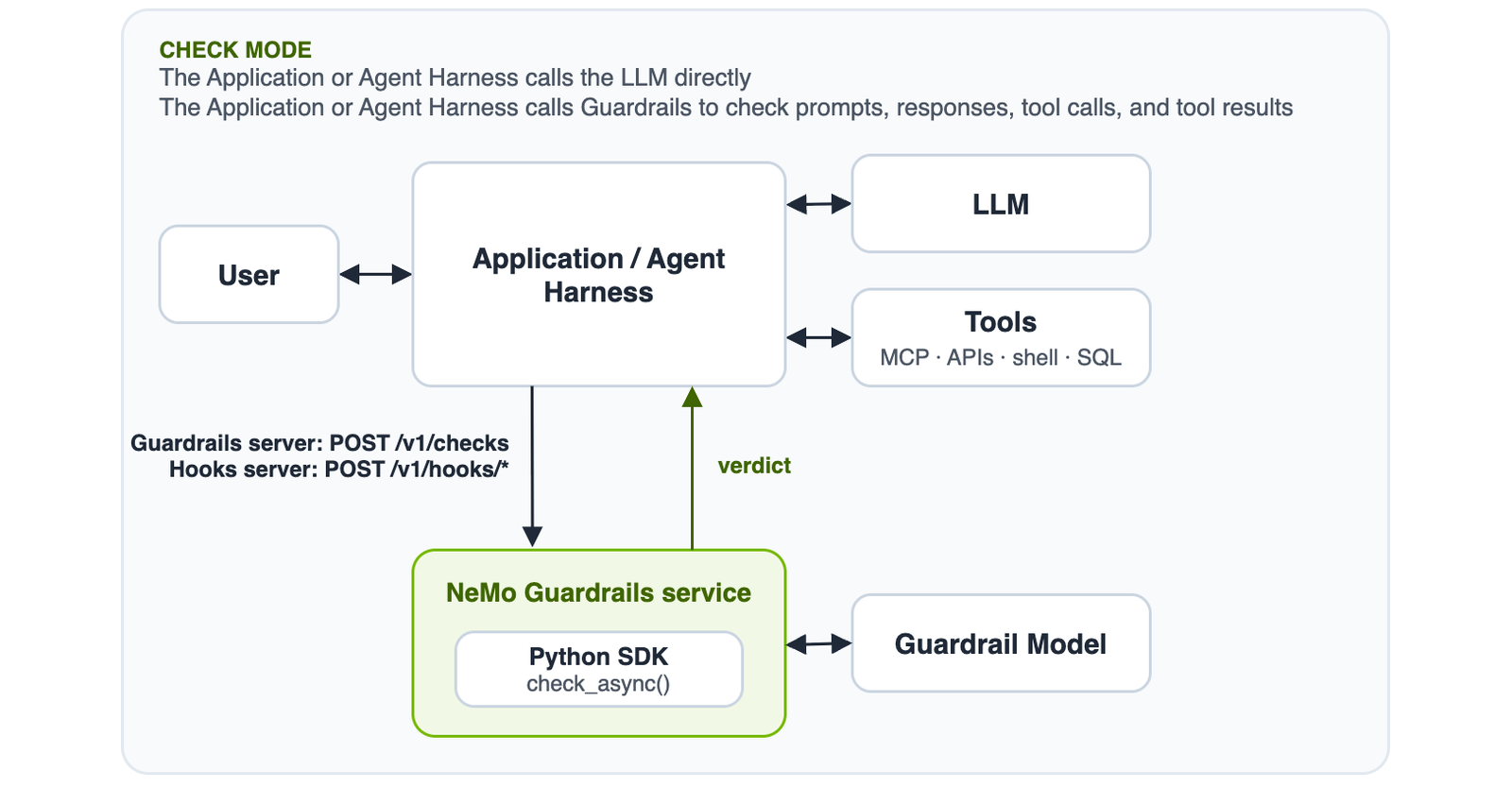
Your application or agent harness calls the LLM and executes tools directly. At each point that requires a policy decision, send the relevant prompt, model response, tool call, or tool result to the library for checking. Use the result to handle blocked or modified content before you execute a tool, return a response, or pass a tool result to the model.
Use check_async() in Python, POST /v1/checks on the Guardrails server, or the hooks server for coding agents.
For tool checks with check_async(), use the IORails engine and specify RailType.TOOL_CALL or RailType.TOOL_RESULT in rail_types.
Check tool calls before execution and tool results after execution.
Proxy Mode
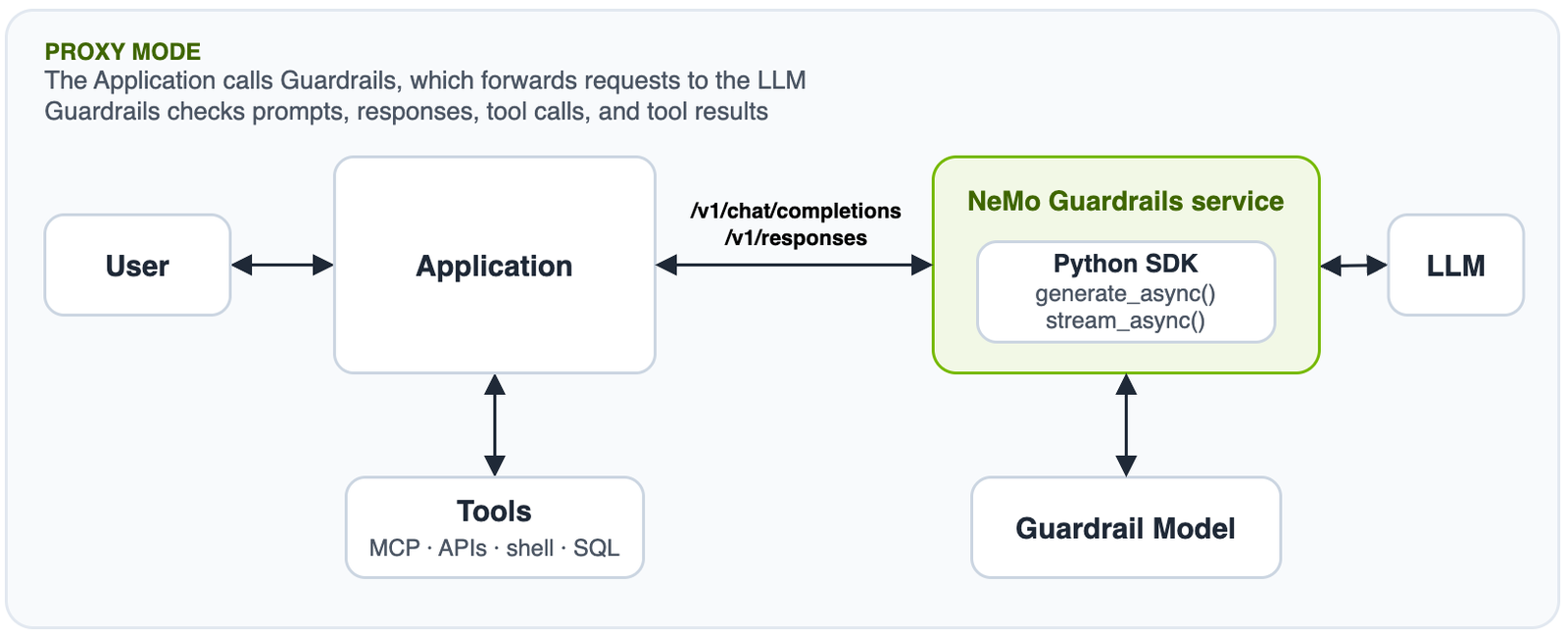
Route model requests through the library to apply the configured input and output rails. Input rails can block a request before it reaches the application LLM. For non-streaming requests, output rails check the response before the library returns it. Blocked content produces a refusal or an error, depending on the integration and configuration.
Use generate_async() or stream_async() in Python, or POST /v1/chat/completions on the Guardrails server.
Your application executes tools; supported integrations can check tool calls in model responses and tool results in subsequent requests.
The gateway server also supports POST /v1/chat/completions and POST /v1/responses, but its built-in profiles do not support tool content.
Each gateway /v1/responses request must include "store": false.
When output streaming is enabled for stream_async(), the default stream_first: true setting delivers chunks before checking them.
To check each chunk before delivery, set rails.output.streaming.stream_first: false.
For configuration details, refer to output rail streaming.