
 projectdiscovery/httpx
Ferramenta HTTP rápida e multiprobe para reconhecimento e coleta de informações. Testa TLS, CSP, cabeçalhos, pilha tecnológica e CDN. Suporta correspondências, filtros e saída JSON para testes automatizados de segurança.
<h1 align="center">
  <img src="https://assets.kitploit.com/production/public/readmes/405/4dc5206927fe161f6f2bb22d21326c0518dc3d5cb655fda1739b30b6bd29dec9.png" alt="httpx" width="200px">
  <br>
</h1>


<p align="center">
<a href="https://opensource.org/licenses/MIT"><img src="https://img.shields.io/badge/license-MIT-_red.svg"></a>
<a href="https://goreportcard.com/badge/github.com/projectdiscovery/httpx"><img src="https://goreportcard.com/badge/github.com/projectdiscovery/httpx"></a>
<a href="https://github.com/projectdiscovery/httpx/releases"><img src="https://img.shields.io/github/release/projectdiscovery/httpx"></a>
<a href="https://hub.docker.com/r/projectdiscovery/httpx"><img src="https://img.shields.io/docker/pulls/projectdiscovery/httpx.svg"></a>
<a href="https://twitter.com/pdiscoveryio"><img src="https://img.shields.io/twitter/follow/pdiscoveryio.svg?logo=twitter"></a>
<a href="https://discord.gg/projectdiscovery"><img src="https://img.shields.io/discord/695645237418131507.svg?logo=discord"></a>
</p>

<p align="center">
  <a href="#features">Recursos</a> •
  <a href="#installation-instructions">Instalação</a> •
  <a href="#usage">Uso</a> •
  <a href="https://docs.projectdiscovery.io/tools/httpx/">Documentação</a> •
  <a href="#notes">Notas</a> •
  <a href="https://discord.gg/projectdiscovery">Entre no Discord</a>
</p>


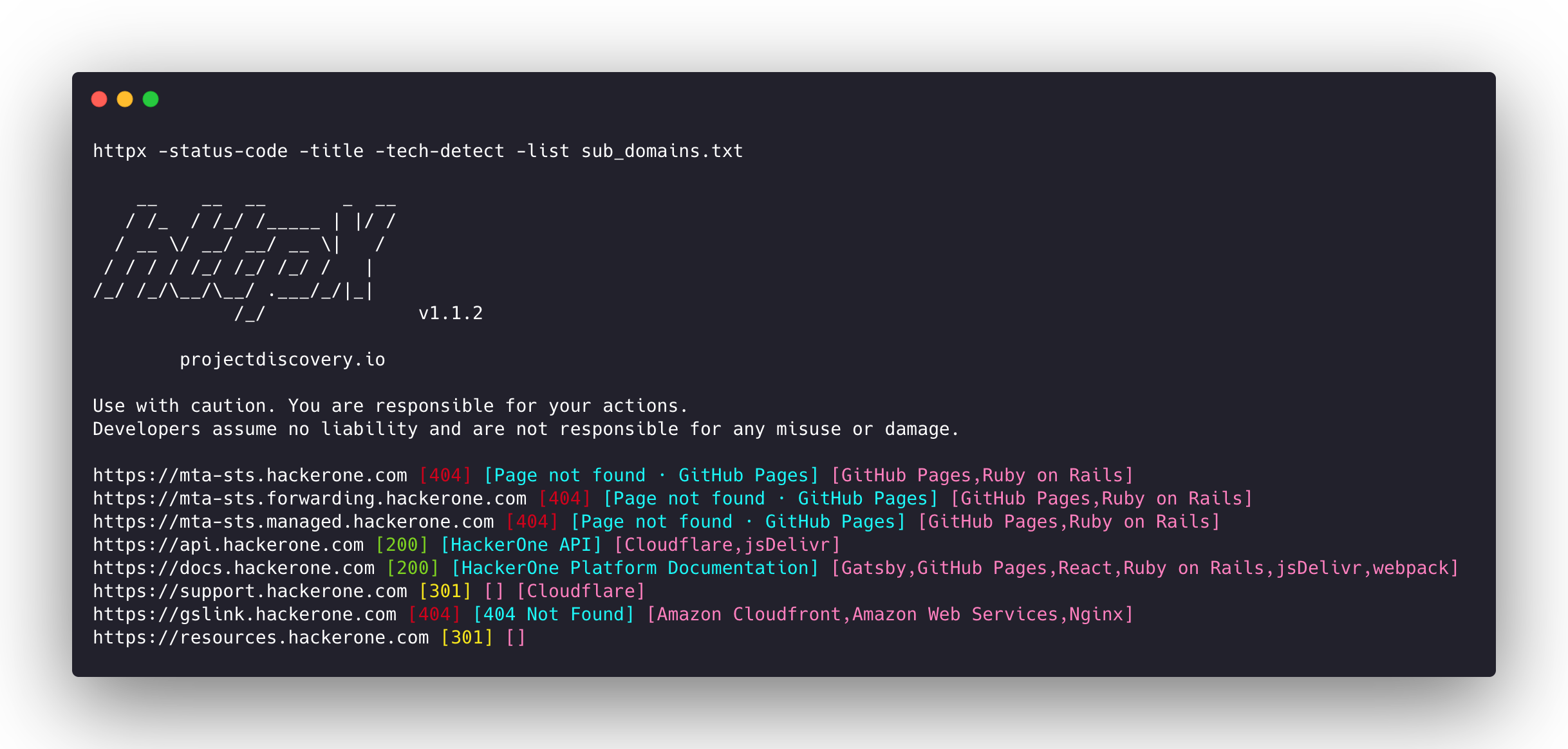
`httpx` é um kit de ferramentas HTTP rápido e versátil que permite executar múltiplas sondagens usando a biblioteca [retryablehttp](https://github.com/projectdiscovery/retryablehttp-go). Ele foi projetado para manter a confiabilidade dos resultados com um número maior de threads.

# Recursos

<h1 align="center">
  <img src="https://assets.kitploit.com/production/public/readmes/405/844a8c468c1b9ef257f46c2bf9f9efe0d2e5b1b676a3ac5be70918d44c9e7403.png" alt="httpx" width="700px">
  <br>
</h1>

 - Base de código simples e modular, facilitando contribuições.
 - Flags rápidas e totalmente configuráveis para sondar múltiplos elementos.
 - Suporta múltiplas sondagens baseadas em HTTP.
 - Fallback automático inteligente de https para http por padrão.
 - Suporta hosts, URLs e CIDR como entrada.
 - Lida com casos extremos realizando novas tentativas, backoffs etc. para lidar com WAFs.

### Sondagens suportadas

| Sondagens       | Verificação padrão | Sondagens       | Verificação padrão |
|-----------------|--------------------|-----------------|--------------------|
| URL             | true               | IP              | true               |
| Title           | true               | CNAME           | true               |
| Status Code     | true               | Raw HTTP        | false              |
| Content Length  | true               | HTTP2           | false              |
| TLS Certificate | true               | HTTP Pipeline   | false              |
| CSP Header      | true               | Virtual host    | false              |
| Line Count      | true               | Word Count      | true               |
| Location Header | true               | CDN             | false              |
| Web Server      | true               | Paths           | false              |
| Web Socket      | true               | Ports           | false              |
| Response Time   | true               | Request Method  | true               |
| Favicon Hash    | false              | Probe  Status   | false              |
| Body Hash       | true               | Header  Hash    | true               |
| Redirect chain  | false              | URL Scheme      | true               |
| JARM Hash       | false              | ASN             | false              |

# Instruções de Instalação

`httpx` requer **go >=1.26.10** para ser instalado com sucesso. Execute o seguinte comando para obter o repositório:

```sh
go install -v github.com/projectdiscovery/httpx/cmd/httpx@latest
```

Para saber mais sobre como instalar o httpx, consulte https://docs.projectdiscovery.io/tools/httpx/install.

| :exclamation:  **Aviso legal**  |
|---------------------------------|
| **Este projeto está em desenvolvimento ativo**. Espere mudanças que quebram compatibilidade entre versões. Revise o changelog antes de atualizar. |
| Este projeto foi construído principalmente para ser usado como uma ferramenta CLI autônoma. **Executá-lo como serviço pode apresentar riscos de segurança.** Recomenda-se usá-lo com cautela e medidas de segurança adicionais. |

# Uso

```sh
httpx -h
```

Isso exibirá a ajuda para a ferramenta. Aqui estão todas as opções que ela suporta.


```console
httpx is a fast and multi-purpose HTTP toolkit that allows running multiple probes using the retryablehttp library.

Usage:
  ./httpx [flags]

Flags:
INPUT:
   -l, -list string              input file containing list of hosts to process
   -rr, -request string          file containing raw request
   -u, -target string[]          input target host(s) to probe
   -im, -input-mode string       mode of input file (burp)

PROBES:
   -sc, -status-code                      display response status-code
   -cl, -content-length                   display response content-length
   -ct, -content-type                     display response content-type
   -location                              display response redirect location
   -favicon                               display mmh3 hash for '/favicon.ico' file
   -hash string                           display response body hash (supported: md5,mmh3,simhash,sha1,sha256,sha512)
   -jarm                                  display jarm fingerprint hash
   -rt, -response-time                    display response time
   -lc, -line-count                       display response body line count
   -wc, -word-count                       display response body word count
   -title                                 display page title
   -bp, -body-preview                     display first N characters of response body (default 100)
   -server, -web-server                   display server name
   -td, -tech-detect                      display technology in use based on wappalyzer dataset
   -cff, -custom-fingerprint-file string  path to a custom fingerprint file for technology detection
   -kb, -knowledge-base                   enable knowledge base classification
   -method                                display http request method
   -ws, -websocket                        display server using websocket
   -ip                                    display host ip
   -cname                                 display host cname
   -extract-fqdn, -efqdn                  get domain and subdomains from response body and header in jsonl/csv output
   -asn                                   display host asn information
   -cdn                                   display cdn/waf in use (default true)
   -probe                                 display probe status

HEADLESS:
   -ss, -screenshot                 enable saving screenshot of the page using headless browser
   -system-chrome                   enable using local installed chrome for screenshot
   -ho, -headless-options string[]  start headless chrome with additional options
   -esb, -exclude-screenshot-bytes  enable excluding screenshot bytes from json output
   -ehb, -exclude-headless-body     enable excluding headless header from json output
   -no-screenshot-full-page         disable saving full page screenshot
   -st, -screenshot-timeout value   set timeout for screenshot in seconds (default 10s)
   -sid, -screenshot-idle value     set idle time before taking screenshot in seconds (default 1s)
   -jsc, -javascript-code string[]  execute JavaScript code after navigation

MATCHERS:
   -mc, -match-code string            match response with specified status code (-mc 200,302)
   -ml, -match-length string          match response with specified content length (-ml 100,102)
   -mlc, -match-line-count string     match response body with specified line count (-mlc 423,532)
   -mwc, -match-word-count string     match response body with specified word count (-mwc 43,55)
   -mfc, -match-favicon string[]      match response with specified favicon hash (-mfc 1494302000)
   -ms, -match-string string[]        match response with specified string (-ms admin)
   -mr, -match-regex string[]         match response with specified regex (-mr admin)
   -mcdn, -match-cdn string[]         match host with specified cdn provider (cloudfront, fastly, google, etc.)
   -mrt, -match-response-time string  match response with specified response time in seconds (-mrt '< 1')
   -mdc, -match-condition string      match response with dsl expression condition

EXTRACTOR:
   -er, -extract-regex string[]   display response content with matched regex
   -ep, -extract-preset string[]  display response content matched by a pre-defined regex (url,ipv4,mail)

FILTERS:
   -fc, -filter-code string               filter response with specified status code (-fc 403,401)
   -fpt, -filter-page-type string[]       filter response with specified page type (e.g. -fpt login,captcha,parked)
   -fep, -filter-error-page               [DEPRECATED: use -fpt] filter response with ML based error page detection
   -fd, -filter-duplicates                filter out near-duplicate responses (only first response is retained)
   -fl, -filter-length string             filter response with specified content length (-fl 23,33)
   -flc, -filter-line-count string        filter response body with specified line count (-flc 423,532)
   -fwc, -filter-word-count string        filter response body with specified word count (-fwc 423,532)
   -ffc, -filter-favicon string[]         filter response with specified favicon hash (-ffc 1494302000)
   -fs, -filter-string string[]           filter response with specified string (-fs admin)
   -fe, -filter-regex string[]            filter response with specified regex (-fe admin)
   -fcdn, -filter-cdn string[]            filter host with specified cdn provider (cloudfront, fastly, google, etc.)
   -frt, -filter-response-time string     filter response with specified response time in seconds (-frt '> 1')
   -fdc, -filter-condition string         filter response with dsl expression condition
   -strip                                 strips all tags in response. supported formats: html,xml (default html)
   -lof, -list-output-fields              list of fields to output (comma separated)
   -eof, -exclude-output-fields string[]  exclude output fields output based on a condition

RATE-LIMIT:
   -t, -threads int              number of threads to use (default 50)
   -rl, -rate-limit int          maximum requests to send per second (default 150)
   -rlm, -rate-limit-minute int  maximum number of requests to send per minute

MISCELLANEOUS:
   -pa, -probe-all-ips        probe all the ips associated with same host
   -p, -ports string[]        ports to probe (nmap syntax: eg http:1,2-10,11,https:80)
   -path string               path or list of paths to probe (comma-separated, file)
   -tls-probe                 send http probes on the extracted TLS domains (dns_name)
   -csp-probe                 send http probes on the extracted CSP domains
   -tls-grab                  perform TLS(SSL) data grabbing
   -pipeline                  probe and display server supporting HTTP1.1 pipeline
   -http2                     probe and display server supporting HTTP2
   -vhost                     probe and display server supporting VHOST
   -ldv, -list-dsl-variables  list json output field keys name that support dsl matcher/filter

UPDATE:
   -up, -update                 update httpx to latest version
   -duc, -disable-update-check  disable automatic httpx update check

OUTPUT:
   -o, -output string                     file to write output results
   -oa, -output-all                       filename to write output results in all formats
   -sr, -store-response                   store http response to output directory
   -srd, -store-response-dir string       store http response to custom directory
   -ob, -omit-body                        omit response body in output
   -csv                                   store output in csv format
   -csvo, -csv-output-encoding string     define output encoding
   -j, -json                              store output in JSONL(ines) format
   -irh, -include-response-header         include http response (headers) in JSON output (-json only)
   -irr, -include-response                include http request/response (headers + body) in JSON output (-json only)
   -irrb, -include-response-base64        include base64 encoded http request/response in JSON output (-json only)
   -include-chain                         include redirect http chain in JSON output (-json only)
   -store-chain                           include http redirect chain in responses (-sr only)
   -svrc, -store-vision-recon-cluster     include visual recon clusters (-ss and -sr only)
   -pr, -protocol string                  protocol to use (unknown, http11, http2, http3)
   -fepp, -filter-error-page-path string  path to store filtered error pages (default "filtered_error_page.json")
   -rdb, -result-db                       store results in database
   -rdbc, -result-db-config string        path to database config file
   -rdbt, -result-db-type string          database type (mongodb, postgres, mysql)
   -rdbcs, -result-db-conn string         database connection string (env: HTTPX_DB_CONNECTION_STRING)
   -rdbn, -result-db-name string          database name (default "httpx")
   -rdbtb, -result-db-table string        table/collection name (default "results")
   -rdbbs, -result-db-batch-size int      batch size for database inserts (default 100)
   -rdbor, -result-db-omit-raw            omit raw request/response data from database

CONFIGURATIONS:
   -config string                   path to the httpx configuration file (default $HOME/.config/httpx/config.yaml)
   -ptm, -page-type-model string    path to a local dit model for page classification (requires -kb or -fpt; skips model download)
   -r, -resolvers string[]          list of custom resolver (file or comma separated)
   -allow string[]                  allowed list of IP/CIDR's to process (file or comma separated)
   -deny string[]                   denied list of IP/CIDR's to process (file or comma separated)
   -sni, -sni-name string           custom TLS SNI name
   -random-agent                    enable Random User-Agent to use (default true)
   -auto-referer                    set the Referer header to the current URL
   -H, -header string[]             custom http headers to send with request
   -http-proxy, -proxy string       proxy (http|socks) to use (eg http://127.0.0.1:8080)
   -unsafe                          send raw requests skipping golang normalization
   -resume                          resume scan using resume.cfg
   -fr, -follow-redirects           follow http redirects
   -maxr, -max-redirects int        max number of redirects to follow per host (default 10)
   -fhr, -follow-host-redirects     follow redirects on the same host
   -rhsts, -respect-hsts            respect HSTS response headers for redirect requests
   -vhost-input                     get a list of vhosts as input
   -x string                        request methods to probe, use 'all' to probe all HTTP methods
   -body string                     post body to include in http request
   -s, -stream                      stream mode - start elaborating input targets without sorting
   -sd, -skip-dedupe                disable dedupe input items (only used with stream mode)
   -ldp, -leave-default-ports       leave default http/https ports in host header (eg. http://host:80 - https://host:443
   -ztls                            use ztls library with autofallback to standard one for tls13
   -no-decode                       avoid decoding body
   -tlsi, -tls-impersonate string    enable experimental client hello (ja3) tls impersonation (chrome, or ja3 full string)
   -no-stdin                        Disable Stdin processing
   -hae, -http-api-endpoint string  experimental http api endpoint
   -sf, -secret-file string         path to secret file for authentication

DEBUG:
   -health-check, -hc        run diagnostic check up
   -debug                    display request/response content in cli
   -debug-req                display request content in cli
   -debug-resp               display response content in cli
   -version                  display httpx version
   -stats                    display scan statistic
   -profile-mem string       optional httpx memory profile dump file
   -silent                   silent mode
   -v, -verbose              verbose mode
   -si, -stats-interval int  number of seconds to wait between showing a statistics update (default: 5)
   -mp, -metrics-port int    port to expose httpx metrics on (default 63636)
   -nc, -no-color            disable colors in cli output
   -tr, -trace               trace

OPTIMIZATIONS:
   -nf, -no-fallback                  display both probed protocol (HTTPS and HTTP)
   -nfs, -no-fallback-scheme          probe with protocol scheme specified in input
   -maxhr, -max-host-error int        max error count per host before skipping remaining path/s (default 30)
   -e, -exclude string[]              exclude host matching specified filter ('cdn', 'private-ips', cidr, ip, regex)
   -retries int                       number of retries
   -timeout int                       timeout in seconds (default 10)
   -delay value                       duration between each http request (eg: 200ms, 1s) (default -1ns)
   -rsts, -response-size-to-save int  max response size to save in bytes (default 50000000)
   -rstr, -response-size-to-read int  max response size to read in bytes (default 50000000)

CLOUD:
   -auth                           configure projectdiscovery cloud (pdcp) api key (default true)
   -ac, -auth-config string        configure projectdiscovery cloud (pdcp) api key credential file
   -pd, -dashboard                 upload / view output in projectdiscovery cloud (pdcp) UI dashboard
   -tid, -team-id string           upload asset results to given team id (optional)
   -aid, -asset-id string          upload new assets to existing asset id (optional)
   -aname, -asset-name string      assets group name to set (optional)
   -pdu, -dashboard-upload string  upload httpx output file (jsonl) in projectdiscovery cloud (pdcp) UI dashboard
```

# Executando o httpx

Para detalhes sobre como executar o httpx, consulte https://docs.projectdiscovery.io/tools/httpx/running.

### Usando `httpx` como biblioteca
`httpx` pode ser usado como biblioteca criando uma instância da struct `Option` e preenchendo-a com as mesmas opções que seriam especificadas via CLI. Uma vez validada, a struct deve ser passada para uma instância de runner (a ser fechada ao final do programa) e o método `RunEnumeration` deve ser chamado. Um exemplo mínimo de como fazer isso está na pasta [examples](https://github.com/projectdiscovery/httpx/blob/dev/examples).

### Usando um modelo local de classificação de páginas

Para ambientes que não conseguem acessar o Hugging Face, provisione o [dit model.json](https://huggingface.co/datasets/happyhackingspace/dit/resolve/main/model.json) em uma máquina acessível e copie-o para o ambiente de varredura. Selecione-o com `-page-type-model` (`-ptm`):

```bash
httpx -l hosts.txt -kb -json -ptm /opt/httpx/model.json
httpx -l hosts.txt -fpt error,parked -ptm /opt/httpx/model.json
```

O caminho seleciona um modelo local e ignora a descoberta e o download automáticos de modelos. Um modelo ausente ou ilegível, ou um JSON de modelo inválido, interrompe a inicialização em vez de recorrer a um download. A classificação continua a ser opcional: use `-kb` ou `-fpt` (o `-fep` obsoleto também é suportado). Definir apenas `-ptm` não carrega o modelo nem ativa a classificação. Os utilizadores da biblioteca podem definir `Options.PageTypeModel` juntamente com `KnowledgeBase` ou `OutputFilterPageType`. Sem um caminho personalizado, o comportamento existente de descoberta e download de modelos mantém-se inalterado.

Os modelos explícitos também têm de passar numa verificação de classificação de página e formulário antes de o varrimento começar ou de os índices de saída existentes serem alterados. Isto verifica se o modelo consegue ser executado, em vez de certificar cada parte do seu conteúdo. Um erro de classificação posterior deixa essa resposta sem informação de tipo de página; os diagnósticos estão disponíveis com `-debug`.

## Receitas Comuns

Abaixo estão one-liners práticos para casos de uso comuns que tiram partido das primitivas componíveis do httpx. Estas receitas são validadas em `runner/wellknown_recipes_test.go`.

Use `-mdc` com helpers DSL como `contains(content_type, ...)` e `contains(body, ...)` para corresponder a metadados de resposta e conteúdo do corpo. (`-mr`/`-ms` correspondem à resposta bruta completa; use `-mdc` para correspondência de campos estruturados.)

### Ficheiros bem conhecidos

**security.txt**
Sondar por um ficheiro security.txt válido segundo a [RFC 9116](https://www.rfc-editor.org/rfc/rfc9116.html) nos caminhos padrão (`/.well-known/security.txt`, `/security.txt`):

```bash
echo target.com | httpx -path '/.well-known/security.txt,/security.txt' -mc 200 -mdc 'contains(content_type, "text/plain") && contains(body, "Contact:") && contains_any(body, "mailto:", "https://")'
```

- `-path` testa caminho(s) personalizado(s)
- `-mc 200` corresponde a HTTP 200
- `-mdc` corresponde usando expressões DSL em campos de resposta como `content_type` e `body`

**robots.txt**

```bash
echo target.com | httpx -path '/robots.txt' -mc 200 -mdc 'contains(content_type, "text/plain")'
```

**sitemap.xml**

```bash
echo target.com | httpx -path '/sitemap.xml' -mc 200 -mdc 'contains_any(content_type, "application/xml", "text/xml") && contains(body, "<urlset")'
```

**humans.txt**

```bash
echo target.com | httpx -path '/humans.txt' -mc 200 -mdc 'contains(content_type, "text/plain")'
```

**ads.txt**

```bash
echo target.com | httpx -path '/ads.txt' -mc 200 -mdc 'contains(content_type, "text/plain") && contains(body, "google.com")'
```

### URIs bem conhecidos

**Descoberta do OpenID Connect** ([spec](https://openid.net/specs/openid-connect-discovery-1_0.html))

```bash
echo target.com | httpx -path '/.well-known/openid-configuration' -mc 200 -mdc 'contains(content_type, "application/json") && contains(body, "\"issuer\"")'
```

**Apple Universal Links**

```bash
echo target.com | httpx -path '/.well-known/apple-app-site-association,/.well-known/apple-app-site-association.json' -mc 200 -mdc 'contains(content_type, "application/json") && contains(body, "\"applinks\"")'
```

**App Links do Android**

```bash
echo target.com | httpx -path '/.well-known/assetlinks.json' -mc 200 -mdc 'contains(content_type, "application/json") && contains(body, "\"android_app\"")'
```

**crossdomain.xml** (arquivo de política Flash legado)

```bash
echo target.com | httpx -path '/crossdomain.xml' -mc 200 -mdc 'contains_any(content_type, "application/xml", "text/xml") && contains(body, "cross-domain-policy")'
```

**Outros URIs bem conhecidos** ([registro IANA](https://www.iana.org/assignments/well-known-uris/well-known-uris.xhtml)):

```bash
echo target.com | httpx -path '/.well-known/security.txt,/.well-known/change-password,/.well-known/openid-configuration' -mc 200
```

# Notas

- Por padrão, o `httpx` faz a sondagem com o esquema **HTTPS** e recorre ao **HTTP** apenas se o **HTTPS** não estiver acessível.
- Exportações XML do Burp Suite podem ser usadas como entrada com `-l burp-export.xml -im burp`
- Um alvo pode ser fixado a um IP com uma linha de entrada JSON, no formato das linhas de alvo do nuclei, como `curl --resolve`, mas em todas as portas do seu host:
  ```
  {"target": "https://app.example.com", "ip": "192.0.2.10"}
  {"target": "https://app.example.com", "ip": "192.0.2.11"}
  ```
  - Toda conexão com o hostname, incluindo redirecionamentos, vai para o IP, que `host_ip` reporta e a saída exibe. O hostname é mantido para o cabeçalho Host e SNI e não é resolvido. Um host pode ser listado com vários IPs, e uma linha sem `ip` é o alvo simples.
- As chaves que o nuclei usa para selecionar templates, como `tags`, são ignoradas, e qualquer outra chave torna a linha inválida. Uma linha inválida é reportada e ignorada. O `input` de um resultado é a linha em forma canônica.
- `-u` divide seu valor por vírgulas, então passe tais linhas em um arquivo (`-l`) ou na entrada padrão.
- Uma linha com um IP interrompe a execução com `-proxy`, `-pr http2`, `-unsafe`, `-pipeline`, `-http2`, `-jarm`, `-screenshot` e `-vhost-input`, pois eles não se conectam através do IP ou, para HTTP/2, não compartilham uma conexão entre os IPs de um host. Um proxy definido com `HTTP_PROXY`/`HTTPS_PROXY` também resolve o host por conta própria, então uma sondagem através dele falha: adicione os hosts fixados a `NO_PROXY`.
- `-pa` sonda cada IP de um host da mesma forma, então também não pode ser usado com `-proxy`. Os IPs de um host são mantidos separados: `-maxhr` conta suas falhas e `-sr` armazena suas respostas separadamente.
- Os hostnames encontrados por `-tls-probe` e `-csp-probe`, incluindo o fixado, são sondados como novos alvos e resolvidos.
- A flag `-no-fallback` pode ser usada para sondar e exibir resultados tanto de **HTTP** quanto de **HTTPS**.
- Um esquema personalizado para portas pode ser definido, por exemplo `-ports http:443,http:80,https:8443`
- O resolvedor personalizado suporta múltiplos protocolos (**doh|tcp|udp**) na forma `protocol:resolver:port` (por exemplo, `udp:127.0.0.1:53`)
- Arquivos de segredos podem ser usados para autenticação baseada em domínio via `-sf secrets.yaml`. Tipos de autenticação suportados: `BasicAuth`, `BearerToken`, `Header`, `Cookie`, `Query`. Exemplo:
  ```yaml
  id: example-auth
  info:
    name: Example Auth Config
  static:
    - type: Header
      domains:
        - api.example.com
      headers:
        - key: X-API-Key
          value: secret-key-here
    - type: BasicAuth
      domains-regex:
        - ".*\\.internal\\.com$"
      username: admin
      password: secret
  ```
- As seguintes flags devem ser usadas para casos de uso específicos em vez de executá-las como padrão com outras sondagens:
   - `-ports`
   - `-path`
   - `-vhost`
   - `-screenshot`
   - `-csp-probe`
   - `-tls-probe`
   - `-favicon`
   - `-http2`
   - `-pipeline`
   - `-tls-impersonate`


# Agradecimentos

O recurso de sondagem é inspirado no trabalho de [@tomnomnom/httprobe](https://github.com/tomnomnom/httprobe) ❤️


--------

<div align="center">

`httpx` é feito com 💙 pela equipe [projectdiscovery](https://projectdiscovery.io) e distribuído sob a [Licença MIT](https://github.com/projectdiscovery/httpx/blob/dev/LICENSE.md).


<a href="https://discord.gg/projectdiscovery"><img src="https://assets.kitploit.com/production/public/readmes/405/d0624f94cb9ea6401be5a089bb694bc963c47fa82aa3b758c893e3b0bbfdf663.png" width="300" alt="Join Discord"></a>

</div>





