레드팀 인프라 트래커 및 C2 리다이렉터 -- RedWarden의 현대적인 대안입니다.
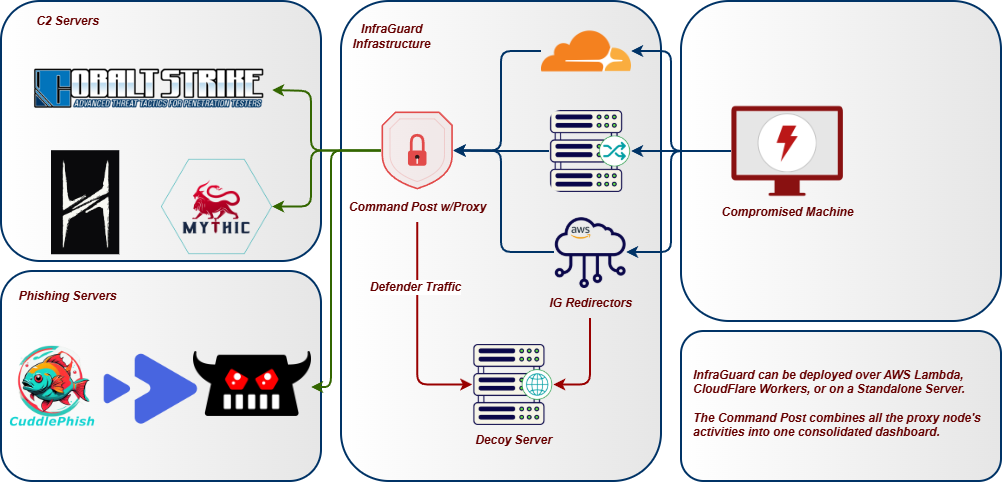
InfraGuard는 인터넷과 C2 팀서버 사이에 위치하여, 모든 인바운드 요청을 가변 C2 프로필과 대조해 검증하고 부합하지 않는 모든 요청을 차단합니다. 스캐너, 봇, 블루팀 프로브는 디코이 사이트로 리다이렉트되고, 정상 비콘 트래픽만 팀서버로 통과됩니다.
아키텍처
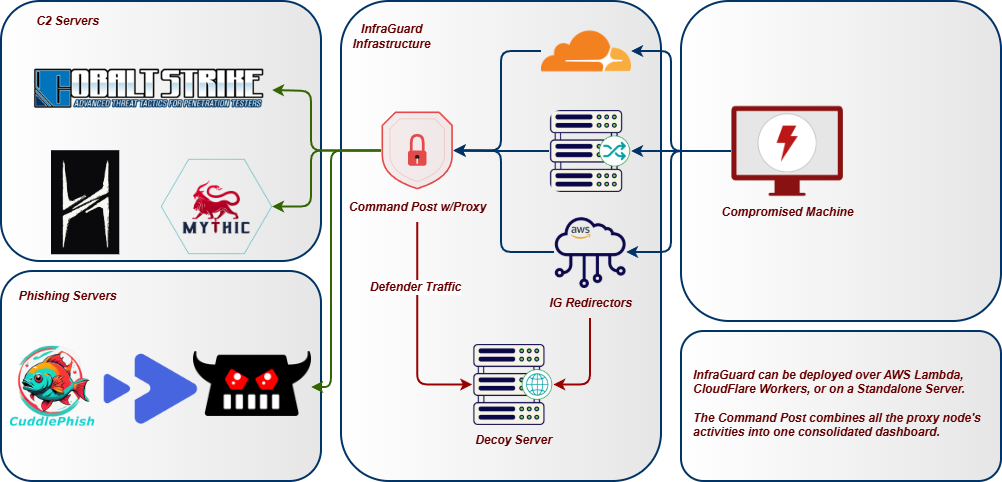
기능
프록시 및 리스너
- 멀티 도메인 프록싱 -- 여러 도메인을 동시에 프록시하며, 각 도메인은 독립적인 C2 프로필, 업스트림, 규칙을 가집니다
- 멀티 프로토콜 리스너 -- HTTP/HTTPS, HTTP/3 (QUIC), WebSocket, gRPC, DNS, MQTT, TCP 터널 리스너가 동시에 실행되며 IP 인텔리전스와 이벤트 추적을 공유합니다
- 서킷 브레이커 -- 업스트림별 장애 보호 기능으로 closed/open/half-open 상태를 가지며, 백엔드에 연결할 수 없을 때 도메인의 드롭 액션으로 폴스루합니다
- 프로토콜 페일오버 -- 우선순위에 따라 정렬된 리스너 프로토콜 간 자동 페일오버 및 페일백
C2 프로필 지원
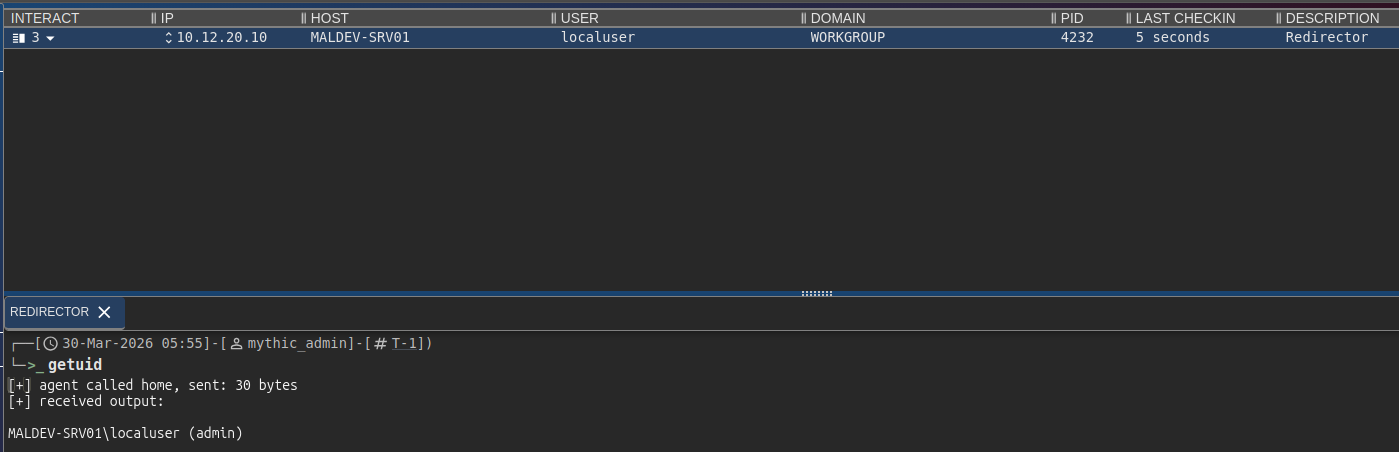
- C2 프로필 검증 -- Cobalt Strike, Mythic, Brute Ratel C4, Sliver, Havoc, Nighthawk, PoshC2 프로필을 리다이렉터 규칙으로 파싱하고 적용합니다
- 핫스왑 가능한 프로필 -- 프록시를 재시작하지 않고 대시보드에서 런타임 중 도메인의 활성 C2 프로필을 교체합니다
- 프로필 생성 마법사 -- 지원되는 8가지 유형 모두에 대해 안내 양식을 통해 처음부터 새 C2 프로필을 생성하거나, 기존 프로필을 자동 유형 감지 및 검증과 함께 가져와 업로드합니다
- AI 지원 프로필 생성 -- 선택적 Ollama 통합으로 대시보드에 프로필 생성 도움 및 OPSEC 조언을 위한 채팅 패널을 제공합니다
필터 파이프라인
- 점수 기반 필터 파이프라인 -- 10개의 필터가 각각 0.0--1.0 점수를 기여하며, 설정 가능한 임계값이 차단/허용을 결정합니다. 필터: JA3, IP, 봇, 헤더, DNS, 지역, 프로필, 리플레이, 열거, 샌드박스.
- JA3 TLS 핑거프린트 필터링 -- HTTP 데이터가 교환되기 전 TLS 핸드셰이크 계층에서 Masscan, ZGrab2, Shodan, curl, Python requests, Nmap을 차단합니다; 리버스 프록시 헤더 또는 커스텀 asyncio 프로토콜을 통해 작동하며, 선택적 허용 목록 모드는 비콘 JA3를 강제합니다
- 샌드박스 및 헤드리스 브라우저 탐지 -- HTTP 신호 전반에 걸친 점수 누적: HeadlessChrome UA, Accept-Language 누락, sec-ch-ua 없는 Chrome, Safe Links 및 msnbot 스캐너 UA, 비브라우저 Accept 순서
- 경로 열거 탐지 -- 슬라이딩 윈도우 내 IP별 고유 URI 추적; dirbuster/ffuf/gobuster가 URI 공간을 매핑하기 전에 차단합니다
- DNS 서브도메인 열거 탐지 -- 클라이언트 IP별 NXDOMAIN 응답을 추적하며, 임계값 위반 시 소스 IP를 자동 차단합니다
- 안티봇 / 안티크롤링 -- 40개 이상의 알려진 스캐너/봇 User-Agent 패턴, 헤더 이상 탐지
- 리플레이 보호 -- 콘텐츠 해시로 중복 요청을 거부하며, 해시는 SQLite에 저장되어 재시작 후에도 보호가 유지됩니다
- 드롭 액션 -- 리다이렉트, TCP 리셋, 디코이 사이트로 프록시, 또는 타핏(스캐너 시간을 낭비시키기 위한 느린 응답)
인텔리전스
- IP 인텔리전스 -- 19개 보안 벤더 대역(Shodan, Censys, Rapid7 등)에 대한 내장 CIDR 차단 목록, GeoIP 필터링, 역방향 DNS 키워드 매칭
- 위협 인텔 피드 -- 공개 소스(abuse.ch, Emerging Threats, Spamhaus DROP, Binary Defense)에서 차단 목록을 자동 업데이트하며, 설정 가능한 새로고침 간격과 디스크 캐싱을 제공합니다
- 동적 IP 차단 -- 허용 목록 범위 밖의 IP를 차단하며, N회의 유효한 C2 요청 후 IP를 자동 허용 목록에 추가합니다
- 허용 목록 강화 -- 허용 목록에 등록된 CIDR은 시작 시 GeoIP 데이터베이스를 통해 ASN, 조직, 국가, 대륙 데이터로 자동 강화됩니다
- 번 탐지 -- crt.sh를 통한 인증서 투명성 로그 모니터링, URLhaus/OpenPhish/Google Safe Browsing을 통한 도메인 평판 자체 모니터링, 단일 IP가 여러 운영자 도메인에 접근할 때의 교차 도메인 분석가 탐지
- 번 신뢰도 점수 -- 6가지 가중 신호(JA3 다양성, 볼륨 급증, 신규 ASN, CT 로그 노출, 평판 적중, 인증 실패 시도)로부터의 연속 0--100 점수. 권장 조치 포함: 모니터, 교체, 즉시 번.
- 카나리 토큰 주입 -- 추적 픽셀, 허니팟 링크, 허니팟 폼이 디코이 페이지에 자동 주입되어 블루팀 조사를 탐지합니다
- 패시브 DNS 모니터링 -- 도메인의 외부 해석을 위해 CIRCL PDNS를 폴링하며, 신규 레코드, NXDOMAIN 급증, 최초 노출을 탐지합니다
페이로드 전달
- 콘텐츠 전달 라우트 -- PwnDrop, Mythic 파일 저장소, 로컬 파일시스템, 또는 HTTP 프록시 백엔드를 통해 특정 경로에서 페이로드, 디코이, 정적 파일을 제공합니다; 선택적 조건부 전달로 대상에게는 실제 콘텐츠를, 스캐너에게는 디코이를 제공합니다
- Mythic 파일 스테이징 --
mythic_file 백엔드는 Mythic의 /direct/download/{uuid}를 깔끔한 URL로 프록시합니다; 고정 UUID 또는 프록시 모드; 접근 제어는 InfraGuard의 필터 스택이 제공합니다
- 일회용 페이로드 토큰 -- 비콘이 동적으로 허용 목록에 추가될 때 자동 발급되는 토큰; 원자적 단일 사용 SQLite 적용으로 분석가나 샌드박스의 URL 리플레이를 방지합니다; 설정 가능한 TTL 및 최대 사용 횟수
- 라우트별 속도 제한 -- 콘텐츠 라우트에서 IP별 슬라이딩 윈도우 다운로드 속도 제한기; 한도를 초과하면 설정된 스캐너 디코이 또는 429를 반환합니다
- 전달 가드 -- 콘텐츠 라우트에 대한 환경 키잉: 비콘 IP 요구, UA 허용 목록, 필수 헤더 값, 금지 헤더; 검사 실패 시 원시 403이 아닌 도메인 드롭 액션을 제공합니다
- 피싱 캠페인 토큰 -- 이메일 링크에 삽입된 캠페인별 토큰으로 피싱 페이지를 보호합니다; 정적 토큰 목록 또는 설정 가능한 TTL을 가진 HMAC 서명 자체 검증 토큰
복원력
- 인프라 교체 -- 사전 점검, 롤백, age 암호화 상태를 갖춘 5개 클라우드 제공자 전반의 원클릭 블루-그린 Terraform 교체
- 교체 스케줄링 -- 자동화된 교체 정책: 고정 간격, 번 트리거, 요청 수 임계값, 스태거드 롤링
- 자동 교체 워치독 -- 주기적으로 번 점수와 인증서 만료를 폴링하며, 번 임계값이 발동되거나 인증서가 N일 미만 남았을 때 자동 교체하거나, 비용 상한이 있는 경보 전용 모드로 폴백합니다
- 서킷 브레이커 -- HEALTHY / PROBING / TRIPPED 상태와 설정 가능한 복구 타임아웃을 갖춘 업스트림별 장애 추적이 대시보드의 Upstreams 위젯에 실시간으로 표시됩니다
- 도메인 프론팅 -- SNI/Host 헤더 분할을 통한 CDN 기반 C2 라우팅으로 CDN 헤더 제거 및 SSRF 보호를 제공합니다
- 데드맨 스위치 -- 운영자 하트비트 TTL로, 운영자가 체크인하지 않으면 C2 포워딩을 자동 중지합니다
- 퍼플팀 미러 -- 허용된 이벤트를 블루팀 수집기로 중복 전송하여(파이어 앤 포겟) 교전 점수를 산출합니다
- 공유 상태 백엔드 (Redis) -- 선택적 노드 간 리플레이 캐시, 동적 허용 목록, 비콘 세션 백, 드롭 속도 제한으로 수평 확장된 복제본이 동일한 상태를 봅니다
- 엣지 프록시 -- CDN 인프라를 통한 도메인 프론팅, 엣지 국가 차단, 호스트 재작성을 위한 Cloudflare Worker 및 AWS Lambda
대시보드 및 운영자 도구
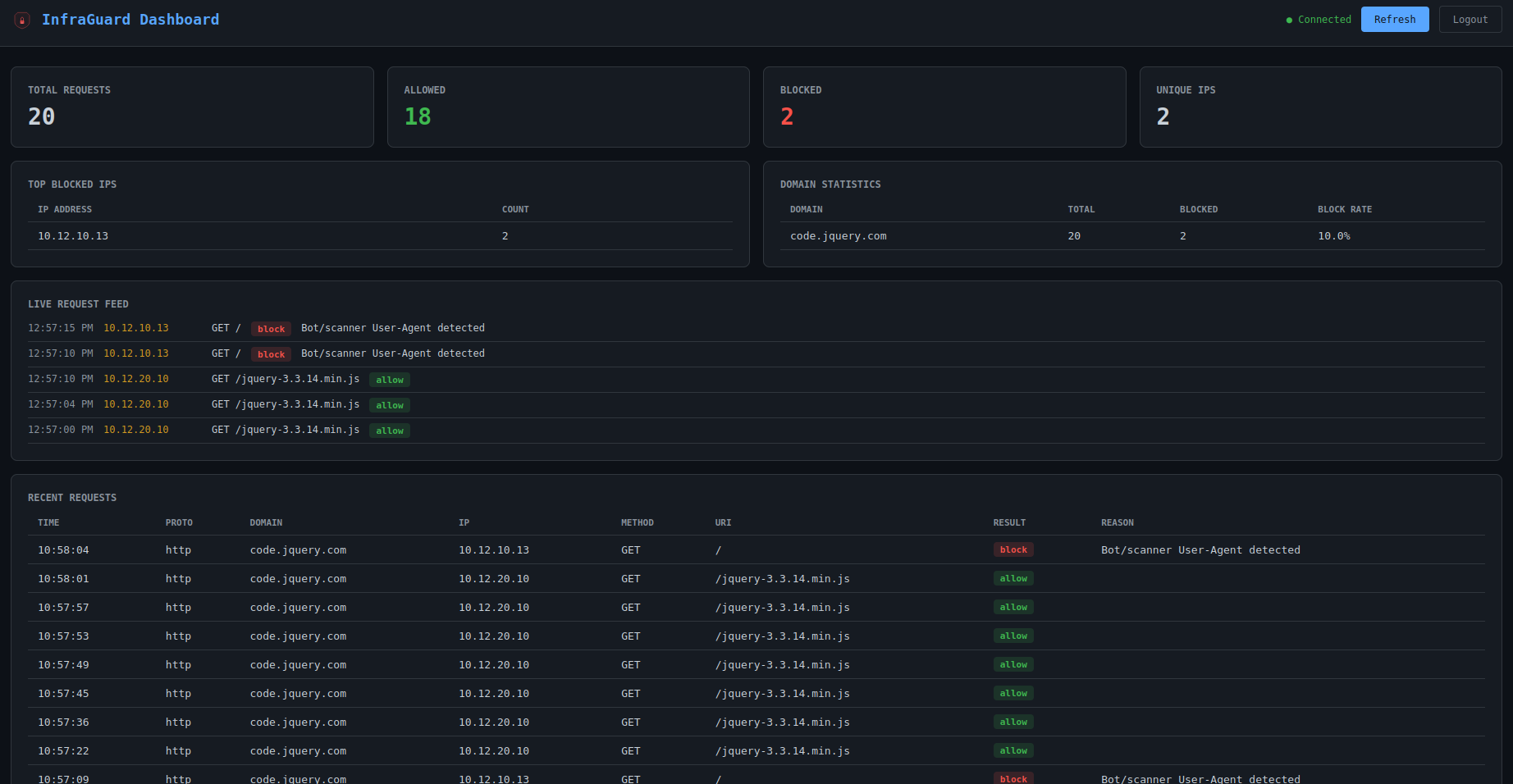
- 웹 대시보드 -- 로그인 페이지, 실시간 요청 피드, 도메인 통계, 상위 차단 IP, WebSocket 이벤트 스트리밍, 인라인 차단/허용/차단 해제 액션을 갖춘 실시간 SPA
- 디코이 페이지 관리 -- 대시보드에서 직접 디코이 HTML 페이지를 나열, 미리보기, 편집합니다; 도메인별 카나리 개요(픽셀 / 숨겨진 링크 / 숨겨진 폼 토글)와 디코이 자산을 가져간 모든 스캐너 또는 샌드박스를 표시하는 카나리 적중 패널
- 전용 콜백 엔드포인트가 있는 디코이 토큰 -- 주입된 추적 픽셀, 숨겨진 링크, 숨겨진 폼이 각각
/_ig/px|hp|hf?c=<token>에서 canary_hit 이벤트를 발생시킵니다; 적중은 filter_result=canary_hit과 함께 추적 DB에 기록되고 Decoys 페이지 및 구독된 모든 경보 플러그인으로 실시간 스트리밍됩니다
- 플러그인 탭 -- 로드된 플러그인을 런타임
enable / disable 토글(재시작 불필요)과 함께 나열하고, 29개의 내장 플러그인 중 하나를 원클릭으로 추가할 수 있는 플러그인 마켓플레이스를 제공합니다; 모든 변경은 config.yaml에 저장되고 config-history 저장소에 커밋으로 기록됩니다
- 커맨드 포스트 -- 여러 InfraGuard 노드의 통계, 요청, 라이브 이벤트를 단일 뷰로 병합하는 다중 인스턴스 집계 대시보드로, 각 프록시와 모든 차단 소스 IP를 지리적 위도/경도에 표시하는 플릿 맵(MapLibre)과 교차 인스턴스 작업을 위한 팬아웃 플러그인 토글을 제공합니다
- 터미널 UI -- 로그인 화면, 라이브 API 폴링, 색상 코드 요청 로그를 갖춘 Textual 기반 TUI
- 교전 보고서 -- 도메인별 분석, 필터 효과, 운영자 감사 추적을 포함한 자체 포함 HTML, JSON, CSV 보고서
- Prometheus 메트릭 -- 요청 카운터, 업스트림 지연 히스토그램, 서킷 브레이커 상태, 피드 신선도, 활성 연결, Helm HPA가 스케일링하는
infraguard_active_beacons 게이지를 노출하는 /metrics 엔드포인트
- OpenTelemetry -- 선택적 OTLP 트레이스 + 메트릭 익스포터; 관측성 compose 프로필은 OTEL 수집기와 Prometheus + 자동 프로비저닝된 Grafana 개요 대시보드를 구성합니다
- Kubernetes Helm 차트 -- 프록시, 대시보드, Redis StatefulSet, ServiceMonitor, 활성 비콘 게이지 기반 HPA;
deploy/helm/infraguard/에 포함
통합 및 플러그인
- SIEM 통합 -- Elasticsearch, Wazuh, Syslog (CEF/JSON)용 내장 플러그인과 배치 포워딩
- 웹훅 경보 -- Discord(임베드), Slack(Block Kit), 범용 웹훅, PagerDuty(Events API v2, 중복 제거 키), Telegram(양방향 운영 채팅: 휴대폰에서
/status, /sessions, /kill, /ack)용 내장 플러그인
- 탐지 플러그인 -- 요청 본문에 대한 YARA 규칙, GreyNoise Community 조회, ML 봇 분류기(JA4 + UA + 타이밍에 대한 로지스틱 회귀), 응답 카나리(canarytokens.org), p0f v3 핑거프린팅, JA4/JA4H 강화, GeoIP 강화
- 응답 조작기 -- HTML 재작성기, 페이로드 워터마크, 서명 제거기, JS 챌린지, 캐시 모방, 느린 타핏, 섀도우 차단(스캐너가 적응하지 못하도록 200 반환)
- Phishing.club 통합 -- 피싱 이벤트를 수집하고 클릭한 대상 IP를 자동 허용 목록에 추가하는 HMAC 서명 웹훅 수신기
- 플러그인 시스템 --
on_event 훅, 플러그인별 설정, 이벤트 필터링을 갖춘 이벤트 기반 아키텍처; 모든 플러그인은 재시작 없이 대시보드의 플러그인 탭에서 토글하거나 로드할 수 있으며, 변경 사항은 config-history 감사 커밋과 함께 config.yaml에 저장됩니다
구성 및 배포
- 구성 암호화 -- age(전체 파일) 및 SOPS(값별) 암호화와
.env 파일 지원
- 구성 검증 -- CLI diff 도구 및 20개 이상의 보안, 운영, TLS 검증 검사
- API 키 관리 -- 키별 속도 제한, 사용 추적, 할당량과 함께 API 키를 생성, 폐기, 교체합니다
- 백엔드 구성 생성 -- TLS, IP 필터링, 헤더 검사, 별칭, 커스텀 헤더를 포함한 Nginx, Caddy, Apache 구성 생성
- 규칙 수집 -- 기존
.htaccess 및 robots.txt 파일에서 IP 차단 목록과 User-Agent 패턴 가져오기
- Docker 배포 -- 선택적 Let's Encrypt, GeoIP 다운로더, PwnDrop 페이로드 서버, Ollama AI 어시스턴트를 포함한 Dockerfile + docker-compose
- GeoIP 지원 -- 세 가지 GeoLite2 데이터베이스(City, ASN, Country) 모두와 Docker 자동 다운로드
- 자체 서명 TLS 폴백 -- 구성된 경로가 존재하지 않을 때 인증서를 자동 생성합니다
- 환경 변수 지원 --
.env 파일 자동 로드; ${VAR} 구문이 모든 구성 값과 키에서 작동합니다
- 구성 가능한 상태 엔드포인트 -- 핑거프린팅을 피하기 위해 상태 검사 경로 변경
- 구조화된 로깅 -- structlog를 통한 JSON 형식 구조화 로그
- 추적 및 지속성 -- 요청 로깅, 통계, 노드 레지스트리, 리플레이 해시, 페이로드 토큰을 위한 WAL 모드의 SQLite
설치 가이드
설치 방법은 Wiki 페이지를 확인하세요