
 stanfrbd/cyberbro
쓰레기 입력에서 IoC를 추출하고 여러 CTI 서비스를 사용하여 평판을 확인하는 간단한 애플리케이션입니다.
<h1 align="center">Cyberbro</h1>
<p align="center">
<img src="https://assets.kitploit.com/production/public/readmes/10725/4970c639439a60187e1ba39523b24c3343a5b6946445d8225e23c4060e002ff0.png" width="90" /><br />
<b><i>잡다한 입력에서 IoC를 추출하고 여러 서비스를 통해 평판을 확인하는 간단한 애플리케이션입니다.</i></b>
<br />
<b>🌐 <a href="https://demo.cyberbro.net/">demo.cyberbro.net</a></b><br />
</p>
---
<p align="center">
<a href="https://github.com/stanfrbd/cyberbro/stargazers">
<img src="https://img.shields.io/github/stars/stanfrbd/cyberbro?style=social" alt="GitHub stars">
</a>
<a href="https://x.com/cyberbro_cti">
<img src="https://img.shields.io/twitter/follow/cyberbro_cti?style=social" alt="Follow on X/Twitter">
</a>
<a href="https://infosec.exchange/@cyberbro">
<img src="https://img.shields.io/badge/Follow_@cyberbro-23-blue?logo=mastodon" alt="Mastodon">
</a>
<a href="https://github.com/stanfrbd/cyberbro/issues">
<img src="https://img.shields.io/github/issues/stanfrbd/cyberbro" alt="GitHub issues">
</a>
<a href="https://github.com/stanfrbd/cyberbro/blob/main/LICENSE">
<img src="https://img.shields.io/github/license/stanfrbd/cyberbro" alt="License">
</a>
<a href="https://github.com/stanfrbd/cyberbro/actions/workflows/jobs.yml">
<img src="https://github.com/stanfrbd/cyberbro/actions/workflows/jobs.yml/badge.svg" alt="build and test badge">
</a>
<a href="https://github.com/stanfrbd/cyberbro/actions/workflows/pre-commit-validation.yml">
<img src="https://github.com/stanfrbd/cyberbro/actions/workflows/pre-commit-validation.yml/badge.svg" alt="pre-commit validation badge">
</a>
<a href="https://www.python.org/">
<img src="https://img.shields.io/badge/Python-3.13-blue?logo=python" alt="Python">
</a>
</p>
---
# 소개
[Cybergordon](https://cybergordon.com/)과 [IntelOwl](https://github.com/intelowlproject/IntelOwl)에서 영감을 받았습니다.
이 프로젝트는 **복잡한** 솔루션을 배포할 필요 없이, 여러 서비스를 사용하여 관찰 가능한 항목(observable)의 평판을 간단하고 효율적으로 확인할 수 있는 방법을 제공하는 것을 목표로 합니다.
문서는 https://docs.cyberbro.net/ 에서 확인하세요.
> [!TIP]
> 사용자 정의 보고서를 작성하려면 **MCP**(Model Context Protocol)를 통해 Cyberbro를 좋아하는 **LLM**(Claude, OpenAI gpt-5...)과 함께 사용하세요. \
> 자세한 내용은 [Cyberbro MCP](https://github.com/stanfrbd/mcp-cyberbro)를 확인하세요.
# 데모
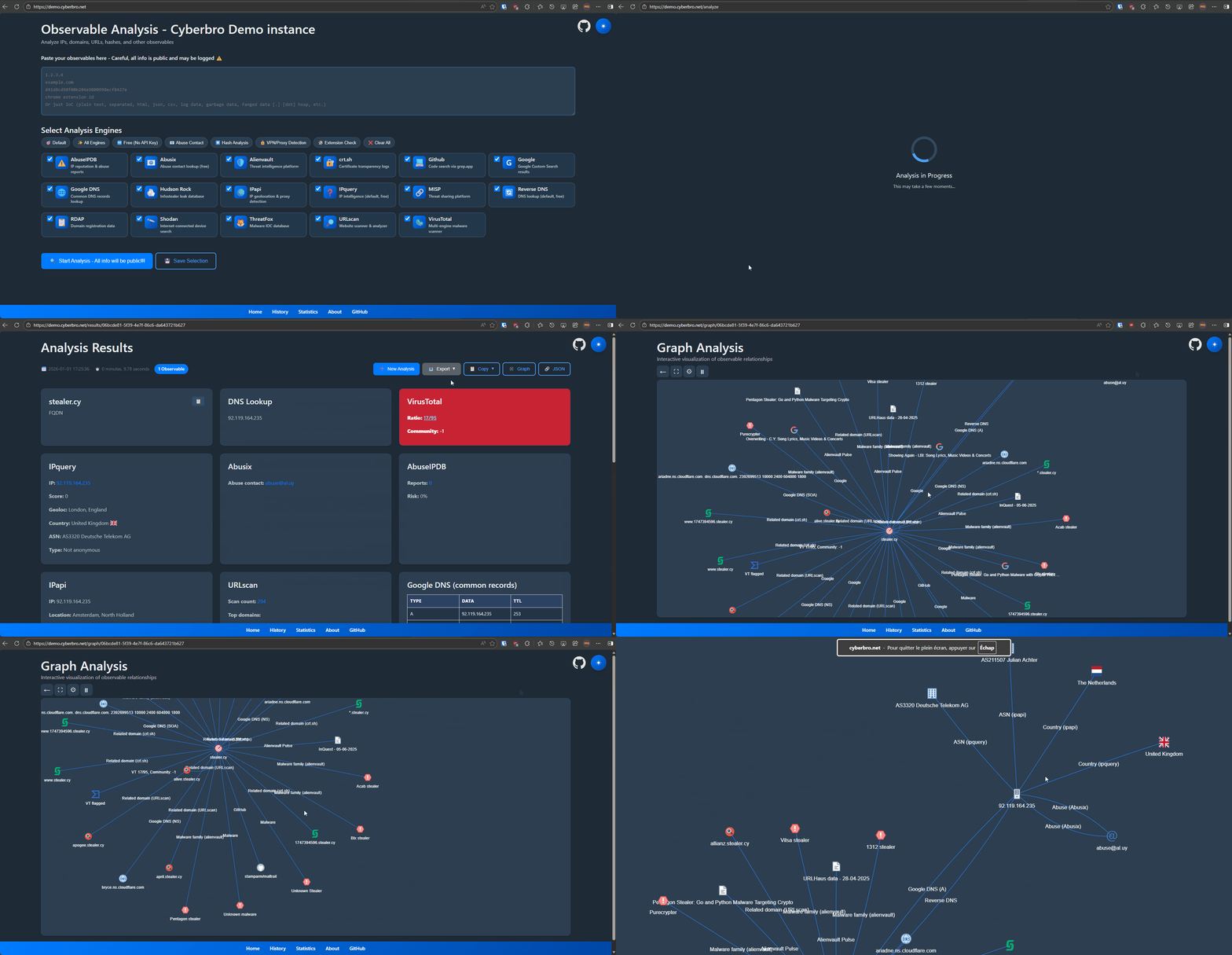
# 기능
* **간편한 입력**: 원시 로그나 IoC를 붙여넣으면 자동으로 파싱하고 추출합니다.
* **다중 서비스 검사**: 다양한 위협 인텔리전스 서비스 전반에 걸쳐 IP, 해시, 도메인, URL, Chrome 확장 프로그램 ID의 평판을 조회합니다.
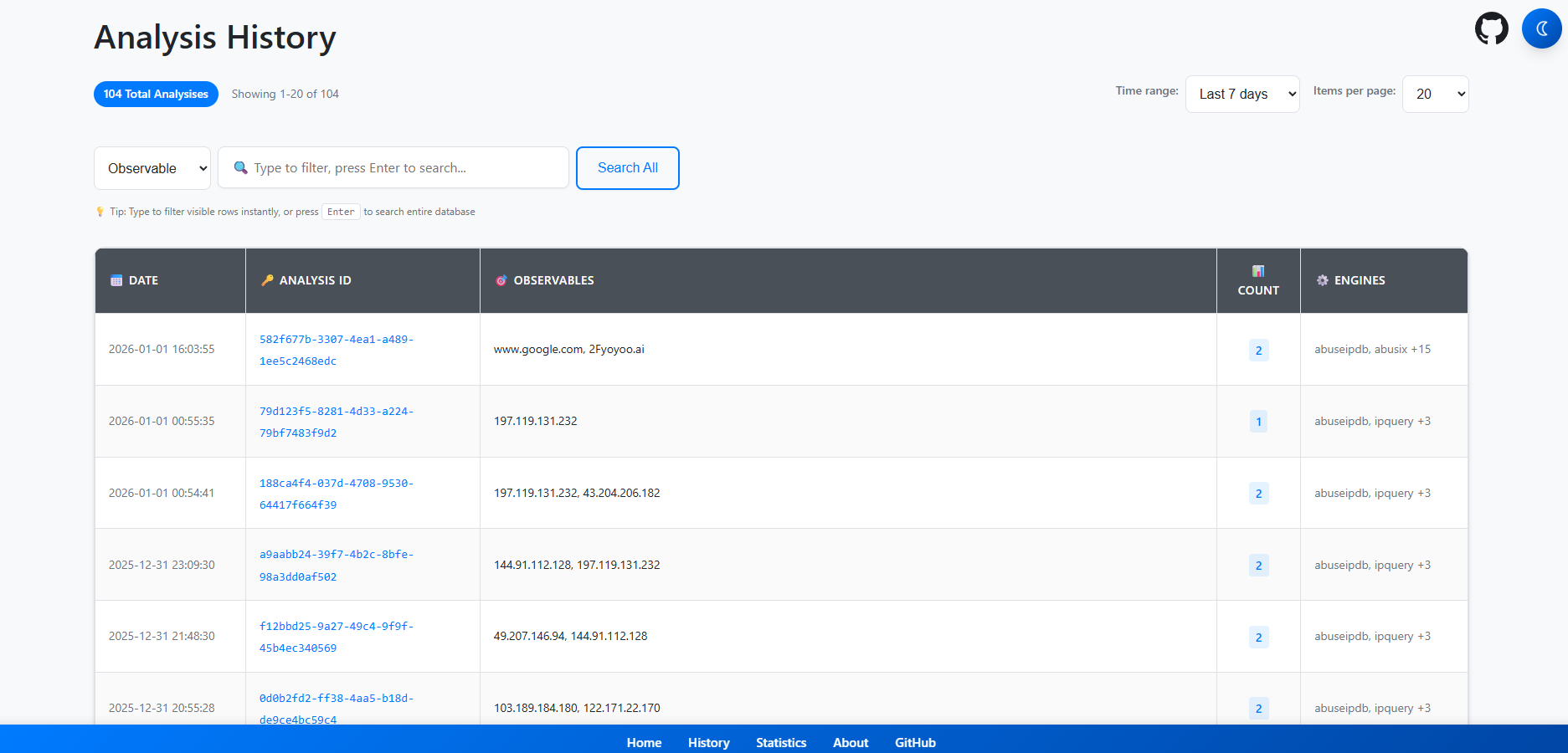
* **종합적인 보고서**: 고급 검색, 필터링, CSV/Excel 내보내기.
* **빠른 처리**: 속도를 위한 멀티스레딩.
* **자동 피벗팅**: 역방향 DNS와 RDAP / Whois를 통해 관련 도메인, URL, IP를 발견합니다.
* **정확한 도메인 및 악용 정보**: RDAP / Whois 및 악용 연락처 조회.
* **통합**: Microsoft Defender for Endpoint, CrowdStrike, OpenCTI, Grep.App, Hudson Rock 등.
* **프록시 및 저장소**: 프록시 지원 및 결과를 SQLite에 저장.
* **기록 및 그래프**: 분석 기록 및 실험적 그래프 보기.
* **캐시**: 반복 조회 속도를 높이기 위한 캐싱(각 엔진이 아닌 다중 엔진 수준에서 활성화됨).
# Cyberbro만의 차별점
* **초보자 친화적**: 모든 숙련도 수준에서 접근 가능합니다.
* **Chrome 확장 프로그램 ID 조회**: ID로부터 확장 프로그램 이름과 CTI 데이터를 가져옵니다.
* **가벼운 배포**: 간단한 설정과 사용.
* **고급 TLD 추출**: 더 나은 조회를 위한 정확한 루트 도메인 탐지.
* **실용적인 데이터 수집**: GitHub와 Google을 사용하여 간과하기 쉬운 IoC를 찾습니다.
* **CTI 보고서 통합**: IoC.One에서 IoC 관련 보고서를 가져옵니다.
* **EDR 통합**: 자체 보안 도구(MDE, CrowdStrike)에 대해 관찰 가능한 항목을 검사합니다.
# 시작하기 - 요약
> [!TIP]
> 귀찮다면 Docker만 있으면 됩니다. \
> `git clone`을 하고, `.env.sample`을 `.env`로 복사한 뒤, `docker compose up`을 실행하고 `localhost:5000`으로 이동하세요. 네, 그게 전부입니다!
# 시작하기
* 시작하려면 저장소를 클론하세요.
```bash
git clone https://github.com/stanfrbd/cyberbro
cd cyberbro
```
## 설정 파일 편집 (필수)
```
cp .env.sample .env
```
> [!NOTE]
> API 키가 없으신가요? 문제없습니다. `.env.sample`을 `.env`로 복사하고 선택적 값을 비워두면 됩니다. 프록시를 사용하는 경우 주의하세요. \
> **모든 무료 엔진**을 사용할 수 있습니다!
* `.env` 파일에 값(필요한 경우 프록시 포함)을 채우세요.
> [!WARNING]
> `.env`에는 민감한 비밀이 포함되어 있으므로 절대 커밋해서는 안 됩니다.
> 프로덕션/팀 배포의 경우 SOPS, Vault 또는 이에 상응하는 비밀 관리 워크플로를 사용하세요.
```bash
ABUSEIPDB=token_here
ALIENVAULT=token_here
CRIMINALIP_API_KEY=token_here
CROWDSTRIKE_CLIENT_ID=client_id_here
CROWDSTRIKE_CLIENT_SECRET=client_secret_here
DFIR_IRIS_API_KEY=token_here
DFIR_IRIS_URL=https://dfir-iris.local
DFIR_IRIS_SEARCH_NOTES=false
GOOGLE_CSE_CX=cx_here
GOOGLE_CSE_KEY=key_here
GOOGLE_CSE_URL=https://www.googleapis.com/customsearch/v1
GOOGLE_SAFE_BROWSING=token_here
HISTER_TOKEN=token_here
HISTER_BASE_URL=https://hister.example.com
IPAPI=token_here
IPINFO=token_here
MDE_CLIENT_ID=client_id_here
MDE_CLIENT_SECRET=client_secret_here
MDE_TENANT_ID=tenant_here
MISP_API_KEY=token_here
MISP_URL=https://misp.local
MISP_FEEDBACK_SERVER_URL=https://misp-feedback.local
MISP_FEEDBACK_TOKEN=token_here
OPENCTI_API_KEY=token_here
OPENCTI_URL=https://demo.opencti.io
PROXY_URL=
RANSOMWARE_LIVE_API_KEY=token_here
RL_ANALYZE_API_KEY=token_here
RL_ANALYZE_URL=https://spectra_analyse_url_here
ROSTI_API_KEY=token_here
SHODAN=token_here
SPUR_US=token_here
THREATFOX=token_here
VIRUSTOTAL=token_here
WEBSCOUT=token_here
```
> [!IMPORTANT]
> 버전 `v0.13.0`부터 Cyberbro는 더 이상 `secrets.json`과 `/config` 페이지를 지원하지 않습니다. [discussion 165](https://github.com/stanfrbd/cyberbro/discussions/165)를 참고하세요.\
> 기존 `secrets.json`이 있다면 다음 명령으로 `.env`로 변환하세요:
> `python3 scripts/secrets_json_to_env.py`
문서의 [배포를 위한 고급 옵션](https://docs.cyberbro.net/quick-start/Advanced-options-for-deployment)을 참고하세요.
# 앱 실행
## 간편하고 쉬운 방법 - docker 사용
> [!WARNING]
> `docker-compose`가 아닌 `docker compose`로 `compose` 플러그인을 설치했는지 확인하세요.
> Docker에서는 로컬 `.env`에 `FLASK_HOST=127.0.0.1`이 설정되어 있더라도 앱이 컨테이너 내부에서 `0.0.0.0`에 바인딩됩니다.
```bash
docker compose up # 백그라운드에서 실행하려면 -d를, 이미지를 다시 빌드하려면 --build를 사용하세요
```
* http://127.0.0.1:5000 으로 이동하여 즐기세요.
> 이미지를 빌드하기 전에 `.env`를 편집하는 것을 잊지 마세요.
모든 Docker 배포 옵션을 확인하려면 문서의 [배포를 위한 고급 옵션](https://docs.cyberbro.net/quick-start/Advanced-options-for-deployment)을 참고하세요.
## 예전 방식
* 저장소를 클론하고 요구 사항을 설치하세요.
의존성을 설치하기 전에 [`venv`](https://docs.python.org/3/library/venv.html)를 생성하는 것이 좋습니다.
```bash
pip install -r requirements.txt
```
* `gunicorn`으로 앱을 실행하세요(클린 모드).
```bash
gunicorn -c prod/gunicorn.conf.py app:app
```
* 개발 모드로 앱을 실행하세요.
```bash
python3 app.py
```
# 스크린샷
<details>
<summary>모든 스크린샷 보기</summary>
<img width="1897" height="909" alt="image" src="https://assets.kitploit.com/production/public/readmes/10725/b3a07f1e163ae260b2a5f908a70d571a145f702ad50b524725ce4b3562f7c367.png" />
<img width="1883" height="907" alt="image" src="https://assets.kitploit.com/production/public/readmes/10725/3d3404a7e55b688b497db428ecb7fa01b6a23ec8879e2c2c751c68a92545a334.png" />
<img width="1887" height="906" alt="image" src="https://assets.kitploit.com/production/public/readmes/10725/cd57a214ae604ed83ca50d119b49391afc0a66c03b3ed93feecfbb59578f5984.png" />
</details>
<img width="1788" height="1536" alt="image" src="https://assets.kitploit.com/production/public/readmes/10725/2e6051fe1ad7fadde5ff9074dbb4d96528dd2c8ab8262ea10e1fe49fee031153.png" />
<img width="1873" height="900" alt="image" src="https://assets.kitploit.com/production/public/readmes/10725/5201b888fdaa97465f141379e9f5caedb0bdd847b1e31a08b3e236df8b663ed6.png" />
> [!CAUTION]
> **프로덕션 환경**에서 사용할 계획이라면 **보안 문제**를 방지하기 위해 잘 구성된 **리버스 프록시** + **WAF**를 사용하세요.
# Cyberbro 브라우저 확장 프로그램
<p>
<a href="https://addons.mozilla.org/addon/cyberbro-analyzer/"><img src="https://assets.kitploit.com/production/public/readmes/10725/7e7e7002c8f357304f16d1d06ff840c40e92c66f6ed072b18da36329502c7a13.png" alt="Get Cyberbro Analyzer for Firefox"></a>
<a href="https://chromewebstore.google.com/detail/cyberbro-analyzer/nfcfigpaollodajabegcdobhmgaclbbm"><img src="https://assets.kitploit.com/production/public/readmes/10725/28dd6378e71c68b4f21b54ad99bb1225f978b8f2bacfa3c46444f988c09ace1c.png" alt="Get Cyberbro Analyzer for Chromium"></a>
<a href="https://microsoftedge.microsoft.com/addons/detail/cyberbro-analyzer/lbponbmcggcepflackehgpbceehagiam"><img src="https://assets.kitploit.com/production/public/readmes/10725/0a301e6c3048478ead36dfbccdba2e5263de7fbeb3de9d22a9f159f64f378273.png" alt="Get Cyberbro Analyzer for Microsoft Edge"></a>
</p>
# Cyberbro API
* API는 `/api/`에서 사용할 수 있으며 GUI 또는 명령줄을 통해 접근할 수 있습니다.
**현재 3개의 엔드포인트가 있습니다:**
* `/api/analyze` - 텍스트를 분석하고 분석 ID를 반환합니다(JSON).
* `/api/is_analysis_complete/<analysis_id>` - 분석이 완료되었는지 확인합니다(JSON).
* `/api/results/<analysis_id>` - 이전 분석의 결과를 검색합니다(JSON).
```bash
curl -X POST "http://localhost:5000/api/analyze" -H "Content-Type: application/json" -d '{"text": "cyberbro.net", "engines": ["reverse_dns", "rdap_whois"]}'
```
```json
{
"analysis_id": "e88de647-b153-4904-91e5-8f5c79174854",
"link": "/results/e88de647-b153-4904-91e5-8f5c79174854"
}
```
```bash
curl "http://localhost:5000/api/is_analysis_complete/e88de647-b153-4904-91e5-8f5c79174854"
```
```json
{
"complete": true
}
```
```bash
curl "http://localhost:5000/api/results/e88de647-b153-4904-91e5-8f5c79174854"
```
```json
[
{
"observable": "cyberbro.net",
"rdap_whois": {
"abuse_contact": "[email protected]",
"creation_date": "2024-12-20",
"data_source": "rdap",
"emails": [
"[email protected]"
],
"expiration_date": "2026-12-20",
"link": "https://rdap.verisign.com/net/v1/domain/CYBERBRO.NET",
"name_servers": [
"anderson.ns.cloudflare.com",
"lisa.ns.cloudflare.com"
],
"organization": null,
"registrant": null,
"registrant_country": null,
"registrant_email": null,
"registrar": "Cloudflare, Inc.",
"update_date": "2025-11-20"
},
"reverse_dns": {
"reverse_dns": [
"172.67.197.226",
"104.21.42.7"
]
},
"reversed_success": true,
"type": "FQDN"
}
]
```
> [!NOTE]
> [전용 문서 페이지](https://docs.cyberbro.net/quick-start/API-usage-and-engine-names)에서 사용 가능한 모든 엔진의 이름을 확인할 수 있습니다.
# API 및 서드파티 서비스
* [AbuseIPDB](https://docs.abuseipdb.com/)
* [Abusix](https://abusix.com/)
* [Alienvault](https://otx.alienvault.com/)
* [CriminalIP](https://www.criminalip.io/)
* [CrowdStrike](https://www.crowdstrike.com/)
* [crt.sh](https://crt.sh/)
* [DFIR Iris](https://www.dfir-iris.org/)
* [Github](https://github.com/)
* [Google Safe Browsing](https://developers.google.com/safe-browsing)
* [Google](https://google.com/)
* [Google DNS](https://dns.google/)
* [Grep.App](https://grep.app/)
* [Hister](https://hister.org/)
* [Hudson Rock](https://hudsonrock.com/)
* [ICANN](https://lookup.icann.org/)
* [IPapi](https://ipapi.is/)
* [IPinfo](https://ipinfo.io/developers)
* [IPquery](https://ipquery.gitbook.io/ipquery-docs)
* [Ioc.One](https://ioc.one/)
* [Microsoft Defender for Endpoint](https://docs.microsoft.com/en-us/windows/security/threat-protection/microsoft-defender-atp/microsoft-defender-for-endpoint-api)
* [Microsoft Entra ID (OpenID Configuration)](https://login.microsoftonline.com/)
* [MISP](https://www.misp-project.org/)
* [MISP Feedback](https://github.com/MISP/misp-feedback/)
* [OpenCTI](https://www.opencti.io/)
* [OpenRDAP](https://www.openrdap.org/)
* [Phishtank](https://www.phishtank.com/)
* [Ransomware.Live](https://ransomware.live/)
* [ReversingLabs Spectra Analyze](https://www.reversinglabs.com/products/spectra-analyze)
* [Rösti](https://rosti.bin.re/) - Repackaged Open Source Threat Intelligence
* [ScanMalware](https://scanmalware.com/)
* [Shodan](https://developer.shodan.io/)
* [Spur.us](https://spur.us/)
* [ThreatFox](https://threatfox.abuse.ch/api/)
* [URLscan](https://urlscan.io/)
* [VirusTotal](https://developers.virustotal.com/v3.0/reference)
* [WebScout](https://webscout.io/)
> [!NOTE]
> 질문이 있으신가요? https://docs.cyberbro.net 을 확인하거나 [이슈](https://github.com/stanfrbd/cyberbro/issues/new)를 제기하세요. \
> 고급 설정(배포 전 `supervisord.conf` 튜닝, 표시할 엔진 선택, `/api/` 접두사 변경...)에 대해서는 [전용 문서 페이지](https://docs.cyberbro.net/quick-start/Advanced-options-for-deployment)를 확인하세요.
# 특별 감사
풀 리퀘스트를 보내고 이 프로젝트를 개선하는 데 도움을 주신 모든 놀라운 기여자분들께 큰 감사를 드립니다:
* [Florian PILLOT](https://github.com/Harukunnn) - 엔진을 재작업(리팩토링 및 최적화)해 주셨습니다.
* [Axel](https://github.com/botlabsDev) - [Ioc.One](https://ioc.one/)을 개발하고 Ioc[.]One 스크래핑을 허용하는 특정 User-Agent를 추가해 주셨습니다.
* [Jon Mark Allen](https://github.com/ubahmapk/) - 더 나은 비밀 관리와 테스트를 추가해 주셨습니다. 코드베이스를 많이 리팩토링하고 CriminalIP를 포함한 많은 개선을 해 주셨습니다.
* [cirosec GmbH - Felix Friedberger](https://github.com/cirosec) - crt.sh 엔진을 추가해 주셨습니다.
* [Stig Dahl](https://github.com/sdaaish) - crt.sh 엔진을 개선하고, DFIR IRIS 검색을 추가하고, Bandit 이슈를 수정하고, MISP 엔진을 교정하고, MISP Feedback 엔진을 추가해 주셨습니다.
* [0xffr](https://github.com/0xffr) - 이슈 #98(Grep.app 엔진 손상)을 수정하고 CriminalIP 엔진에 적절한 주석을 달아 주셨습니다.
* [Maxime Berthault - Maxou56800](https://github.com/Maxou56800) - Cyberbro CLI를 개발해 주셨습니다.
* [Jonas Lejon](https://github.com/jonaslejon) - ScanMalware 엔진을 추가해 주셨습니다.
* [egeoguz04](https://github.com/egeoguz04) - Google CSE 엔드포인트를 구성할 수 있게 해 주셨습니다. 다가오는 Google 변경 사항에 유용할 것입니다.
여러분의 기여에 깊이 감사드립니다!
# 라이선스
```
MIT License
Copyright (c) 2024-2026 stanfrbd
Permission is hereby granted, free of charge, to any person obtaining a copy
of this software and associated documentation files (the "Software"), to deal
in the Software without restriction, including without limitation the rights
to use, copy, modify, merge, publish, distribute, sublicense, and/or sell
copies of the Software, and to permit persons to whom the Software is
furnished to do so, subject to the following conditions:
The above copyright notice and this permission notice shall be included
in all copies or substantial portions of the Software.
THE SOFTWARE IS PROVIDED "AS IS", WITHOUT WARRANTY OF ANY KIND, EXPRESS
OR IMPLIED, INCLUDING BUT NOT LIMITED TO THE WARRANTIES OF MERCHANTABILITY,
FITNESS FOR A PARTICULAR PURPOSE AND NONINFRINGEMENT. IN NO EVENT SHALL
THE AUTHORS OR COPYRIGHT HOLDERS BE LIABLE FOR ANY CLAIM, DAMAGES OR OTHER
LIABILITY, WHETHER IN AN ACTION OF CONTRACT, TORT OR OTHERWISE, ARISING
FROM, OUT OF OR IN CONNECTION WITH THE SOFTWARE OR THE USE OR OTHER
DEALINGS IN THE SOFTWARE.
```
# 로고
이 프로젝트에서 사용된 로고는 개인 및 상업적 사용이 무료이며 [여기](https://www.veryicon.com/icons/object/material_design_icons/web-39.html)에서 찾을 수 있습니다.