 reprise99/sentinel-queries
KQL 쿼리 모음

Microsoft Sentinel에서 KQL을 사용하기 위한 몇 가지 팁, 요령 및 예제입니다.
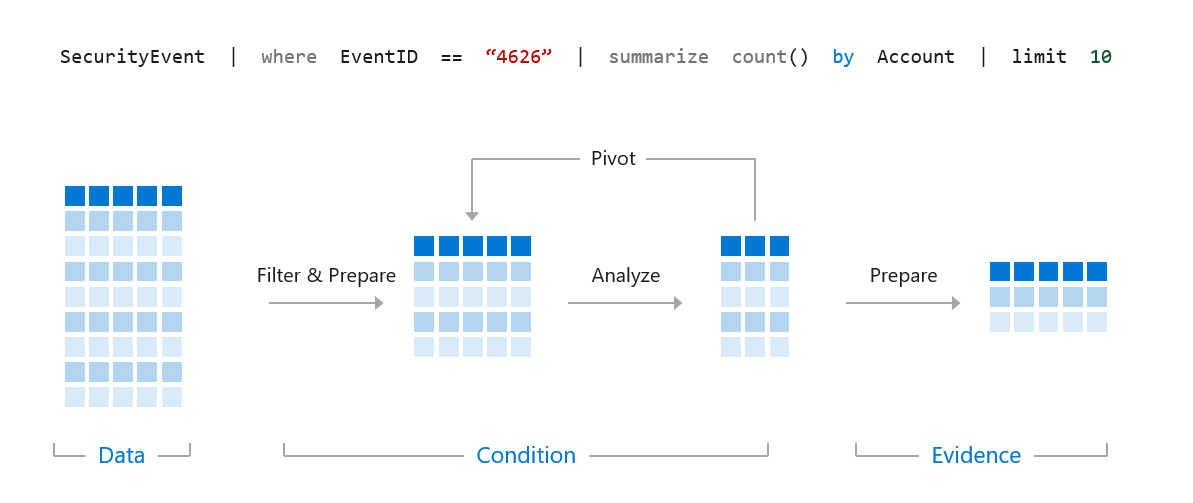
Kusto Query Language는 Azure Monitor, Azure Data Explorer 및 Azure Log Analytics(그 내부에서 Microsoft Sentinel이 사용하는 것) 전반에 걸쳐 사용되는 언어입니다. 저는 항상 KQL에 관한 이 시각화가 유용하다고 생각했습니다 -
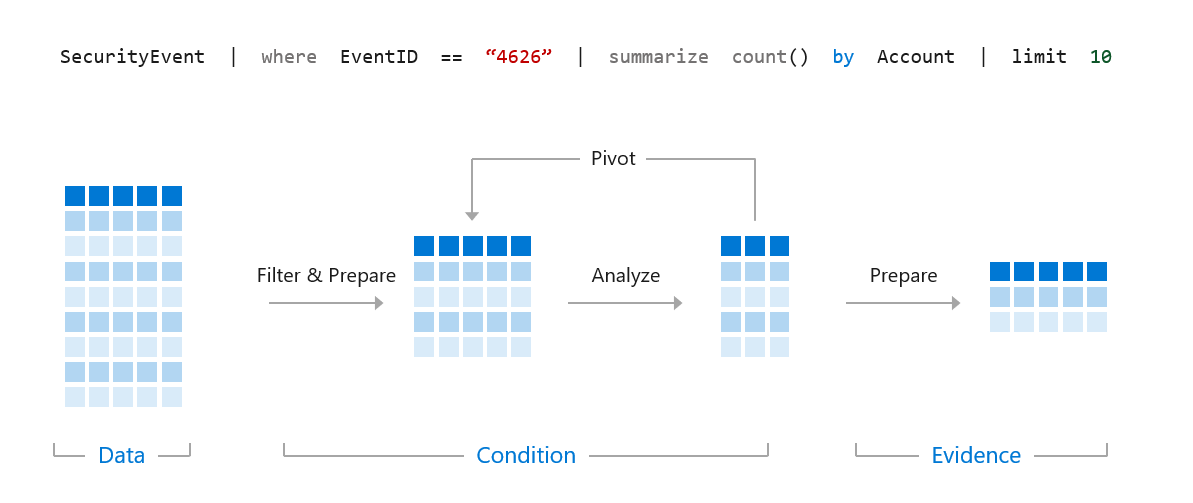
우리는 더 큰 데이터 세트에서 위협, 탐지, 패턴 및 이상 징후를 찾기 위해 정확하고 효율적인 쿼리를 만드는 데 KQL을 사용하려고 합니다.
아래 쿼리를 예로 들어 보겠습니다.```kql SigninLogs | where TimeGenerated > ago(14d) | where UserPrincipalName == "[email protected]" | where ResultType == "0" | where AppDisplayName == "Microsoft Teams" | project TimeGenerated, Location, IPAddress, UserAgent
이와 같은 쿼리를 실행하면 첫 번째 줄은 Microsoft Sentinel에 데이터를 조회할 테이블을 알려줍니다. 따라서 이 경우에는 Azure AD 로그인 데이터가 전송되는 SigninLogs 테이블을 검색하려고 합니다. 테이블 목록은 [여기](https://docs.microsoft.com/en-us/azure/sentinel/data-source-schema-reference)에서 확인할 수 있습니다.

그런 다음 Microsoft Sentinel은 쿼리를 순차적으로 실행하므로 오류가 발생하거나 끝에 도달할 때까지 각 줄을 하나씩 실행합니다. 이제 쿼리를 줄별로 분석해 보겠습니다.```kql
SigninLogs
그래서 먼저 SigninLogs 테이블을 선택했습니다.```kql SigninLogs | where TimeGenerated > ago(14d)
다음으로 우리는 Sentinel에게 이 테이블의 지난 14일 분량의 데이터를 다시 살펴보도록 지시합니다.```kql
SigninLogs
| where TimeGenerated > ago(14d)
| where UserPrincipalName == "[email protected]"
다음으로, Sentinel이 UserPrincipalName이 "[email protected]"인 로그만 찾도록 요청합니다.```kql SigninLogs | where TimeGenerated > ago(14d) | where UserPrincipalName == "[email protected]" | where ResultType == "0"
그런 다음 ResultType == 0인 로그만 찾습니다. 이는 Azure AD에 대한 성공적인 로그온입니다.```kql
SigninLogs
| where TimeGenerated > ago(14d)
| where UserPrincipalName == "[email protected]"
| where ResultType == "0"
| where AppDisplayName == "Microsoft Teams"
다음으로 Microsoft Teams에 대한 로그인만 찾아보겠습니다.```kql SigninLogs | where TimeGenerated > ago(14d) | where UserPrincipalName == "[email protected]" | where ResultType == "0" | where AppDisplayName == "Microsoft Teams" | project TimeGenerated, Location, IPAddress, UserAgent
마지막 줄은 project 연산자를 사용하여 로그에서 4개의 필드만 반환하므로, SigninLogs 데이터에서 TimeGenerated, Location, IPAddress 및 UserAgent만 볼 수 있습니다.

이것이 쿼리를 작성하는 방법입니다. 이제 기본 사항입니다.

## 기본 사항

### 시간 기본 사항

Microsoft Sentinel과 KQL은 시간 필터에 매우 최적화되어 있으므로, 검색하려는 데이터의 기간을 알고 있다면 시간 범위를 바로 필터링해야 합니다. 지난 14일의 로그를 검색한 다음, 아래 쿼리처럼 사용자 이름을 검색하는 경우 -```kql
SigninLogs
| where TimeGenerated > ago(14d)
| where UserPrincipalName == "[email protected]"
사용자 이름을 먼저 검색한 다음 기간을 검색하는 것보다 훨씬 더 효율적입니다. 다음과 같이 -```kql SigninLogs | where UserPrincipalName == "[email protected]" | where TimeGenerated > ago(14d)
KQL에는 특정 기간을 쿼리하기 위한 다양한 옵션이 있습니다.```kql
SigninLogs
| where TimeGenerated > ago(14d)
첫 번째 예에서와 같이, 이는 지난 14일을 검색할 것입니다.```kql SigninLogs | where TimeGenerated > ago(14h)
시간 단위로도 설정할 수 있습니다.```kql
SigninLogs
| where TimeGenerated > ago(14m)
그리고 분.
KQL은 또한 시간 범위 간의 조회를 지원합니다 -```kql SigninLogs | where TimeGenerated between (ago(14d) .. ago(7d))
이것은 14일 전에서 7일 전 사이의 SigninLogs 데이터를 찾습니다.```kql
SigninLogs
| where TimeGenerated between (ago(14h) .. ago(7h))
14시간 전과 7시간 전 사이.```kql SigninLogs | where TimeGenerated between (ago(14m) .. ago(7m))
그리고 14분 전에서 7분 전 사이에.

### Where 기초

Where는 작성하는 거의 모든 쿼리에서 사용하게 될 연산자입니다. 이것이 Microsoft Sentinel에 특정 데이터를 탐색하라고 지시하는 방법입니다. where 연산자에서는 구문이 매우 중요합니다. 동일한 예제를 사용한다면.```kql
SigninLogs
| where TimeGenerated > ago(14d)
| where UserPrincipalName == "[email protected]"
This will search our SigninLogs table, over the last 14 days, for exact matches where our UserPrincipalName equals [email protected]. In KQL == is case sensitive, so if you search for [email protected] and the username is actually [email protected], you won't get any results. The non case sensitive equivalent is =~
이것은 지난 14일 동안 SigninLogs 테이블에서 UserPrincipalName이 [email protected]과 정확히 일치하는 항목을 검색합니다. KQL에서 ==는 대소문자를 구분하므로 [email protected]으로 검색하고 실제 사용자 이름이 [email protected]인 경우 결과를 얻을 수 없습니다. 대소문자를 구분하지 않는 동등 연산자는 =입니다.```kql
SigninLogs
| where TimeGenerated > ago(14d)
| where UserPrincipalName = "[email protected]"
이것은 대소문자 구분 없이 [email protected]과 일치하는 모든 항목을 찾습니다.

같음 대신에 포함을 사용할 수도 있습니다.```kql
SigninLogs
| where TimeGenerated > ago(14d)
| where UserPrincipalName contains "reprise_99"
This will find any log entries where the UserPrincipalName contains reprise_99, if you had [email protected] and [email protected] data, it would find both. The contains operator is not case sensitive, but you can use contains_cs to make it case sensitive.
You can use either startswith or endswith if you are searching for particular patterns.```kql SigninLogs | where TimeGenerated > ago(14d) | where UserPrincipalName startswith "reprise_99"
SigninLogs | where TimeGenerated > ago(14d) | where UserPrincipalName endswith "testdomain.com"
startswith와 endswith는 모두 대소문자를 구분하지 않지만, startswith_cs 또는 endswith_cs를 사용하여 대소문자를 구분하도록 만들 수 있습니다.

네 글자를 초과하는 전체 단어를 검색하는 경우 KQL에서 has 연산자를 사용할 수 있습니다. 데이터가 인덱싱되어 있으므로 'has'를 사용하는 것이 'contains'보다 더 효율적입니다.```kql
SigninLogs
| where TimeGenerated > ago(14d)
| where AppDisplayName has "Teams"
이렇게 하면 애플리케이션 표시 이름에 Teams라는 단어가 포함된 모든 SigninLogs를 찾을 수 있습니다. 여기에는 "Microsoft Teams"와 "Microsoft Teams Web Client"가 포함될 수 있으며, 둘 다 쿼리를 충족합니다.
여러 단어를 검색하는 경우 has_any 또는 has_all을 사용할 수 있습니다.```kql SigninLogs | where TimeGenerated > ago(14d) | where AppDisplayName has_any ("Teams","Outlook")
이것은 애플리케이션 표시 이름에 "Teams" 또는 "Outlook"이 포함된 결과를 반환합니다.```kql
SigninLogs
| where TimeGenerated > ago(14d)
| where AppDisplayName has_all ("Teams","Outlook")
이렇게 하면 애플리케이션 표시 이름에 "Teams"와 "Outlook"이 포함된 결과가 반환됩니다.
검색할 필드를 모를 경우 와일드카드를 사용할 수도 있습니다. 비효율적일 수 있지만 원하는 항목을 찾는 데 올바른 방향을 제시해 줄 수 있습니다.```kql SigninLogs | where TimeGenerated > ago(14d) | where * contains "reprise_99"
이것은 reprise_99를 포함하는 모든 필드에 대해 SigninLogs 테이블을 검색합니다.

이들 옵션 중 상당수는 !를 사용하여 쿼리를 반전시켜 조건이 참이 아닌 결과를 찾는 것도 지원합니다.```kql
SigninLogs
| where TimeGenerated > ago(14d)
| where UserPrincipalName != "[email protected]"
이 쿼리는 UserPrincipalName이 [email protected]과 같지 않은 모든 SigninLogs를 찾습니다.```kql SigninLogs | where TimeGenerated > ago(14d) | where UserPrincipalName !contains "reprise_99"
이 쿼리는 UserPrincipalName에 reprise_99가 포함되어 있지 않은 모든 SigninLogs를 찾습니다.```kql
SigninLogs
| where TimeGenerated > ago(14d)
| where AppDisplayName !has "Teams"
이 쿼리는 애플리케이션 표시 이름에 "Teams"가 포함되지 않은 SigninLogs를 찾습니다.
Project를 사용하면 쿼리에서 반환되는 열과 그 순서를 선택할 수 있습니다.```kql SigninLogs | where TimeGenerated > ago(14d) | where UserPrincipalName == "[email protected]" | where ResultType == "0" | where AppDisplayName == "Microsoft Teams" | project TimeGenerated, Location, IPAddress, UserAgent
이 쿼리는 최근 14일 동안의 SigninLogs 데이터를 검색하며, UserPrincipalname이 [email protected]이고, ResultType이 0이며, 애플리케이션 표시 이름이 "Microsoft Teams"인 항목을 찾습니다. 그런 다음 해당 쿼리의 각 일치 항목에 대해 TimeGenerated, Location, IPAddress 및 UserAgent를 반환합니다.

동일한 함수의 일부로 열 이름을 바꿀 수 있습니다.```kql
| project LogTime=TimeGenerated, SigninLocation=Location, IP=IPAddress, Agent=UserAgent
이것은 동일한 데이터를 반환하지만, 열 이름을 LogTime, SigninLocation, IP 및 Agent로 바꿉니다.
또한 project 연산자를 사용하여 출력을 인라인으로 조작할 수 있습니다.```kql | project LocalTime=TimeGenerated+5h, Location, IPAddress, UserAgent
This returns the same data, but changes the TimeGenerated name to LocalTime and converts to a +5h time zone if you work in that time zone.
