
Skip to content
KitploitKITPLOIT
도구익스플로잇블로그
Log in
제출
도구익스플로잇블로그
제출

해킹, 침투 테스트 및 사이버 보안 도구를 당신의 보안 무기고에!

Kitploit은 해킹, 사이버 보안 및 침투 테스트 도구 디렉토리입니다. 최신 프로젝트 업데이트를 발견하여 취약점을 찾고, 시스템을 분석하고, 테스트를 자동화하고, 보안을 강화하세요.

피드문의개인정보© 2026 Kitploit

도구 디렉토리

카테고리

모든 카테고리 보기
Loading categories
SafeGuard — CLI Encryption tool written in Go only for learning purposes and demonstration of encryption (not secure) | Kitploit
도구/GitHubGitHub/pingpongplus/safeguard
General Purpose UtilitiesEncryption/Decryption ToolsCryptographyLearning & Education
GitHubpingpongplus/safeguard

SafeGuard

CLI Encryption tool written in Go only for learning purposes and demonstration of encryption (not secure)

저장소 보기
811036일 전아직 검토되지 않음
공유
요청한 언어로 콘텐츠를 사용할 수 없습니다. 영어 버전을 표시합니다.

Safeguard-Terminal


Safeguard is a fast, lightweight, cross-platform command-line file encryption tool written in Go.

Security Notice

This project is a learning-oriented file encryption tool.

While it uses standard cryptographic primitives from Go’s standard library (e.g. AES-GCM for authenticated encryption), it does not use a modern, memory-hard password key derivation function such as Argon2 or scrypt.

Instead, keys are derived using a lightweight, standard-library-only method. This means:

  • The encryption is secure against casual inspection
  • Integrity and tampering are detected
  • Passwords are not strongly protected against determined brute-force or GPU-based attacks

Do NOT use this tool fr your key is in plaintext and is getting saved in your terminal history

Intended use:

  • Learning and experimentation
  • Personal or low-risk file protection
  • Open-source collaboration and improvement

Installation

Build (req. Go)

git clone https://github.com/pingplus/SafeGuard.git
cd SafeGuard
go build

Usage

General syntax:

./safeguard <file> <action> <cipher> [options]

Actions:

  • --encrypt or e Encrypt a file
  • --decrypt or d Decrypt a file
  • --decrypt-directory or de Decrypt a whole directory (decrypting directory not available yet sorry :( )

Options:

  • --inplace decrypt/encrypt a file in place (experimental)
  • --key add key
  • --output specify the output name

Supported ciphers:

./safeguard --list-ciphers
[i] Available ciphers:
  xor
  caesar
  aes

AES

Encrypt a file:

./safeguard secret.txt e aes --key "your-strong-password"
# or
./safeguard secret.txt --encrypt aes --key "your-strong-password" --output secret.txt.aes

Decrypt a file:

./safeguard secret.txt d aes --key "your-strong-password"
# or
./safeguard secret.txt --decrypt aes --key "your-strong-password" --output secret.txt.dec

More

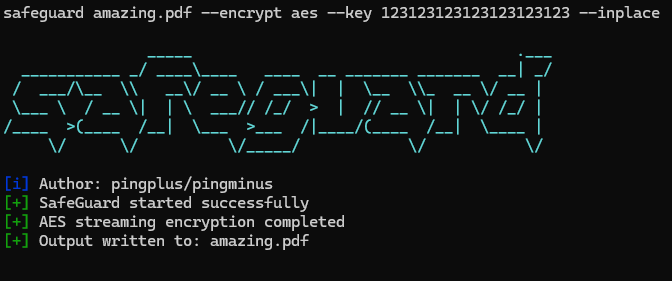
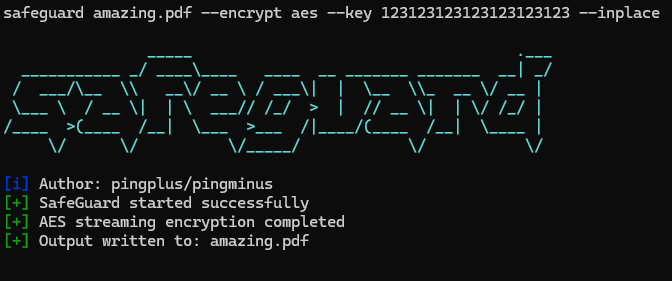
  • Encrypt with AES and write in place:
./safeguard secrets.txt e aes --key "123123123123123123123123" --inplace
# -> creates secrets.txt but encrypted
  • Decrypt with AES and specify output file :
./safeguard secrets.txt.aes d aes --key "123123123123123123123123" --output secrets_decrypted.txt

도구 다운로드

인기

모두 보기 →

커뮤니티에서 가장 많이 사용되는 도구를 찾아보세요.

  • 1

    OsintHunter

    letox4/osinthunter

    🎯 궁극의 OSINT 툴킷: 조사 그래프, 신뢰도 점수 산정, 별칭 패밀리, 지도, 타임라인 및 보고서. 49개 모듈, 400개 이상 사이트, API 키 불필요.

    732
  • 2

    ghostlock-app

    yukonga/ghostlock-app

    # GhostLock 원탭 실행 앱 (CVE-2026-43499)

    506
  • 3

    ARTEX

    baarai/artex

    LLM 멀티 에이전트 자율 침투 테스트 플랫폼으로, 플래너/워커 에이전트, 자산 및 탐색 그래프, MITM 트래픽 기록, 취약점 재테스트 기능을 제공합니다.

    405
  • 4

    redforge

    cybersecurity91/redforge

    브라우저 측 레드 팀 툴킷으로, 정찰, 페이로드 생성, 자격 증명 공격, 암호화, 인코딩 및 참여 보고를 위한 102개의 오프라인 도구를 제공합니다.

    342
  • 5

    CyberStrikeAI

    ed1s0nz/cyberstrikeai

    AI 네이티브 사이버보안을 위한 행동 체계—의도가 통제된 실행이 되고, 증거가 운영 메모리가 되며, 모든 운영이 다음 운영을 개선하는 곳.

    261
  • 6

    antifox

    antifox-ai/antifox

    정찰, 공격 표면 탐색, 익스플로잇 검증, 증거 기반 보고서 전달을 수행하는 AI 멀티 에이전트 자율 침투 테스트 플랫폼입니다.

    259

모든 도구 탐색

도구 컬렉션을 둘러보세요

모든 도구 보기 →





