
Rule-based static and dynamic analysis tool that identifies capabilities in PE, ELF, .NET, and shellcode files, mapping them to MITRE ATT&CK techniques for malware triage.
capa는 실행 파일에서 기능을 탐지합니다. PE, ELF, .NET 모듈, 셸코드 파일 또는 샌드박스 보고서에 대해 실행하면 프로그램이 무엇을 할 수 있다고 생각하는지 알려줍니다. 예를 들어, 파일이 백도어이거나 서비스를 설치할 수 있거나 HTTP를 통신에 사용한다고 제안할 수 있습니다.
브라우저에서 capa 결과를 대화형으로 검사하려면 capa Explorer Web을 사용하십시오.
capa 규칙을 검사하거나 작성하려면 capa-rules 저장소로 이동하세요. 그렇지 않으면 계속 읽으십시오.
아래에 자세한 내용이 있는 당사의 capa 블로그 게시물 목록이 있습니다.
$ capa.exe suspicious.exe
+--------------------+------------------------------------------------------------------------+ | ATT&CK Tactic | ATT&CK Technique | |--------------------+------------------------------------------------------------------------| | DEFENSE EVASION | Obfuscated Files or Information [T1027] | | DISCOVERY | Query Registry [T1012] | | | System Information Discovery [T1082] | | EXECUTION | Command and Scripting Interpreter::Windows Command Shell [T1059.003] | | | Shared Modules [T1129] | | EXFILTRATION | Exfiltration Over C2 Channel [T1041] | | PERSISTENCE | Create or Modify System Process::Windows Service [T1543.003] | +--------------------+------------------------------------------------------------------------+
+-------------------------------------------+-------------------------------------------------+ | CAPABILITY | NAMESPACE | |-------------------------------------------+-------------------------------------------------| | read and send data from client to server | c2/file-transfer | | execute shell command and capture output | c2/shell | | receive data (2 matches) | communication | | send data (6 matches) | communication | | connect to HTTP server (3 matches) | communication/http/client | | send HTTP request (3 matches) | communication/http/client | | create pipe | communication/named-pipe/create | | get socket status (2 matches) | communication/socket | | receive data on socket (2 matches) | communication/socket/receive | | send data on socket (3 matches) | communication/socket/send | | connect TCP socket | communication/socket/tcp | | encode data using Base64 | data-manipulation/encoding/base64 | | encode data using XOR (6 matches) | data-manipulation/encoding/xor | | run as a service | executable/pe | | get common file path (3 matches) | host-interaction/file-system | | read file | host-interaction/file-system/read | | write file (2 matches) | host-interaction/file-system/write | | print debug messages (2 matches) | host-interaction/log/debug/write-event | | resolve DNS | host-interaction/network/dns/resolve | | get hostname | host-interaction/os/hostname | | create process | host-interaction/process/create | | create registry key | host-interaction/registry/create | | create service | host-interaction/service/create | | create thread | host-interaction/thread/create | | persist via Windows service | persistence/service | +-------------------------------------------+-------------------------------------------------+
# 다운로드 및 사용법
안정적인 독립형 capa 바이너리의 릴리스를 [여기](https://github.com/mandiant/capa/releases)에서 다운로드하세요. 설치 없이 독립형 바이너리를 실행할 수 있습니다. capa는 터미널에서 실행해야 하는 명령줄 도구입니다.
capa를 라이브러리로 사용하거나 다른 도구와 통합하려면 추가 설정 지침은 [doc/installation.md](https://github.com/mandiant/capa/blob/master/doc/installation.md)를 참조하세요.
**문서:** [사용법 및 팁](https://github.com/mandiant/capa/blob/master/doc/usage.md) · [설치](https://github.com/mandiant/capa/blob/master/doc/installation.md) · [제한사항](https://github.com/mandiant/capa/blob/master/doc/limitations.md) · [FAQ](https://github.com/mandiant/capa/blob/master/doc/faq.md)
# capa Explorer Web
[capa Explorer Web](https://mandiant.github.io/capa/explorer/)을 사용하면 웹 브라우저에서 대화형으로 capa 결과를 탐색할 수 있습니다. 온라인 버전 외에도 로컬 오프라인 사용을 위한 독립형 HTML 파일을 다운로드할 수 있습니다.
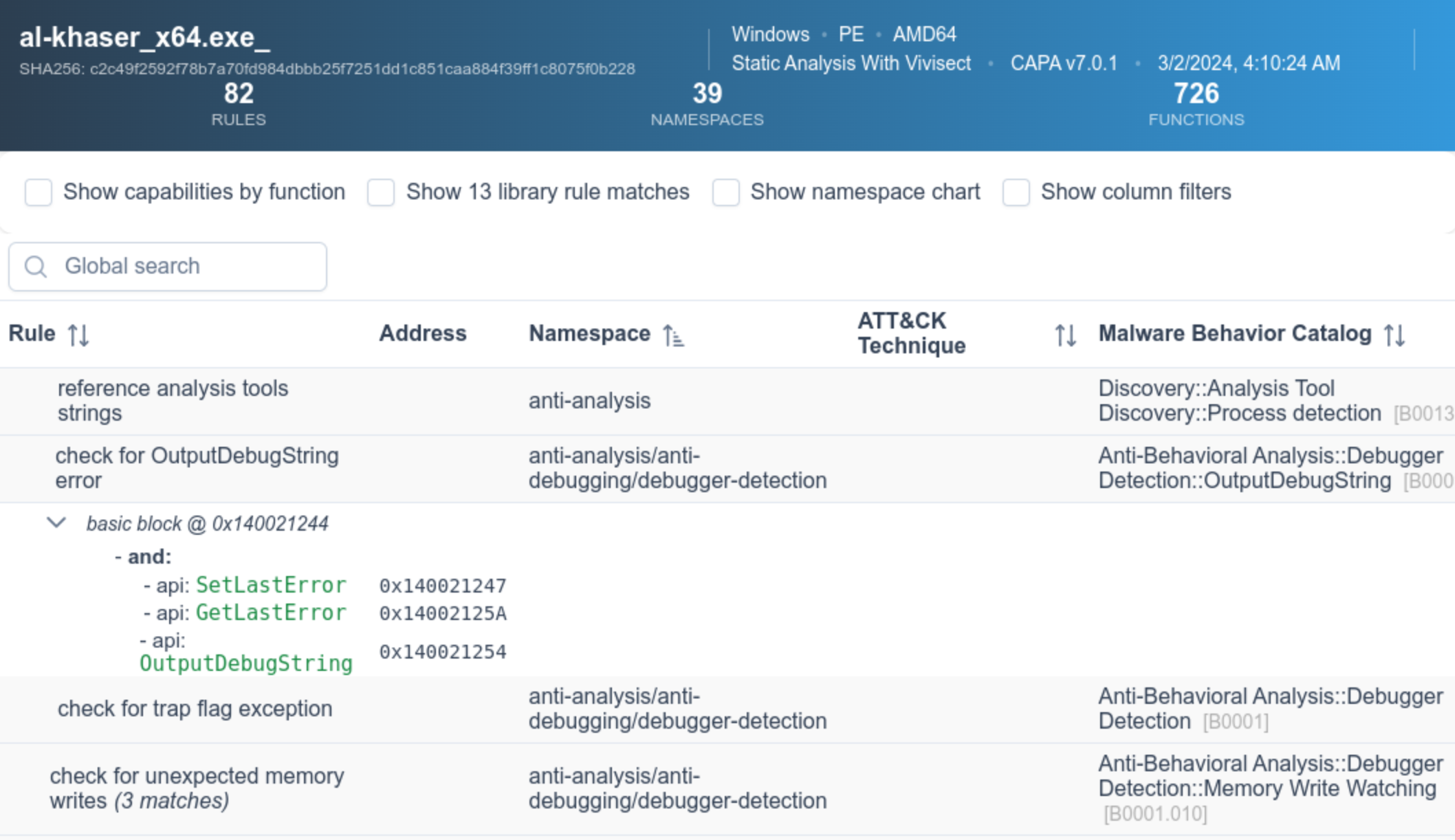
웹 UI에 대한 자세한 내용은 [capa Explorer Web README](https://github.com/mandiant/capa/blob/master/web/explorer/README.md)에서 확인할 수 있습니다.
# 예제
위 샘플 출력에서 알 수 없는 바이너리(`suspicious.exe`)에 대해 capa를 실행하고, 도구는 프로그램이 HTTP 요청을 보내고, XOR 및 Base64를 통해 데이터를 디코딩하고, 서비스를 설치하고, 새 프로세스를 생성할 수 있다고 보고합니다. 종합해 보면, `suspicious.exe`가 지속형 백도어일 수 있다고 생각됩니다. 따라서 다음 분석 단계는 샌드박스에서 `suspicious.exe`를 실행하고 명령 및 제어 서버를 복구하는 것일 수 있습니다.
## 상세 결과
`-vv` 플래그(매우 자세한 출력)를 전달하면 capa가 이러한 기능의 증거를 찾은 위치를 정확히 보고합니다. 이는 적어도 두 가지 이유로 유용합니다:
- 결과를 신뢰해야 하는 이유를 설명하고 결론을 검증할 수 있도록 도와줍니다.
- 경험이 풍부한 분석가가 IDA Pro로 연구할 수 있는 바이너리 내 위치를 보여줍니다.```
$ capa.exe suspicious.exe -vv
...
execute shell command and capture output
namespace c2/shell
author [email protected]
scope function
att&ck Execution::Command and Scripting Interpreter::Windows Command Shell [T1059.003]
references https://docs.microsoft.com/en-us/windows/win32/api/processthreadsapi/ns-processthreadsapi-startupinfoa
function @ 0x4011C0
and:
match: create a process with modified I/O handles and window @ 0x4011C0
and:
number: 257 = STARTF_USESTDHANDLES | STARTF_USESHOWWINDOW @ 0x4012B8
or:
number: 68 = StartupInfo.cb (size) @ 0x401282
or: = API functions that accept a pointer to a STARTUPINFO structure
api: kernel32.CreateProcess @ 0x401343
match: create pipe @ 0x4011C0
or:
api: kernel32.CreatePipe @ 0x40126F, 0x401280
optional:
match: create thread @ 0x40136A, 0x4013BA
or:
and:
os: windows
or:
api: kernel32.CreateThread @ 0x4013D7
or:
and:
os: windows
or:
api: kernel32.CreateThread @ 0x401395
or:
string: "cmd.exe" @ 0x4012FD
...
capa는 다음과 같은 여러 샌드박스에 대한 동적 기능 탐지를 지원합니다:
.json, .json_, .json.gz).log, .log.gz).zip)이 기능을 사용하려면 지원되는 샌드박스에 파일을 제출한 후 생성된 보고서 파일을 다운로드하여 capa를 실행하세요. 이 기능을 통해 capa는 실행 중 샌드박스가 캡처한 동적 및 정적 기능을 매칭할 수 있습니다.
다음은 패킹된 파일에 대해 capa를 실행한 후, 동일한 패킹된 파일에 대해 생성된 CAPE 보고서에 대해 capa를 실행하는 예입니다.```yaml $ capa 05be49819139a3fdcdbddbdefd298398779521f3d68daa25275cc77508e42310.exe WARNING:capa.capabilities.common:-------------------------------------------------------------------------------- WARNING:capa.capabilities.common: This sample appears to be packed. WARNING:capa.capabilities.common: WARNING:capa.capabilities.common: Packed samples have often been obfuscated to hide their logic. WARNING:capa.capabilities.common: capa cannot handle obfuscation well using static analysis. This means the results may be misleading or incomplete. WARNING:capa.capabilities.common: If possible, you should try to unpack this input file before analyzing it with capa. WARNING:capa.capabilities.common: Alternatively, run the sample in a supported sandbox and invoke capa against the report to obtain dynamic analysis results. WARNING:capa.capabilities.common: WARNING:capa.capabilities.common: Identified via rule: (internal) packer file limitation WARNING:capa.capabilities.common: WARNING:capa.capabilities.common: Use -v or -vv if you really want to see the capabilities identified by capa. WARNING:capa.capabilities.common:--------------------------------------------------------------------------------
$ capa 05be49819139a3fdcdbddbdefd298398779521f3d68daa25275cc77508e42310.json
┍━━━━━━━━━━━━━━━━━━━━━━━━┯━━━━━━━━━━━━━━━━━━━━━━━━━━━━━━━━━━━━━━━━━━━━━━━━━━━━━━━━━━━━━━━━━━━━━━━━━━━━━━━━━━━━┑ │ ATT&CK Tactic │ ATT&CK Technique │ ┝━━━━━━━━━━━━━━━━━━━━━━━━┿━━━━━━━━━━━━━━━━━━━━━━━━━━━━━━━━━━━━━━━━━━━━━━━━━━━━━━━━━━━━━━━━━━━━━━━━━━━━━━━━━━━━┥ │ CREDENTIAL ACCESS │ Credentials from Password Stores T1555 │ ├────────────────────────┼────────────────────────────────────────────────────────────────────────────────────┤ │ DEFENSE EVASION │ File and Directory Permissions Modification T1222 │ │ │ Modify Registry T1112 │ │ │ Obfuscated Files or Information T1027 │ │ │ Virtualization/Sandbox Evasion::User Activity Based Checks T1497.002 │ ├────────────────────────┼────────────────────────────────────────────────────────────────────────────────────┤ │ DISCOVERY │ Account Discovery T1087 │ │ │ Application Window Discovery T1010 │ │ │ File and Directory Discovery T1083 │ │ │ Query Registry T1012 │ │ │ System Information Discovery T1082 │ │ │ System Location Discovery::System Language Discovery T1614.001 │ │ │ System Owner/User Discovery T1033 │ ├────────────────────────┼────────────────────────────────────────────────────────────────────────────────────┤ │ EXECUTION │ System Services::Service Execution T1569.002 │ ├────────────────────────┼────────────────────────────────────────────────────────────────────────────────────┤ │ PERSISTENCE │ Boot or Logon Autostart Execution::Registry Run Keys / Startup Folder T1547.001 │ │ │ Boot or Logon Autostart Execution::Winlogon Helper DLL T1547.004 │ │ │ Create or Modify System Process::Windows Service T1543.003 │ ┕━━━━━━━━━━━━━━━━━━━━━━━━┷━━━━━━━━━━━━━━━━━━━━━━━━━━━━━━━━━━━━━━━━━━━━━━━━━━━━━━━━━━━━━━━━━━━━━━━━━━━━━━━━━━━━┙
┍━━━━━━━━━━━━━━━━━━━━━━━━━━━━━━━━━━━━━━━━━━━━━━━━━━━━━━┯━━━━━━━━━━━━━━━━━━━━━━━━━━━━━━━━━━━━━━━━━━━━━━━━━━━━━━┑ │ Capability │ Namespace │ ┝━━━━━━━━━━━━━━━━━━━━━━━━━━━━━━━━━━━━━━━━━━━━━━━━━━━━━━┿━━━━━━━━━━━━━━━━━━━━━━━━━━━━━━━━━━━━━━━━━━━━━━━━━━━━━━┥ │ check for unmoving mouse cursor (3 matches) │ anti-analysis/anti-vm/vm-detection │ │ gather bitkinex information │ collection/file-managers │ │ gather classicftp information │ collection/file-managers │ │ gather filezilla information │ collection/file-managers │ │ gather total-commander information │ collection/file-managers │ │ gather ultrafxp information │ collection/file-managers │ │ resolve DNS (23 matches) │ communication/dns │ │ initialize Winsock library (7 matches) │ communication/socket │ │ act as TCP client (3 matches) │ communication/tcp/client │ │ create new key via CryptAcquireContext │ data-manipulation/encryption │ │ encrypt or decrypt via WinCrypt │ data-manipulation/encryption │ │ hash data via WinCrypt │ data-manipulation/hashing │ │ initialize hashing via WinCrypt │ data-manipulation/hashing │ │ hash data with MD5 │ data-manipulation/hashing/md5 │ │ generate random numbers via WinAPI │ data-manipulation/prng │ │ extract resource via kernel32 functions (2 matches) │ executable/resource │ │ interact with driver via control codes (2 matches) │ host-interaction/driver │ │ get Program Files directory (18 matches) │ host-interaction/file-system │ │ get common file path (575 matches) │ host-interaction/file-system │ │ create directory (2 matches) │ host-interaction/file-system/create │ │ delete file │ host-interaction/file-system/delete │ │ get file attributes (122 matches) │ host-interaction/file-system/meta │ │ set file attributes (8 matches) │ host-interaction/file-system/meta │ │ move file │ host-interaction/file-system/move │ │ find taskbar (3 matches) │ host-interaction/gui/taskbar/find │ │ get keyboard layout (12 matches) │ host-interaction/hardware/keyboard │ │ get disk size │ host-interaction/hardware/storage │ │ get hostname (4 matches) │ host-interaction/os/hostname │ │ allocate or change RWX memory (3 matches) │ host-interaction/process/inject │ │ query or enumerate registry key (3 matches) │ host-interaction/registry │ │ query or enumerate registry value (8 matches) │ host-interaction/registry │ │ delete registry key │ host-interaction/registry/delete │ │ start service │ host-interaction/service/start │ │ get session user name │ host-interaction/session │ │ persist via Run registry key │ persistence/registry/run │ │ persist via Winlogon Helper DLL registry key │ persistence/registry/winlogon-helper │ │ persist via Windows service (2 matches) │ persistence/service │ ┕━━━━━━━━━━━━━━━━━━━━━━━━━━━━━━━━━━━━━━━━━━━━━━━━━━━━━━┷━━━━━━━━━━━━━━━━━━━━━━━━━━━━━━━━━━━━━━━━━━━━━━━━━━━━━━┙
# capa 규칙
capa는 프로그램 내에서 기능을 식별하기 위해 규칙 모음을 사용합니다.
이 규칙은 리버스 엔지니어링에 처음인 사람도 쉽게 작성할 수 있습니다.
규칙을 작성함으로써 capa가 인식하는 기능을 확장할 수 있습니다.
일부 측면에서 capa 규칙은 OpenIOC, Yara 및 YAML 형식의 혼합입니다.
다음은 capa에서 사용하는 예제 규칙입니다:```yaml
rule:
meta:
name: create TCP socket
namespace: communication/socket/tcp
authors:
- [email protected]
- [email protected]
- [email protected]
scopes:
static: basic block
dynamic: call
mbc:
- Communication::Socket Communication::Create TCP Socket [C0001.011]
examples:
- Practical Malware Analysis Lab 01-01.dll_:0x10001010
features:
- or:
- and:
- number: 6 = IPPROTO_TCP
- number: 1 = SOCK_STREAM
- number: 2 = AF_INET
- or:
- api: ws2_32.socket
- api: ws2_32.WSASocket
- api: socket
- property/read: System.Net.Sockets.TcpClient::Client
The github.com/mandiant/capa-rules 저장소에는 capa와 함께 배포되는 수백 개의 표준 규칙이 포함되어 있습니다. 악성코드에서 흥미로운 기술을 발견하면 규칙 작성 방법을 배우고 새로운 항목을 기여해 주시기 바랍니다.
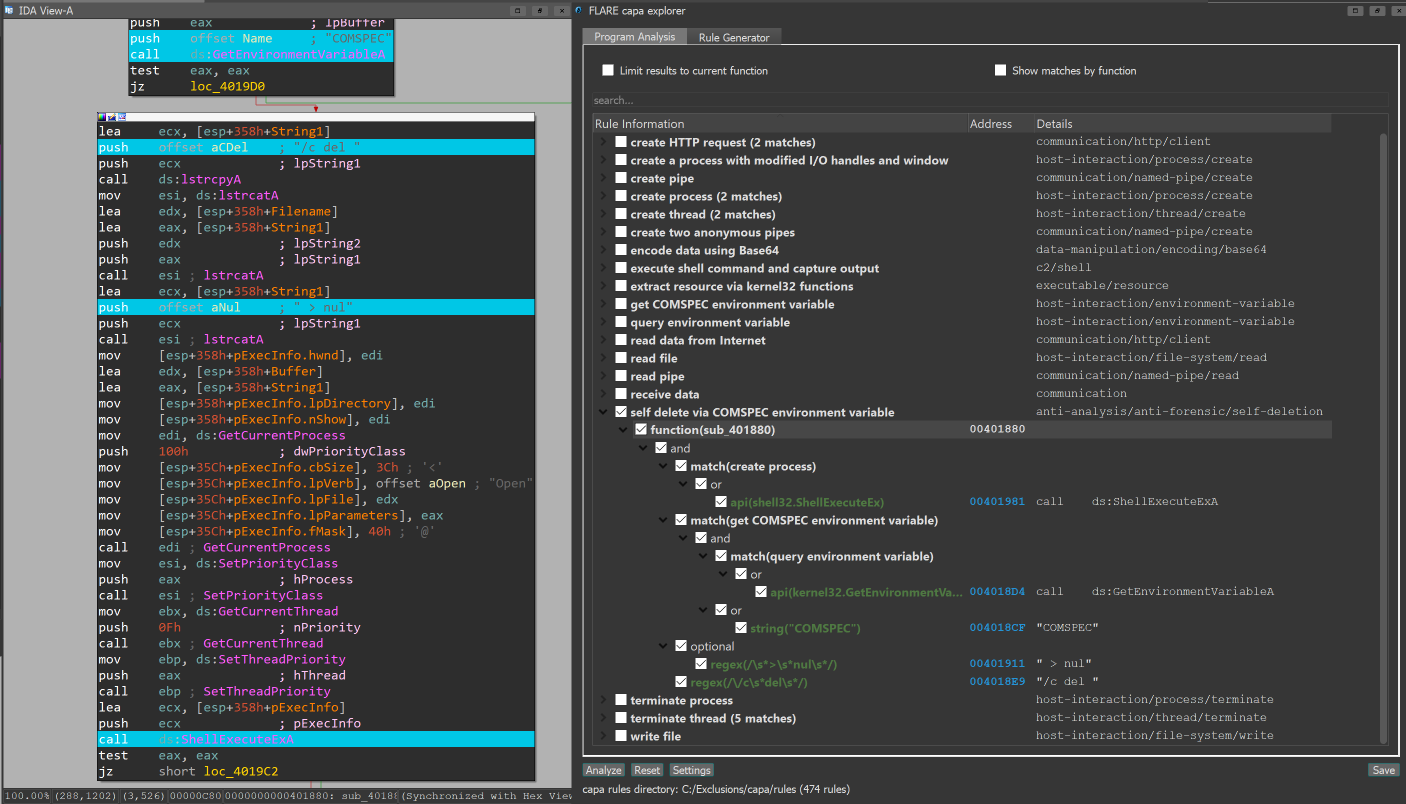
IDA Pro를 사용하는 경우 capa explorer 플러그인을 사용할 수 있습니다. capa explorer는 프로그램의 흥미로운 영역을 식별하고 IDA Pro 데이터베이스에서 직접 추출한 특징을 사용하여 새로운 capa 규칙을 작성하는 데 도움을 줍니다. 또한 동적으로 해석된 API 주소를 포함하는 전역 변수의 이름을 바꾸는 등 .idb에 대한 로컬 변경 사항을 사용하여 더 나은 특징을 추출합니다.

capa는 Ghidra를 (PyGhidra 통해) 특징 추출 백엔드로 사용하는 것을 지원합니다. 이를 통해 Ghidra의 분석 엔진을 사용하여 바이너리에 대해 capa를 실행할 수 있습니다.
capa explorer for Ghidra를 사용하여 Ghidra UI에서 capa 결과를 실행하고 볼 수 있습니다.
또한 Ghidra backend를 사용하여 명령줄에서 capa를 실행할 수 있습니다.
capa-testfiles 저장소에는 capa의 코드와 규칙을 테스트하는 데 사용하는 데이터가 포함되어 있습니다.
커뮤니티 공지를 위해 FLARE 메일링 리스트를 구독하세요! [email protected]로 "subscribe" 이메일을 보내주세요.