
시스템 가상화를 위해 AI를 활용하는 보안 로우 코드 디셉션 런타임 프레임워크
디셉션 런타임 프레임워크
Beelzebub는 SSH, HTTP, TCP, TELNET, MCP 프로토콜 전반에 걸쳐 적응형 LLM 기반 데코이 서비스를 배포하는 오픈소스 디셉션 런타임입니다. 수동적인 허니팟을 넘어, 공격자와 현실적인 상호작용을 능동적으로 수행하여 고정밀 위협 인텔리전스를 수집하고 AI 에이전트에 대한 프롬프트 인젝션 공격을 탐지합니다.
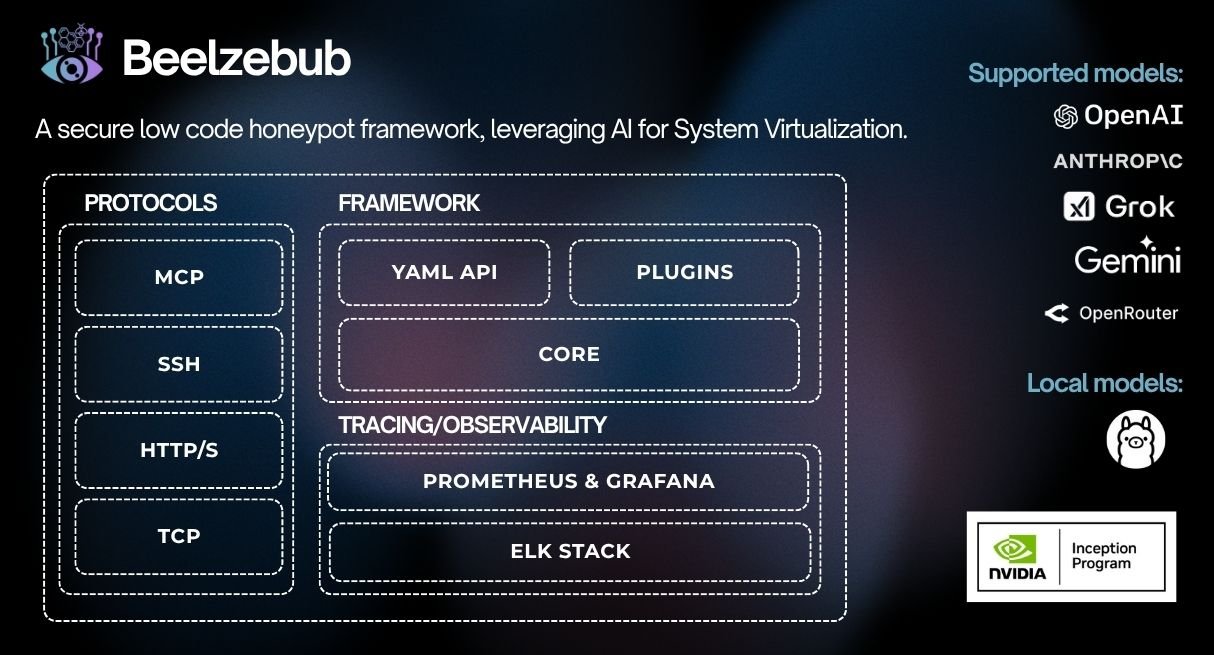
CommandPlugin 또는 HTTPPlugin 인터페이스를 구현하고 init()을 통해 등록 핵심 변경이 필요 없습니다.

./install.sh # asks local or Docker, checks prerequisites, and starts it
비대화형: `./install.sh --local` 또는 `./install.sh --docker`.
`./install.sh --local --no-run`을 사용하여 로컬 런타임을 시작하지 않고 설치 및 빌드를 수행합니다.
루트가 아닌 호스트에서는 기본 구성에 권한 있는 포트가 포함된 경우 로컬 설치가 자동으로 시작되지 않습니다.
### 로컬 (Go)```bash
make start # installs any declared plugins, compiles them in, and runs
make docker # builds an image with declared plugins baked in, then runs it
### Helm (Kubernetes) 사용하기```bash
helm install beelzebub ./beelzebub-chart
# Upgrade:
helm upgrade beelzebub ./beelzebub-chart
Beelzebub는 구조화된 CLI와 함께 제공됩니다. 모든 사용 가능한 명령을 확인하려면 beelzebub --help를 실행하세요.
beelzebub run구성된 모든 디셉션 서비스를 시작합니다.```bash beelzebub run [flags]
Flags: -c, --conf-core string Path to core configuration file (default "./configurations/beelzebub.yaml") -s, --conf-services string Path to services configuration directory (default "./configurations/services/") -m, --mem-limit-mib int Memory limit in MiB, -1 to disable (default 100)
### `beelzebub validate`
서비스를 시작하지 않고 모든 구성 파일을 구문 분석하고 검증합니다. CI 파이프라인에서 유용합니다. 검증 아키텍처 및 규칙 참조에 대해서는 [구성 검증](https://github.com/beelzebub-labs/beelzebub/blob/HEAD/docs/configuration-validation.md)을 참조하세요.```bash
beelzebub validate --conf-core ./configurations/beelzebub.yaml --conf-services ./configurations/services/
beelzebub pluginGitHub에서 가져온 플러그인을 설치, 나열, 제거합니다. 플러그인 시스템을 참조하세요.```bash beelzebub plugin install github.com/your-org/beelzebub-myplugin beelzebub plugin list beelzebub plugin remove myplugin
### `beelzebub version`
버전, 커밋 SHA, 빌드 날짜 및 Go 런타임 정보를 출력합니다.```bash
beelzebub version
Beelzebub는 핵심 코드를 수정하지 않고도 디셉션 런타임을 확장할 수 있는 안정적인 공개 SDK를 pkg/plugin에 제공합니다.
// CommandPlugin generates text responses for SSH, TCP, TELNET, and HTTP services. type CommandPlugin interface { Metadata() Metadata Execute(ctx context.Context, req CommandRequest) (string, error) }
// HTTPPlugin generates full HTTP responses with status code, headers, and body. type HTTPPlugin interface { Metadata() Metadata HandleHTTP(r *http.Request) HTTPResponse }
### 플러그인 작성```go
package myplugin
import (
"context"
"github.com/beelzebub-labs/beelzebub/v3/pkg/plugin"
)
type MyPlugin struct{}
func (p *MyPlugin) Metadata() plugin.Metadata {
return plugin.Metadata{
Name: "MyPlugin",
Description: "Custom deception response generator",
Version: "1.0.0",
Author: "your-name",
}
}
func (p *MyPlugin) Execute(_ context.Context, req plugin.CommandRequest) (string, error) {
return "simulated response to: " + req.Command, nil
}
func init() {
plugin.Register(&MyPlugin{})
}
beelzebub plugin install github.com/your-org/myplugin # also appends to the config
make start # local: install declared plugins → build → run (needs Go) make docker # docker: image with plugins baked in → run (needs Docker)
| 명령 | 기능 |
|---|---|
| `plugin install <link>` | 플러그인을 가져와 연결하고 다시 빌드합니다. 또한 `configurations/plugins.yaml`에 추가합니다. |
| `plugin install` | `configurations/plugins.yaml`에 선언된 모든 것을 설치합니다. |
| `plugin list` | 설치된 플러그인과 바이너리에 컴파일된 플러그인을 보여줍니다. |
| `plugin update [name]` | 선언된 ref로 다시 가져와 커밋을 다시 고정합니다. |
| `plugin remove <name>` | `configurations/plugins.yaml`에서 플러그인을 제거하고 연결을 해제한 후 다시 빌드 단계를 출력합니다. |
배포 플러그인 소스는 `configurations/plugins.yaml`에 구성됩니다:```yaml
plugins:
- source: github.com/your-org/myplugin
- source: github.com/your-org/[email protected]
향후 플러그인별 런타임 구성은 configurations/plugins/ 아래에 플러그인당 하나의 YAML 파일로 둘 수 있습니다.
각 플러그인 저장소는 plugins.yaml 매니페스트를 포함하고 init()에서 자체 등록해야 합니다 (플러그인 작성 참조):```yaml
name: myplugin
version: 1.0.0
module: github.com/your-org/myplugin # must match its go.mod
entrypoint: . # package that calls plugin.Register (default ".")
min-core-version: v3.8.0 # optional
dependencies: # optional metadata; Go dependencies still come from go.mod
설치된 플러그인은 Beelzebub 바이너리에 컴파일되어 런타임과 동일한 프로세스에서 실행됩니다. 신뢰하는 저장소의 플러그인만 설치하세요.
## Observability
### Prometheus 메트릭
Beelzebub는 구성된 엔드포인트(기본값: `:2112/metrics`)에서 Prometheus 메트릭을 노출합니다:
| 메트릭 | 설명 |
|--------|-------------|
| `beelzebub_events_total` | 모든 서비스의 총 디셉션 이벤트 |
| `beelzebub_events_ssh_total` | SSH 이벤트 |
| `beelzebub_events_http_total` | HTTP 이벤트 |
| `beelzebub_events_tcp_total` | TCP 이벤트 |
| `beelzebub_events_telnet_total` | TELNET 이벤트 |
| `beelzebub_events_mcp_total` | MCP 이벤트 |
### RabbitMQ 통합
다운스트림 SIEM 통합을 위해 모든 디셉션 이벤트를 메시지 큐에 게시합니다:```yaml
core:
tracings:
rabbit-mq:
enabled: true
uri: "amqp://guest:guest@localhost:5672/"
이벤트는 구조화된 JSON으로 event 큐에 게시됩니다.
make test.unit
make test.dependencies.start make test.integration make test.dependencies.down
beelzebub validate
## 코드 품질
- **CI**: 모든 커밋 및 풀 리퀘스트에 대해 GitHub Actions 실행
- **정적 분석**: CodeQL 및 Go Report Card
- **커버리지**: [Codecov](https://codecov.io/gh/beelzebub-labs/beelzebub)를 통해 모니터링
- **코드 리뷰**: 모든 기여는 동료 검토를 거칩니다
## 라이선스
Beelzebub은 [GNU GPL v3 라이선스](https://github.com/beelzebub-labs/beelzebub/blob/HEAD/LICENSE)에 따라 라이선스가 부여됩니다.
## 기여
Beelzebub 팀은 기여와 프로젝트 참여를 환영합니다. 버그를 신고하거나, 새로운 기능을 기여하거나, 질문이 있는 경우 자세한 내용은 [기여자 가이드](https://github.com/beelzebub-labs/beelzebub/blob/HEAD/CONTRIBUTING.md)를 참조하세요. 모든 참가자와 관리자가 [행동 강령](https://github.com/beelzebub-labs/beelzebub/blob/HEAD/CODE_OF_CONDUCT.md)을 준수하고 지지적이고 존중하는 커뮤니티를 조성하도록 권장합니다.
즐거운 해킹 되세요!
## 구성 참조
Beelzebub은 2계층 구성 시스템을 사용합니다:
1. **핵심 구성** (`beelzebub.yaml`) 전역 설정: 로깅, 추적, Prometheus
2. **서비스 구성** (`services/*.yaml`) 유인 서비스당 하나의 파일
### 핵심 구성```yaml
core:
logging:
debug: false
debugReportCaller: false
logDisableTimestamp: true
logsPath: ./logs
tracings:
rabbit-mq:
enabled: false
uri: "amqp://guest:guest@localhost:5672/"
prometheus:
path: "/metrics"
port: ":2112"
환경 변수 재정의는 모든 필드에서 지원됩니다(예: BEELZEBUB_RABBITMQ_ENABLED). 서비스 구성은 JSON 배열로 BEELZEBUB_SERVICES_CONFIG를 통해 전체적으로 제공할 수도 있습니다.
각 데코이 서비스는 services/ 디렉터리에 있는 별도의 YAML 파일로 정의됩니다. protocol 필드는 사용되는 디셉션 엔진을 결정합니다. 명령은 요청 매칭에 regex를 사용하며, 정적 handler 또는 동적 응답을 위한 plugin 참조 중 하나를 사용합니다.
LLMHoneypot 플러그인을 사용할 때는 LLM이 탈옥(jailbreak)되거나 허니팟을 손상시킬 수 있는 방식으로 조작되지 않도록 가드레일을 사용하는 것이 좋습니다. 자세한 내용은 LLMHoneypot 플러그인 문서를 참조하세요.
MCP(Model Context Protocol) 디셉션 서비스는 LLM 기반 에이전트에 대한 프롬프트 인젝션 공격을 감지하도록 설계된 데코이 도구를 노출합니다.
데코이 도구는 에이전트의 도구 목록에 등록되지만 정상 작동 중에는 절대 호출되어서는 안 됩니다. 호출이 발생하면 프롬프트 인젝션 공격이 에이전트의 가드레일을 성공적으로 우회했음을 나타냅니다. 이를 통해 다음을 제공합니다:

mcp-8000.yaml:```yaml apiVersion: "v1" protocol: "mcp" address: ":8000" description: "MCP Honeypot" tools:
`http://beelzebub:port/mcp`를 통해 접근 가능합니다 (Streamable HTTP 전송).
### HTTP 디셉션 서비스
HTTP 디셉션 서비스는 URL 패턴 매칭을 기반으로 구성 가능한 응답으로 웹 요청에 응답합니다. TLS, 정적 핸들러, LLM 기반 응답, 무한 미로 생성기를 지원합니다.
**WordPress 시뮬레이션** (`http-80.yaml`):```yaml
apiVersion: "v1"
protocol: "http"
address: ":80"
description: "Wordpress 6.0"
commands:
- regex: "^(/index.php|/index.html|/)$"
handler: |
<html><header><title>Wordpress 6 test page</title></header>
<body><h1>Hello from Wordpress</h1></body></html>
headers:
- "Content-Type: text/html"
- "Server: Apache/2.4.53 (Debian)"
- "X-Powered-By: PHP/7.4.29"
statusCode: 200
- regex: "^(/wp-login.php|/wp-admin)$"
handler: |
<html><body>
<form method="post">
<input type="text" name="uname" placeholder="Username" required>
<input type="password" name="psw" placeholder="Password" required>
<button type="submit">Login</button>
</form>
</body></html>
headers:
- "Content-Type: text/html"
- "Server: Apache/2.4.53 (Debian)"
statusCode: 200
- regex: "^.*$"
handler: "<html><body><h1>Not found!</h1></body></html>"
headers:
- "Content-Type: text/html"
statusCode: 404
LLM 기반 HTTP 서비스 일치하지 않는 모든 요청에 대해 동적 응답을 생성하려면 plugin: LLMHoneypot과 함께 fallbackCommand를 추가하세요.
무한 미로 생성기 plugin: MazeHoneypot을 사용하여 자동화된 스캐너와 크롤러를 함정에 빠뜨리는 무한히 확장되는 Apache 스타일 디렉터리 목록을 배포하세요.
SSH 디셉션 서비스는 정적 명령 응답과 세션별 대화 기록이 있는 LLM 기반 대화형 세션을 모두 지원합니다.
LLM 기반 SSH (OpenAI):```yaml apiVersion: "v1" protocol: "ssh" address: ":2222" description: "SSH interactive GPT-4o" commands:
**LLM 기반 SSH** (로컬 Ollama):```yaml
apiVersion: "v1"
protocol: "ssh"
address: ":2222"
description: "SSH Ollama Llama3"
commands:
- regex: "^(.+)$"
plugin: "LLMHoneypot"
serverVersion: "OpenSSH"
serverName: "ubuntu"
passwordRegex: "^(root|qwerty|123456)$"
deadlineTimeoutSeconds: 60
plugin:
llmProvider: "ollama"
llmModel: "codellama:7b"
host: "http://localhost:11434/api/chat"
정적 SSH:```yaml apiVersion: "v1" protocol: "ssh" address: ":22" description: "SSH interactive" commands:
### TELNET 디셉션 서비스
TELNET 디셉션 서비스는 터미널 기반 장치(라우터, 스위치, 레거시 시스템)를 완전한 인증 흐름과 LLM 통합으로 에뮬레이션합니다.
**LLM 기반 TELNET**:```yaml
apiVersion: "v1"
protocol: "telnet"
address: ":23"
description: "TELNET LLM"
commands:
- regex: "^(.+)$"
plugin: "LLMHoneypot"
serverName: "router"
passwordRegex: "^(admin|root|password|123456)$"
deadlineTimeoutSeconds: 120
plugin:
llmProvider: "openai"
llmModel: "gpt-4o"
openAISecretKey: "sk-1234"
정적 Cisco IOS 시뮬레이션:```yaml apiVersion: "v1" protocol: "telnet" address: ":23" description: "Cisco IOS Router" commands:
### TCP 디셉션 서비스
TCP 디셉션 서비스는 데이터베이스, 메시지 브로커, 디렉터리 서비스, 원격 액세스 등 바이너리 및 텍스트 기반 프로토콜을 다룹니다. 배너 전용 모드, 대화형 정규식 매칭, LLM 통합을 지원합니다.
**Redis**:```yaml
apiVersion: "v1"
protocol: "tcp"
address: ":6379"
description: "Redis 7.0.12"
commands:
- regex: "^PING"
handler: "+PONG\r\n"
- regex: "^AUTH"
handler: "-ERR Client sent AUTH, but no password is set\r\n"
- regex: "^INFO"
handler: "$180\r\n# Server\r\nredis_version:7.0.12\r\nos:Linux 5.15.0-76-generic x86_64\r\ntcp_port:6379\r\n\r\n"
- regex: "^(.+)$"
handler: "-ERR unknown command\r\n"
deadlineTimeoutSeconds: 60
serverName: "redis-prod-01"
LDAP / Active Directory:```yaml apiVersion: "v1" protocol: "tcp" address: ":389" description: "Active Directory LDAP Domain Controller" banner: "0\x84\x00\x00\x00\x10\x02\x01\x01\x61\x84\x00\x00\x00\x07\x0a\x01\x00\x04\x00\x04\x00" commands:
**LLM 기반 PostgreSQL**:```yaml
apiVersion: "v1"
protocol: "tcp"
address: ":5432"
description: "PostgreSQL 15.3"
commands:
- regex: "^(.+)$"
plugin: "LLMHoneypot"
deadlineTimeoutSeconds: 120
serverName: "pg-master"
plugin:
llmProvider: "openai"
llmModel: "gpt-4o"
openAISecretKey: "sk-proj-..."
prompt: "You are simulating a PostgreSQL 15.3 server. Respond to incoming TCP data as a PostgreSQL server would."
추가 예제 구성은 configurations/services/에서 Memcached, MS-SQL, SMB, RDP, VNC 및 MQTT에 대해 사용할 수 있습니다.

