
 b23r0/heroinn
A cross platform C2/post-exploitation framework.

English · 简体中文


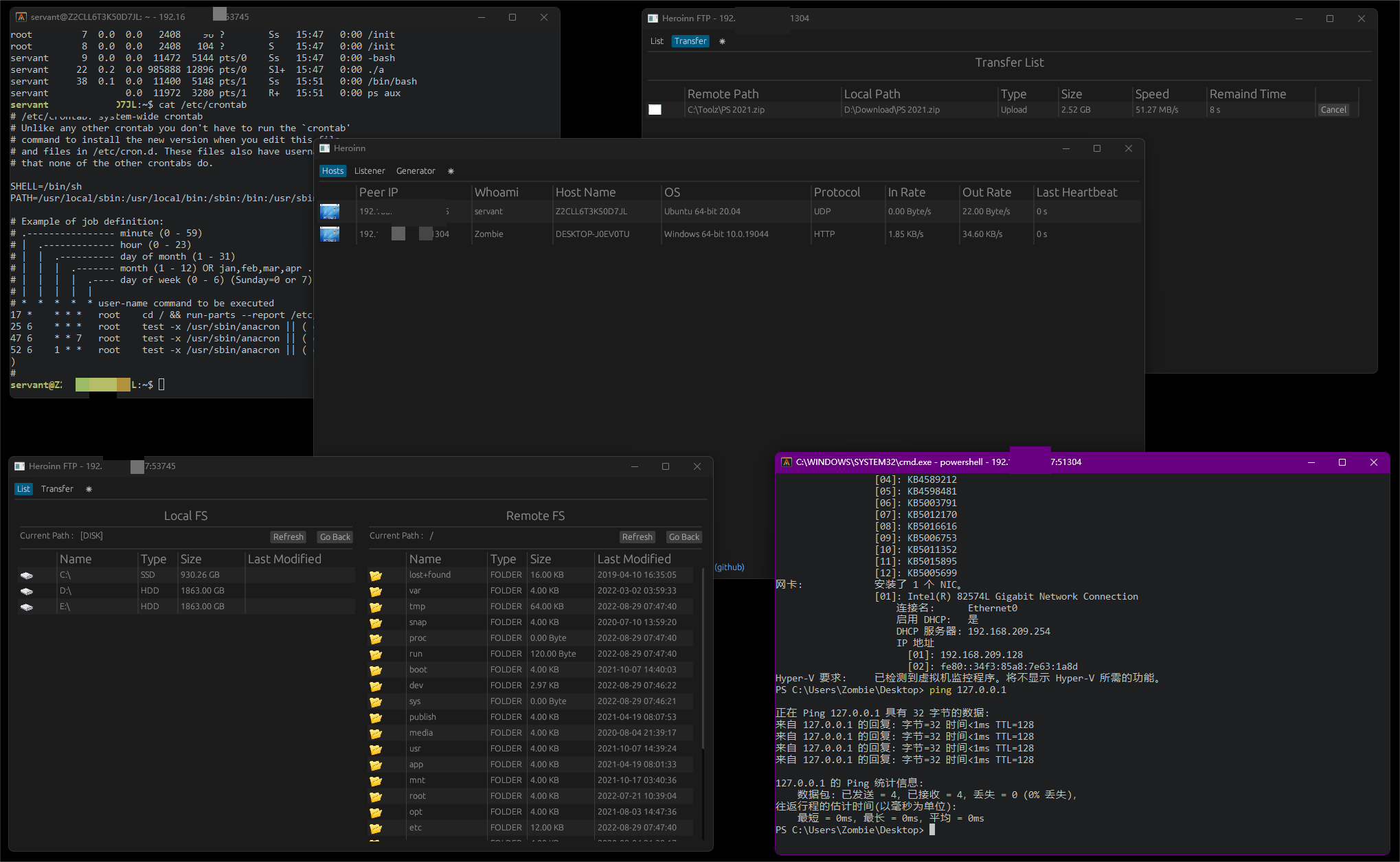
Heroinn is a cross-platform command-and-control and post-exploitation framework written in Rust. It combines a desktop server application, lightweight agents, an interactive PTY shell, a resumable file manager, and a client generator for authorized security research and red-team exercises.
Authorized use only. Use Heroinn exclusively on systems you own or have explicit permission to test. You are responsible for complying with all applicable laws and authorization requirements.
https://
proxy URL is used), or SOCKS5. Reliable UDP and loopback IPC remain direct.sudo apt-get install -y \
build-essential pkg-config cmake libssl-dev \
libfontconfig1-dev libfreetype6-dev libexpat1-dev \
libx11-dev libx11-xcb-dev libxcb1-dev libxrandr-dev \
libxi-dev libxcursor-dev libxinerama-dev \
libxkbcommon-dev libxkbcommon-x11-dev libwayland-dev \
libegl1-mesa-dev libvulkan-dev
git clone https://github.com/b23r0/Heroinn.git
cd Heroinn
cargo build --release --locked
The build produces five executables:
heroinn — server GUIheroinn_client — agentheroinn_ftp — file managerheroinn_shell — terminal window used by interactive shell sessionsheroinn_socks5proxy — reverse SOCKS5 proxy GUI used by online agentsheroinn_shell, heroinn_ftp, and heroinn_socks5proxy must be placed next to
the heroinn executable because the server launches them from its working
directory.
The server's Generator tab does not compile an agent. It copies a prebuilt
heroinn_client and rewrites its embedded connection stamp in place.
For TCP and HTTP agents, the Generator can also embed an optional SOCKS5 proxy. If the generated agent discovers a system proxy, it connects through the system proxy to the configured SOCKS5 proxy and then to the server, forming a proxy chain. SOCKS5 settings are not available for UDP agents. Any SOCKS5 credentials are embedded in the generated client binary and may be extractable.
Templates are searched next to the running heroinn executable first, then in
the current working directory. Both legacy platform-suffixed names and normal
Cargo output names are accepted:
| Platform | Template names |
|---|---|
| Windows x86_64 | heroinn_client_windows.exe, heroinn_client.exe |
| Linux x86_64 | heroinn_client_linux, heroinn_client |
| BSD x86_64 | heroinn_client_bsd, heroinn_client |
| macOS x86_64 | heroinn_client_darwin, heroinn_client |
Build a native agent with cargo build -p heroinn_client --release --locked and
keep it next to the server. Cross-platform agents must first be compiled for
their target and copied under one of the matching names above.
The generated executable inherits the template's permissions, including the Unix executable bit. Connection information is limited to 1024 bytes of JSON, and the generator rejects templates containing more than one valid stamp.
| Path | Purpose |
|---|---|
heroinn | Server GUI and controller |
heroinn_client | Cross-platform agent |
heroinn_core | Shared application-core logic |
heroinn_util | Protocol, transport, packet, and utility layers |
th3rd/heroinn_ftp | File manager |
th3rd/heroinn_socks5proxy | Reverse SOCKS5 proxy GUI and sidecar |
th3rd/heroinn_shell | Terminal implementation used by heroinn_shell |
First-party crates use edition 2024 and share dependency versions pinned at the
workspace root in [workspace.dependencies]. Vendored terminal crates retain
their upstream editions.
The vendored terminal driver removes the two inherited PTY backends because
Heroinn connects through a local TCP socket. The existing windowing stack is
kept on its current glutin release to avoid a separate full rewrite of the
terminal event loop.
Bug reports, feature suggestions, pull requests, and documentation improvements are welcome. Before opening a pull request, run the same checks used by CI:
cargo fmt -p heroinn_ftp -- --check
cargo metadata --format-version 1 --locked --no-deps
cargo check --workspace --lib --bins --locked
cargo clippy -p heroinn -p heroinn_client -p heroinn_core -p heroinn_util -p heroinn_ftp -p heroinn_socks5proxy --all-targets --locked -- -D warnings
cargo test --workspace --exclude heroinn_shell_terminal --locked
cargo test -p heroinn_shell_terminal --lib --locked
cargo test -p heroinn_shell_config_derive --test config --locked
cargo build --workspace --release --locked
HEROINN_CLIENT_TEMPLATE=target/release/heroinn_client \
  cargo test -p heroinn_util --test real_client_template --locked -- --ignored --exact patches_a_real_client_template
On Windows PowerShell, set
$env:HEROINN_CLIENT_TEMPLATE = "target/release/heroinn_client.exe" before running
the same test command.
Join the community on Discord.
Heroinn is distributed under the GNU General Public License v3.0. The project logo is an original asset distributed with the project under the same license.






