 projectdiscovery/tlsx
TLSベースのデータ収集に特化した、高速で設定可能なTLSグラバー。




機能 • インストール • 使用方法 • tlsxの実行 • Discordに参加
TLSベースのデータ収集と分析に焦点を当てた、高速で設定可能なTLSグラバーです。
tlsxを正常にインストールするにはGo 1.27.3が必要です。インストールするには、以下のコマンドを実行するか、リリースページからコンパイル済みバイナリをダウンロードしてください。
go install github.com/projectdiscovery/tlsx/cmd/tlsx@latest
tlsx -h
これはツールのヘルプを表示します。サポートされているすべてのスイッチは以下のとおりです。
TLSX is a tls data gathering and analysis toolkit.

Usage:
  tlsx [flags]

Flags:
INPUT:
   -u, -host string[]  target host to scan (-u INPUT1,INPUT2)
   -l, -list string    target list to scan (-l INPUT_FILE)
   -p, -port string[]  target port to connect (default 443)

SCAN-MODE:
   -sm, -scan-mode string     tls connection mode to use (ctls, ztls, openssl, auto) (default "auto")
   -ps, -pre-handshake        enable pre-handshake tls connection (early termination) using ztls
   -sa, -scan-all-ips         scan all ips for a host (default false)
   -iv, -ip-version string[]  ip version to use (4, 6) (default 4)

PROBES:
   -san                     display subject alternative names
   -cn                      display subject common names
   -so                      display subject organization name
   -tv, -tls-version        display used tls version
   -cipher                  display used cipher
   -hash string             display certificate fingerprint hashes (md5,sha1,sha256)
   -jarm                    display jarm fingerprint hash
   -ja3                     display ja3 fingerprint hash (using ztls)
   -wc, -wildcard-cert      display host with wildcard ssl certificate
   -tps, -probe-status      display tls probe status
   -ve, -version-enum       enumerate and display supported tls versions
   -ce, -cipher-enum        enumerate and display supported cipher
   -ct, -cipher-type value  ciphers types to enumerate. possible values: all/secure/insecure/weak (comma-separated) (default all)
   -ch, -client-hello       include client hello in json output (ztls mode only)
   -sh, -server-hello       include server hello in json output (ztls mode only)
   -se, -serial             display certificate serial number

MISCONFIGURATIONS:
   -ex, -expired      display host with host expired certificate
   -ss, -self-signed  display host with self-signed certificate
   -mm, -mismatched   display host with mismatched certificate
   -re, -revoked      display host with revoked certificate
   -un, -untrusted    display host with untrusted certificate

CONFIGURATIONS:
   -config string               path to the tlsx configuration file
   -r, -resolvers string[]      list of resolvers to use
   -cc, -cacert string          client certificate authority file
   -ci, -cipher-input string[]  ciphers to use with tls connection
   -sni string[]                tls sni hostname to use
   -rs, -random-sni             use random sni when empty
   -rps, -rev-ptr-sni           perform reverse PTR to retrieve SNI from IP
   -min-version string          minimum tls version to accept (ssl30,tls10,tls11,tls12,tls13)
   -max-version string          maximum tls version to accept (ssl30,tls10,tls11,tls12,tls13)
   -cert, -certificate          include certificates in json output (PEM format)
   -tc, -tls-chain              include certificates chain in json output
   -vc, -verify-cert            enable verification of server certificate
   -ob, -openssl-binary string  OpenSSL Binary Path
   -hf, -hardfail               strategy to use if encountered errors while checking revocation status
   -proxy string                socks5 proxy to use for tlsx

OPTIMIZATIONS:
   -c, -concurrency int  number of concurrent threads to process (default 300)
   -cec, -cipher-concurrency int  cipher enum concurrency for each target (default 10)
   -timeout int          tls connection timeout in seconds (default 5)
   -retry int            number of retries to perform for failures (default 3)
   -delay string         duration to wait between each connection per thread (eg: 200ms, 1s)

UPDATE:
   -up, -update                 update tlsx to latest version
   -duc, -disable-update-check  disable automatic tlsx update check

OUTPUT:
   -o, -output string  file to write output to
   -j, -json           display output in jsonline format
   -dns                display unique hostname from SSL certificate response
   -ro, -resp-only     display tls response only
   -silent             display silent output
   -nc, -no-color      disable colors in cli output
   -v, -verbose        display verbose output
   -version            display project version

PDCP:
   -pd, -dashboard              upload or view output in the PDCP UI dashboard
   -pdu, -dashboard-upload string  upload tlsx output file (JSONL format) to the PDCP UI dashboard
   -auth string                  PDCP API key for authentication
   -tid, -team-id string         upload asset results to a specified team ID
   -aid, -asset-id string        upload new assets to an existing asset ID
   -aname, -asset-name string    asset group name

DEBUG:
   -health-check, -hc  run diagnostic check up
tlsx をライブラリとして使用する例は、examples フォルダに用意されています。
tlsx は TLS 接続を行うために ip を必要とし、以下に示す複数の形式を受け付けます:
AS1449 # ASN input
173.0.84.0/24 # CIDR input
93.184.216.34 # IP input
example.com # DNS input
example.com:443 # DNS input with port
https://example.com:443 # URL input port
入力ホストは -host / -u フラグを使用して指定でき、複数の値はカンマ区切りで指定できます。同様に、ファイル入力は -list / -l フラグを使用してサポートされています。
カンマ区切りのホスト入力の例:
$ tlsx -u 93.184.216.34,example.com,example.com:443,https://example.com:443 -silent
ファイルベースのホスト入力の例:
$ tlsx -list host_list.txt
ポート入力:
tlsx はデフォルトでポート 443 に接続します。これは -port / -p フラグを使用してカスタマイズでき、カンマ区切りの入力、または接続するポートのリストを含む改行区切りファイルを使用して、単一または複数のポートを指定できます。
カンマ区切りのポート入力の例:
$ tlsx -u hackerone.com -p 443,8443
ファイルベースのポート入力の例:
$ tlsx -u hackerone.com -p port_list.txt
注意:
入力ホストにポートが含まれている場合、例えば
8.8.8.8:443やhackerone.com:8443のように、ホストとともに指定されたポートが、デフォルトまたは-port / -pフラグで指定されたポートの代わりに TLS 接続の確立に使用されます。
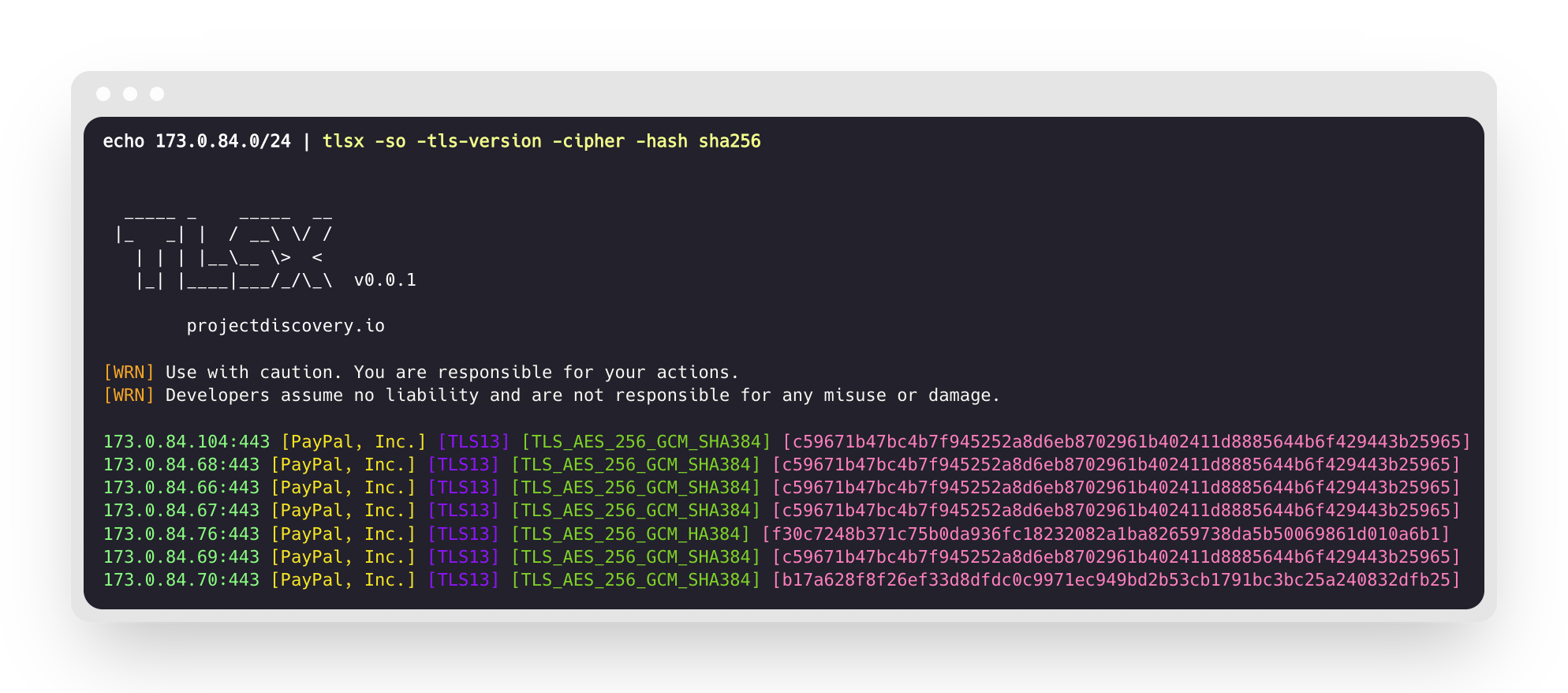
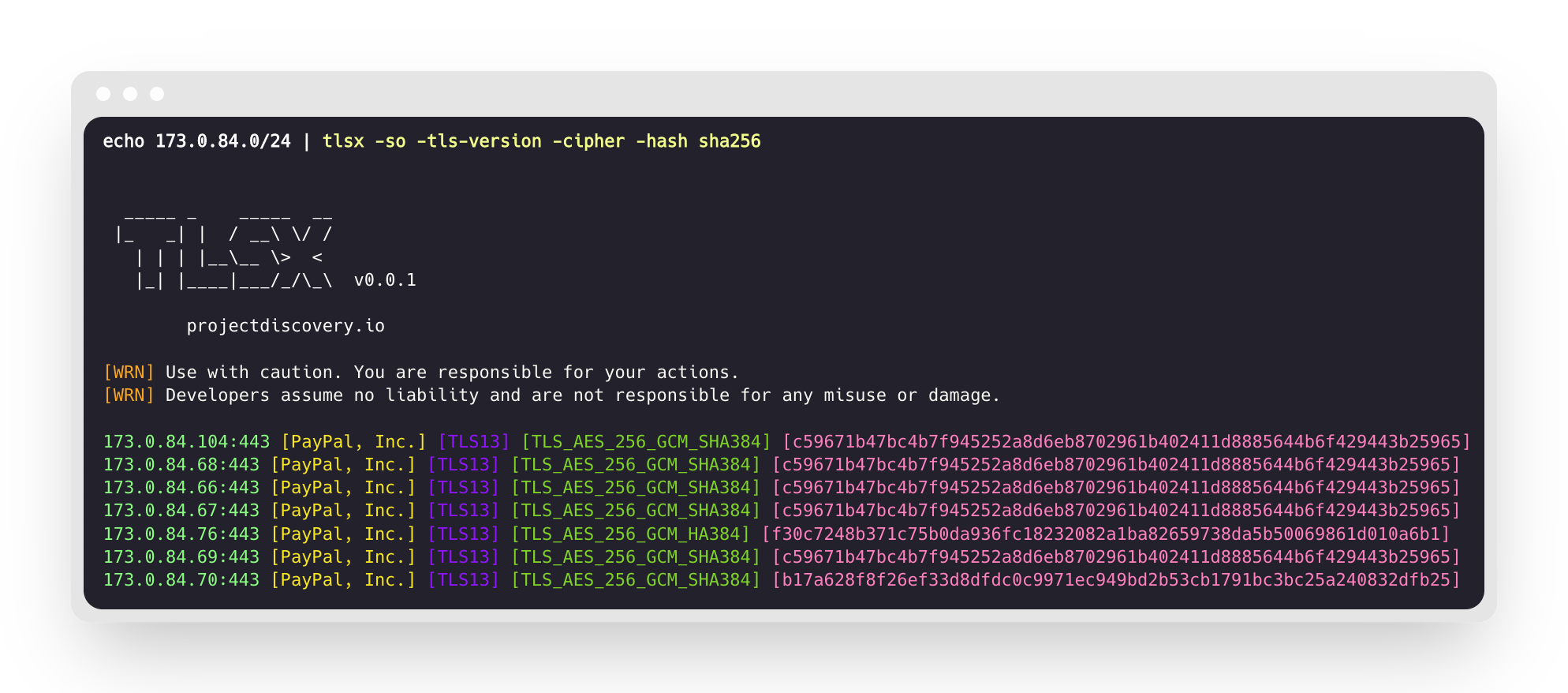
これは指定された CIDR 範囲に対してツールを実行し、ポート 443 で TLS 接続を受け付けるホストを返します。
$ echo 173.0.84.0/24 | tlsx






