 projectdiscovery/httpx
高速なマルチプローブHTTPツールキット。偵察と情報収集のためのツール。TLS、CSP、ヘッダー、技術スタック、CDNをプローブします。マッチャー、フィルター、JSON出力に対応し、自動セキュリティテストが可能です。
<h1 align="center">
  <img src="https://assets.kitploit.com/production/public/readmes/405/4dc5206927fe161f6f2bb22d21326c0518dc3d5cb655fda1739b30b6bd29dec9.png" alt="httpx" width="200px">
  <br>
</h1>


<p align="center">
<a href="https://opensource.org/licenses/MIT"><img src="https://img.shields.io/badge/license-MIT-_red.svg"></a>
<a href="https://goreportcard.com/badge/github.com/projectdiscovery/httpx"><img src="https://goreportcard.com/badge/github.com/projectdiscovery/httpx"></a>
<a href="https://github.com/projectdiscovery/httpx/releases"><img src="https://img.shields.io/github/release/projectdiscovery/httpx"></a>
<a href="https://hub.docker.com/r/projectdiscovery/httpx"><img src="https://img.shields.io/docker/pulls/projectdiscovery/httpx.svg"></a>
<a href="https://twitter.com/pdiscoveryio"><img src="https://img.shields.io/twitter/follow/pdiscoveryio.svg?logo=twitter"></a>
<a href="https://discord.gg/projectdiscovery"><img src="https://img.shields.io/discord/695645237418131507.svg?logo=discord"></a>
</p>

<p align="center">
  <a href="#features">機能</a> •
  <a href="#installation-instructions">インストール</a> •
  <a href="#usage">使用方法</a> •
  <a href="https://docs.projectdiscovery.io/tools/httpx/">ドキュメント</a> •
  <a href="#notes">注意事項</a> •
  <a href="https://discord.gg/projectdiscovery">Discord に参加</a>
</p>


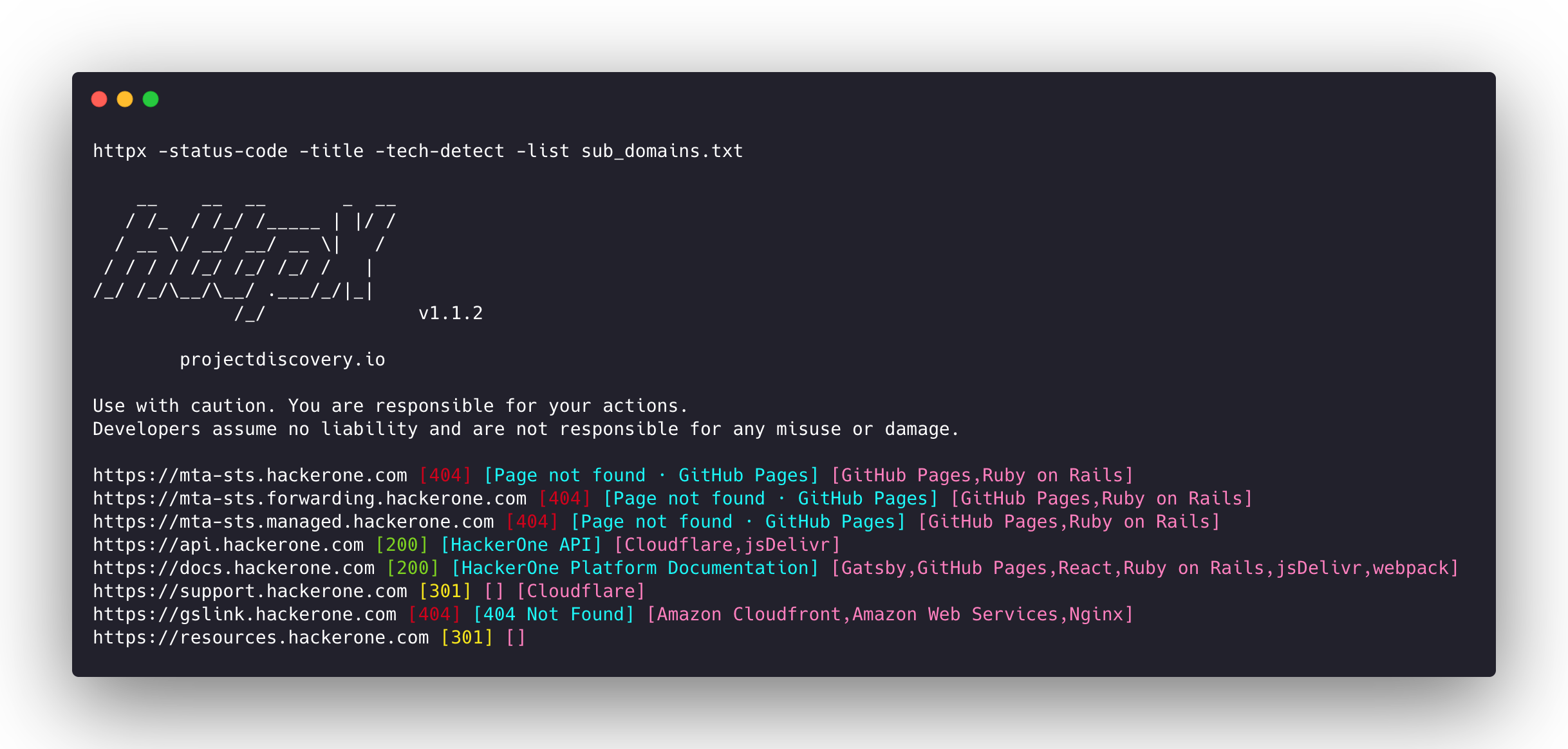
`httpx` は、[retryablehttp](https://github.com/projectdiscovery/retryablehttp-go) ライブラリを使用して複数のプローブを実行できる、高速で多目的な HTTP ツールキットです。スレッド数を増やしても結果の信頼性を維持できるように設計されています。

# 機能

<h1 align="center">
  <img src="https://assets.kitploit.com/production/public/readmes/405/844a8c468c1b9ef257f46c2bf9f9efe0d2e5b1b676a3ac5be70918d44c9e7403.png" alt="httpx" width="700px">
  <br>
</h1>

 - シンプルでモジュール化されたコードベースにより、貢献が容易です。
 - 複数の要素をプローブするための高速かつ完全に設定可能なフラグ。
 - 複数の HTTP ベースのプロービングをサポートします。
 - デフォルトで https から http へのスマートな自動フォールバック。
 - ホスト、URL、CIDR を入力としてサポートします。
 - WAF を処理するためのリトライ、バックオフなどのエッジケースに対応します。

### サポートされるプローブ

| プローブ          | デフォルトチェック | プローブ         | デフォルトチェック |
|-----------------|---------------|----------------|---------------|
| URL             | true          | IP             | true          |
| タイトル           | true          | CNAME          | true          |
| ステータスコード     | true          | Raw HTTP       | false         |
| コンテンツ長  | true          | HTTP2          | false         |
| TLS 証明書 | true          | HTTP パイプライン  | false         |
| CSP ヘッダー      | true          | バーチャルホスト   | false         |
| 行数      | true          | 単語数     | true          |
| Location ヘッダー | true          | CDN            | false         |
| Web サーバー    | true          | パス          | false         |
| Web ソケット      | true          | ポート          | false         |
| 応答時間   | true          | リクエストメソッド | true          |
| Favicon ハッシュ    | false         | プローブステータス  | false         |
| ボディハッシュ       | true          | ヘッダーハッシュ   | true          |
| リダイレクトチェーン  | false         | URL スキーム     | true          |
| JARM ハッシュ       | false         | ASN            | false         |

# インストール手順

`httpx` を正常にインストールするには **go >=1.26.10** が必要です。リポジトリを取得するには次のコマンドを実行してください:

```sh
go install -v github.com/projectdiscovery/httpx/cmd/httpx@latest
```

httpxのインストール方法の詳細については、https://docs.projectdiscovery.io/tools/httpx/install を参照してください。

| :exclamation:  **免責事項**  |
|---------------------------------|
| **このプロジェクトは活発に開発中です**。リリースごとに破壊的な変更が発生する可能性があります。更新前に変更履歴を確認してください。 |
| このプロジェクトは主にスタンドアロンのCLIツールとして使用されることを目的として構築されています。**サービスとして実行するとセキュリティリスクが生じる可能性があります。** 注意して使用し、追加のセキュリティ対策を講じることを推奨します。 |

# 使用方法

```sh
httpx -h
```

これはツールのヘルプを表示します。サポートされているすべてのスイッチは以下のとおりです。


```console
httpx is a fast and multi-purpose HTTP toolkit that allows running multiple probes using the retryablehttp library.

Usage:
  ./httpx [flags]

Flags:
INPUT:
   -l, -list string              input file containing list of hosts to process
   -rr, -request string          file containing raw request
   -u, -target string[]          input target host(s) to probe
   -im, -input-mode string       mode of input file (burp)

PROBES:
   -sc, -status-code                      display response status-code
   -cl, -content-length                   display response content-length
   -ct, -content-type                     display response content-type
   -location                              display response redirect location
   -favicon                               display mmh3 hash for '/favicon.ico' file
   -hash string                           display response body hash (supported: md5,mmh3,simhash,sha1,sha256,sha512)
   -jarm                                  display jarm fingerprint hash
   -rt, -response-time                    display response time
   -lc, -line-count                       display response body line count
   -wc, -word-count                       display response body word count
   -title                                 display page title
   -bp, -body-preview                     display first N characters of response body (default 100)
   -server, -web-server                   display server name
   -td, -tech-detect                      display technology in use based on wappalyzer dataset
   -cff, -custom-fingerprint-file string  path to a custom fingerprint file for technology detection
   -kb, -knowledge-base                   enable knowledge base classification
   -method                                display http request method
   -ws, -websocket                        display server using websocket
   -ip                                    display host ip
   -cname                                 display host cname
   -extract-fqdn, -efqdn                  get domain and subdomains from response body and header in jsonl/csv output
   -asn                                   display host asn information
   -cdn                                   display cdn/waf in use (default true)
   -probe                                 display probe status

HEADLESS:
   -ss, -screenshot                 enable saving screenshot of the page using headless browser
   -system-chrome                   enable using local installed chrome for screenshot
   -ho, -headless-options string[]  start headless chrome with additional options
   -esb, -exclude-screenshot-bytes  enable excluding screenshot bytes from json output
   -ehb, -exclude-headless-body     enable excluding headless header from json output
   -no-screenshot-full-page         disable saving full page screenshot
   -st, -screenshot-timeout value   set timeout for screenshot in seconds (default 10s)
   -sid, -screenshot-idle value     set idle time before taking screenshot in seconds (default 1s)
   -jsc, -javascript-code string[]  execute JavaScript code after navigation

MATCHERS:
   -mc, -match-code string            match response with specified status code (-mc 200,302)
   -ml, -match-length string          match response with specified content length (-ml 100,102)
   -mlc, -match-line-count string     match response body with specified line count (-mlc 423,532)
   -mwc, -match-word-count string     match response body with specified word count (-mwc 43,55)
   -mfc, -match-favicon string[]      match response with specified favicon hash (-mfc 1494302000)
   -ms, -match-string string[]        match response with specified string (-ms admin)
   -mr, -match-regex string[]         match response with specified regex (-mr admin)
   -mcdn, -match-cdn string[]         match host with specified cdn provider (cloudfront, fastly, google, etc.)
   -mrt, -match-response-time string  match response with specified response time in seconds (-mrt '< 1')
   -mdc, -match-condition string      match response with dsl expression condition

EXTRACTOR:
   -er, -extract-regex string[]   display response content with matched regex
   -ep, -extract-preset string[]  display response content matched by a pre-defined regex (url,ipv4,mail)

FILTERS:
   -fc, -filter-code string               filter response with specified status code (-fc 403,401)
   -fpt, -filter-page-type string[]       filter response with specified page type (e.g. -fpt login,captcha,parked)
   -fep, -filter-error-page               [DEPRECATED: use -fpt] filter response with ML based error page detection
   -fd, -filter-duplicates                filter out near-duplicate responses (only first response is retained)
   -fl, -filter-length string             filter response with specified content length (-fl 23,33)
   -flc, -filter-line-count string        filter response body with specified line count (-flc 423,532)
   -fwc, -filter-word-count string        filter response body with specified word count (-fwc 423,532)
   -ffc, -filter-favicon string[]         filter response with specified favicon hash (-ffc 1494302000)
   -fs, -filter-string string[]           filter response with specified string (-fs admin)
   -fe, -filter-regex string[]            filter response with specified regex (-fe admin)
   -fcdn, -filter-cdn string[]            filter host with specified cdn provider (cloudfront, fastly, google, etc.)
   -frt, -filter-response-time string     filter response with specified response time in seconds (-frt '> 1')
   -fdc, -filter-condition string         filter response with dsl expression condition
   -strip                                 strips all tags in response. supported formats: html,xml (default html)
   -lof, -list-output-fields              list of fields to output (comma separated)
   -eof, -exclude-output-fields string[]  exclude output fields output based on a condition

RATE-LIMIT:
   -t, -threads int              number of threads to use (default 50)
   -rl, -rate-limit int          maximum requests to send per second (default 150)
   -rlm, -rate-limit-minute int  maximum number of requests to send per minute

MISCELLANEOUS:
   -pa, -probe-all-ips        probe all the ips associated with same host
   -p, -ports string[]        ports to probe (nmap syntax: eg http:1,2-10,11,https:80)
   -path string               path or list of paths to probe (comma-separated, file)
   -tls-probe                 send http probes on the extracted TLS domains (dns_name)
   -csp-probe                 send http probes on the extracted CSP domains
   -tls-grab                  perform TLS(SSL) data grabbing
   -pipeline                  probe and display server supporting HTTP1.1 pipeline
   -http2                     probe and display server supporting HTTP2
   -vhost                     probe and display server supporting VHOST
   -ldv, -list-dsl-variables  list json output field keys name that support dsl matcher/filter

UPDATE:
   -up, -update                 update httpx to latest version
   -duc, -disable-update-check  disable automatic httpx update check

OUTPUT:
   -o, -output string                     file to write output results
   -oa, -output-all                       filename to write output results in all formats
   -sr, -store-response                   store http response to output directory
   -srd, -store-response-dir string       store http response to custom directory
   -ob, -omit-body                        omit response body in output
   -csv                                   store output in csv format
   -csvo, -csv-output-encoding string     define output encoding
   -j, -json                              store output in JSONL(ines) format
   -irh, -include-response-header         include http response (headers) in JSON output (-json only)
   -irr, -include-response                include http request/response (headers + body) in JSON output (-json only)
   -irrb, -include-response-base64        include base64 encoded http request/response in JSON output (-json only)
   -include-chain                         include redirect http chain in JSON output (-json only)
   -store-chain                           include http redirect chain in responses (-sr only)
   -svrc, -store-vision-recon-cluster     include visual recon clusters (-ss and -sr only)
   -pr, -protocol string                  protocol to use (unknown, http11, http2, http3)
   -fepp, -filter-error-page-path string  path to store filtered error pages (default "filtered_error_page.json")
   -rdb, -result-db                       store results in database
   -rdbc, -result-db-config string        path to database config file
   -rdbt, -result-db-type string          database type (mongodb, postgres, mysql)
   -rdbcs, -result-db-conn string         database connection string (env: HTTPX_DB_CONNECTION_STRING)
   -rdbn, -result-db-name string          database name (default "httpx")
   -rdbtb, -result-db-table string        table/collection name (default "results")
   -rdbbs, -result-db-batch-size int      batch size for database inserts (default 100)
   -rdbor, -result-db-omit-raw            omit raw request/response data from database

CONFIGURATIONS:
   -config string                   path to the httpx configuration file (default $HOME/.config/httpx/config.yaml)
   -ptm, -page-type-model string    path to a local dit model for page classification (requires -kb or -fpt; skips model download)
   -r, -resolvers string[]          list of custom resolver (file or comma separated)
   -allow string[]                  allowed list of IP/CIDR's to process (file or comma separated)
   -deny string[]                   denied list of IP/CIDR's to process (file or comma separated)
   -sni, -sni-name string           custom TLS SNI name
   -random-agent                    enable Random User-Agent to use (default true)
   -auto-referer                    set the Referer header to the current URL
   -H, -header string[]             custom http headers to send with request
   -http-proxy, -proxy string       proxy (http|socks) to use (eg http://127.0.0.1:8080)
   -unsafe                          send raw requests skipping golang normalization
   -resume                          resume scan using resume.cfg
   -fr, -follow-redirects           follow http redirects
   -maxr, -max-redirects int        max number of redirects to follow per host (default 10)
   -fhr, -follow-host-redirects     follow redirects on the same host
   -rhsts, -respect-hsts            respect HSTS response headers for redirect requests
   -vhost-input                     get a list of vhosts as input
   -x string                        request methods to probe, use 'all' to probe all HTTP methods
   -body string                     post body to include in http request
   -s, -stream                      stream mode - start elaborating input targets without sorting
   -sd, -skip-dedupe                disable dedupe input items (only used with stream mode)
   -ldp, -leave-default-ports       leave default http/https ports in host header (eg. http://host:80 - https://host:443
   -ztls                            use ztls library with autofallback to standard one for tls13
   -no-decode                       avoid decoding body
   -tlsi, -tls-impersonate string    enable experimental client hello (ja3) tls impersonation (chrome, or ja3 full string)
   -no-stdin                        Disable Stdin processing
   -hae, -http-api-endpoint string  experimental http api endpoint
   -sf, -secret-file string         path to secret file for authentication

DEBUG:
   -health-check, -hc        run diagnostic check up
   -debug                    display request/response content in cli
   -debug-req                display request content in cli
   -debug-resp               display response content in cli
   -version                  display httpx version
   -stats                    display scan statistic
   -profile-mem string       optional httpx memory profile dump file
   -silent                   silent mode
   -v, -verbose              verbose mode
   -si, -stats-interval int  number of seconds to wait between showing a statistics update (default: 5)
   -mp, -metrics-port int    port to expose httpx metrics on (default 63636)
   -nc, -no-color            disable colors in cli output
   -tr, -trace               trace

OPTIMIZATIONS:
   -nf, -no-fallback                  display both probed protocol (HTTPS and HTTP)
   -nfs, -no-fallback-scheme          probe with protocol scheme specified in input
   -maxhr, -max-host-error int        max error count per host before skipping remaining path/s (default 30)
   -e, -exclude string[]              exclude host matching specified filter ('cdn', 'private-ips', cidr, ip, regex)
   -retries int                       number of retries
   -timeout int                       timeout in seconds (default 10)
   -delay value                       duration between each http request (eg: 200ms, 1s) (default -1ns)
   -rsts, -response-size-to-save int  max response size to save in bytes (default 50000000)
   -rstr, -response-size-to-read int  max response size to read in bytes (default 50000000)

CLOUD:
   -auth                           configure projectdiscovery cloud (pdcp) api key (default true)
   -ac, -auth-config string        configure projectdiscovery cloud (pdcp) api key credential file
   -pd, -dashboard                 upload / view output in projectdiscovery cloud (pdcp) UI dashboard
   -tid, -team-id string           upload asset results to given team id (optional)
   -aid, -asset-id string          upload new assets to existing asset id (optional)
   -aname, -asset-name string      assets group name to set (optional)
   -pdu, -dashboard-upload string  upload httpx output file (jsonl) in projectdiscovery cloud (pdcp) UI dashboard
```

# httpx の実行

httpx の実行の詳細については、https://docs.projectdiscovery.io/tools/httpx/running を参照してください。

### `httpx` をライブラリとして使用する
`httpx` は、`Option` 構造体のインスタンスを作成し、CLI 経由で指定するのと同じオプションを設定することで、ライブラリとして使用できます。検証後、その構造体をランナーインスタンスに渡し(プログラムの終了時にクローズする)、`RunEnumeration` メソッドを呼び出す必要があります。最小限の例は [examples](https://github.com/projectdiscovery/httpx/blob/dev/examples) フォルダにあります。

### ローカルのページ分類モデルを使用する

Hugging Face にアクセスできない環境では、アクセス可能なマシン上で [dit model.json](https://huggingface.co/datasets/happyhackingspace/dit/resolve/main/model.json) を用意し、スキャン環境にコピーしてください。`-page-type-model`(`-ptm`)で選択します:

```bash
httpx -l hosts.txt -kb -json -ptm /opt/httpx/model.json
httpx -l hosts.txt -fpt error,parked -ptm /opt/httpx/model.json
```

このパスはローカルモデルを選択し、自動的なモデル検出とダウンロードをバイパスします。モデルが存在しないか読み取れない場合、またはモデル JSON が無効な場合は、ダウンロードへのフォールバックを行わずに初期化を停止します。分類は引き続きオプトインです。`-kb` または `-fpt` を使用してください(非推奨の `-fep` もサポートされています)。`-ptm` のみを設定しても、モデルは読み込まれず、分類も有効になりません。ライブラリのユーザーは、`KnowledgeBase` または `OutputFilterPageType` と併せて `Options.PageTypeModel` を設定できます。カスタムパスを指定しない場合、既存のモデル検出とダウンロードの動作は変更されません。

明示的なモデルは、スキャンが開始される前、または既存の出力インデックスが変更される前に、ページおよびフォームの分類チェックにも合格する必要があります。これは、モデルが実行可能かどうかを確認するものであり、その内容のすべての部分を保証するものではありません。後続の分類エラーが発生した場合、そのレスポンスにはページタイプ情報が付与されません。診断情報は `-debug` で利用できます。

## 一般的なレシピ

以下は、httpx の組み合わせ可能なプリミティブを活用した、一般的なユースケース向けの実用的なワンライナーです。これらのレシピは `runner/wellknown_recipes_test.go` で検証されています。

レスポンスのメタデータとボディの内容を照合するには、`contains(content_type, ...)` や `contains(body, ...)` などの DSL ヘルパーとともに `-mdc` を使用します。(`-mr`/`-ms` は生のレスポンス全体を照合します。構造化フィールドの照合には `-mdc` を使用してください。)

### よく知られたファイル

**security.txt**
標準パス(`/.well-known/security.txt`、`/security.txt`)にある有効な [RFC 9116](https://www.rfc-editor.org/rfc/rfc9116.html) security.txt ファイルをプローブします:

```bash
echo target.com | httpx -path '/.well-known/security.txt,/security.txt' -mc 200 -mdc 'contains(content_type, "text/plain") && contains(body, "Contact:") && contains_any(body, "mailto:", "https://")'
```

- `-path` はカスタムパスをテストします
- `-mc 200` は HTTP 200 にマッチします
- `-mdc` は `content_type` や `body` などのレスポンスフィールドに対する DSL 式を使用してマッチします

**robots.txt**

```bash
echo target.com | httpx -path '/robots.txt' -mc 200 -mdc 'contains(content_type, "text/plain")'
```

**sitemap.xml**

```bash
echo target.com | httpx -path '/sitemap.xml' -mc 200 -mdc 'contains_any(content_type, "application/xml", "text/xml") && contains(body, "<urlset")'
```

**humans.txt**

```bash
echo target.com | httpx -path '/humans.txt' -mc 200 -mdc 'contains(content_type, "text/plain")'
```

**ads.txt**

```bash
echo target.com | httpx -path '/ads.txt' -mc 200 -mdc 'contains(content_type, "text/plain") && contains(body, "google.com")'
```

### 既知のURI

**OpenID Connectディスカバリー** ([仕様](https://openid.net/specs/openid-connect-discovery-1_0.html))

```bash
echo target.com | httpx -path '/.well-known/openid-configuration' -mc 200 -mdc 'contains(content_type, "application/json") && contains(body, "\"issuer\"")'
```

**Apple Universal Links**

```bash
echo target.com | httpx -path '/.well-known/apple-app-site-association,/.well-known/apple-app-site-association.json' -mc 200 -mdc 'contains(content_type, "application/json") && contains(body, "\"applinks\"")'
```

**Android アプリリンク**

```bash
echo target.com | httpx -path '/.well-known/assetlinks.json' -mc 200 -mdc 'contains(content_type, "application/json") && contains(body, "\"android_app\"")'
```

**crossdomain.xml**(レガシー Flash ポリシーファイル)

```bash
echo target.com | httpx -path '/crossdomain.xml' -mc 200 -mdc 'contains_any(content_type, "application/xml", "text/xml") && contains(body, "cross-domain-policy")'
```

**その他のよく知られた URI**([IANA レジストリ](https://www.iana.org/assignments/well-known-uris/well-known-uris.xhtml)):

```bash
echo target.com | httpx -path '/.well-known/security.txt,/.well-known/change-password,/.well-known/openid-configuration' -mc 200
```

# 注意事項

- デフォルトでは、`httpx` は **HTTPS** スキームでプローブし、**HTTPS** に到達できない場合にのみ **HTTP** にフォールバックします。
- Burp Suite の XML エクスポートは、`-l burp-export.xml -im burp` で入力として使用できます。
- ターゲットは、nuclei のターゲット行形式の JSON 入力行を使用して IP に固定できます。これは `curl --resolve` に似ていますが、ホストのすべてのポートに対して行われます:
  ```
  {"target": "https://app.example.com", "ip": "192.0.2.10"}
  {"target": "https://app.example.com", "ip": "192.0.2.11"}
  ```
  - ホスト名へのすべての接続は、リダイレクトも含め、`host_ip` が報告し出力に表示される IP に対して行われます。ホスト名は Host ヘッダーと SNI のために保持され、解決は行われません。ホストは複数の IP とともにリストできます。`ip` のない行はプレーンなターゲットです。
  - `tags` など、nuclei がテンプレートを選択するために使用するキーは無視され、それ以外のキーがあるとその行は無効になります。無効な行は報告され、スキップされます。結果の `input` は正規化された形式の行です。
  - `-u` は値をカンマで分割するため、そのような行はファイル (`-l`) または標準入力で渡してください。
  - IP を含む行は、`-proxy`、`-pr http2`、`-unsafe`、`-pipeline`、`-http2`、`-jarm`、`-screenshot`、`-vhost-input` を指定した実行を停止させます。これらは IP を経由して接続しないか、HTTP/2 の場合はホストの IP 間で接続を共有しないためです。`HTTP_PROXY`/`HTTPS_PROXY` で設定されたプロキシもホスト自体を解決するため、それを経由したプローブは失敗します。固定したホストを `NO_PROXY` に追加してください。
  - `-pa` はホストの各 IP を同じ方法でプローブするため、`-proxy` と併用することもできません。ホストの IP は個別に扱われます。`-maxhr` はそれらの失敗をカウントし、`-sr` はそれらのレスポンスを個別に保存します。
  - `-tls-probe` と `-csp-probe` で見つかったホスト名は、固定されたものを含め、新しいターゲットとしてプローブされ解決されます。
- `-no-fallback` フラグを使用すると、**HTTP** と **HTTPS** の両方の結果をプローブして表示できます。
- ポートのカスタムスキームを定義できます。例えば `-ports http:443,http:80,https:8443`
- カスタムリゾルバーは複数のプロトコル (**doh|tcp|udp**) を `protocol:resolver:port` の形式でサポートします (例: `udp:127.0.0.1:53`)
- シークレットファイルは `-sf secrets.yaml` によるドメインベースの認証に使用できます。サポートされる認証タイプ: `BasicAuth`、`BearerToken`、`Header`、`Cookie`、`Query`。例:
  ```yaml
  id: example-auth
  info:
    name: Example Auth Config
  static:
    - type: Header
      domains:
        - api.example.com
      headers:
        - key: X-API-Key
          value: secret-key-here
    - type: BasicAuth
      domains-regex:
        - ".*\\.internal\\.com$"
      username: admin
      password: secret
  ```
- 特定のユースケースでは、他のプローブと一緒にデフォルトで実行するのではなく、以下のフラグを使用してください:
   - `-ports`
   - `-path`
   - `-vhost`
   - `-screenshot`
   - `-csp-probe`
   - `-tls-probe`
   - `-favicon`
   - `-http2`
   - `-pipeline`
   - `-tls-impersonate`


# 謝辞

プロービング機能は [@tomnomnom/httprobe](https://github.com/tomnomnom/httprobe) の成果にインスパイアされています ❤️


--------

<div align="center">

`httpx` は [projectdiscovery](https://projectdiscovery.io) チームによって 💙 を込めて作られ、[MIT License](https://github.com/projectdiscovery/httpx/blob/dev/LICENSE.md) の下で配布されています。


<a href="https://discord.gg/projectdiscovery"><img src="https://assets.kitploit.com/production/public/readmes/405/d0624f94cb9ea6401be5a089bb694bc963c47fa82aa3b758c893e3b0bbfdf663.png" width="300" alt="Join Discord"></a>

</div>