
Skip to content
KitploitKITPLOIT
ツールエクスプロイトブログ
Log in
提出
ツールエクスプロイトブログ
提出

ハッキング、侵入テスト、サイバーセキュリティツールをあなたのセキュリティアーセナルに!

Kitploitはハッキング、サイバーセキュリティ、ペネトレーションテストのツールディレクトリです。最新のプロジェクトアップデートを見つけて、脆弱性の発見、システム分析、テストの自動化、セキュリティの強化を行いましょう。

フィードお問い合わせプライバシー© 2026 Kitploit

ツールディレクトリ

カテゴリ

すべてのカテゴリを見る
Loading categories
ツール/GitHubGitHub/pingpongplus/safeguard
General Purpose UtilitiesEncryption/Decryption ToolsCryptographyLearning & Education
GitHubpingpongplus/safeguard

SafeGuard

CLI Encryption tool written in Go only for learning purposes and demonstration of encryption (not secure)

リポジトリを見る
811036日前未レビュー
共有
要求された言語のコンテンツは利用できません。英語版を表示しています。

Safeguard-Terminal


Safeguard is a fast, lightweight, cross-platform command-line file encryption tool written in Go.

Security Notice

This project is a learning-oriented file encryption tool.

While it uses standard cryptographic primitives from Go’s standard library (e.g. AES-GCM for authenticated encryption), it does not use a modern, memory-hard password key derivation function such as Argon2 or scrypt.

Instead, keys are derived using a lightweight, standard-library-only method. This means:

  • The encryption is secure against casual inspection
  • Integrity and tampering are detected
  • Passwords are not strongly protected against determined brute-force or GPU-based attacks

Do NOT use this tool fr your key is in plaintext and is getting saved in your terminal history

Intended use:

  • Learning and experimentation
  • Personal or low-risk file protection
  • Open-source collaboration and improvement

Installation

Build (req. Go)

git clone https://github.com/pingplus/SafeGuard.git
cd SafeGuard
go build

Usage

General syntax:

./safeguard <file> <action> <cipher> [options]

Actions:

  • --encrypt or e Encrypt a file
  • --decrypt or d Decrypt a file
  • --decrypt-directory or de Decrypt a whole directory (decrypting directory not available yet sorry :( )

Options:

  • --inplace decrypt/encrypt a file in place (experimental)
  • --key add key
  • --output specify the output name

Supported ciphers:

./safeguard --list-ciphers
[i] Available ciphers:
  xor
  caesar
  aes

AES

Encrypt a file:

./safeguard secret.txt e aes --key "your-strong-password"
# or
./safeguard secret.txt --encrypt aes --key "your-strong-password" --output secret.txt.aes

Decrypt a file:

./safeguard secret.txt d aes --key "your-strong-password"
# or
./safeguard secret.txt --decrypt aes --key "your-strong-password" --output secret.txt.dec

More

  • Encrypt with AES and write in place:
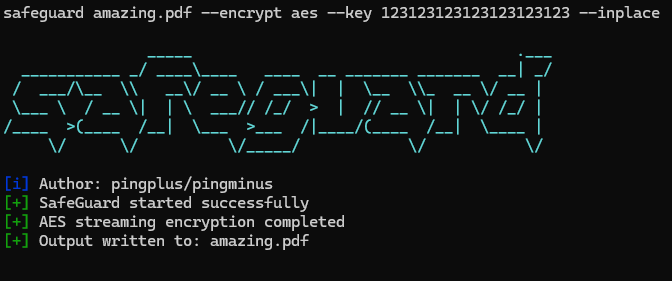
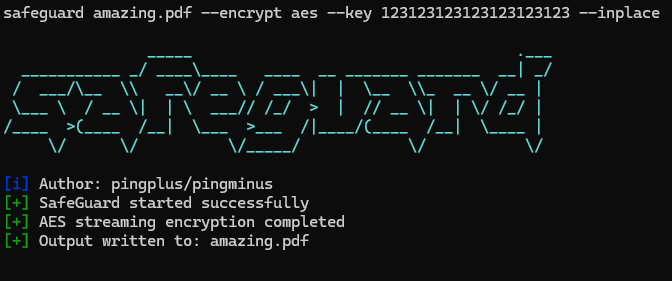
./safeguard secrets.txt e aes --key "123123123123123123123123" --inplace
# -> creates secrets.txt but encrypted
  • Decrypt with AES and specify output file :
./safeguard secrets.txt.aes d aes --key "123123123123123123123123" --output secrets_decrypted.txt

ツールをダウンロード

人気

すべて見る →

コミュニティで最も使われているツールを見つけましょう。

  • 1

    OsintHunter

    letox4/osinthunter

    🎯 究極のOSINTツールキット:調査グラフ、信頼度スコアリング、エイリアスファミリー、マップ、タイムライン、レポート。49個のモジュール、400以上のサイト、APIキー不要。

    732
  • 2

    ghostlock-app

    yukonga/ghostlock-app

    GhostLock ワンタップ実行アプリ(CVE-2026-43499)

    506
  • 3

    ARTEX

    baarai/artex

    プランナー/ワーカーエージェント、資産グラフと探索グラフ、MITMトラフィック記録、脆弱性の再テストを備えたLLMマルチエージェント自律ペネトレーションテストプラットフォーム。

    405
  • 4

    redforge

    cybersecurity91/redforge

    ブラウザ側のレッドチームツールキット。偵察、ペイロード生成、認証情報攻撃、暗号、エンコーディング、エンゲージメントレポート向けの102のオフラインツールを備えています。

    342
  • 5

    CyberStrikeAI

    ed1s0nz/cyberstrikeai

    AIネイティブなサイバーセキュリティのためのアクションシステム。意図がガバナンスされた実行に変わり、証拠が運用記憶となり、すべての操作が次の操作を改善する。

    261
  • 6

    antifox

    antifox-ai/antifox

    偵察、攻撃対象領域の探索、エクスプロイト検証、証拠に基づくレポート提供を実行するAIマルチエージェント自律ペネトレーションテストプラットフォーム。

    259

すべてのツールを探索

ツールコレクションを閲覧

すべてのツールを見る →





